What is AI Lab
AI Lab (formerly known as Intelligent Computing) is an AI computing platform built on a cloud native operating system, delivering an integrated software-hardware AI experience. Leveraging DCE, it consolidates heterogeneous computing power, optimizes GPU performance, and enables unified scheduling and operation of computing resources to maximize efficiency and reduce costs. It also provides optimized AI development frameworks covering the complete workflow — Notebook development, training jobs, data management, and model serving — simplifying AI development and deployment while accelerating AI adoption across industries.
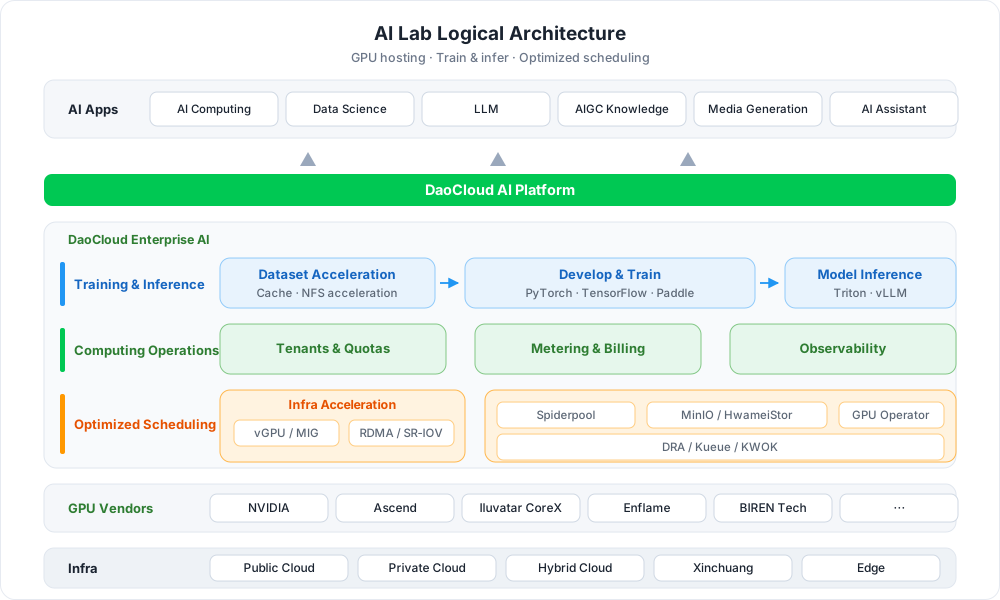
Key Capabilities
-
Fully Managed Computing Resources
Powered by DCE's robust infrastructure, AI Lab supports large-scale computing clusters and one-stop management of heterogeneous GPUs, with software-hardware acceleration options such as vGPU, pooling CPU, memory, and GPU resources.
-
Data Orchestration & Management
Data management for the entire model development process, including dataset management, multi-source data access, dataset preheating, and data labeling — optimized from the underlying container storage engine for efficient and stable data access.
-
Development Environment Management
Built for MLOps and LLMOps engineers, offering development environments such as JupyterLab and CodeServer, with support for custom images and one-click mounting of GPUs, datasets, and other resources.
-
Training Job Management
Full lifecycle management of training jobs, supporting mainstream frameworks such as PyTorch, TensorFlow, PaddlePaddle, and MPI, with native scheduling for single-node, distributed, multi-node, and multi-GPU workloads.
-
Model Inference Services
With built-in mainstream inference engines such as Triton and vLLM, create inference services from trained models in one click, accelerating the final step from training to production.
-
Queue & GPU Governance
Associate queues with workspaces to coordinate and isolate queue resources across clusters; aggregate GPU resources and usage globally, with current and historical job views for GPU stress assessment.
 Create a resource pool
Workflow
Using AI Lab involves two stages — operations preparation and development: the administrator first creates resource pools and queues to allocate computing power to workspaces; developers then complete the closed loop of data preparation, Notebook development, training jobs, and model serving in the developer console.
flowchart TB
    subgraph OAM["Ops · Admin"]
        direction LR
        A["① Create resource pool<br/>Bind clusters & nodes"] --> B["② Create queue<br/>Link workspaces"]
    end
    subgraph DEV["Dev Console · Developer"]
        direction LR
        C["③ Prepare datasets<br/>Code / data / output"] --> D["④ Notebook dev<br/>JupyterLab · CodeServer"] --> E["⑤ Training jobs<br/>PyTorch · Tensorflow · MPI"] --> F["⑥ Inference services<br/>Triton · vLLM"]
    end
    OAM -->|Allocate to workspaces| DEV

    click A href "../oam/resource/create/"
    click B href "../oam/queue/create/"
    click C href "../developer/dataset/"
    click D href "../developer/notebooks/"
    click E href "../developer/jobs/"
click F href "../developer/inference/"| Step | Role | Description |
|---|---|---|
| ① Create a resource pool | Admin | Define available CPU, memory, GPU, and other computing resources in the cluster; bind workloads and node types |
| ② Create a queue | Admin | Create queues and associate them with workspaces to coordinate and isolate queue resources across clusters |
| ③ Prepare datasets | Developer | Create code, data, and output datasets, with multi-source access and preheating support |
| ④ Notebook development | Developer | Develop and debug in JupyterLab / CodeServer, with SSH access and custom images |
| ⑤ Submit training jobs | Developer | Submit single-node or distributed training jobs and analyze them with Tensorboard |
| ⑥ Deploy inference services | Developer | Serve trained models as inference services through Triton / vLLM |
Quick Start
Best Practices & Troubleshooting
-
Best Practices
Hands-on experience including fine-tuning ChatGLM3, submitting DeepSpeed training jobs, topology-aware scheduling, the checkpoint mechanism, NFS dataset preheating, and deploying Label Studio.
-
Troubleshooting
Diagnosis and solutions for common issues, such as clusters missing from the dropdown list, Notebooks not controlled by queue quotas, and local queue initialization failures.
Download Center Learn about d.run Token Factory Learn about d.run AI OS View the AI Lab User Manual