Frequently Asked Questions
This page aggregates FAQs and troubleshooting guides for DaoCloud product modules. Click a question to expand it and view detailed troubleshooting steps.
Installation
For more questions, refer to Installation Troubleshooting.
UI Login Issues
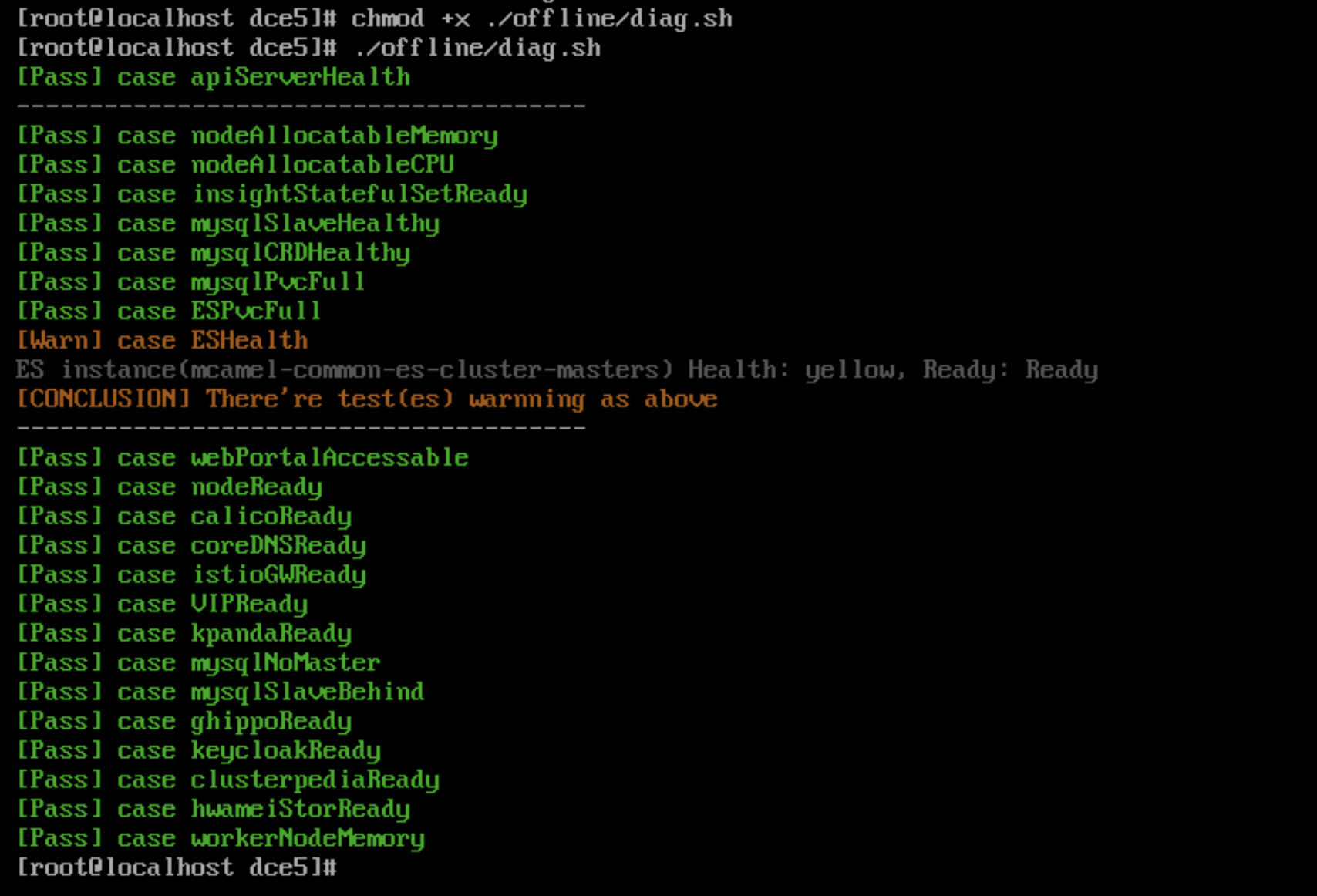
Cannot open the interface after installation is complete; you can execute the diag.sh script for quick troubleshooting
Since installer v0.12.0, the diag.sh script has been added to help users quickly troubleshoot the UI issues.
Run the command:
Example of execution results:
Login interface cannot be opened due to VIP access issues when installing with Metallb
- Check if the VIP address is in the same subnet as the host. In Metallb L2 mode, it is necessary to ensure they are in the same subnet.
- If a network card was added to the control node in a Global cluster causing access issues, L2Advertisement needs to be configured manually.
Refer to the Metallb documentation on this issue.
bootstrap node Issues
After shutting down and restarting the bootstrap node, the kind cluster cannot restart properly
After shutting down and restarting the bootstrap node, the kind cluster cannot start properly due to the lack of auto-start configuration during deployment on the openEuler 22.03 LTS SP2 operating system.
You need to run the following command to start it:
Note
If this scenario occurs in other environments, you can also run this command to restart.
Missing ip6tables when deploying Ubuntu 20.04 as a seed machine
Deploying Ubuntu 20.04 as a bootstrap node may cause errors during the deployment process due to the absence of ip6tables.
Refer to the Podman known issues.
Temporary solution: Manually install iptables, refer to Install and Use iptables on Ubuntu 22.04.
After disabling IPv6 during installation, Podman on the bootstrap node cannot create containers
The error message is as follows:
Solution: Re-enable IPv6 or update the bootstrap node base to Docker.
Refer to the related Podman issue: podman 4.0 hangs indefinitely if ipv6 is disabled on system
After restarting the bootstrap node's kind container, the kubelet service cannot start
After the kind container restarts, the kubelet service cannot start and reports the following error:
Solutions:
-
Solution 1: Restart and run the command
podman restart [kind] --time 120. Do not interrupt this task with Ctrl+C during execution. -
Solution 2: Run
podman execto enter the kind container and run the following command:
How to uninstall data from the bootstrap node
After deploying the commercial version, if you want to uninstall, in addition to the cluster nodes themselves, you also need to reset the bootstrap node. The reset steps are as follows:
You need to use the sudo rm -rf command to delete these three directories:
- /tmp
- /var/lib/dce5/
- /home/kind/etcd
Certificate Issues
The kubeconfig for the global service cluster needs to be updated on the seed's replica
Prior to v0.20.0, the kubeconfig of the Global cluster stored on the bootstrap node does not automatically update. v0.20.0 supports automatic updates, run once a month.
In previous versions, you need to update the dce5-installer to v0.20.0 and then run:
Certificate updates and kubeconfig for the kind cluster on the bootstrap node
Prior to v0.20.0, the kubeconfig of the kind cluster stored on the bootstrap node does not automatically update. v0.20.0 supports automatic updates, run once a month.
In previous versions, you need to update the dce5-installer to v0.20.0 and then run:
After installing Contour, the default certificate validity period is only one year and does not auto-renew, causing the contour-envoy component to restart continuously after expiration
For versions prior to v0.21.0, there was support for enabling the installation of the Contour component. Subsequent versions will no longer support this. Customers who have installed Contour in previous versions need to execute the helm upgrade command to update the certificate validity period:
Operating System Related Issues
Error during installation on CentOS 7.6
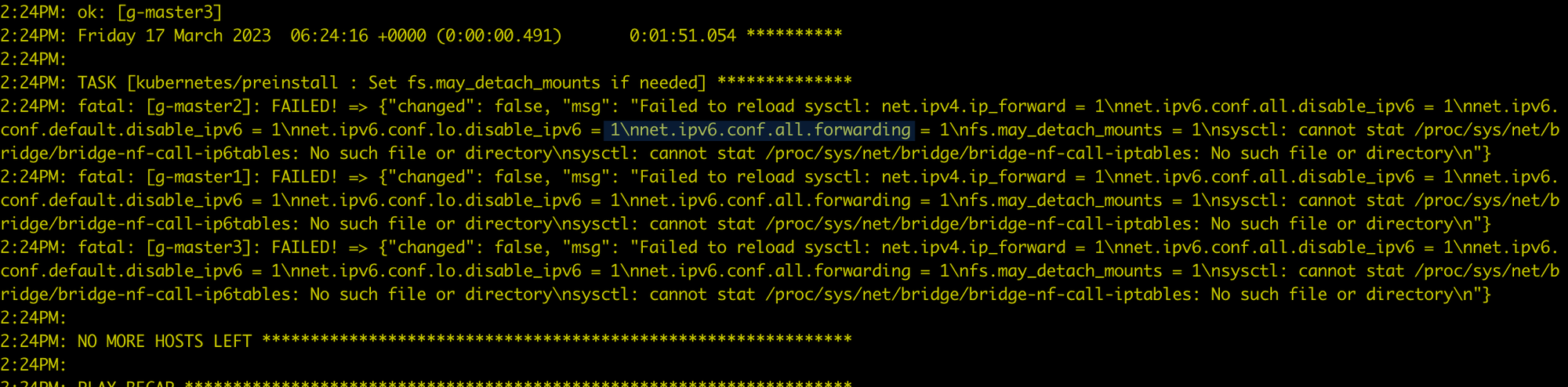
Executing modprobe br_netfilter on each node where the global service cluster is installed will resolve the issue by loading br_netfilter.
CentOS environment preparation issues
An error occurs when running yum install docker:
Failed to set locale, defaulting to C.UTF-8
CentOS Linux 8 - AppStream                                                                    93  B/s |  38  B     00:00
Error: Failed to download metadata for repo 'appstream': Cannot prepare internal mirrorlist: No URLs in mirrorlist
You can try the following methods to resolve it:
-
Install
glibc-langpack-en -
If the issue persists, try:
osRepos External Mode externalRepoURLs Check Failure
The clusterConfig.yaml is as follows:
  osRepos:
    type: external
    externalRepoType: rocky
    externalRepoURLs:
      - http://10.5.14.100:8081/rocky/\$releasever/os/\$basearch
      - http://10.5.14.100:8081/rocky-iso/\$releasever/os/\$basearch/AppStream
      - http://10.5.14.100:8081/rocky-iso/\$releasever/os/\$basearch/BaseOS
Error message:
[root@localhost dce5]# ./dist/dce5-installer cluster-create -c ./sample/clusterConfig.yaml -m ./sample/manifest.yaml --max-tasks 2
[Error]:[Error] invalid ClusterConfig: maybe the binaries.externalRepoURLs http://10.5.14.100:8081/rocky/$releasever/os/$basearch cannot be connected, return code: 404
The configuration is actually correct, and externalRepoURLs can be accessed normally. However, during validation, the variables are not properly parsed, resulting in a 404 error.
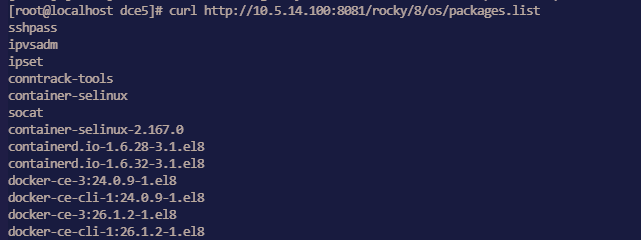
Impact: Clusters using osRepos in external mode cannot be created successfully.
Workaround: Retry using a new binary file.
Manifest setting for enabling MySQL MGR mode not effective
Issue:
Since dce5-installer v0.30, enabling MySQL MGR through the Manifest has no effect.
Other parameters such as pvcSize are also ineffective, and only the enable parameter works.
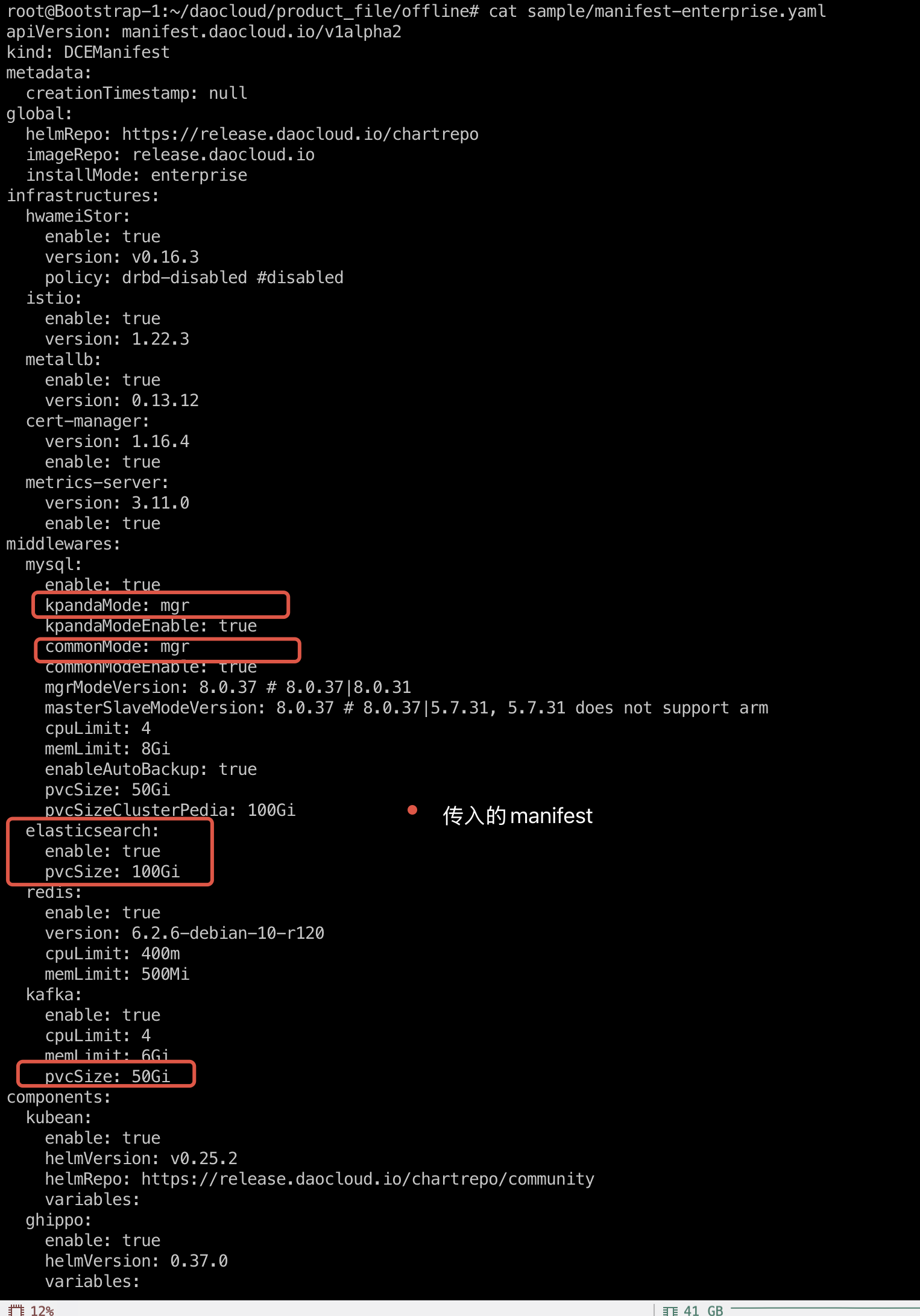
Solution:
-
Run the installer command with the
--dry-runparameter to output the execution script toinstaller.sh: -
At the beginning of the
installer.shscript file, add the following line: -
Add the
-sparameter and re-runinstaller.sh:
Installation fails because the MySQL Common instance in MGR mode cannot be initialized
During installation, the MySQL initialization phase of the mcamel-common instance fails. It was observed that the mysqlrouter user is missing from MySQL, which keeps the replica count of the router Deployment at 0, and the whole installation process cannot continue.
The mcamel-common instance failed to recreate the mysqlrouter user
→ router deployment replica = 0
→ installation hangs/fails
- Affected module: The MySQL initialization process of the installer
- Scope of impact: All
commonMySQL instances that use MGR mode - Affected versions: v0.27.0, v0.28.0, v0.29.0, etc.
-
Summary of symptoms:
- The router cannot connect to the MGR cluster
- The
mysqlrouteruser is missing - The router deployment cannot start (replica = 0)
Root Cause Analysis
After an abnormal operation (such as a power outage restart or PVC cleanup), the operations personnel manually restored the MGR cluster, but the Operator did not detect the change in the cluster state, so the corresponding reconciliation logic was not triggered.
Because the PVC was cleared, the original mysqlrouter user information was lost in the MySQL database, so the router could not authenticate and connect to the cluster, and the installation kept crashing.
Data Verification
Query the user table through MySQL and you will find that the mysqlrouter user cannot be found:
mysql> select user,host from mysql.user;
+---------------------------+-----------+
| user                      | host      |
+---------------------------+-----------+
| kpanda                    | %         |
| mysql_innodb_cluster_1000 | %         |
| mysql_innodb_cluster_1001 | %         |
| mysql_innodb_cluster_1002 | %         |
| mysqladmin                | %         |
| root                      | %         |
| localroot                 | localhost |
| mysql.infoschema          | localhost |
| mysql.session             | localhost |
| mysql.sys                 | localhost |
| mysqlhealthchecker        | localhost |
| mysqlmetrics              | localhost |
+---------------------------+-----------+
12 rows in set (0.00 sec)
Solution
-
Obtain the Secret of
mysqlrouterGet the username and password of the Router from the Kubernetes cluster:
Example output:
apiVersion: v1
data:
  routerPassword: aVVOZHEtWm9tb0gtamJYTGstS3E9VEotNnlqc1M=
  routerUsername: bXlzcWxyb3V0ZXI=
kind: Secret
metadata:
  name: mcamel-common-kpanda-mgr-router
  namespace: mcamel-system
Decode to get the username and password:
-
Manually create the
mysqlrouteruser in the MGR clusterLog in to the MGR cluster that has been restored to normal, and call the
setupRouterAccount()function to recreate themysqlrouteruser:MySQL localhost:33060+ ssl JS > cluster.setupRouterAccount('mysqlrouter', {password: "iUNdq-ZomoH-jbXLk-Kq=TJ-6yjsS"})Output:
Verify that the
mysqlrouteruser was created successfully:MySQL localhost:33060+ ssl SQL > select user,host from mysql.user; +---------------------------+-----------+ | user | host | +---------------------------+-----------+ | kpanda | % | | mysql_innodb_cluster_1000 | % | | mysql_innodb_cluster_1001 | % | | mysql_innodb_cluster_1002 | % | | mysqladmin | % | | mysqlrouter | % | | root | % | | localroot | localhost | | mysql.infoschema | localhost | | mysql.session | localhost | | mysql.sys | localhost | | mysqlhealthchecker | localhost | | mysqlmetrics | localhost | +---------------------------+-----------+ 13 rows in set (0.00 sec) -
Restart the
routerdeployment:kubectl scale deploy mcamel-common-kpanda-mgr-router --replicas=0 -n mcamel-system kubectl scale deploy mcamel-common-kpanda-mgr-router --replicas=2 -n mcamel-systemVerify the recovery:
kubectl get deploy | grep router

mcamel-common-kpanda-mgr-router             2/2     2            2           2d2h
mcamel-common-mgr-cluster-router            2/2     2            2           2d2h
At this point, the
routerruns properly and the installation process returns to normal.
Community Edition Installation Issues
Redis gets stuck when reinstalling the product in a kind cluster
Issue: The Redis Pod has been stuck at 0/4 running for a long time, indicating: primary ClusterIP can not unset
-
Delete rfs-mcamel-common-redis in the
mcamel-systemnamespace -
Then re-run the installation command.
Failed to install fluent-bit in the community edition
Error message:
Check the Pod logs for the following key information:
[warn] [net] getaddrinfo(host='mcamel-common-es-cluster-masters-es-http.mcamel-system.svc.cluster.local',errt11):Could not contact DNS servers
The above issue is a bug in fluent-bit. You can refer to an issue in aws/aws-for-fluent-bit: Seeing Timeout while contacting DNS servers with latest v2.19.1
Workbench
For more questions, refer to Workbench.
Pipeline Related Issues
Error when executing the pipeline
High network communication delay can lead to pipeline running errors, if Jenkins and the application are deployed in different data centers. The error message is similar to:
E0113 01:47:27.690555 50 request.go:1058] Unexpected error when reading response body: net/http: request canceled (Client.Timeout or context cancellation while reading body)
error: unexpected error when reading response body. Please retry. Original error: net/http: request canceled (Client.Timeout or context cancellation while reading body)
Solution :
In the pipeline's Jenkinsfile, change the deployment command from kubectl apply -f to kubectl apply -f. --request-timeout=30m .
How to update the podTemplate image for built-in Label?
The Workbench declares 7 labels through podTemplate: base , maven , mavenjdk11 , go , go16 , node.js , and python . You can specify a specific Agent label to use the corresponding podTemplate.
If the image in the built-in podTemplate does not meet your needs, you can replace or add the container image in the following ways:
-
Go to the Container Management module and click the name of the cluster where the Jenkins component is running.
-
In the left navigation bar, click ConfigMaps & Secrets -> ConfigMaps .
-
Search for jenkins-casc-config and click Edit YAML in the Actions column.
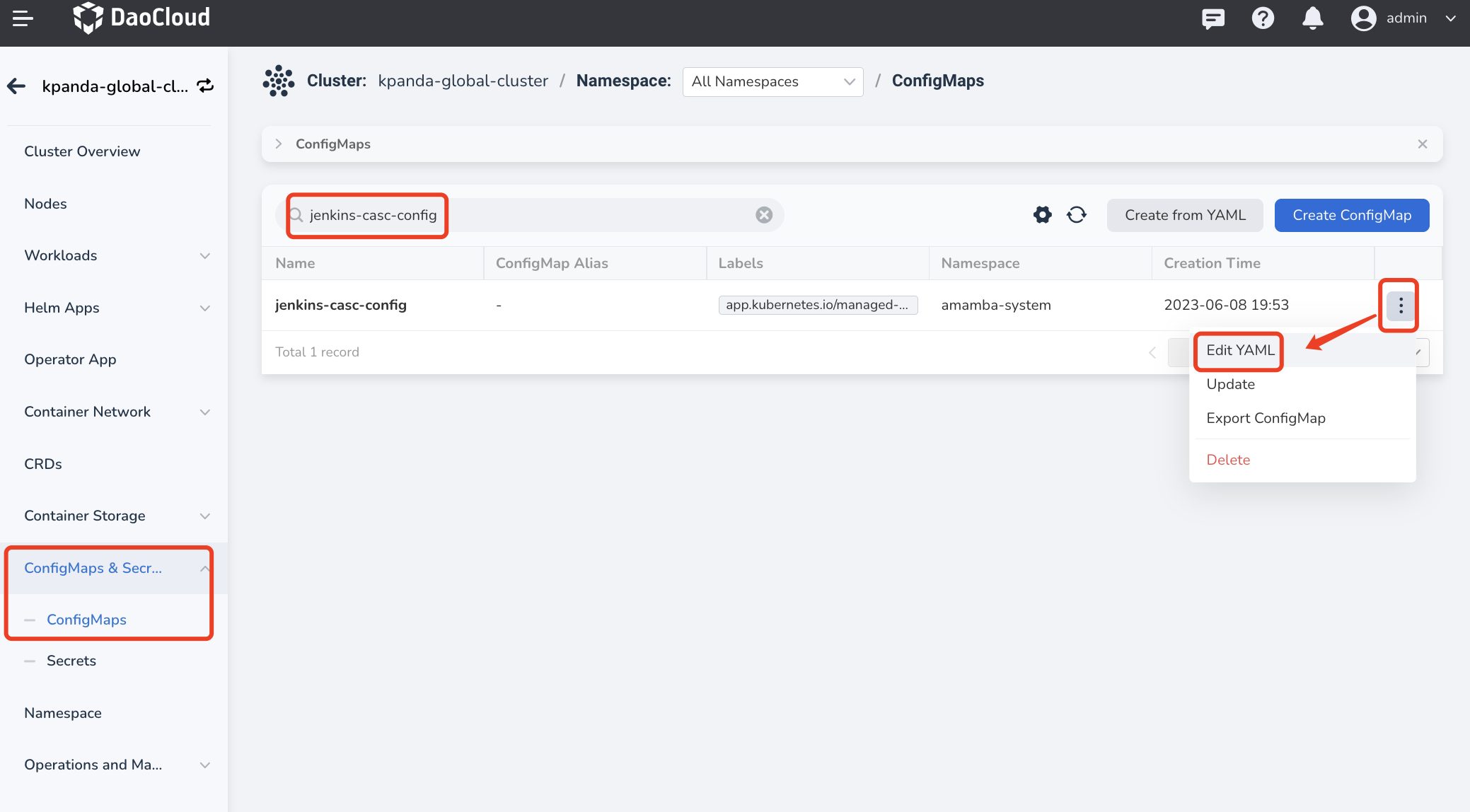
-
Under data -> jenkins.yaml ->
jenkins.clouds.kubernetes.templates, select the podTemplate whose image you want to change.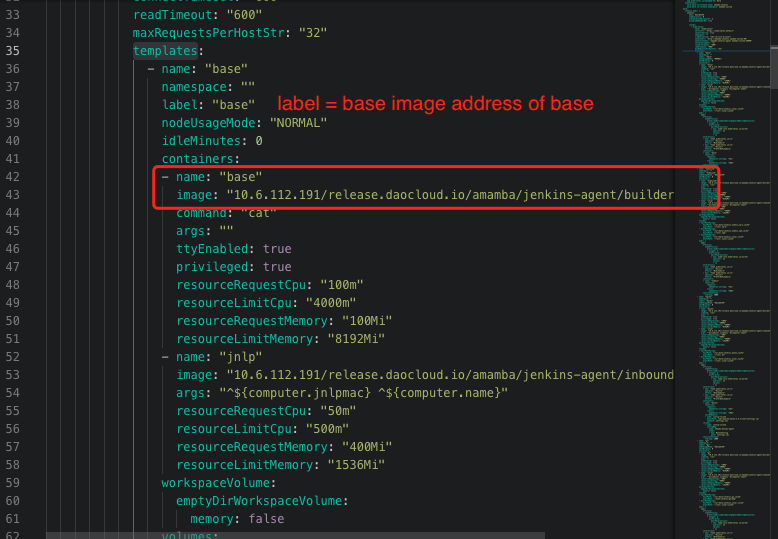
-
Once you have made the necessary updates, go to Workloads section and restart Jenkins deployment.
When the pipeline build environment is Maven, how to modify the dependency package source in settings.xml?
When use Maven as the pipeline build environment, most users need to modify settings.xml file to change the dependency source. You can follow these steps:
-
Go to the Container Management module and click the name of the cluster where the Jenkins component is running.
-
In the left navigation bar, click ConfigMaps & Secrets -> ConfigMaps .
-
Search for amamba-devops-agent and click Edit YAML in the Actions column.
-
Modify the MavenSetting under the data section as per your requirement.
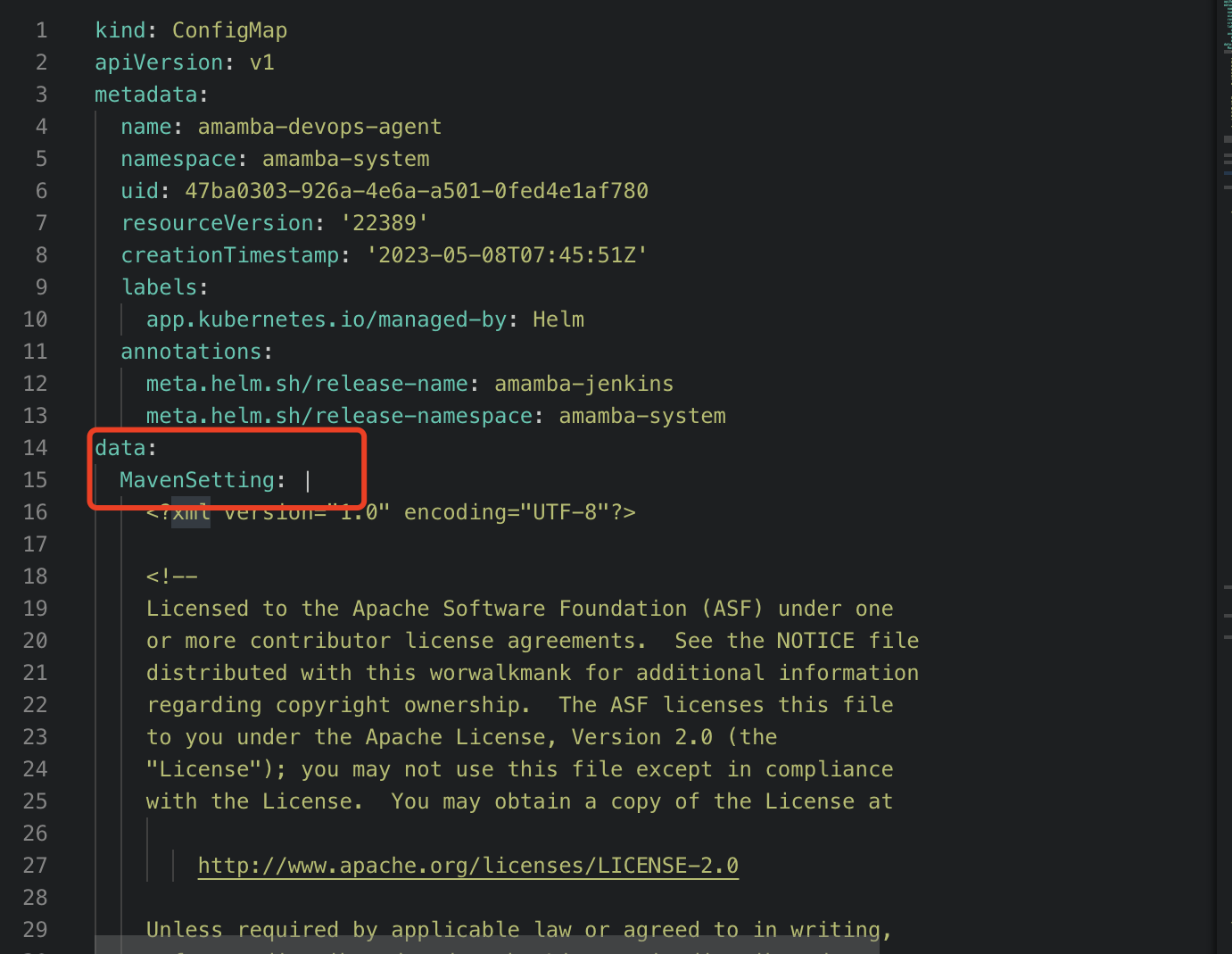
-
Once you have made the necessary updates, go to Workloads and restart Jenkins.
When building images through Jenkins, containers cannot access private registry
Podman runtime
-
Go to the Container Management module and click the name of the cluster where the Jenkins component is running.
-
Click ConfigMaps & Secrets -> ConfigMaps in the left navigation bar in order.
-
Search for insecure-registries and click Edit YAML in the Actions column.
-
Configure under the registries.conf file in the data section.
Pay attention to the formatting and indentation when making modifications. Each registry should have a separate
[registries]section, as shown in the image below: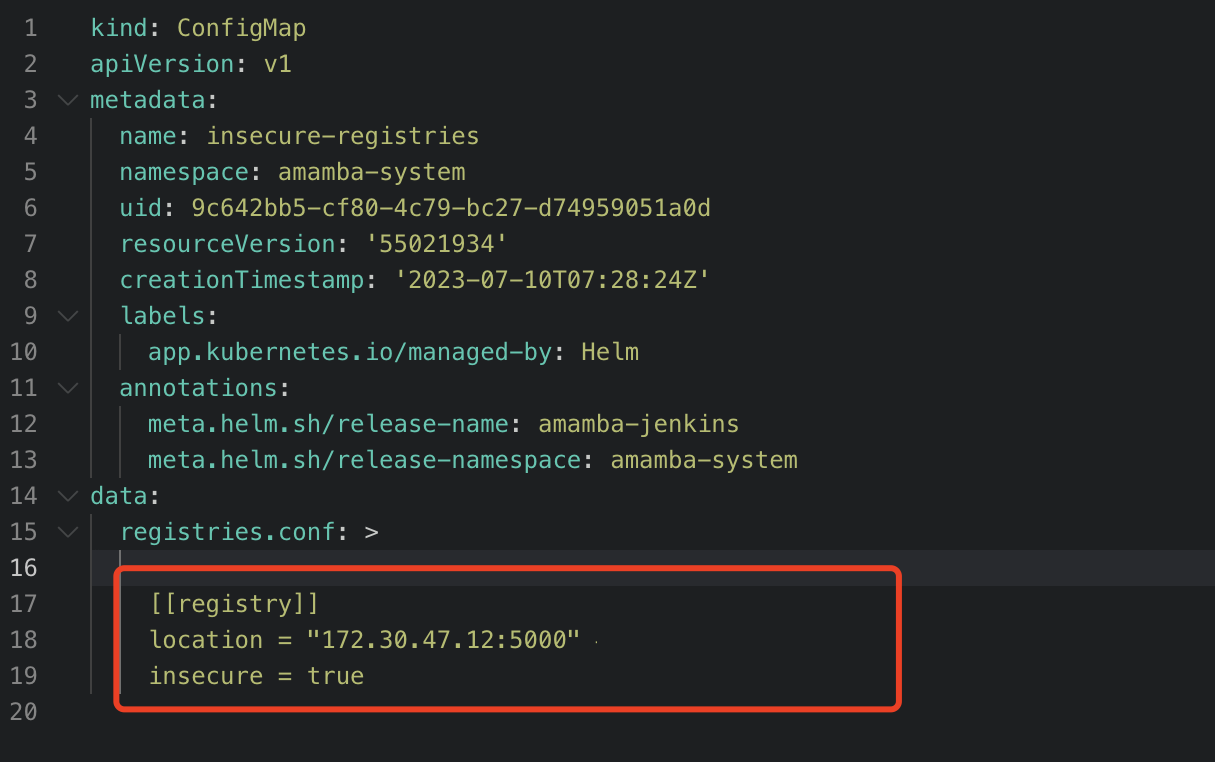
Note
The value of the registries keyword should be the complete domain name or IP address of the container registry, without adding the http or https prefix. If the container registry uses a non-standard port number, you can add a colon : followed by the port number after the address.
Refer to Podman documentation.
Cluster runtime is Docker
-
Open the Docker configuration file. On most Linux distributions, the configuration file is located at
/etc/docker/daemon.json. If it doesn't exist, please create this configuration file. -
Add the repository address to the
insecure-registriesfield. -
After saving, restart Docker by executing the following commands:
Note
Refer to Docker documentation.
How to modify the concurrency execution count of Jenkins pipelines
Currently, the number of concurrent running of Jenkins pipelines after DCE deployment is 2. The following will describe how to change the number of concurrent running:
-
Go to the Container Management module, find the cluster where the Jenkins component is located, and click the cluster name.
-
Click ConfigMaps & Secrets -> ConfigMaps in the left navigation bar in order.
-
Search for jenkins-casc-config, and click Edit YAML in the operation column.
-
Modify the value under the data -> jenkins.yaml ->
jenkins.clouds.kubernetes.containerCapStrfield.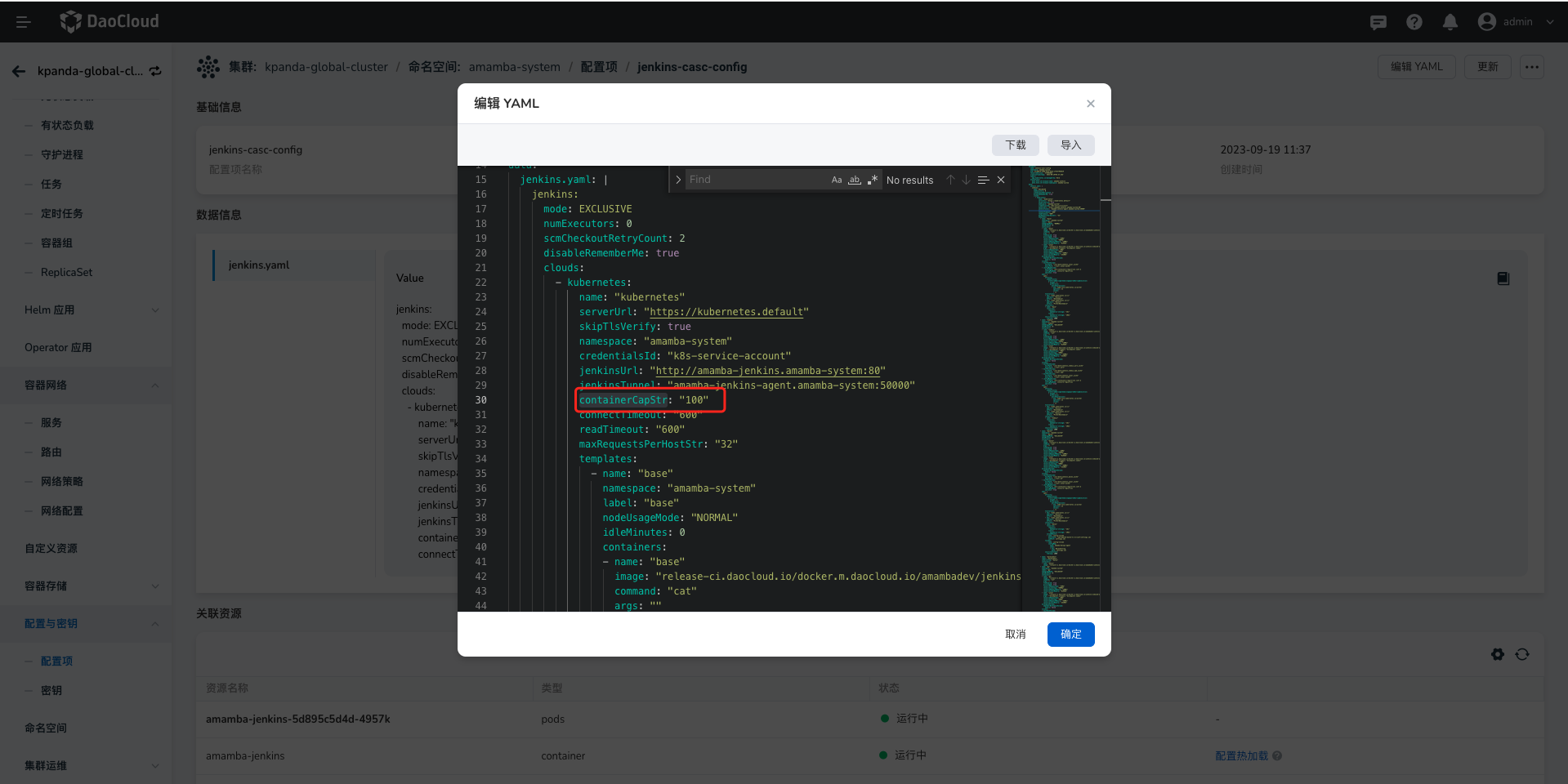
-
After the update is completed, go to Workloads to restart Jenkins.
What to do if the pipeline running status does not update in time?
In the pod of Jenkins, there will be a sidecar container named event-proxy, which sends Jenkins events to the workbench through this container. Currently, Jenkins installed by dce5-installer will enable this container by default. Of course, you can also choose to create Jenkins yourself in the Addon module of the Container Management Platform (this is usually used when Jenkins is deployed in the worker cluster). When creating, you can also choose whether to enable this container.
Based on whether this container is enabled or not, please check whether the different configmaps are correct:
The event-proxy container is enabled
-
Go to the Container Management module, find the cluster where the Jenkins component is located, and click the cluster name.
-
Click ConfigMaps & Secrets -> ConfigMaps in the left navigation bar in order.
-
Search for jenkins-casc-config, and click Edit YAML in the operation column.
-
Search for
eventDispatcher.receiverin data -> jenkins.yaml, its value should behttp://localhost:9090/event.If Jenkins is deployed in the worker cluster (need to penetrate the gateway), you also need to check the following configmaps.
-
Query the configmap named event-proxy-config again, check YAML, and the configmap description:
- This is the gateway address. If it is Jenkins installed by dce5-installer, this does not need to be modified
- This is the gateway protocol (http or https)
-
In the cluster where Jenkins is located, search for the secret amamba-jenkins in ConfigMaps & Secrets -> ConfigMaps.
-
Check whether the event-proxy-token in the secret is correct. This Token is used for the gateway authentication. If it is incorrect, Jenkins will not be able to send events to the workbench. For how to generate this Token, you can check Access Key.
If all the above configmaps are correct, but the status of Jenkins pipeline still cannot be updated, please first check the container log of event-proxy in Jenkins.
The event-proxy container is not enabled
-
Go to the Container Management module, find the cluster where the Jenkins component is located, and click the cluster name.
-
Click ConfigMaps & Secrets -> ConfigMaps in the left navigation bar in order.
-
Search for jenkins-casc-config, and click Edit YAML in the operation column.
-
Search for
eventDispatcher.receiverin data -> jenkins.yaml, its value should behttp://amamba-devops-server.amamba-system:80/apis/internel.amamba.io/devops/pipeline/v1alpha1/webhooks/jenkinswhereamamba-systemis the namespace where the workbench is deployed.
GitOps Related Issues
Error when adding a GitHub repository under the GitOps module
When adding a GitHub repository in the GitOps section, the following error may appear due to GitHub removal of username/password auth:
remote: Support for password authentication was removed on August 13, 2021.
remote: Please see https://docs.github.com/en/get-started/getting-started-with-git/about-remote-repositories#cloning-with-https-urls for information on currently recommended modes of authentication.
fatal: Authentication failed for 'https://github.com/DaoCloud/dce-installer.git/'
Solution:
Use SSH to import your GitHub repository.
When adding a repository in the GitOps module under a certain workspace, it prompts that the repository already exists
One repo can be bound to only one workspace. When a repo is already bound to a workspace, but you try to add it in GitOps section under another workspace, such error will occur.
Solution:
Unbind the repo from its current workspace and then add it again in GitOps section under your target workspace.
Toolchain Related Issues
When the pipeline runs with Maven as the agent and uses integrated SonarQube for Java code scanning, it reports an error
In most cases, the error is caused by the Java environment provided by the pipeline being Java 11, which is incompatible with the Java version required by SonarQube. It is recommended to use the SonarQube deployment provided in the Helm template.
What are the precautions when deploying GitLab
The Helm template supports GitLab deployment. During the deployment process, please pay attention to the following precautions:
- Currently, it only supports POC (Proof of Concept) use and does not meet production operation and maintenance conditions.
- The cluster needs to reserve 80GB of storage space.
- Online deployment may experience instability in the short term due to the use of an acceleration station.
Container Management
For more questions, refer to Container Management FAQs.
Permission Issues
Regarding permission issues in the container management and global management modules, users often ask why they can see a certain cluster or why they cannot see a cluster. Here are three cases to investigate related permission issues:
-
Permissions in the container management module are divided into cluster permissions and namespace permissions. If a user is bound, they can view the corresponding clusters and resources. For specific permission details, refer to Cluster Permission Description.
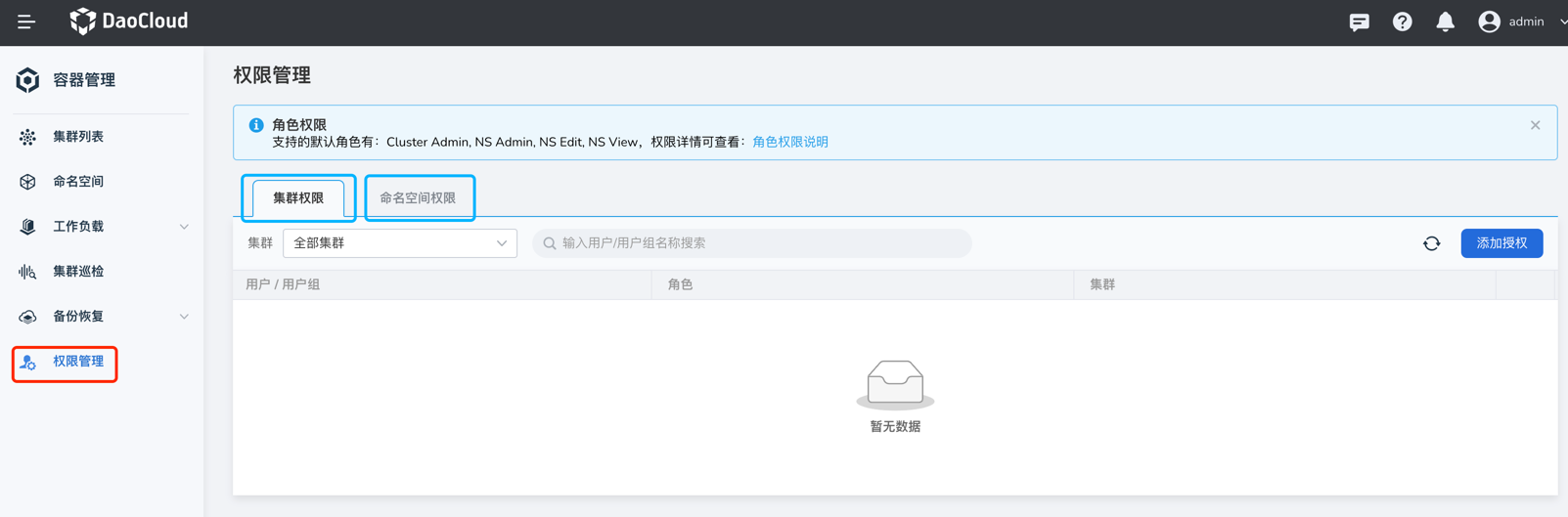
-
User authorization in the global management module: Use the admin account to visit Global Management -> User and Access Control -> Users, and find the corresponding user. In the Authorized User Groups tab, if there are roles like Admin, Kpanda Owner, etc., that have container management permissions, then even if there are no cluster or namespace permissions bound in container management, the user can still see all clusters. Refer to the User Authorization Documentation.
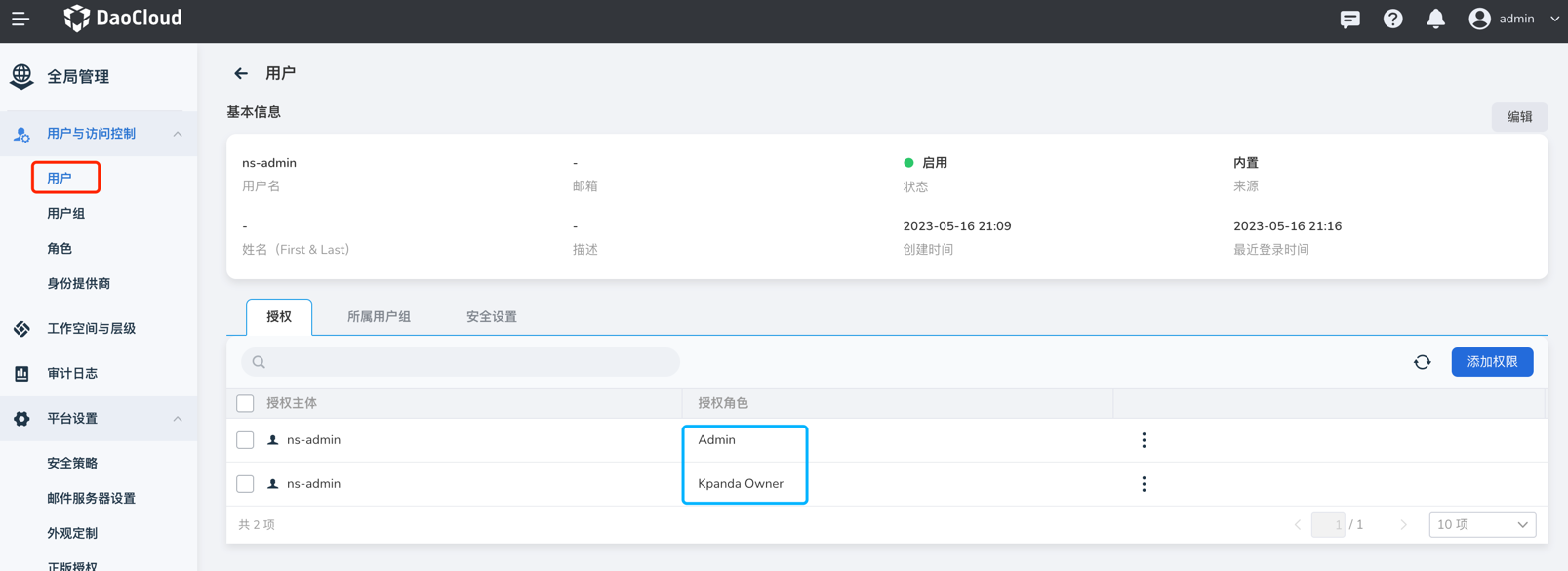
-
Workspace binding in the global management module: Log in to Global Management -> Workspaces and Hierarchies to see your authorized workspaces. Click on the workspace name.
-
If the workspace is authorized only to you, you can see your account in the authorization tab and then check the resource group or shared resource tabs. If the resource group is bound to a namespace or shared resources are bound to a cluster, your account will be able to see the corresponding cluster.
-
If you are granted a global management-related role, you will not see your account in the authorization tab, nor will you see the cluster resources bound to the workspace in the container management module.
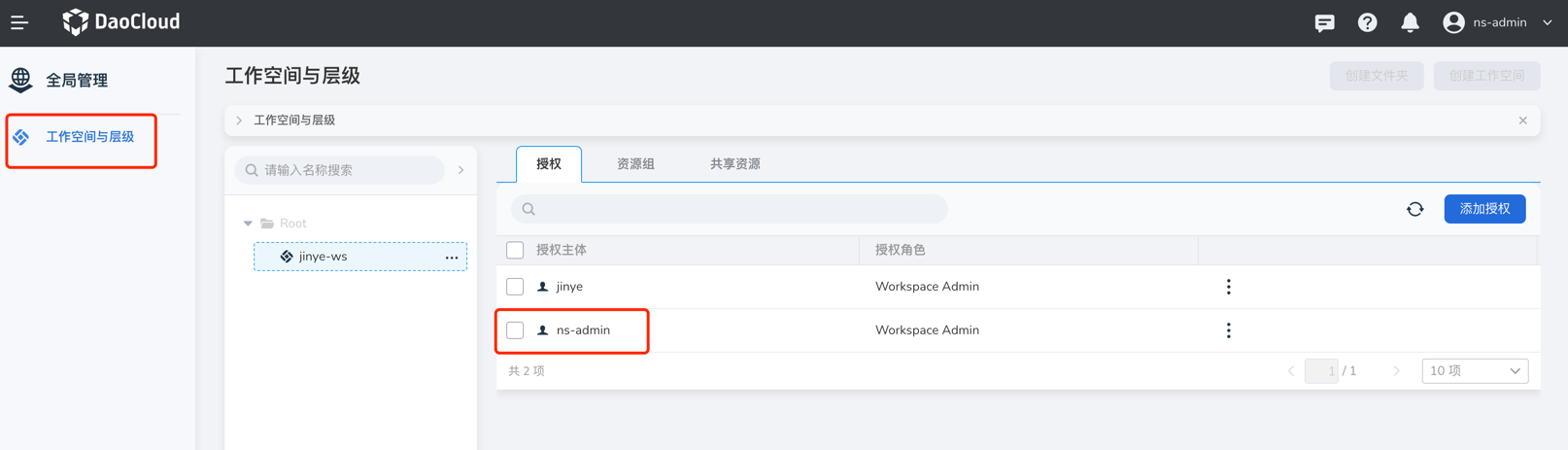
-

Helm Installation
Helm application installation fails with “OOMKilled” error
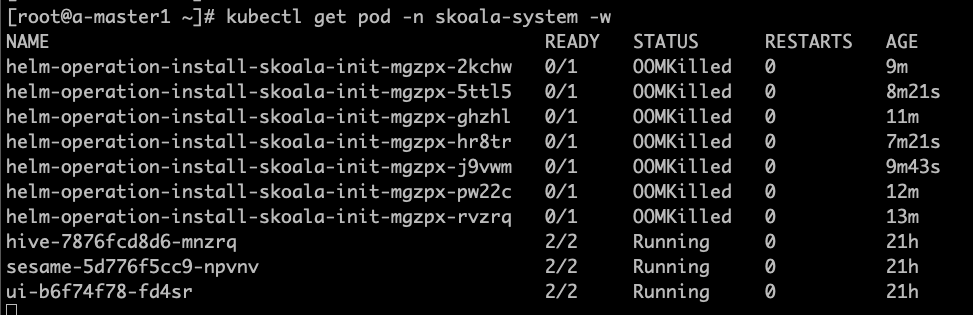
As shown, the container management automatically creates a Job responsible for the application installation. In version v0.6.0, due to improper job resource settings, OOM issues affected the application installation. This bug has been fixed in version 0.6.1. If you upgrade to v0.6.1, it will only take effect in newly created or integrated clusters; existing clusters need to be manually adjusted to take effect.
Click to View How to Adjust the Script
- The following scripts are executed in the global service cluster.
- Find the corresponding cluster; this article uses skoala-dev as an example to obtain the corresponding skoala-dev-setting configmap.
-
After updating the configmap, it will take effect.
kubectl get cm -n kpanda-system skoala-dev-setting -o yaml
apiVersion: v1
data:
clusterSetting: '{"plugins":[{"name":1,"intelligent_detection":true},{"name":2,"enabled":true,"intelligent_detection":true},{"name":3},{"name":6,"intelligent_detection":true},{"name":7,"intelligent_detection":true},{"name":8,"intelligent_detection":true},{"name":9,"intelligent_detection":true}],"network":[{"name":4,"enabled":true,"intelligent_detection":true},{"name":5,"intelligent_detection":true},{"name":10},{"name":11}],"addon_setting":{"helm_operation_history_limit":100,"helm_repo_refresh_interval":600,"helm_operation_base_image":"release-ci.daocloud.io/kpanda/kpanda-shell:v0.0.6","helm_operation_job_template_resources":{"limits":{"cpu":"50m","memory":"120Mi"},"requests":{"cpu":"50m","memory":"120Mi"}}},"clusterlcm_setting":{"enable_deletion_protection":true},"etcd_backup_restore_setting":{"base_image":"release.daocloud.io/kpanda/etcdbrctl:v0.22.0"}}'
kind: ConfigMap
    metadata:
    labels:
        kpanda.io/cluster-plugins: ""
    name: skoala-dev-setting
    namespace: kpanda-system
    ownerReferences:
    - apiVersion: cluster.kpanda.io/v1alpha1
        blockOwnerDeletion: true
        controller: true
        kind: Cluster
        name: skoala-dev
        uid: f916e461-8b6d-47e4-906e-5e807bfe63d4
    uid: 8a25dfa9-ef32-46b4-bc36-b37b775a9632
Modify the clusterSetting -> helm_operation_job_template_resources to appropriate values. The values corresponding to v0.6.1 are cpu: 100m, memory: 400Mi.
Unable to pull kpanda-shell image when installing application with Helm
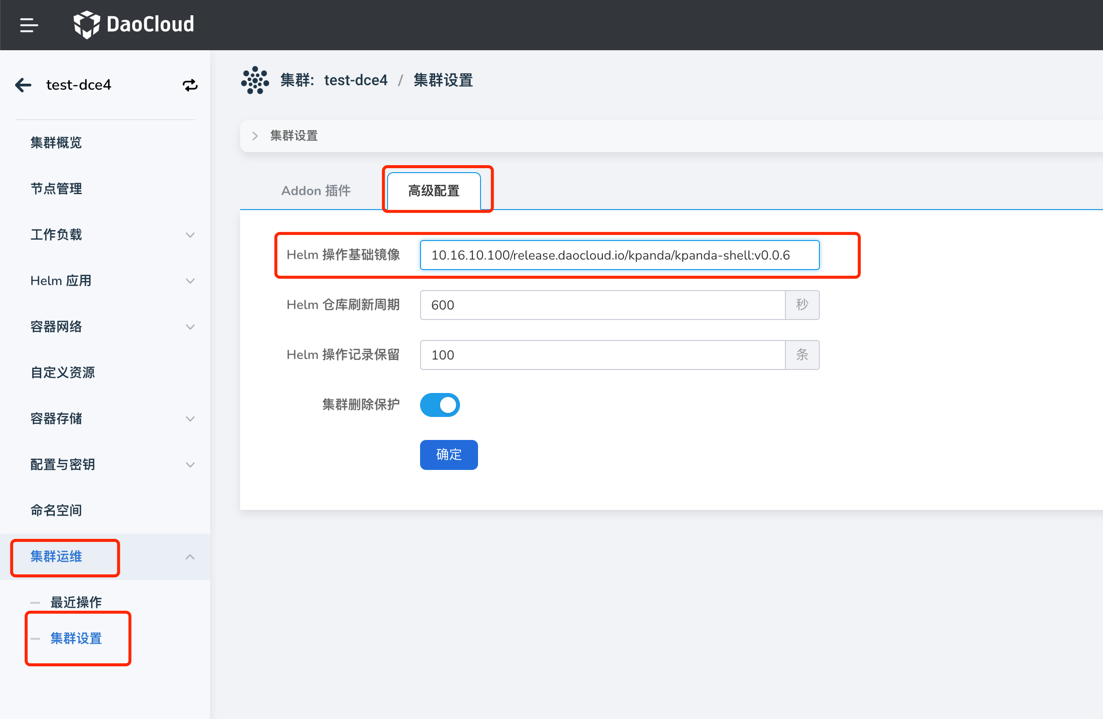
When integrating an offline environment, clusters often encounter failures to pull the kpanda-shell image when installing Helm applications, as shown:

At this time, simply go to the cluster operation and maintenance - cluster settings page, in the advanced configuration tab, and modify the Helm operation base image to a kpanda-shell image that can be pulled normally by the cluster.
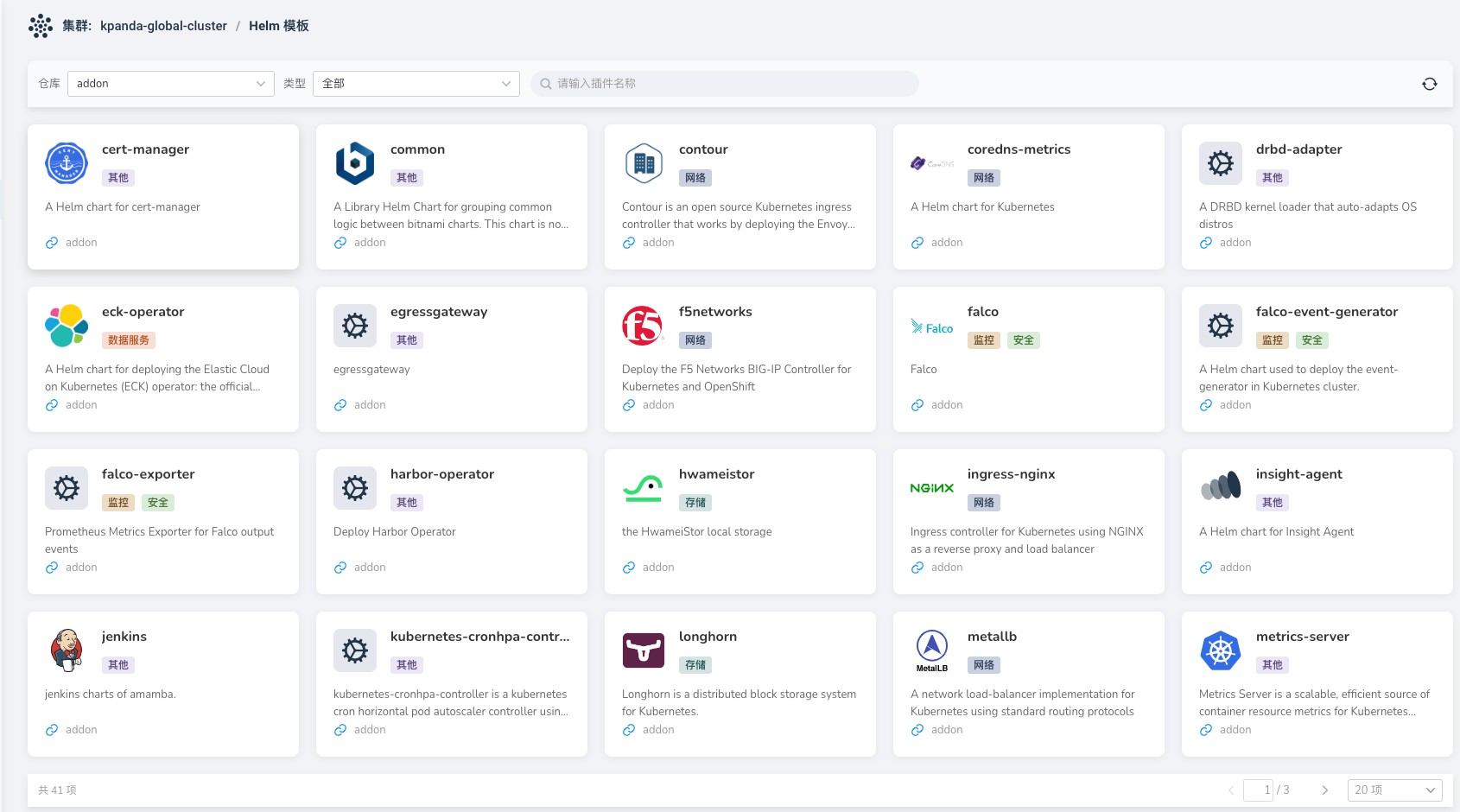
Helm Chart interface does not display the latest Chart uploaded to Helm Repo
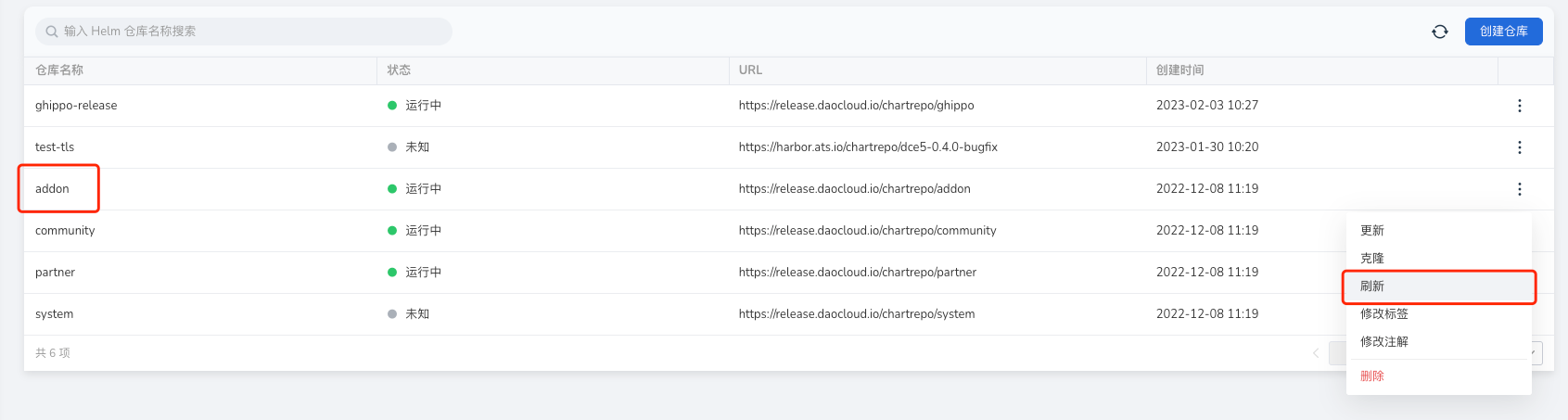
At this time, simply refresh the corresponding Helm repository in the Helm repository.
When Helm application installation fails, it gets stuck during installation and cannot delete the application to reinstall
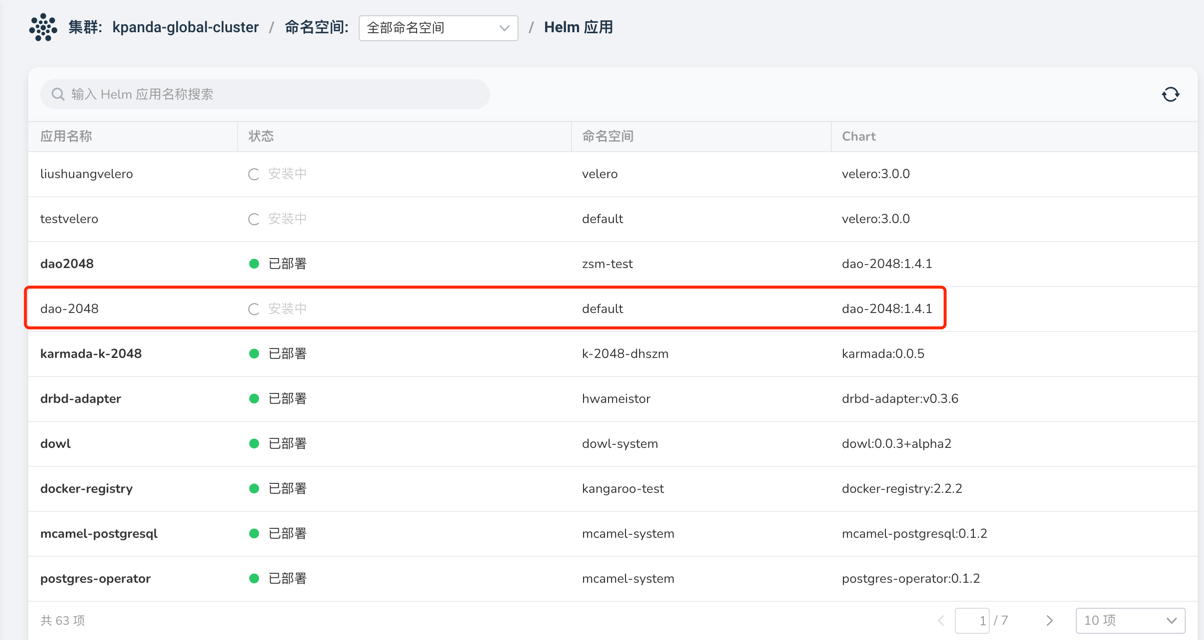
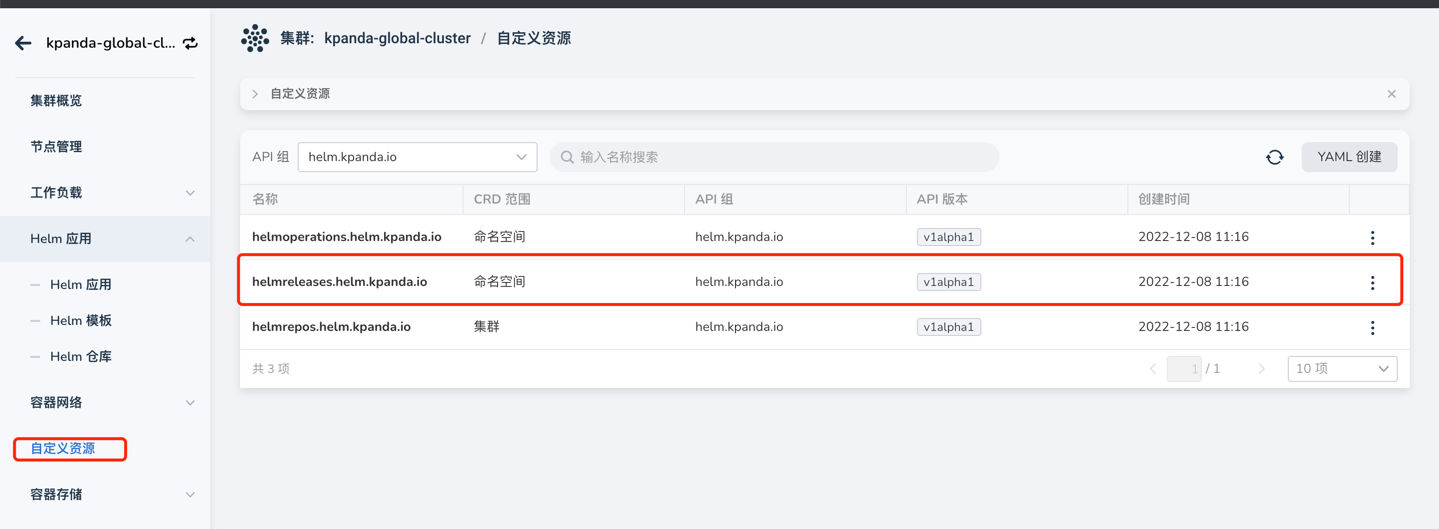
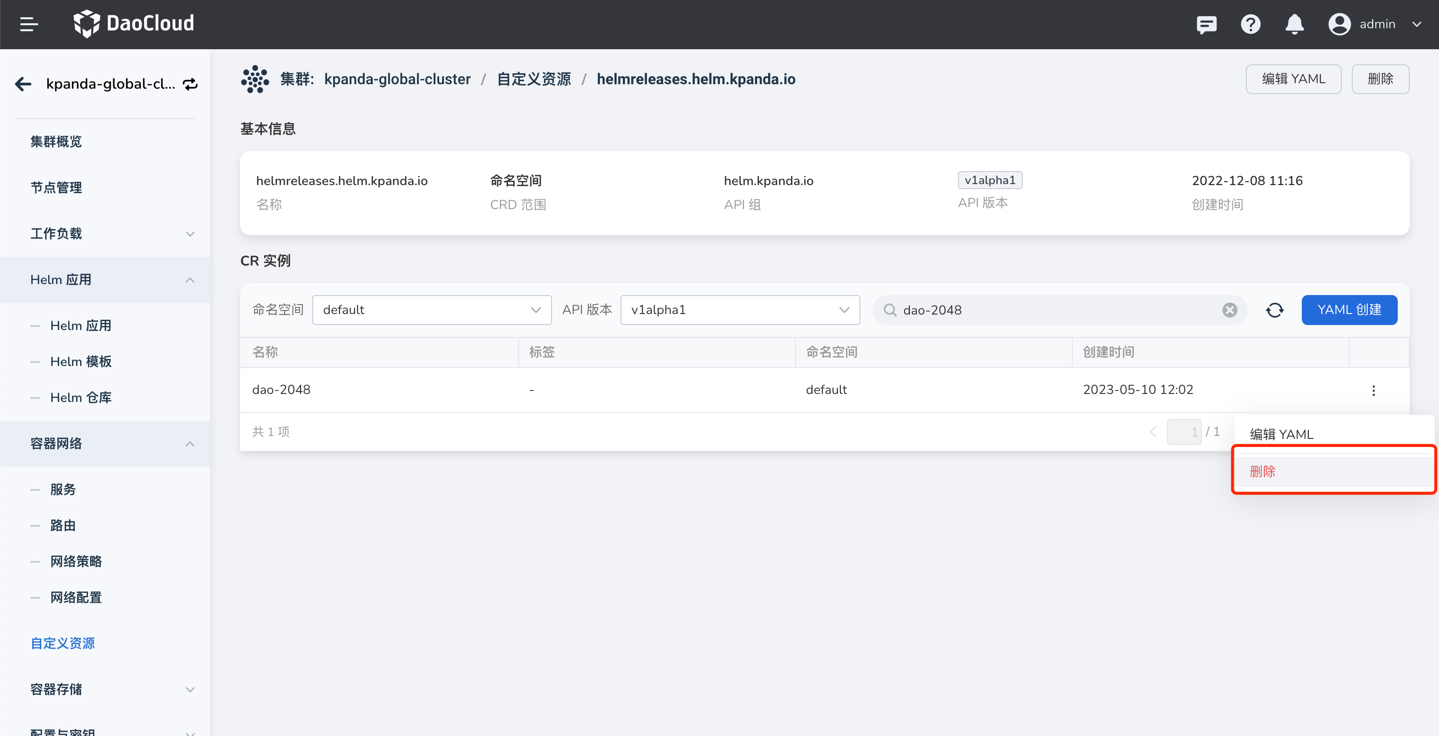
At this time, simply go to the custom resource page, find the helmreleases.helm.kpanda.io CRD, and delete the corresponding helmreleases CR.
Scheduling Issues
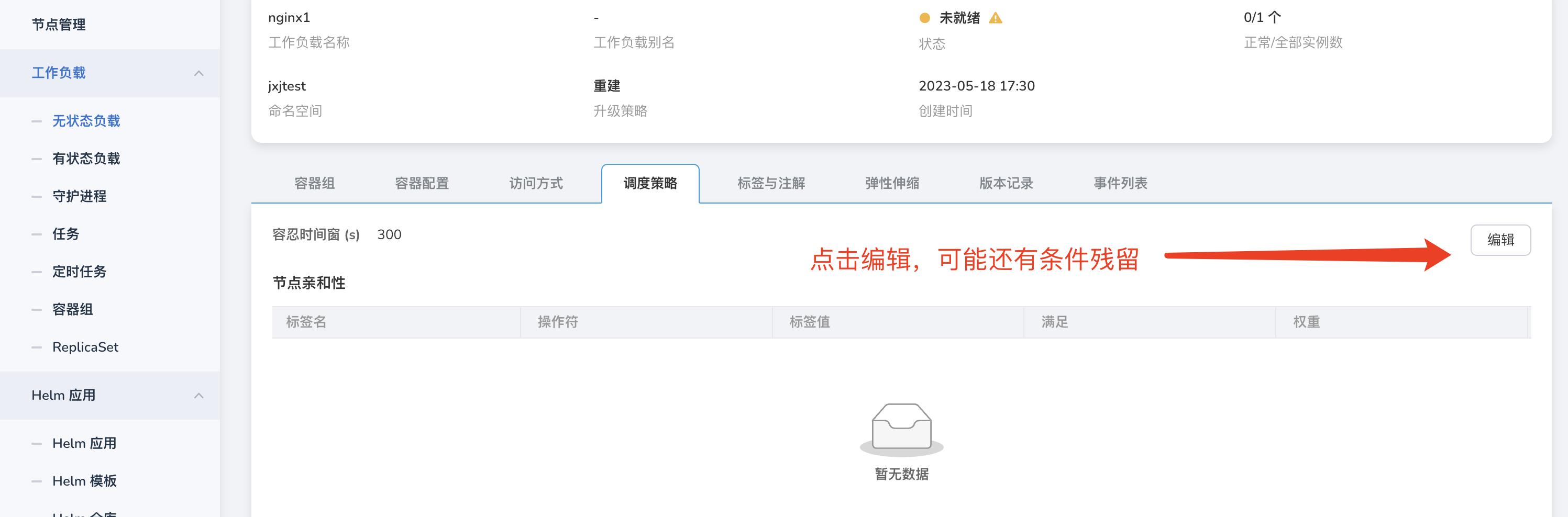
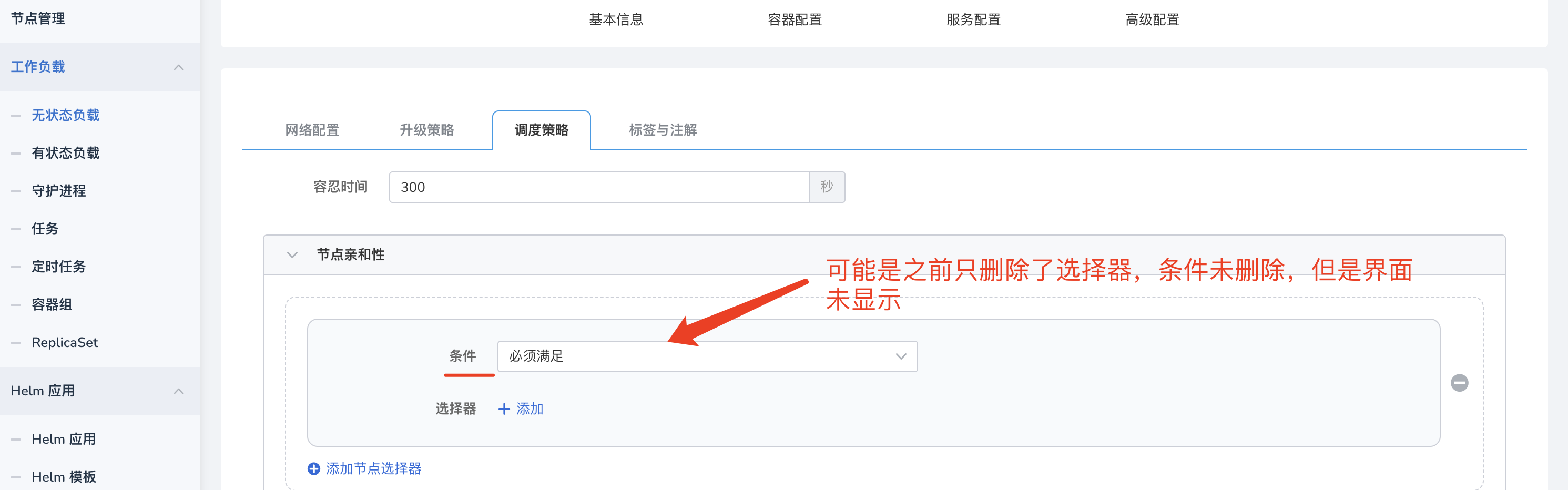
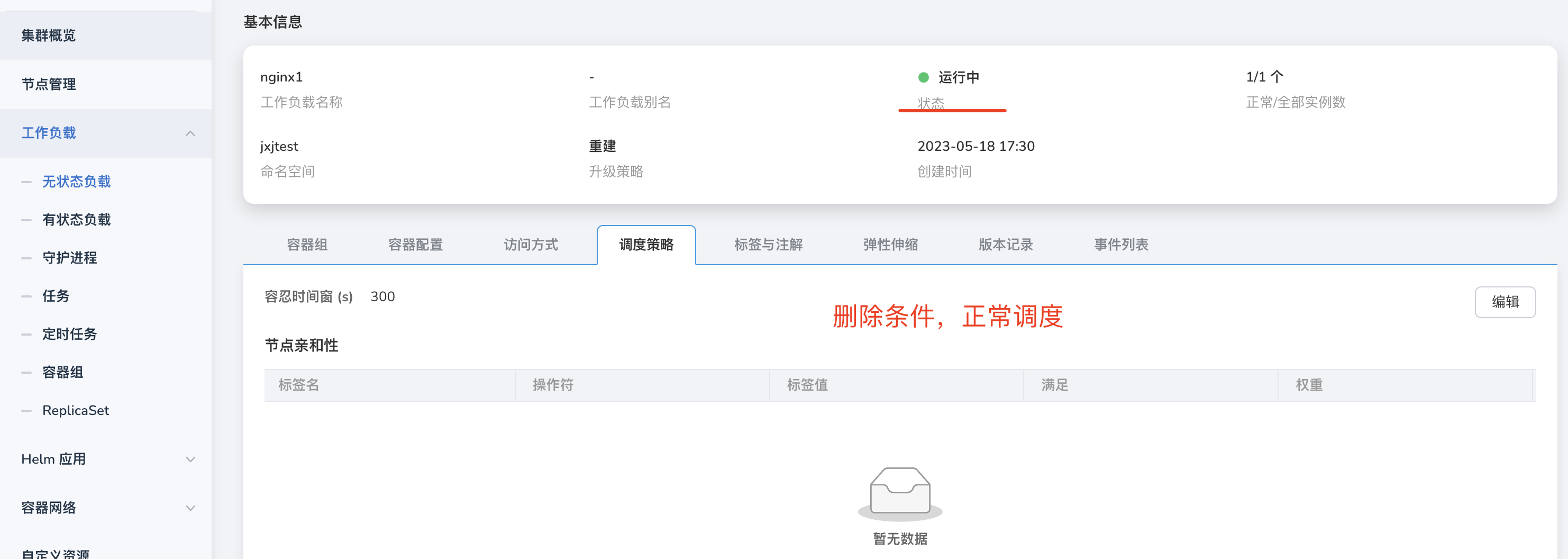
After removing node affinity and other scheduling policies through Workload, scheduling exceptions occur.
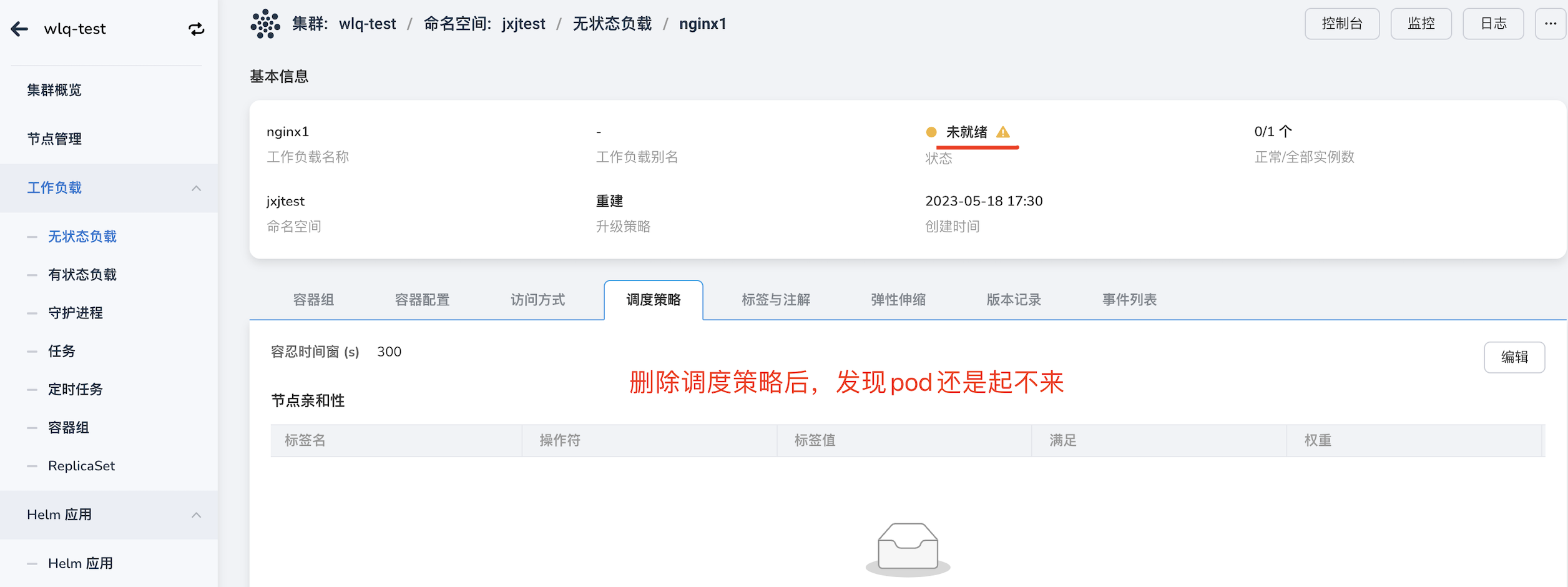
At this time, it may be because the policies were not deleted cleanly. Click edit and delete all policies.
Application Backup
What is the logic for Kcoral application backup to detect Velero status in the working cluster
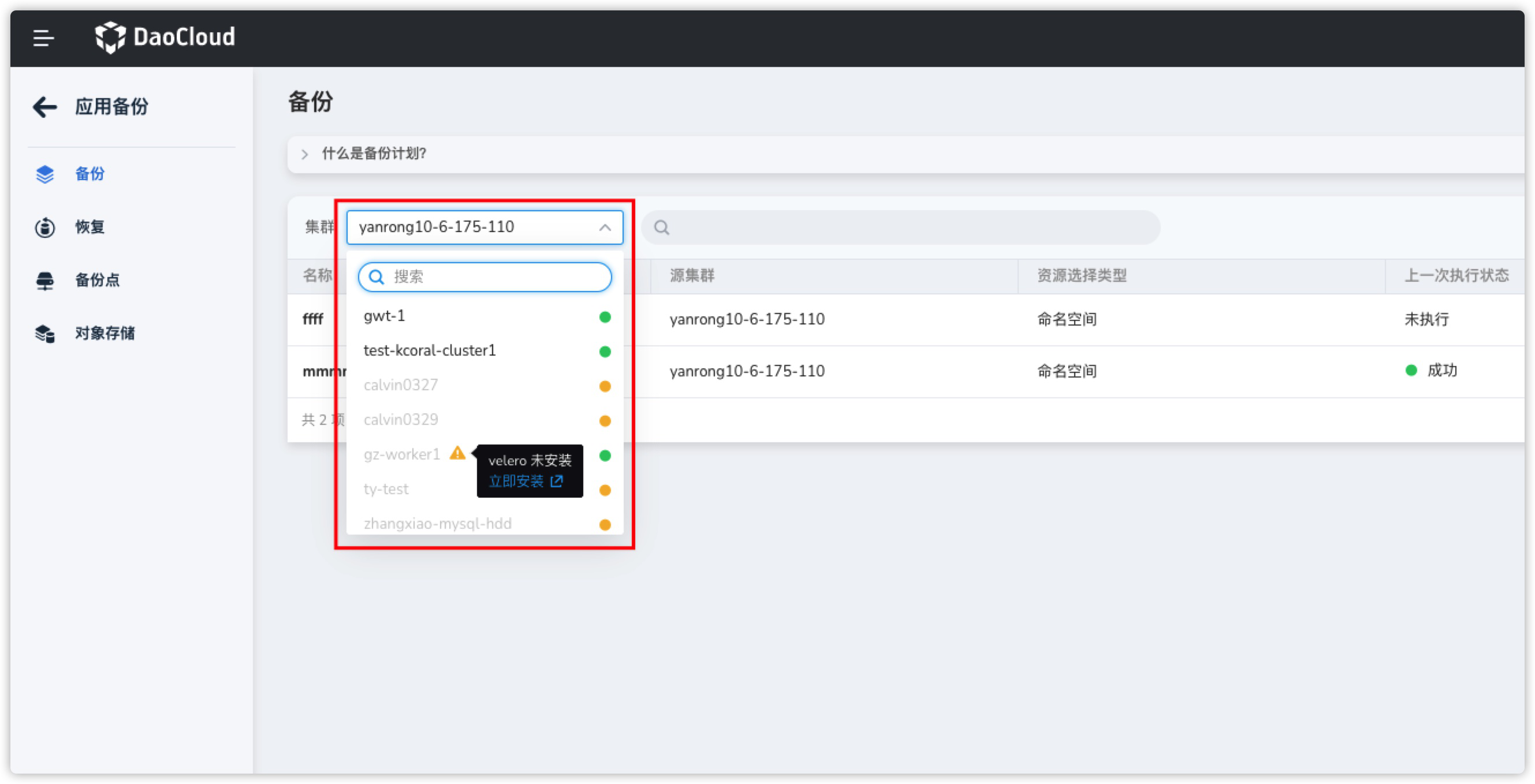
- The working cluster has the standard Velero components installed under the velero namespace.
- The velero control plane deployment is running and has reached the desired replica count.
- The velero data plane node agent is running and has reached the desired replica count.
- Velero has successfully connected to the target MinIO (BSL status is Available).
When backing up and restoring across clusters, how does Kcoral obtain available clusters
When Kcoral performs cross-cluster backup and restore of applications, it helps users filter the list of clusters that can perform cross-cluster restores on the restore page. The logic is as follows:
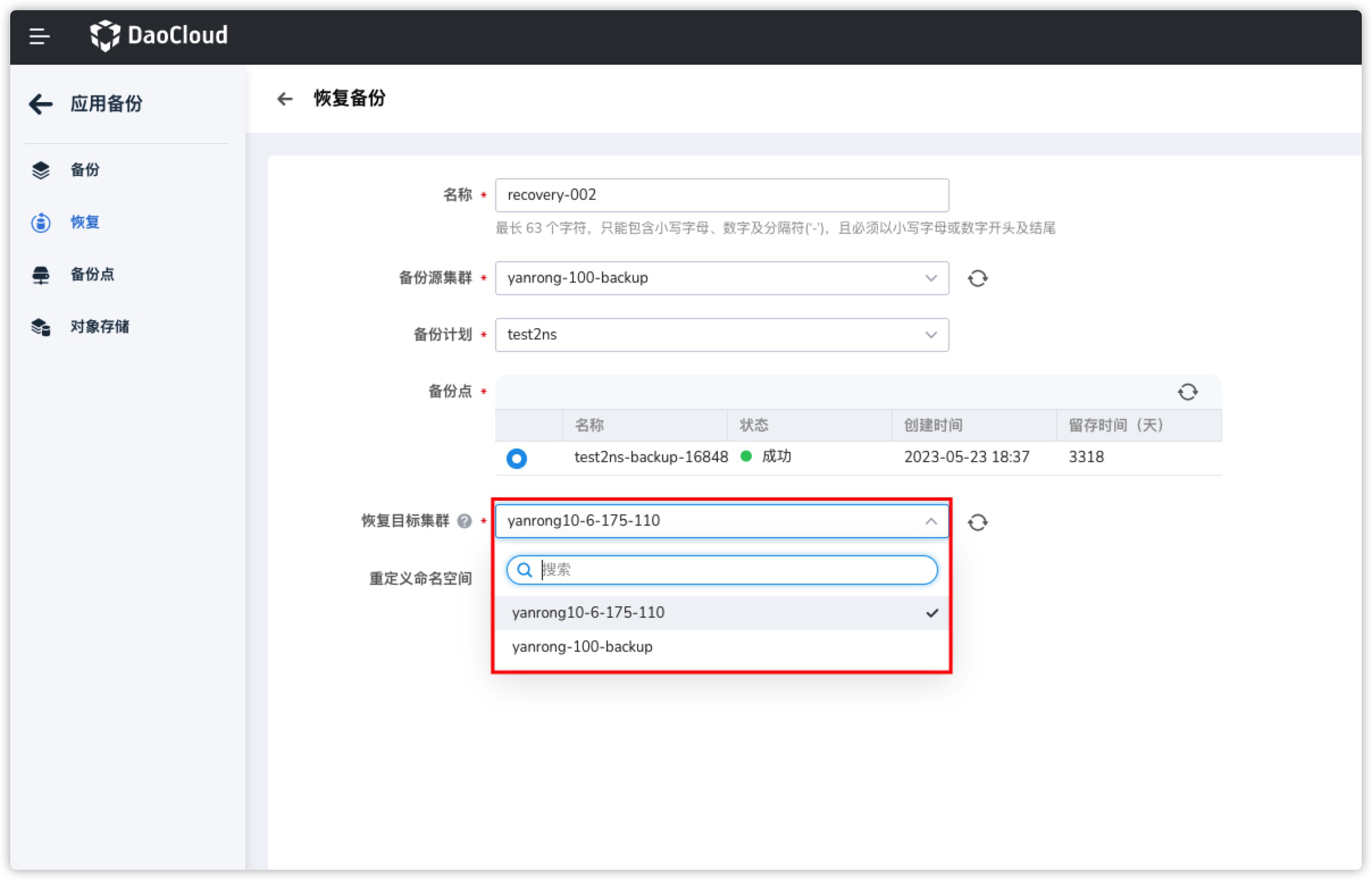
- Filters out clusters that have not installed Velero.
- Filters out clusters with abnormal Velero status.
- Retrieves and returns the list of clusters that connect to the same MinIO and Bucket as the target cluster.
Therefore, as long as they connect to the same MinIO and Bucket, and Velero is running, cross-cluster backups (with write permissions) and restores can be performed.
Kcoral backed up Pods and Deployments with the same label, but after restoring the backup, two Pods appear
The reason for this phenomenon is that during restoration, the Pod labels were modified, causing their labels to not match the parent resource ReplicaSet / Deployment labels at the time of backup, resulting in two times the number of Pods upon restoration.
To avoid this situation, try to avoid modifying the labels of any resources in the associated resources.
Log Issues
Why do scaling records still exist after uninstalling VPA, HPA, and CronHPA?
Although the corresponding components were uninstalled through the Helm Addon market, the records related to application scaling still remain, as shown in the figure:
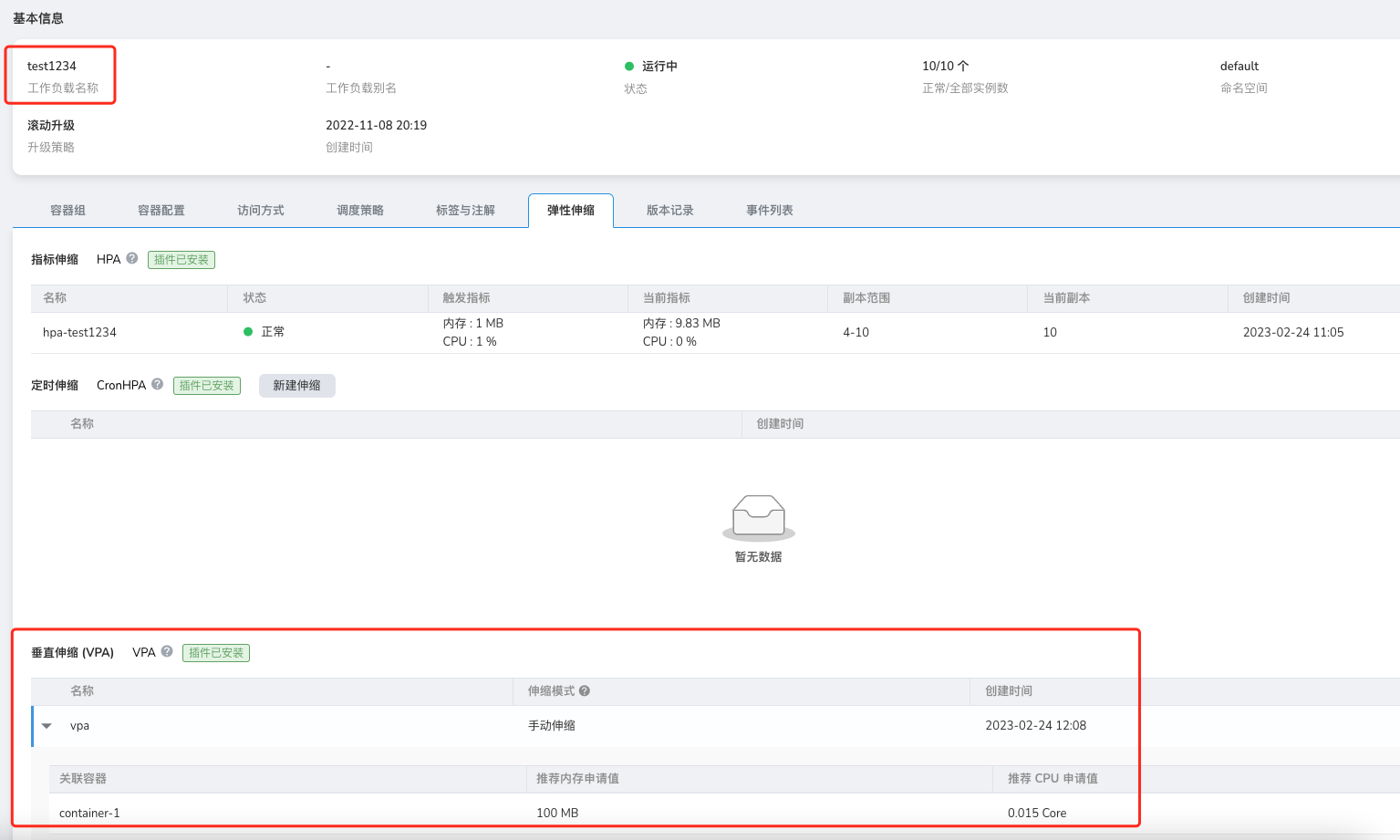
This is an issue with helm uninstall, as it does not uninstall the corresponding CRD, leading to data residue. At this point, we need to manually uninstall the corresponding CRD to complete the final cleanup.
Console Issues
Why does the console open abnormally in low-version clusters?
In Kubernetes clusters with low versions (below v1.18), opening the console may result in CSR resource request failures. When opening the console, a certificate request is made through the CSR resource by the currently logged-in user in the target cluster. If the cluster version is too low or this feature's controller is not enabled, it will lead to certificate request failures, thus preventing connection to the target cluster.
For the certificate request process, refer to kubernetes website.
Solution:
-
If the cluster version is above v1.18, check if the kube-controller-manager has the CSR feature enabled, and ensure the following controllers are functioning properly:
-
For low-version clusters, the only solution is to upgrade the version.
Creating and Integrating Clusters
How to reset a created cluster
There are two situations for created clusters:
- Failed cluster creation: If the cluster creation fails due to incorrect parameter settings during the creation process, you can select to retry in the failed cluster and reset the parameters to recreate it.
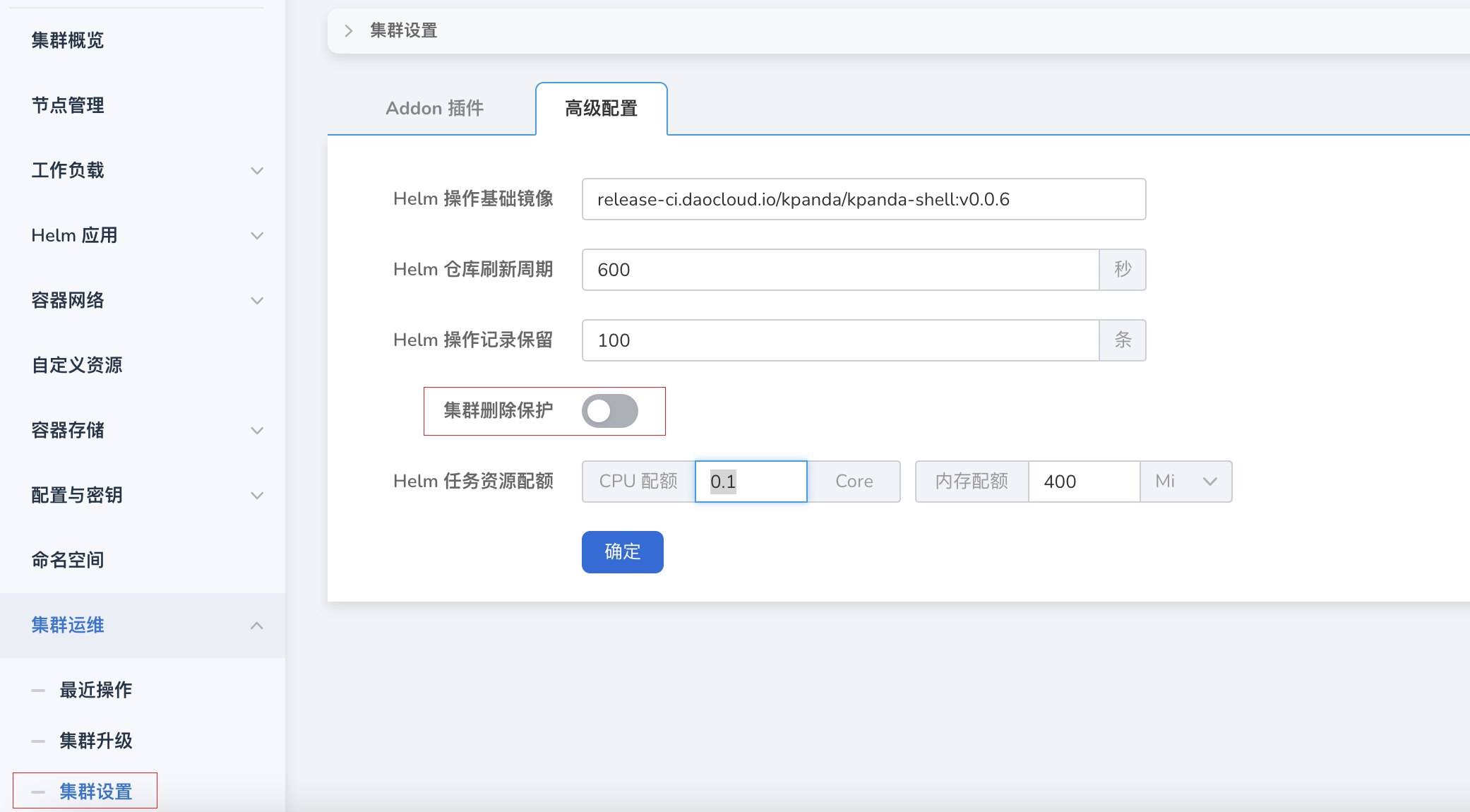
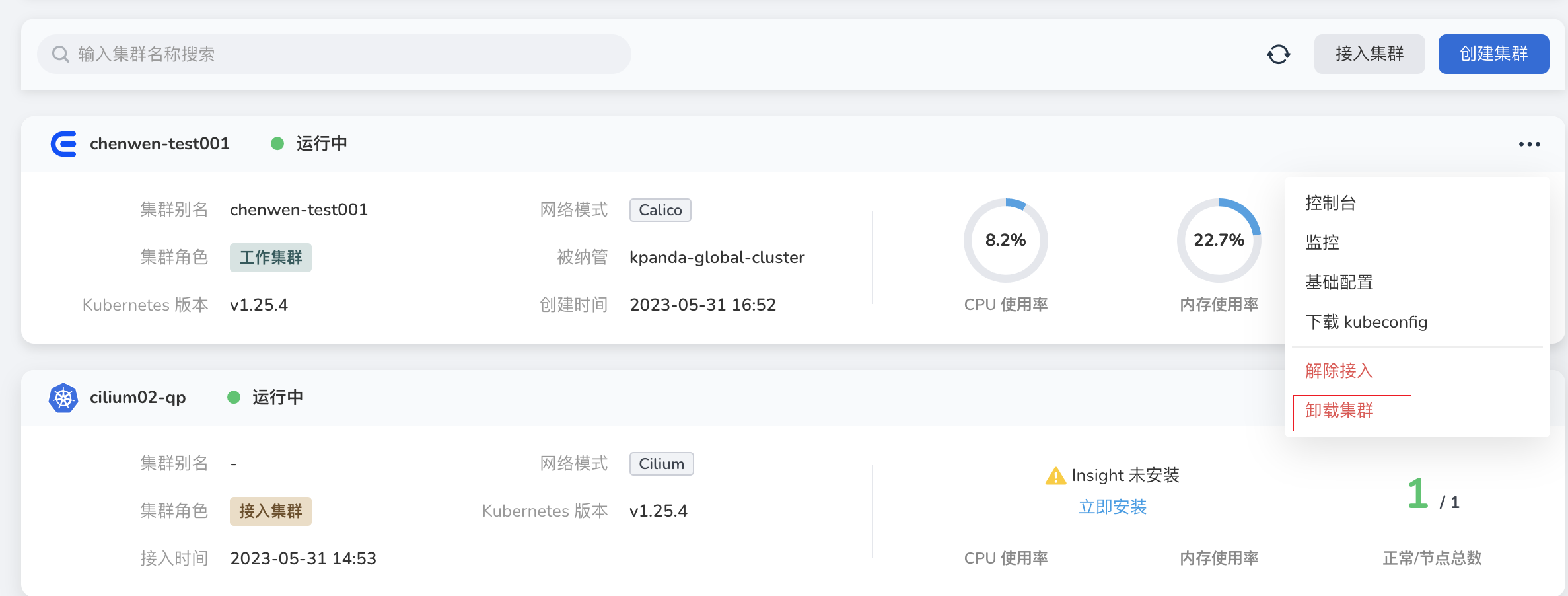
- Successfully created cluster: This cluster can be uninstalled first and then recreated. To uninstall the cluster, you need to disable cluster protection.
Failed to install plugins when integrating the cluster
For clusters integrated in an offline environment, you need to configure the CRI proxy repository to ignore TLS verification before installing plugins (this needs to be executed on all nodes).
-
Modify the file
/etc/docker/daemon.json -
Add "insecure-registries": ["172.30.120.243","temp-registry.daocloud.io"],
The content after modification should be as follows:
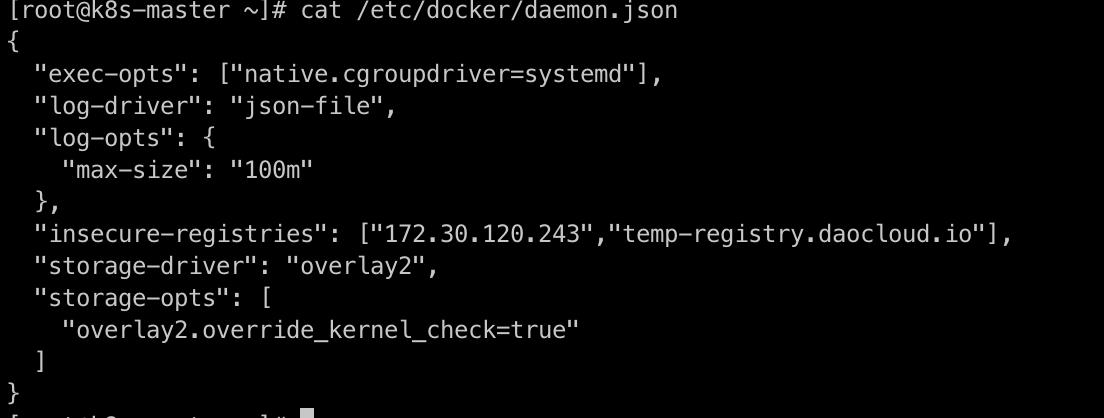
-
Restart Docker
-
Modify
/etc/containerd/config.toml -
The content after modification should be as follows:
[plugins."io.containerd.grpc.v1.cri".registry.mirrors."docker.io"]
endpoint = ["https://registry-1.docker.io"]
[plugins."io.containerd.grpc.v1.cri".registry.mirrors."temp-registry.daocloud.io"]
endpoint = ["http://temp-registry.daocloud.io"]
[plugins."io.containerd.grpc.v1.cri".registry.configs."http://temp-registry.daocloud.io".tls]
insecure_skip_verify = true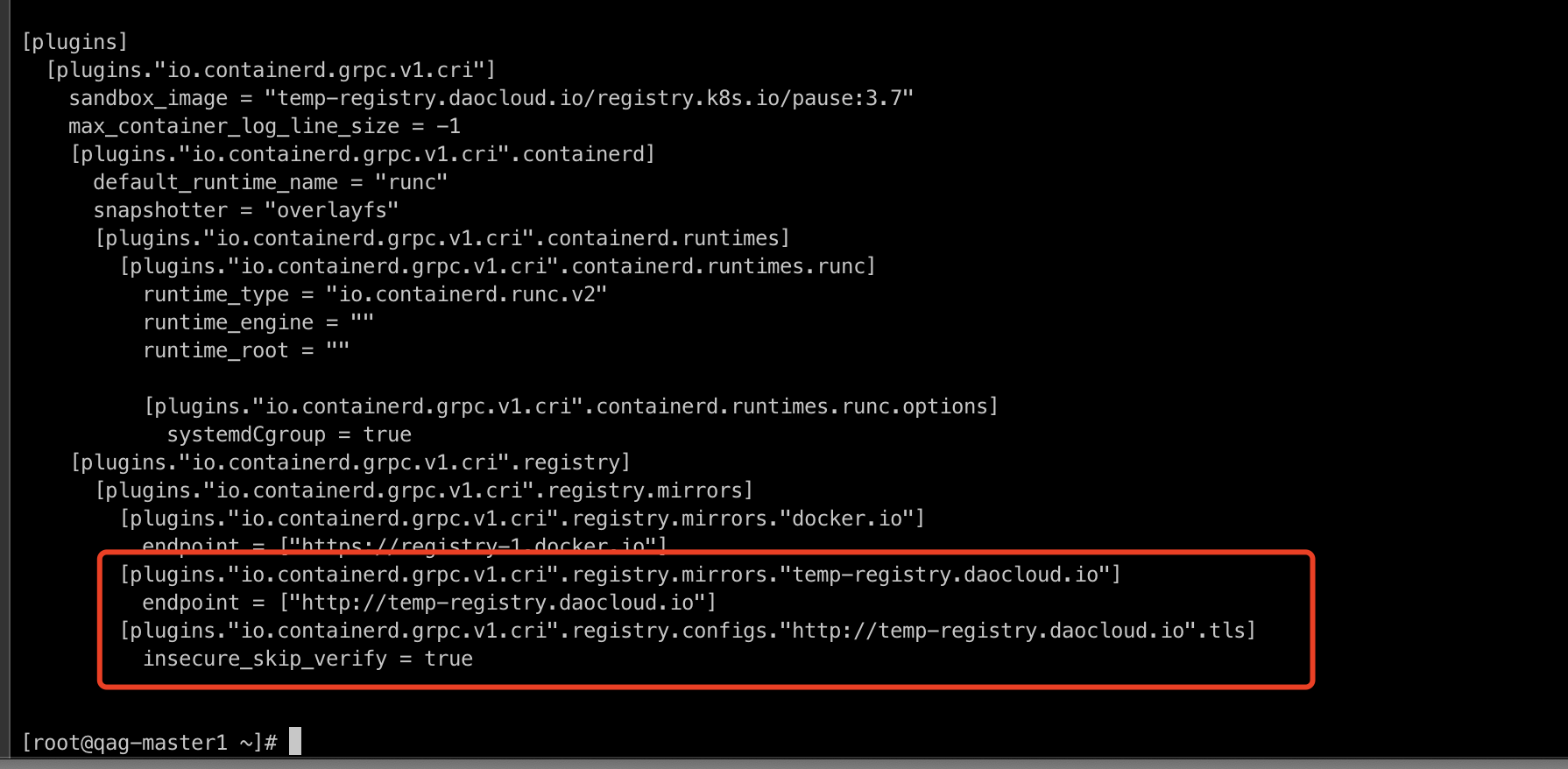
-
Pay attention to spaces and line breaks to ensure the configuration is correct. After modification, run:
When creating a cluster, enabling Kernel tuning for new clusters in advanced settings fails the cluster creation
-
Check if the kernel module conntrack is loaded by executing the following command:
-
If the return is empty, it indicates that it is not loaded. Reload it with the following command:
Note
If the kernel module has been upgraded, it may also lead to cluster creation failure.
After the cluster is disconnected, the kpanda-system namespace remains in Terminating state
Check if the APIServices status is normal. The command to check is as follows. If the current status is false, try to repair the APIServices or delete the service.
MultiCloud Management
For more questions, refer to FAQs.
The kernel for multicloud management is Karmada; what is the currently supported version of Karmada? Can a specific version be specified? Can it be upgraded?
Yes, The current default version is v1.9.6, and you can upgrade the version by yourself.
How to seamlessly migrate single-cluster applications to multicloud management?
Does multicloud management support cross-cluster application log collection?
This is feature is still under development and will go public soon.
For workloads distributed to multiple clusters in multicloud management, can monitoring information be presented in one view?
Yes. You can view it by clicking the name of the workload in the list of multicloud workloads.
Can multicloud management workloads communicate across clusters?
Yes. Refer to Multicloud Network Interconnection
Can multicloud management services achieve cross-cluster service discovery?
Yes. Refer to Multicloud Network Interconnection
Is there production-level support for multicloud management?
It is still in the TP stage, and the high availability issue of many internal components needs to be resolved (Karmada depends on etcd, etc.).
How does multicloud management achieve failover?
Due to Karmada's native support for fault tolerance, Karmada will intelligently reschedule to complete the fault tolerance when a member cluster experiences a failure. Refer to Failover Introduction
Multi-cluster permission issues
It uses the existing permission system of DCE, and bound Karmada instances with workspaces.
How to query events from multiple clusters in multicloud management?
Multicloud Management integrates resources at the product level. You can view all Karmada-instance-level events.
After creating a multicloud application through multicloud management, how can relevant resource information be obtained through container management?
The Karmada control-plane is essentially a complete Kubernetes control plane without any nodes carrying workloads. Therefore, when creating multicloud management instances, a clever action is taken to add the instance itself as a hidden cluster to the container management (not displayed in the container management). This allows for leveraging the full capabilities of container management (collecting and accelerating the retrieval of resources from various Kubernetes clusters, CRDs, etc.). When querying the resources of a specific multicloud management instance (such as Deployment, PropagationPolicy, OverridePolicy, etc.) in the interface, retrieval can be directly done through container management, achieving read and write separation and speeding up response time.
How to customize the Karmada image source repository address in multicloud management?
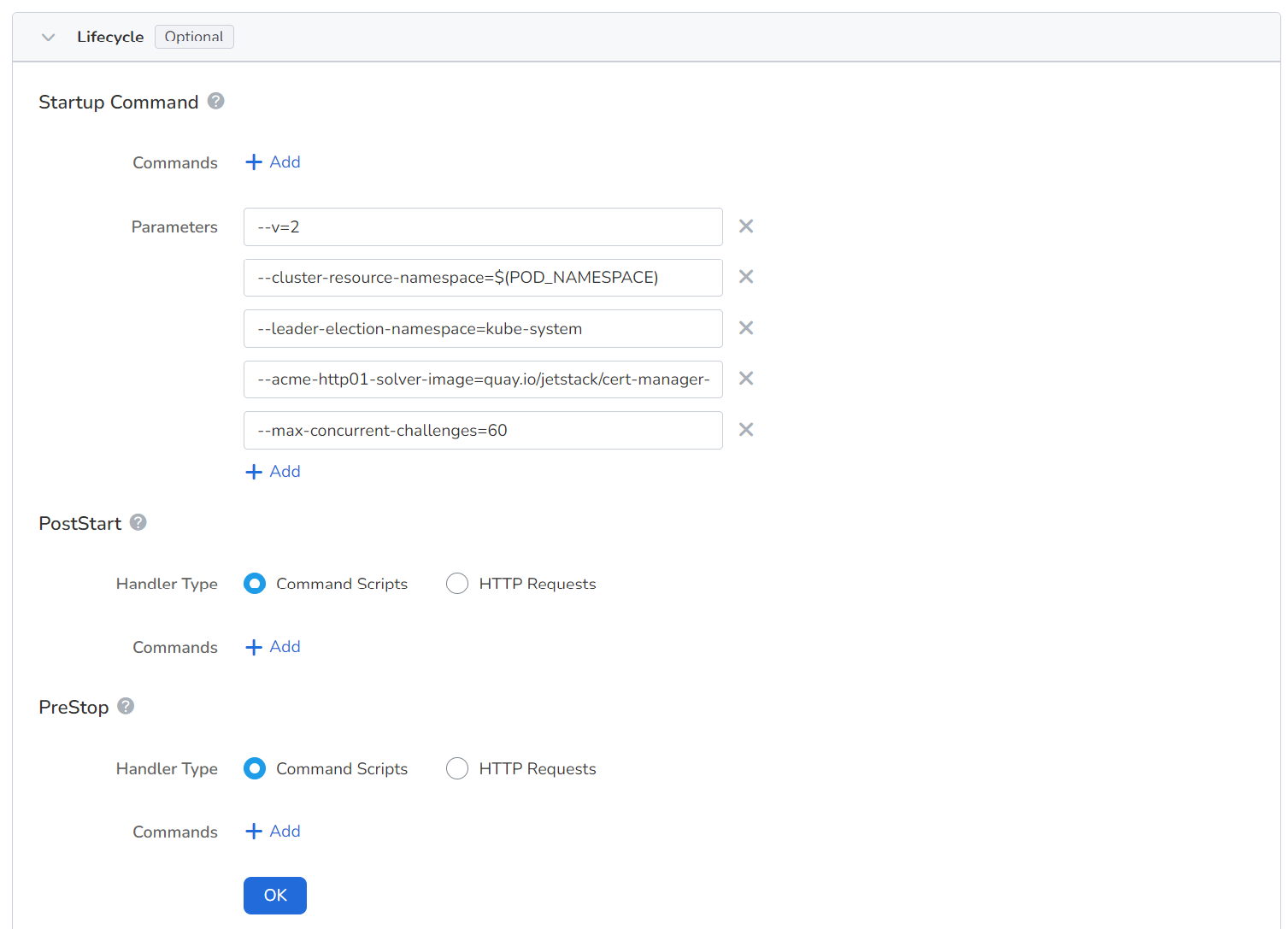
Kairship uses the open-source karmada-operator for multi-instance LCM management. Operator provides rich customization capabilities. It supports customizing the repository address of the karmada resource image in the startup parameters.
Add --chat-repo-url in the startup commands of containers to specify the image source.
How to connect to multicloud clusters?
Click Console in the upper right corner of the instance overview page.
Is it possible to delete only multicloud instances without deleting the components of multicloud management?
Yes, when creating a multicloud instance, you can choose whether to select the instance release feature. If selected, the corresponding Karmada instance will be deleted synchronously. If not deleted, you can continue to use it through the terminal, but you cannot manage the Karmada instance within the multicloud management, so it is recommended to delete it synchronously.
How to achieve network intercommunication among multiple working clusters within a multicloud instance?
Refer to Multicloud Network Interconnection
Cloud Native Networking
For more questions, refer to Known Network Component Issues and Kernel Compatibility.
kube-proxy Issues
IPVS Mode
Accessing services may encounter 1s delay or failed requests.
-
Symptoms:
- Accessing services through Service experiences a 1s delay.
- Some requests fail during a rolling update.
-
Impacts:
kubernetes Versions kube-proxy Behaviors Symptoms <= v1.17 net.ipv4.vs.conn_reuse_mode=0 RealServer could not be removed, and some requests fail during a rolling update. >= v1.19 net.ipv4.vs.conn_reuse_mode=0 (kernel > v4.1)
net.ipv4.vs.conn_reuse_mode=1 (kernel < v4.1)The default kernel version of CentOS 7.6-7.9 is earlier than v4.1, and accessing services through Service experiences a 1s delay.
The default kernel version of CentOS 8 is higher than v4.1, and RealServer could not be removed, and some requests fail during a rolling update.>= v1.22 The net.ipv4.vs.conn_reuse_mode value (kernel > v5.6) is not modified
net.ipv4.vs.conn_reuse_mode=0 (kernel > v4.1)
net.ipv4.vs.conn_reuse_mode = 1 (kernel < v4.1)The default kernel version of CentOS 7.6-7.9 is earlier than v4.1, and accessing services through Service experiences a 1s delay.
The default kernel v4.16 of CentOS 8 is higher than v4.1, and RealServer could not be removed, and some requests fail during a rolling update.
The default kernel v5.15 of Ubuntu 22.04 is higher than v5.9 kernel, and does not have the issue. -
Recommendation: IPVS mode is not recommended when the kernel version is below v5.9.
-
Reference: Kubernetes Issue #93297
iptables Mode
-
Symptom: The source port is not random enough after NAT, resulting in a 1s delay
-
Impact:
Kernel iptables Version Symptom < v3.13 v1.6.2 The source port is not random enough after NAT, resulting in a 1s delay -
Recommendation: An upgrade of the kernel version is advised by considering released versions.
externalIPs not working under externalTrafficPolicy: Local
-
Impact: v1.26.0 <= affected version < v1.30.0
-
Recommendation: Update kubernetes to v1.30.0
-
Reference: Kubernetes PR #121919
New endpoint rules for Service take a long time to take effect when updating endpoints
-
Impact: v1.27.0 <= affected versions < v1.30.0
-
Recommendation: Update kubernetes to v1.30.0
-
Reference: Kubernetes PR #122204
LoadBalancerSourceRanges not working properly under nftables mode
-
Recommendation: Update kubernetes to v1.30.0
-
Reference: Kubernetes PR #122614
iptables nft and legacy mode selection issues
-
Impacts:
Versions Behaviors Impacts < v1.18 Using iptables-legacy kube-proxy may not work >= v1.18 Prefer to choose nft None -
Reference: kubernetes-sigs/iptables-wrappers
Calico Issues
Offloading VXLAN causes latency
-
Impacts:
Calico Versions Behaviors Impacts < v3.20 No response When the kernel version is lower than v5.7, a 63s delay experiences between pods and Service. >= v3.20 VXLAN offload is automatically disabled by default via FelixConfiguration. The performance of NICs is low, only running 1-2 Gbps/s. >= v3.28 VXLAN offload is automatically enabled in kernel v5.7, addressing previous packet loss issues with ClusterIP and improving performance. When the kernel version is lower than v5.7, the performance of NICs is low, only running 1-2 Gbps/s. -
Recommendations:
- When lower versions Calico have access latency issue, it can be avoided by
ethtool --offload vxlan.calico rx off tx off. - Higher versions Calico will automatically disable VXLAN offload by default, so customers with network performance requirements can update the kernel version to v5.7 to solve the problem.
- When lower versions Calico have access latency issue, it can be avoided by
-
References:
VXLAN parent device changed but routing not updated
-
Impacts:
Calico Versions Behaviors Impacts < v3.28.0 No response If routing tables do not to use new parent NIC, old routes can't be cleaned up even after restarting felix. >= v3.28.0 The VXLAN Manager recreates a routing table when the parent device changes. None -
Recommendation: Update Calico to v3.28.0
-
Reference: Calico PR #8279
Cluster calico-kube-controllers cache desynchronization causing memory leaks
- Recommendation: Update Calico to v3.26.0
Inter-node pod networking not working in IPIP mode
-
Impacts:
Calico Versions Behaviors Impacts < v3.28.0 No response The inter-node networking may fail for pods in kernel < v5.7 due to incompatibility between checksum calculation and iptables --random-fully.>= v3.28.0 The checksum calculation is disabled by default None -
Recommendation: Update Calico to v3.28.0+. For earlier versions, you can manually turn off the feature using the
ethtool -K tunl0 tx offcommand. -
Reference: Calico PR #8031
iptables nft and legacy mode selection issues
-
Impacts:
Calico Versions Behaviors Impacts < v3.26.0 It needs to be specified manually, and there are some logical problems with automatic calculations. Service network anomalies may occur due to a incorrect iptables mode selection. >= v3.26.0 Automatic calculation None -
Recommendations: Update Calico to v3.26.0+. For earlier versions, you need to manually specify the
FELIX_IPTABLESBACKENDvariable with either the NFT or LEGACY option. -
Reference: Calico PR #7111
Known Issues in Spiderpool v0.9
Error when SpiderCoordinator synchronizes status, but status remains running
-
Analysis: If getting the CIDR information for the cluster fails, we should update its status to NotReady, which prevents the pod from being created properly. Otherwise, the pod will run with an incorrect CIDR, which makes network connectivity fail.
-
Reference: Spiderpool PR #2929
Values.multus.multusCNI.uninstall setting ineffective, causing multus resources not to be deleted correctly
-
Analysis: After
Values.multus.multusCNI.uninstallset to true and Spiderpool uninstalled, multus-related resources are still present and not removed as expected. -
Reference: Spiderpool PR #2974
Unable to obtain serviceCIDR from kubeControllerManager Pod when kubeadm-config is missing
-
Analysis: In some scenarios where kubeadm is not used to create a cluster, there may not be a kubeadm-config configMap, so that an attempt will be made to get the serviceCIDR from kubeControllerManager. Due to a bug, the serviceCIDR cannot be gotten from the kubeControllerManager pod, causing the SpiderCoordinator to fail to update status.
-
Reference: Spiderpool PR #3020
Upgrading from v0.7.0 to v0.9.0 causes panic due to new TxQueueLen property in SpiderCoordinator CRD
-
Analysis: In Spiderpool v0.9.0, a new attribute
TxQueueLenis added to SpiderCoordinator CRD. However, during the upgrade operation, there is no default value, which may cause a panic. Therefore, you need to use it and treat it as default value 0. -
Reference: Spiderpool PR #3118
Due to different cluster deployment methods, SpiderCoordinator returns empty serviceCIDR, preventing Pod creation
-
Analysis: Due to different cluster deployment methods, there are two types of CIDRs recorded in the cluster kube-controller-manager pod:
Spec.Containers[0].CommandSpec.Containers[0].Args
For example, the RKE2 cluster is
Spec.Containers[0].Argsinstead ofSpec.Containers[0].Command. TheSpec.Containers[0].Commandis hardcoded in the original implementation logic, leading to a judgment error that results in an emptyserviceCIDRand subsequently causes pods creation to fail. -
Reference: Spiderpool PR #3211
Known Issues in Spiderpool v0.8
ifacer cannot create bond using vlan 0
-
Analysis: Creating a bond via ifacer fails when vlan 0 is used.
-
Reference: Spiderpool PR #2639
Disabling multus functionality still creates multus CR resources
-
Symptom: During installation, the multus feature is disabled, but the multus CR resource is still created, which is not as expected.
-
Reference: Spiderpool PR #2756
SpiderCoordinator cannot detect gateway connections in Pod's netns
-
Analysis: Currently, spiderCoordinator uses a plugin to use errgroup to concurrently check for gateway reachability and IP conflicts to improve detection speed. Each OS thread can have different network namespaces and the thread scheduling of Go is highly variable, so the caller is not guaranteed to set any particular namespaces. However, when starting a goroutine in netns.Do, the code is not guaranteed to execute in the specified network namespace when the Go is running. Therefore, the errgroup method of Go needs to be modified to manually switch to the target network namespace when starting goroutine, and then return to the original network namespace after execution to ensure that gateway reachability and IP conflicts can be checked.
-
Reference: Spiderpool PR #2738
spiderpool-agent Pod crashes when kubevirt fixed IP feature is turned off
-
Analysis: When the kubevirt fixed IP feature is turned off, the spiderpool-agent pod crashes and fails to run, affecting the overall IPAM functionality.
-
Reference: Spiderpool PR #2971
SpiderIPPool resources do not inherit gateway and route properties from SpiderSubnet
-
Analysis: If you create a SpiderSubnet resource first, and then create a SpiderIPPool resource for the corresponding subnet, the SpiderIPPool will inherit the gateway and routes of the SpiderSubnet. However, if you create an isolated SpiderIPPool first, and then create the corresponding SpiderSubnet resource, the SpiderIPPool resource will not inherit the attributes of SpiderSubnet.
-
Reference: Spiderpool PR #3011
Known Issues in Spiderpool v0.7
StatefulSet type Pods report IP conflict when obtaining IP allocation after restart
-
Analysis: As the StatefulSet pod restarts, GC scanAll will release the previous IP address, because the system considers that the pod UID is different from the IP address recorded by IPPool so that notifies conflicts.
-
Reference: Spiderpool PR #2538
Spiderpool cannot recognize certain third-party controllers, causing Pods in StatefulSet to be unable to use fixed IP
-
Symptom: Spiderpool cannot recognize third-party controllers like RedisCluster, so that the pod of StatefulSet controlled by them cannot use fixed IPs.
-
Analysis: For third party controllers: RedisCluster -> StatefulSet -> Pod, if Spiderpool sets SpiderSubnet autopool annotations for them, the pod will not start successfully.
-
Reference: Spiderpool PR #2370
Empty spidermultusconfig.spec causes spiderpool-controller Pod to crash
-
Symptom: After creating CR with empty
spidermultusconfig.spec, webhook checksum succeeds, but the related network-attachment-definitions is not generated and spiderpool-controller experiences a panic. -
Reference: Spiderpool PR #2444
Cilium mode obtains incorrect overlayPodCIDR
-
Symptoms:
- In the auto SpiderCoordinator mode, it is failed to get
podCIDRType, so that the status of SpiderCoordinator is not as expected after updating. - Creating a Pod may cause network issues.
- In the auto SpiderCoordinator mode, it is failed to get
-
Reference: Spiderpool PR #2434
In scenarios with a 1:1 Pod to IP ratio, IPAM allocation blockage occurs, preventing some Pods from running and affecting IP allocation performance
-
Analysis: An IPPool with 1000 IP addresses and a Deployment with 1000 replicas is created. After allocating a certain number of IP addresses, you will observe a significant decrease in allocation performance, even cannot continue to allocate IP addresses, while a pod cannot start normally without an IP address. An actual IPPool resource has already recorded the pod and assigned its IP address, but the pod corresponding to the SpiderEndpoint does not exist.
-
Reference: Spiderpool PR #2518
Disabling IP GC feature causes spiderpool-controller component to fail to start correctly due to readiness health check failure
-
Analysis: After disabling the IP GC feature, the spiderpool-controller component will not start correctly due to a readiness health check failure
-
Reference: Spiderpool PR #2532
IPPool.Spec.MultusName namespace/multusName resolution error causes associated multusName to be unfindable
-
Symptom:
IPPool.Spec.MultusNamespecifies namespace/multusName, but a namespace parsing error makes the multusName unfindable, causinhg affinity to fail. -
Analysis: The pod annotation
v1.multus-cni.io/default-network: kube-system/ipvlan-eth0is specified. However, due to Spiderpool's incorrect resolution of namespace, the wrong namespace is used when querying network-attachment-definitions, and the corresponding network-attachment-definitions not being found, so that the pod could not be created successfully. -
Reference: Spiderpool PR #2514
Cloud Native Storage
For more questions, refer to HwameiStor FAQs.
How does HwameiStor scheduler work in Kubernetes platform?
The HwameiStor scheduler is deployed as a pod in the HwameiStor namespace.
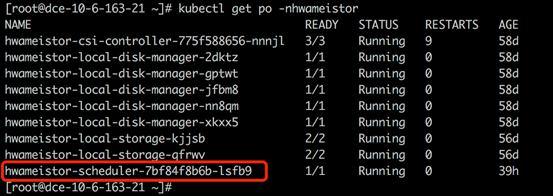
When an application (Deployment or StatefulSet) is created, the pods of the application are automatically deployed to worker nodes that have been configured with HwameiStor local storage capability.
How does HwameiStor handle scheduling for multi-replica workloads? How is it different from traditional general-purpose shared storage?
HwameiStor recommends using StatefulSet for applications with multiple replicas.
StatefulSet deploys the replicated replicas to the same worker node, but creates a proper PV volume for each pod replica. If you need to deploy replicas to different nodes to distribute the workload, you need to manually configure using podaffinity .
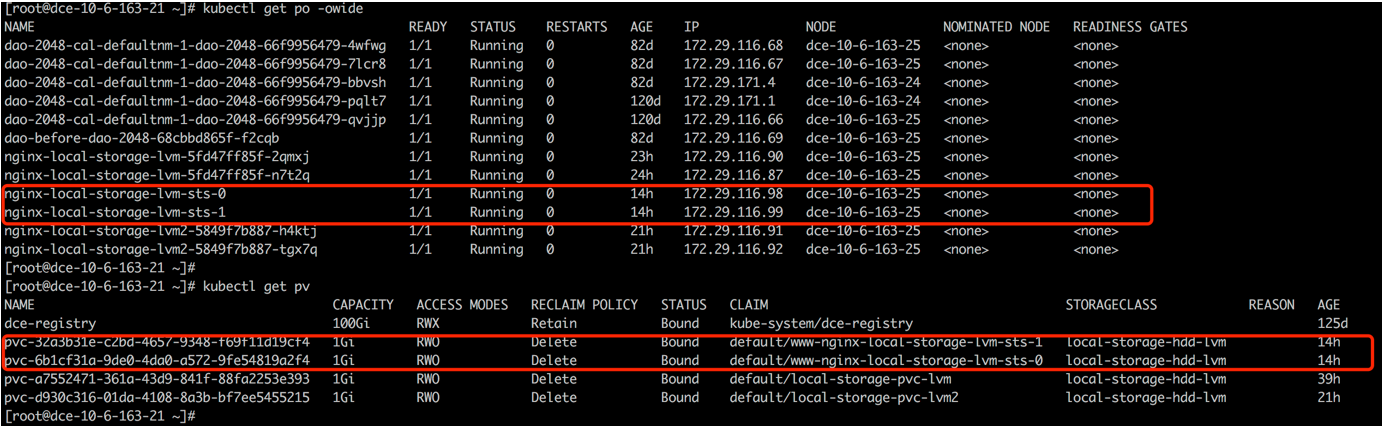
Deployment cannot share block volumes, so it is recommended to use a single replica.
For traditional shared storage:
StatefulSet deploys the replicated replicas to different nodes to distribute the workload, but creates a proper PV volume for each pod replica. Only when the number of replicas exceeds the number of worker nodes will multiple replicas be on the same node.
Deployment deploys the replicated replicas to different nodes to distribute the workload, and all pods share one PV volume (currently only NFS is supported). Only when the number of replicas exceeds the number of Worker nodes will multiple replicas be on the same node. For block storage, since the volume cannot be shared, it is recommended to use a single replica.
How to operate and maintain a data volume on a Kubernetes node?
HwameiStor provides volume eviction and migration features. When removing or restarting a Kubernetes node, the pods and volumes on that node can be automatically migrated to other available nodes, ensuring that the pods continue to run and provide services.
Removing a node
To ensure the continuous operation of pods and the availability of HwameiStor local data, before removing a Kubernetes node, you need to migrate the pods and local volumes on that node to other available nodes. This can be done through the following steps:
-
Drain the node
This command will evict the pods on the node and reschedule them. It will also trigger the HwameiStor volume eviction behavior automatically. HwameiStor will automatically migrate all volume replicas on the node to other nodes and ensure that the data remains available.
-
Check the migration progress
apiVersion: hwameistor.io/v1alpha1 kind: LocalStorageNode metadata: name: NODE spec: hostname: NODE storageIP: 10.6.113.22 topogoly: region: default zone: default status: ... pools: LocalStorage_PoolHDD: class: HDD disks: - capacityBytes: 17175674880 devPath: /dev/sdb state: InUse type: HDD freeCapacityBytes: 16101933056 freeVolumeCount: 999 name: LocalStorage_PoolHDD totalCapacityBytes: 17175674880 totalVolumeCount: 1000 type: REGULAR usedCapacityBytes: 1073741824 usedVolumeCount: 1 volumeCapacityBytesLimit: 17175674880 volumes: # (1)! state: Ready- Ensure that the volumes field is empty
At the same time, HwameiStor will automatically reschedule the evicted pods and schedule them to nodes with available volumes, ensuring that the pods run normally.
-
Remove the node from the cluster
Restarting a node
Restarting a node usually takes a long time to restore the node to normal. During this time, all pods and local data on that node cannot run normally. This can be a significant cost, or even unacceptable, for some applications such as databases.
HwameiStor can immediately schedule pods to other available nodes that have volumes and keep them running continuously. For pods that use HwameiStor multi-replica volumes, this process is very fast, taking about 10 seconds (subject to the native scheduling mechanism of Kubernetes). For pods that use single-replica volumes, the time required depends on the time required for volume migration, which is affected by the size of user data.
If you want to keep the volumes on the node and still be able to access them after the node restarts, you can add the following label to the node to prevent the system from migrating the volumes on that node. The system will still immediately schedule pods to other nodes that have replicas of the volumes.
-
Add a label (optional)
If you don't need to migrate the volumes during the node restart, you can add the following label to the node before draining it:
-
Drain the node
- If you performed step 1, you can restart the node after step 2 is successful.
- If you didn't perform step 1, after step 2 is successful, you should check if the data migration is completed (same as step 2 in Remove a node). After the data migration is completed, you can restart the node.
After the first two steps are successful, you can restart the node and wait for the node system to return to normal.
-
Uncordon the node to restore it to normal in Kubernetes
For traditional shared storage
StatefulSet deploys the replicated replicas to different nodes to distribute the workload, but creates a proper PV volume for each pod replica. Only when the number of replicas exceeds the number of Worker nodes will multiple replicas be on the same node.
Deployment deploys the replicated replicas to different nodes to distribute the workload, and all pods share one PV volume (currently only NFS is supported). Only when the number of replicas exceeds the number of Worker nodes will multiple replicas be on the same node. For block storage, since the volumes cannot be shared, it is recommended to use a single replica.
How to handle errors when viewing LocalStorageNode?
When viewing LocalStorageNode, if you encounter the following error:
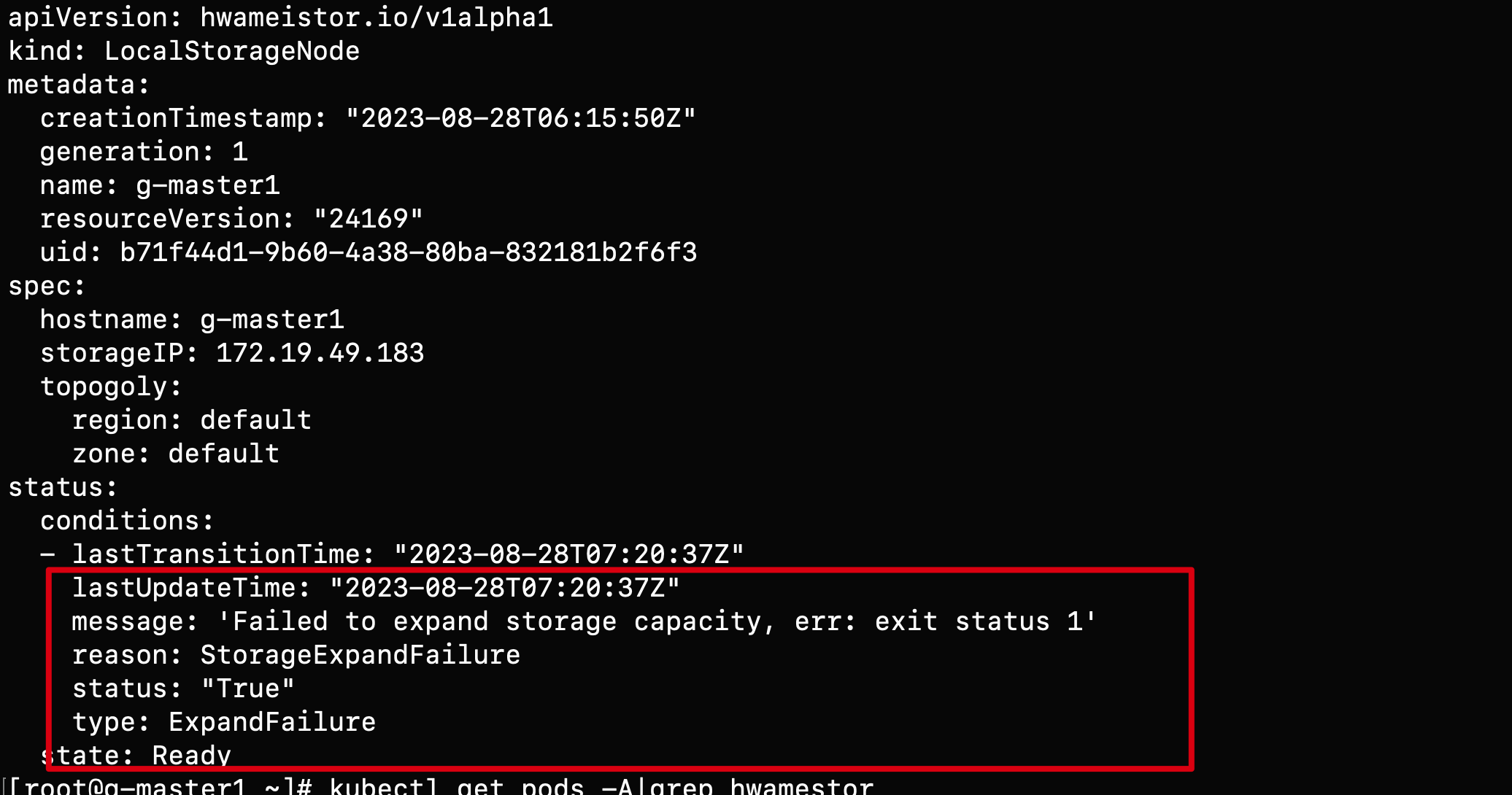
Possible causes of the error:
-
The LVM2 package is not installed on the node. You can install it with the following command:
- Check if LVM2 is installed
- Install LVM2 on each node
-
Check if the proper disk has GPT partition:
- Check if the disk has clean partitions
- Clean the disk
Why is StorageClass not automatically created after installing hwameistor-operator?
Possible reasons:
-
There are no remaining bare disks on the nodes that can be automatically managed. You can check with the following command:
- Check the disks
- Check if the disks are properly managed
-
The Hwameistor-related components (excluding drbd-adapter) are not working properly. You can check with the following command:
- Check if the pods are running properly
- Check the health field
Note
The drbd-adapter component only takes effect when HA is enabled. If it is not enabled, you can ignore the related errors.
Virtual Machine
For more questions, refer to Virtual Machine FAQs.
Virtual Machine Page API Error
Virtual machine (virtnest) consists of two parts: apiserver and agent. When encountering problems, troubleshoot from these two parts.
Page API Error
If the page requests API error 500 or cluster resource does not exist, first check the logs of VM-related services in the Global Service Cluster, looking for keywords of kpanda. If they exist, confirm whether kpanda-related services are running normally.
Virtual Machine Created Successfully but Cannot Be Used
If the created VM cannot be used normally, there are various reasons. Here are the troubleshooting directions:
VM Creation Failed
When VM creation fails, check the detailed information of the VM in the target cluster:
If the detailed information involves storage such as PVC, PV, SC, etc., please check the SC status. If the problem is not resolved, consult developers.
If the detailed information involves devices such as KVM, GPU, etc., please verify whether the target cluster nodes have completed dependency checks. If all dependencies are installed, consult developers.
Case 1
-
Phenomenon: Error reported even with sufficient resources:

-
Solution: Enable hardware virtualization for nodes
Case 2
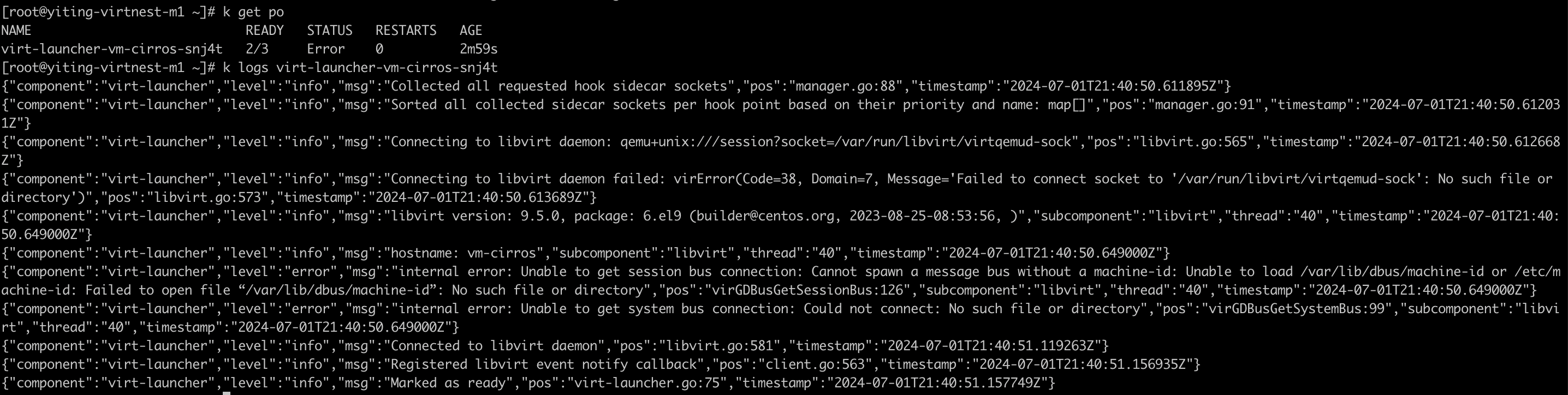
Solution: Upgrade the node operating system kernel
Case 3

Solution: Run the following command in the worker cluster:
kubectl patch cdi cdi \
  --type merge \
  --patch '{"spec":{"config":{"insecureRegistries":["your registry ip"]}}}'
VM Created Successfully but Cannot Be Used
If the VM is created successfully but cannot be used, check whether the VNC page of the VM works normally on the UI. If only startup information is displayed, check the dependencies. If the dependencies are complete, consult developers.
If the VNC page displays an abnormality, use the following command to view the detailed information of the VM:
When the detailed information involves storage such as PVC, PV, SC, etc., check the SC status. If the problem is not resolved, consult developers.
VNC Starts but the Network Is Unreachable
Follow the troubleshooting procedure below, record the relevant information, and report it to the developers. Perform the following operations in the cluster where the VM is located:
-
Get the Pod IP of the VM.
-
Log in to your VM via SSH on the node.
If it is unreachable, consult developers.
-
Check the network mode used by the VM.
If it is the default network mode (masquerade), consult developers.
If it is bridge + ovs, confirm the following information.
- Check whether Spiderpool is installed successfully and make sure it is installed in the
kube-systemnamespace. - Check whether ovs is installed successfully and whether the ovs bridge is configured successfully.
If the information above is correct, consult developers.
- Check whether Spiderpool is installed successfully and make sure it is installed in the
Windows VM Cannot Recognize a Newly Added Disk
When adding a new disk through KubeVirt on a newly installed Windows Server, the disk cannot be recognized. You need to install virtio drivers following these steps:
-
Download stable virtio-win iso
Download address: https://github.com/virtio-win/virtio-win-pkg-scripts/blob/master/README.md

-
Install virtio-win iso
After mounting the iso image, click virtio-win-gt-x64 to install. After installation, you can see the added disk

-
Effect after adding disk

Insight
For more questions, refer to Insight.
Clock skew in trace data
In a distributed system, due to Clock Skew (clock skew adjustment) influence, Time drift exists between different hosts. Generally speaking, the system time of different hosts at the same time has a slight deviation.
The traces system is a typical distributed system, and it is also affected by this phenomenon in terms of time data collection. For example, in a link, the start time of the server-side span is earlier than that of the client-side span. This phenomenon does not exist logically, but due to the influence of clock skew, there is a deviation in the system time between the hosts at the moment when the trace data is collected in each service, which eventually leads to the phenomenon shown in the following figure:
The phenomenon in the above figure cannot be eliminated theoretically. However, this phenomenon is rare, and even if it occurs, it will not affect the calling relationship between services.
Currently Insight uses Jaeger UI to display trace data, and the UI will remind when encountering such a link:
Currently Jaeger's community is trying to optimize this problem through the UI level.
For more information, refer to:
Log collection troubleshooting guide
After installing the insight-agent in the cluster, Fluent Bit in insight-agent will collect logs in the cluster by default, including Kubernetes event logs, node logs, and container logs. Fluent Bit has already configured various log collection plugins, related filter plugins, and log output plugins. The working status of these plugins determines whether log collection is normal. Below is a dashboard for Fluent Bit that monitors the working conditions of each Fluent Bit in the cluster and the collection, processing, and export of plugin logs.
-
Enter Insight , and select the Dashboard in the left navigation bar.
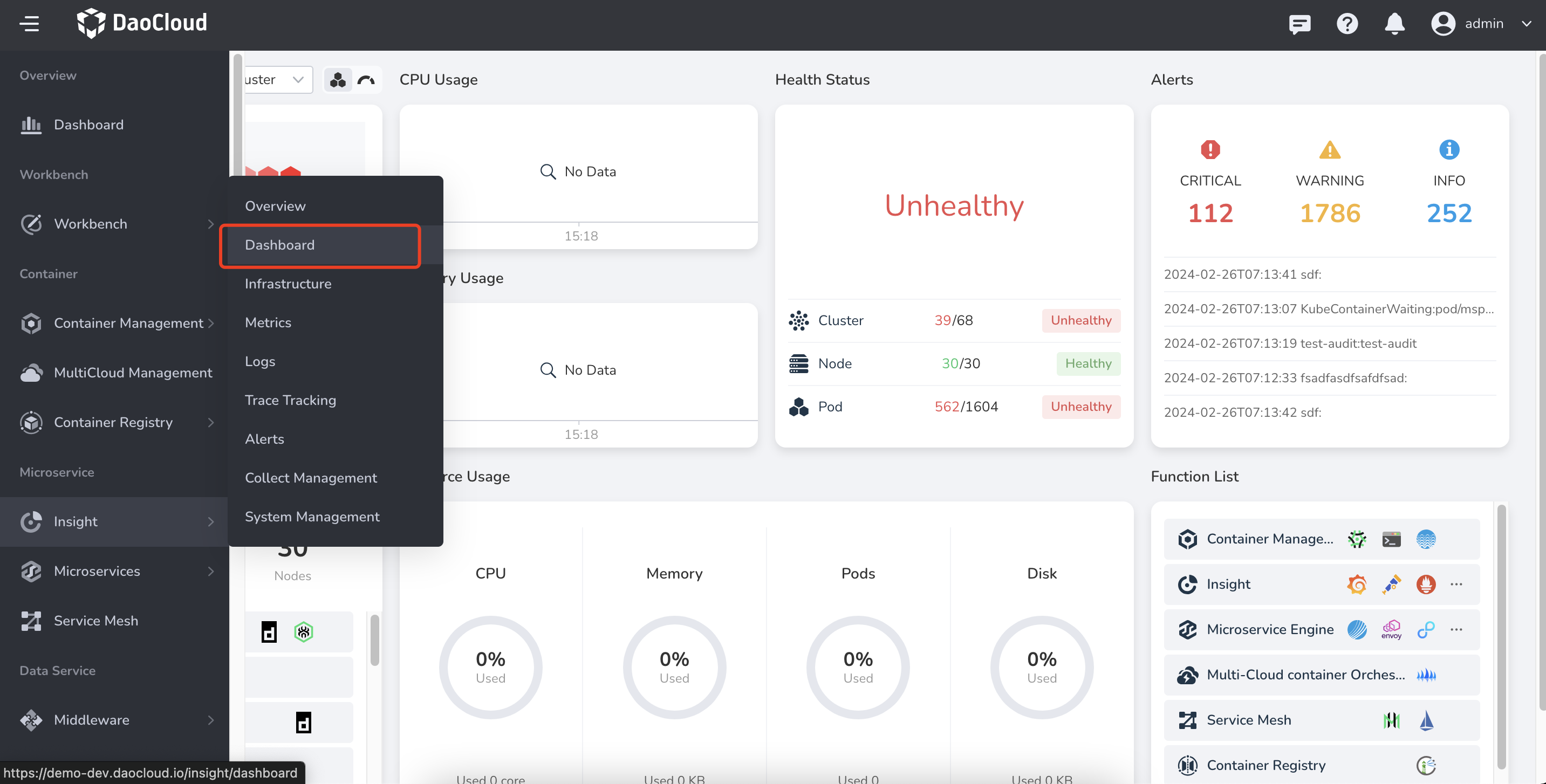
-
Click the dashboard title Overview .
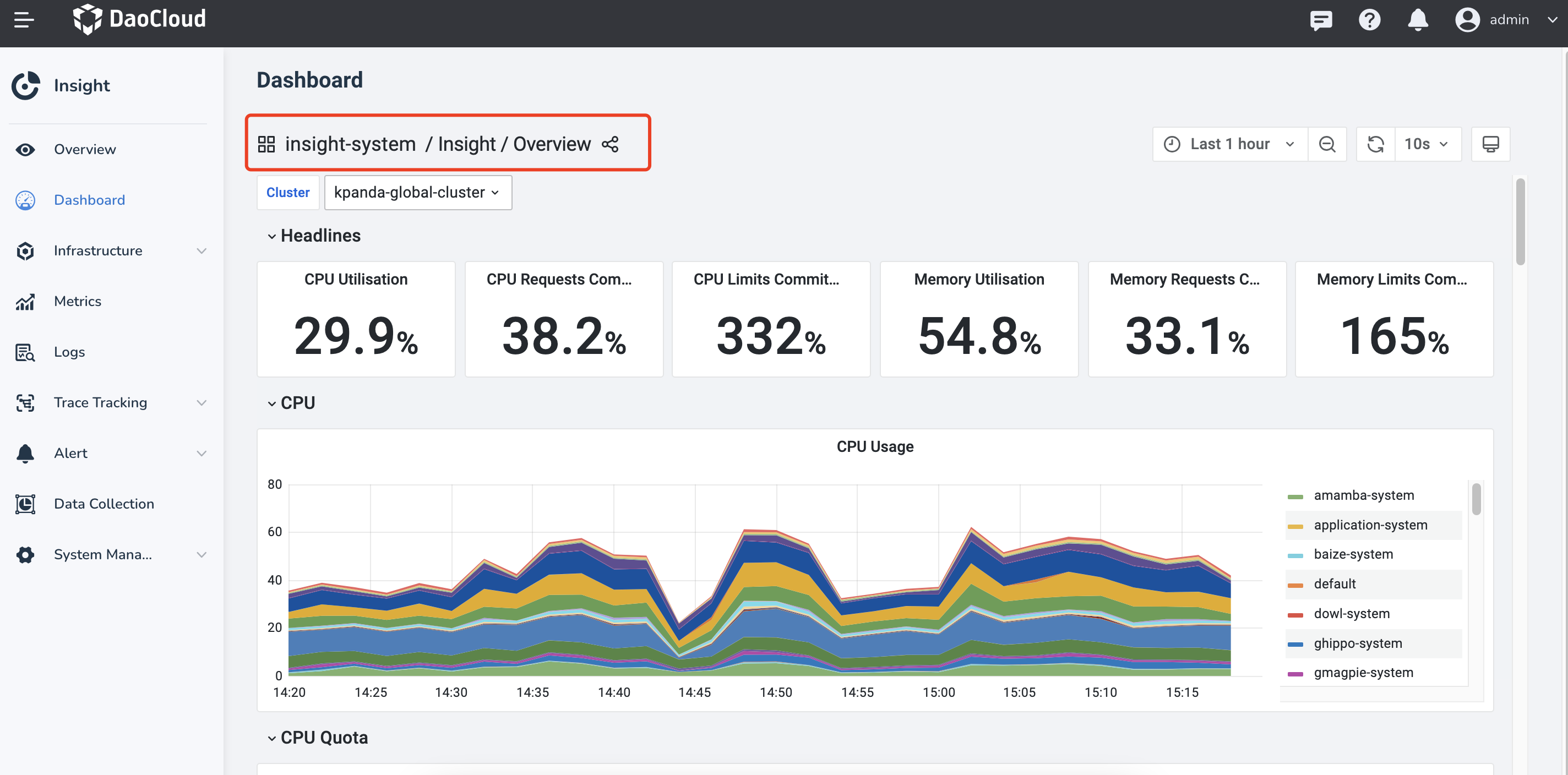
-
Switch to the insight-system -> Fluent Bit dashboard.
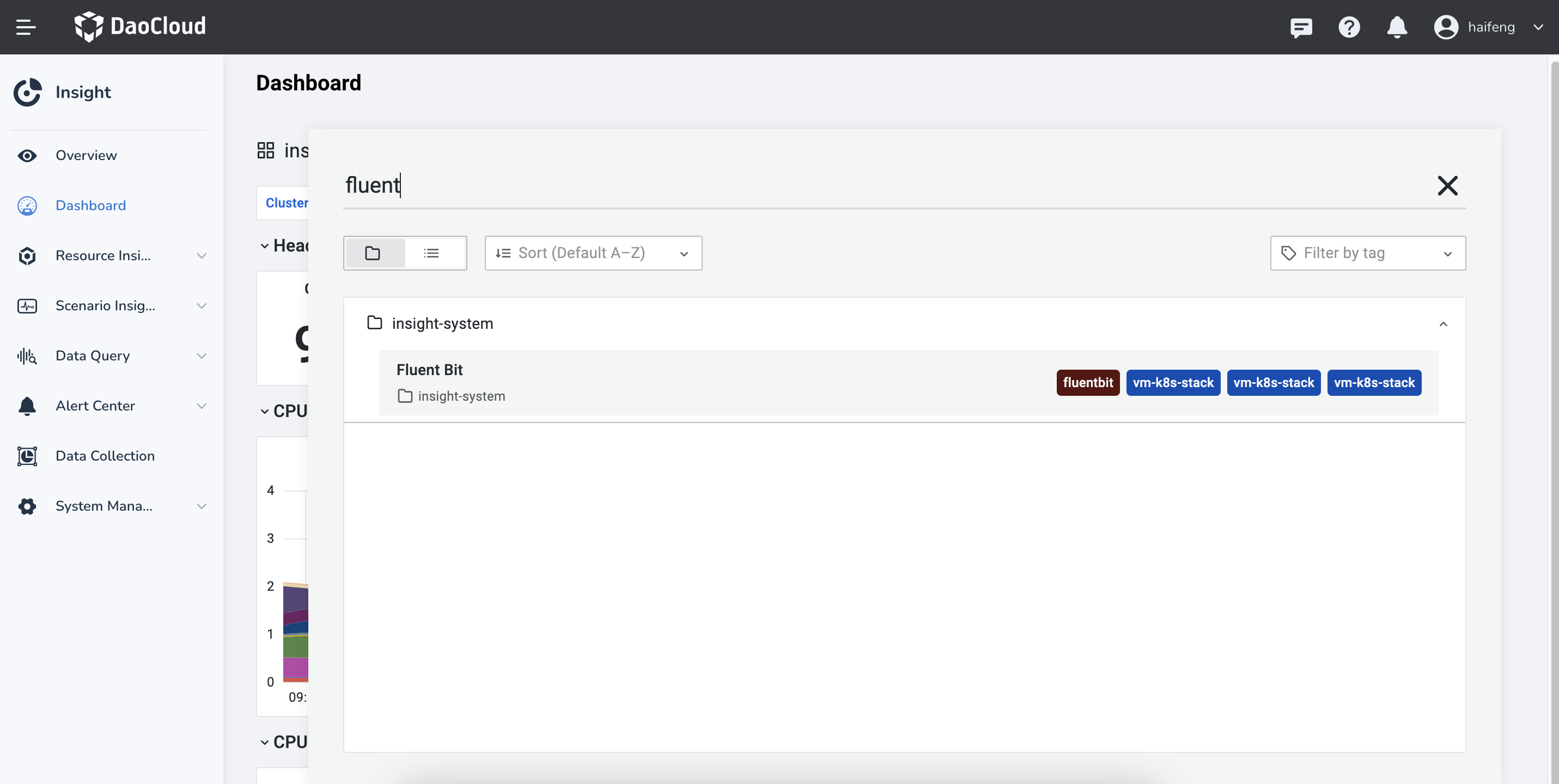
-
There are several check boxes above the Fluent Bit dashboard to select the input plugin, filter plugin, output plugin, and cluster in which it is located.
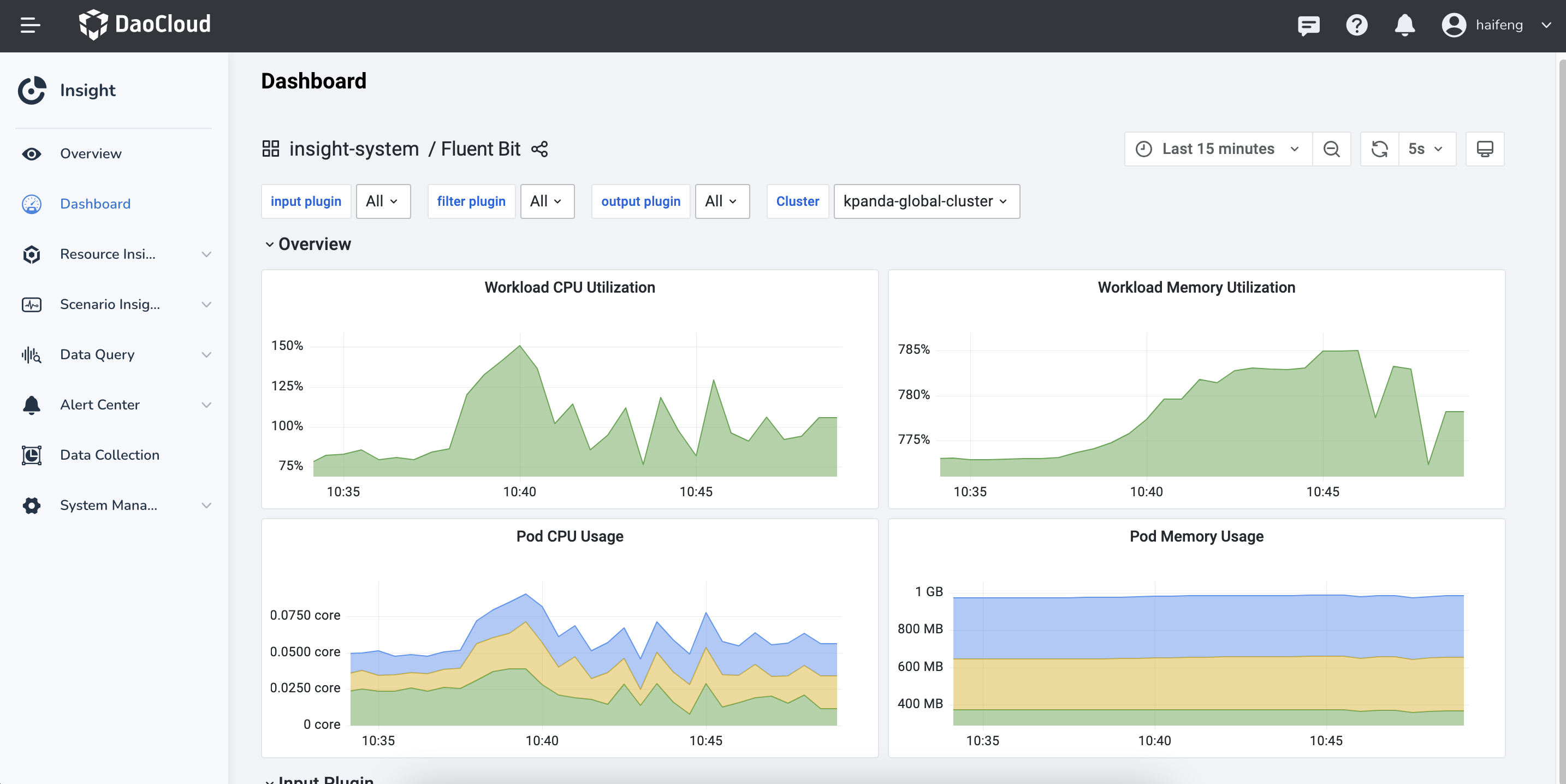
Plugin Description
Here are some plugins for Fluent Bit .
Log Collection Plugin
| Input Plugin | Plugin Description | Collection Directory |
|---|---|---|
| tail.kube | Collect container logs | /var/log/containers/*.log |
| tail.kubeevent | Collect Kubernetes event logs | /var/log/containers/-kubernetes-event-exporter.log |
| tail.syslog.dmesg | Collect host dmesg logs | /var/log/dmesg |
| tail.syslog.messages | Collect frequently used host logs | /var/log/secure, /var/log/messages, /var/log/syslog,/var/log/auth.log |
| syslog.syslog.RSyslog | Collect RSyslog logs | |
| systemd.syslog.systemd | Collect Journald daemon logs | |
| tail.audit_log.k8s | Collect Kubernetes audit logs | /var/log//audit/.log |
| tail.audit_log.ghippo | Collect global management audit logs | /var/log/containers/_ghippo-system_audit-log.log |
| tail.skoala-gw | Collect microservice gateway logs | /var/log/containers/_skoala-gw.log |
Log Filter Plugin
| Filter Plugin | Plugin Description |
|---|---|
| Lua.audit_log.k8s | Use lua to filter Kubernetes audit logs that meet certain conditions |
Note
There are more filter plugins than Lua.audit_log.k8s, which only introduces filters that will discard logs.
Log Output Plugin
| Output Plugin | Plugin Description |
|---|---|
| es.kube.kubeevent.syslog | Write Kubernetes audit logs, event logs, and syslog logs to ElasticSearch cluster |
| forward.audit_log | Send Kubernetes audit logs and global management audit logs to Global Management |
| es.skoala | Write request logs and instance logs of microservice gateway to ElasticSearch cluster |
Trace collection troubleshooting guide
Before attempting to troubleshoot issues with trace data collection, you need to understand the transmission path of trace data. The following is a schematic diagram of the transmission of trace data:
graph TB

sdk[Language proble / SDK] --> workload[Workload cluster otel collector]
--> otel[Global cluster otel collector]
--> jaeger[Global cluster jaeger collector]
--> es[Elasticsearch cluster]

classDef plain fill:#ddd,stroke:#fff,stroke-width:1px,color:#000;
classDef k8s fill:#326ce5,stroke:#fff,stroke-width:1px,color:#fff;
classDef cluster fill:#fff,stroke:#bbb,stroke-width:1px,color:#326ce5;

class sdk,workload,otel,jaeger,es cluster
As shown in the above figure, any transmission failure at any step will result in the inability to query trace data. If you find that there is no trace data after completing the application trace enhancement, please perform the following steps:
-
Enter Insight , and select the Dashboard in the left navigation bar.
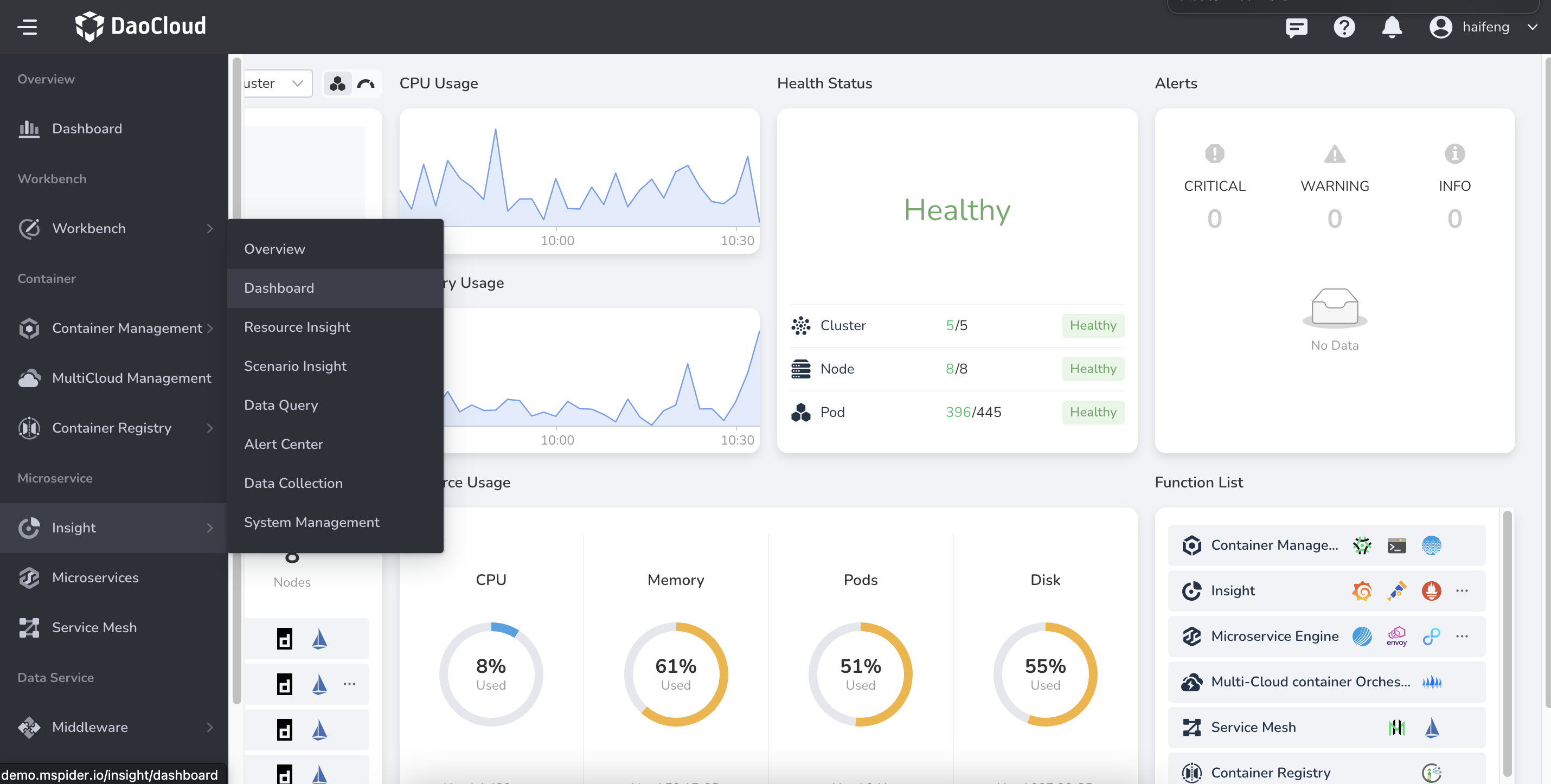
-
Click the dashboard title Overview .
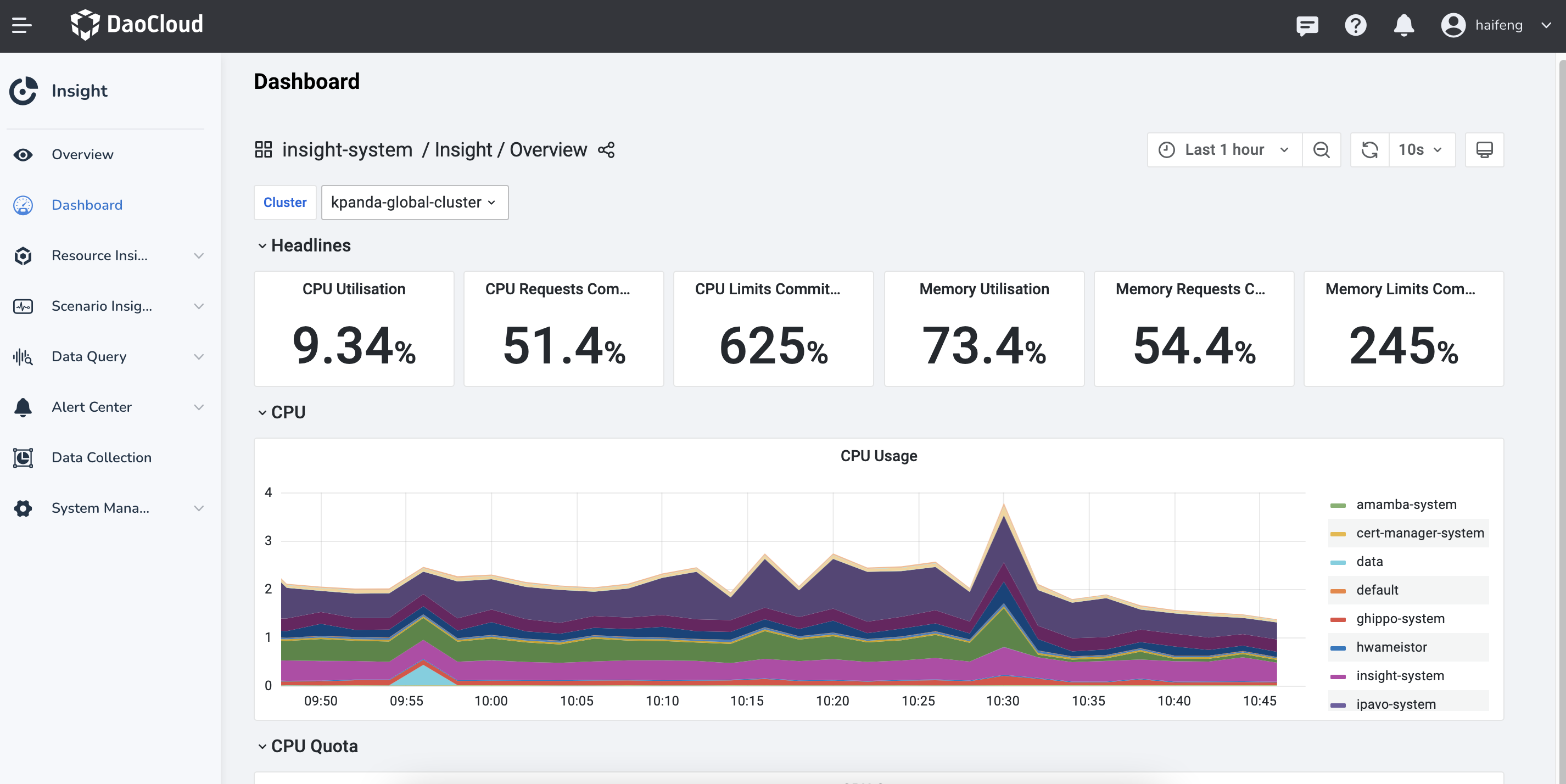
-
Switch to the insight-system -> insight tracing debug dashboard.
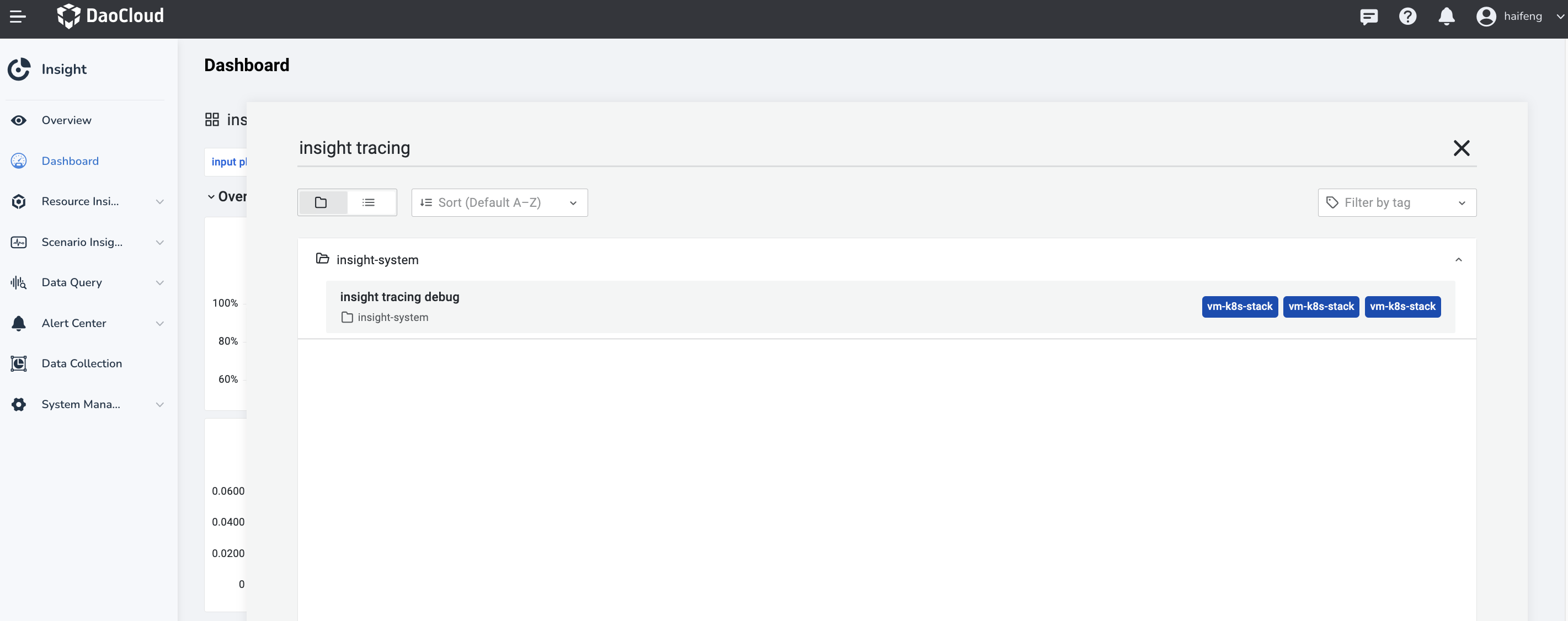
-
You can see that this dashboard is composed of three blocks, each responsible for monitoring the data transmission of different clusters and components. Check whether there are problems with trace data transmission through the generated time series chart.
- workload opentelemetry collector
- global opentelemetry collector
- global jaeger collector
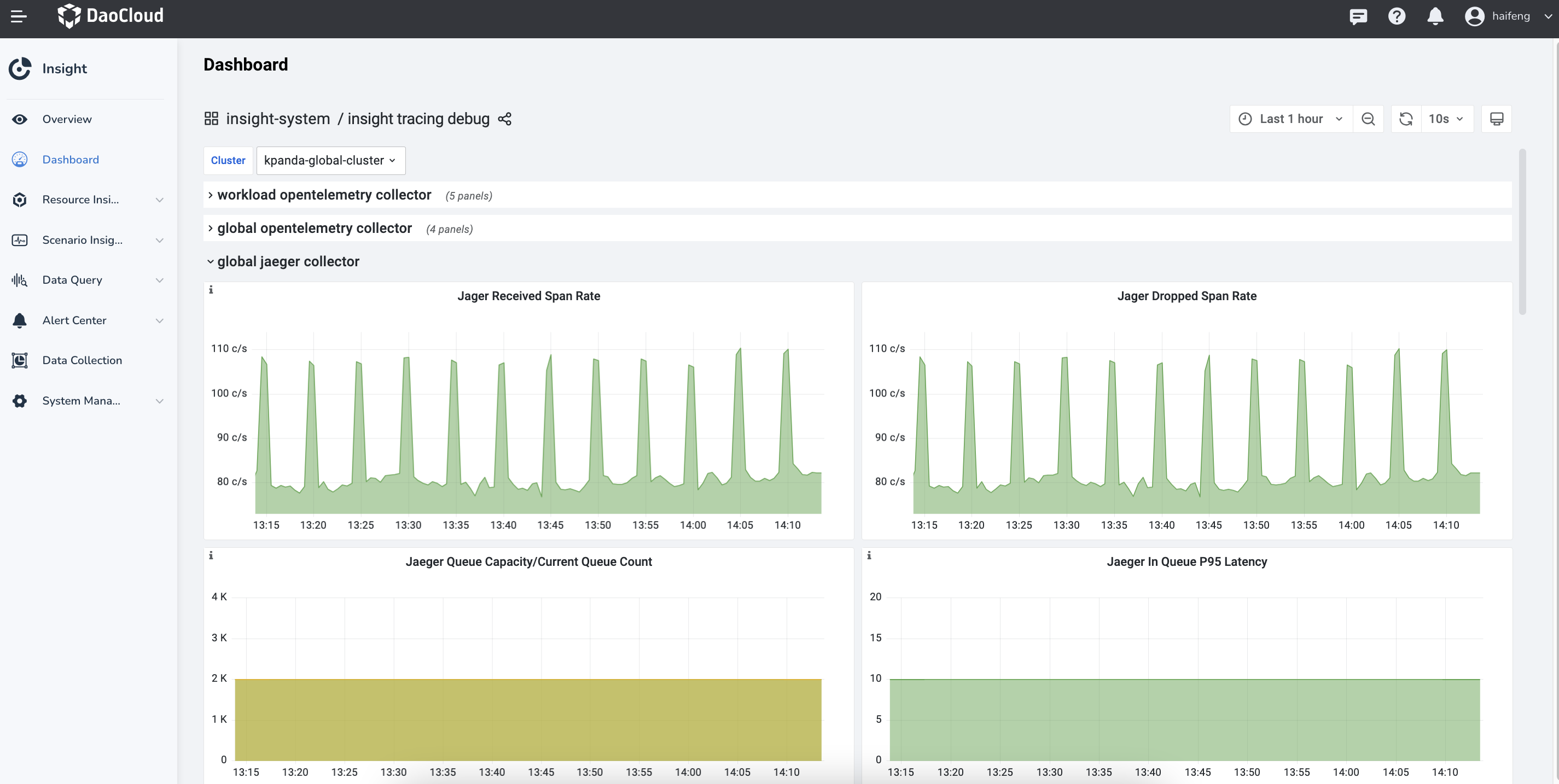
Block Introduction
-
workload opentelemetry collector
Display the opentelemetry collector in different worker clusters receiving language probe/SDK trace data and sending aggregated trace data. You can select the cluster where it is located by the Cluster selection box in the upper left corner.
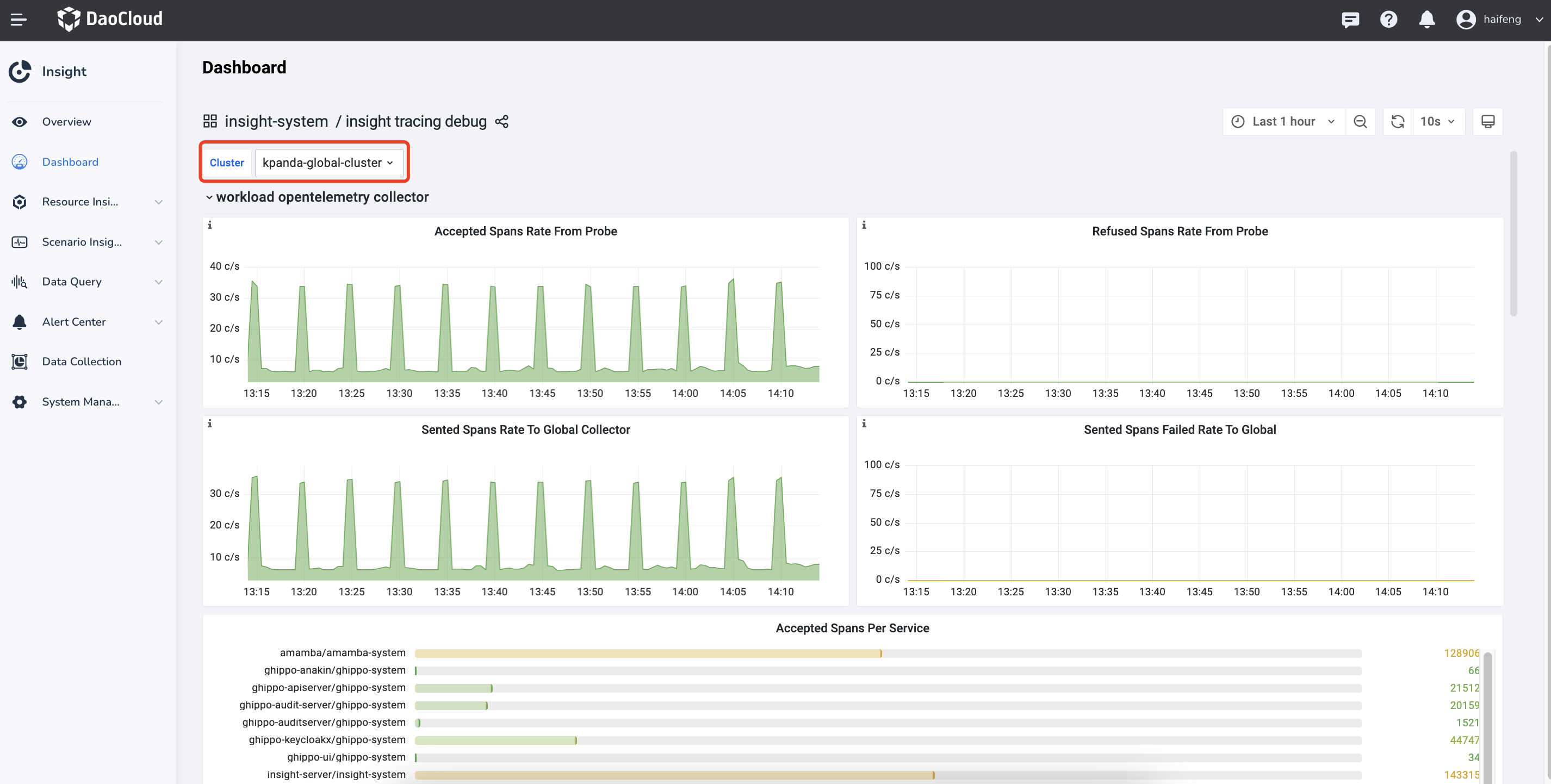
Note
Based on these four time series charts, you can determine whether the opentelemetry collector in this cluster is running normally.
-
global opentelemetry collector
Display the opentelemetry collector in the Global Service Cluster receiving trace data from the worker cluster's opentelemetry collector and sending aggregated trace data.
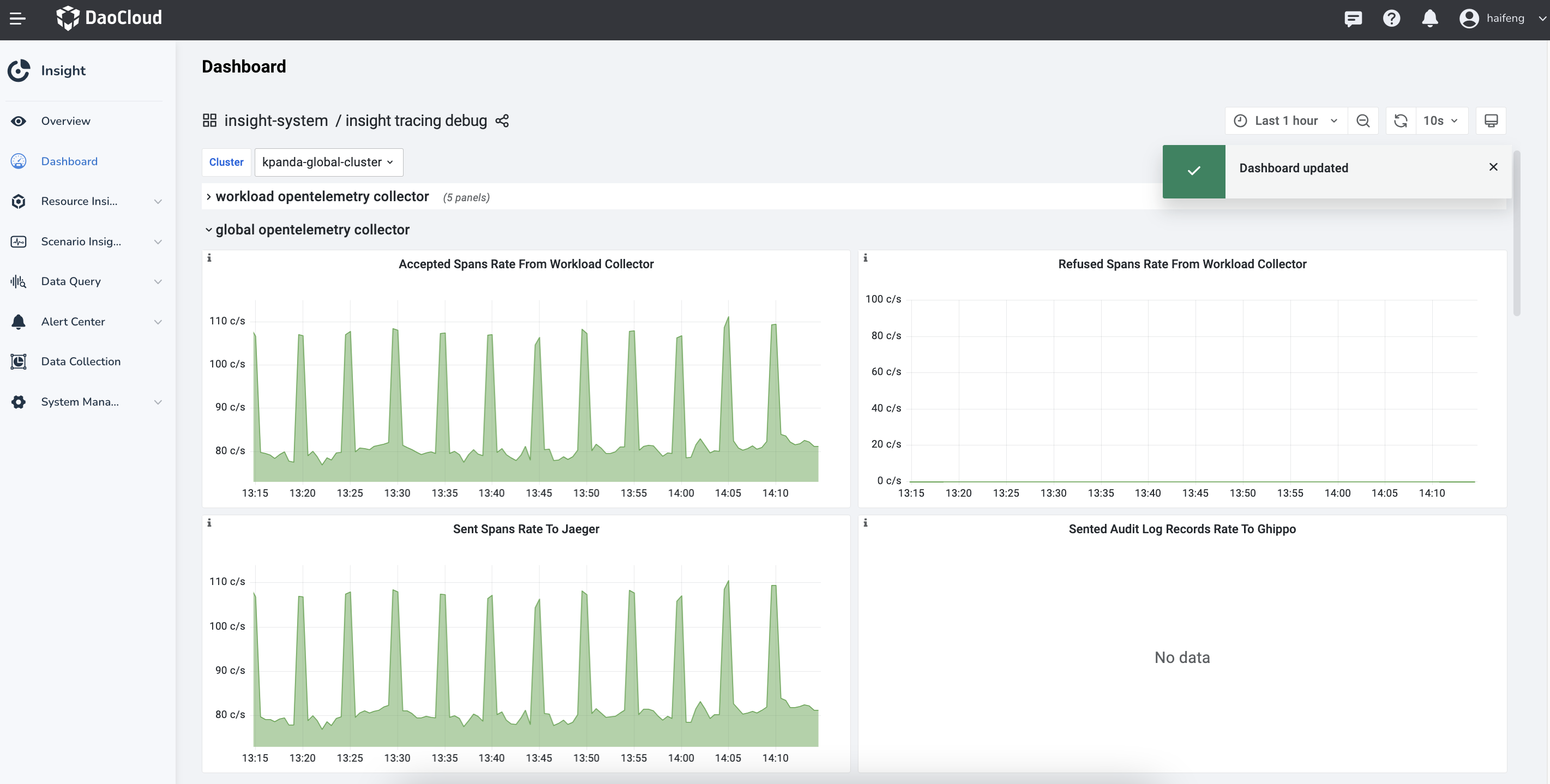
Note
The opentelemetry collector in the Global Management Cluster is also responsible for sending audit logs of all worker clusters' global management module and Kubernetes audit logs (not collected by default) to the audit server component of the global management module.
-
global jaeger collector
Display the jaeger collector in the Global Management Cluster receiving data from the otel collector in the Global Management Cluster and sending trace data to the ElasticSearch cluster.
Using Insight to locate application anomalies
This article serves as a guide on using Insight to identify and analyze abnormal components and determine the root causes of component exceptions.
Please note that this post assumes you have a basic understanding of Insight's product features or vision.
Service Map - Identifying Abnormalities on a Macro Level
In enterprise microservice architectures, managing a large number of services with complex interdependencies can be challenging. Insight offers service map monitoring, allowing users to gain a high-level overview of the running microservices in the system.
In the example below, you observe that the node insight-server is highlighted in red/yellow on the service map. By hovering over the node, you can see the error rate associated with it. To investigate further and understand why the error rate is not 0 , you can explore more detailed information:
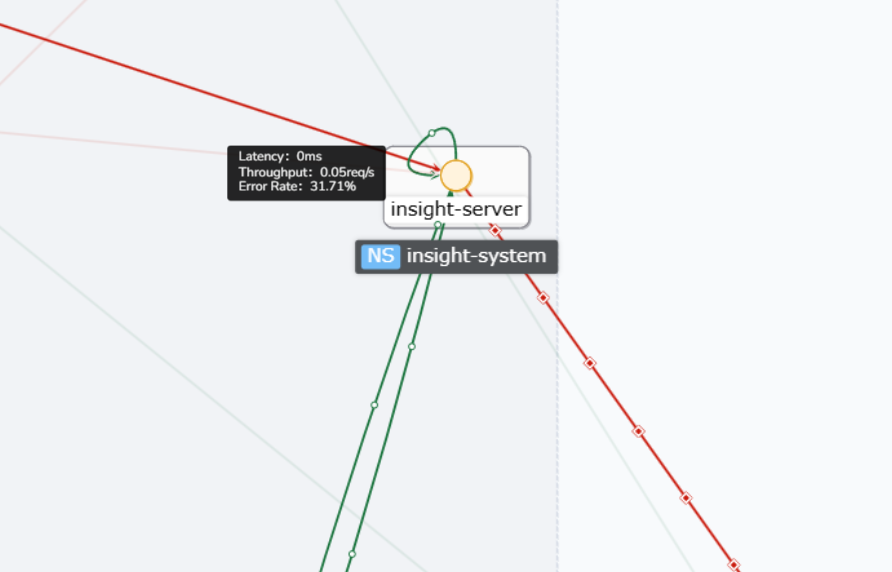
Alternatively, clicking on the service name at the top will take you to the service's overview UI:
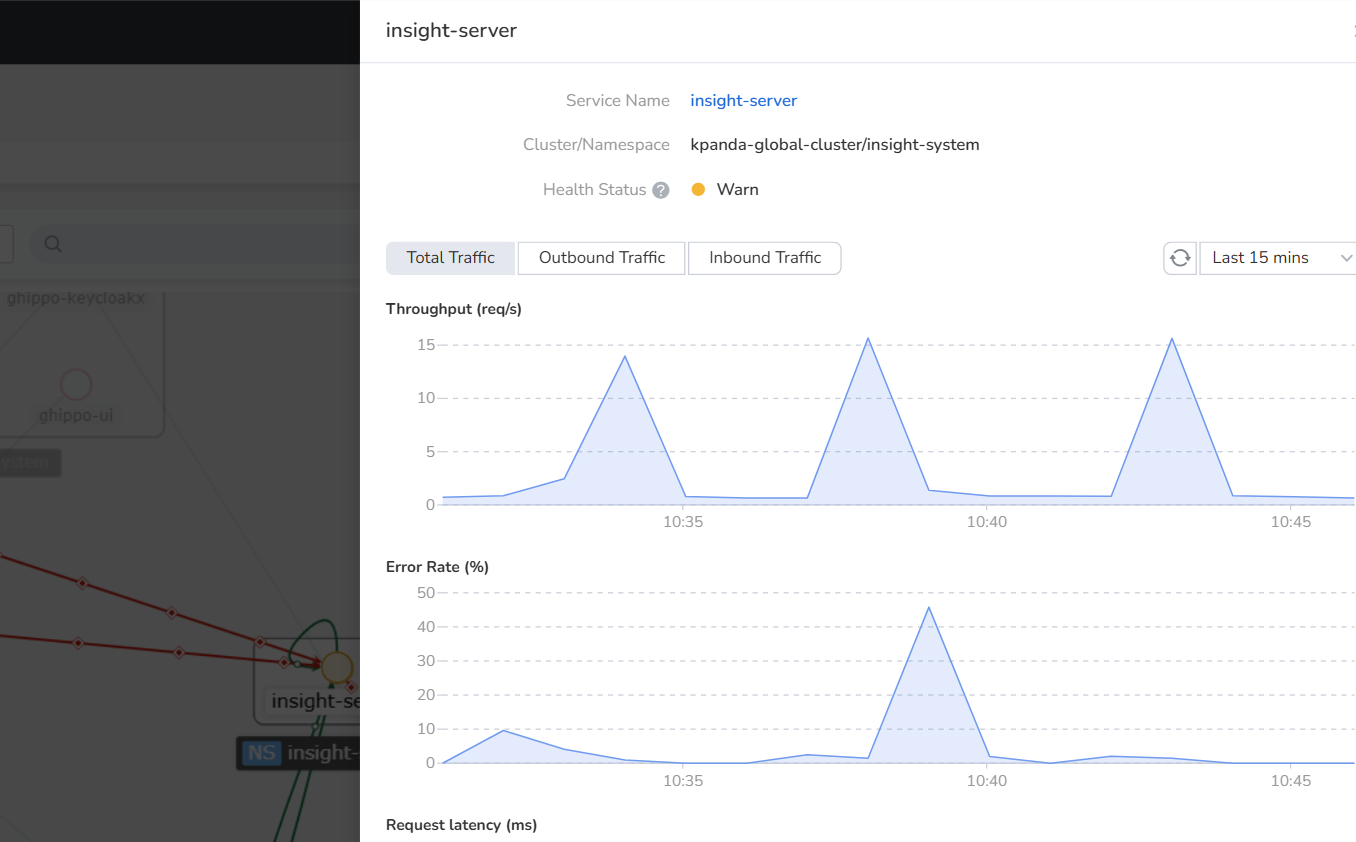
Service Overview - Delving into Detailed Analysis
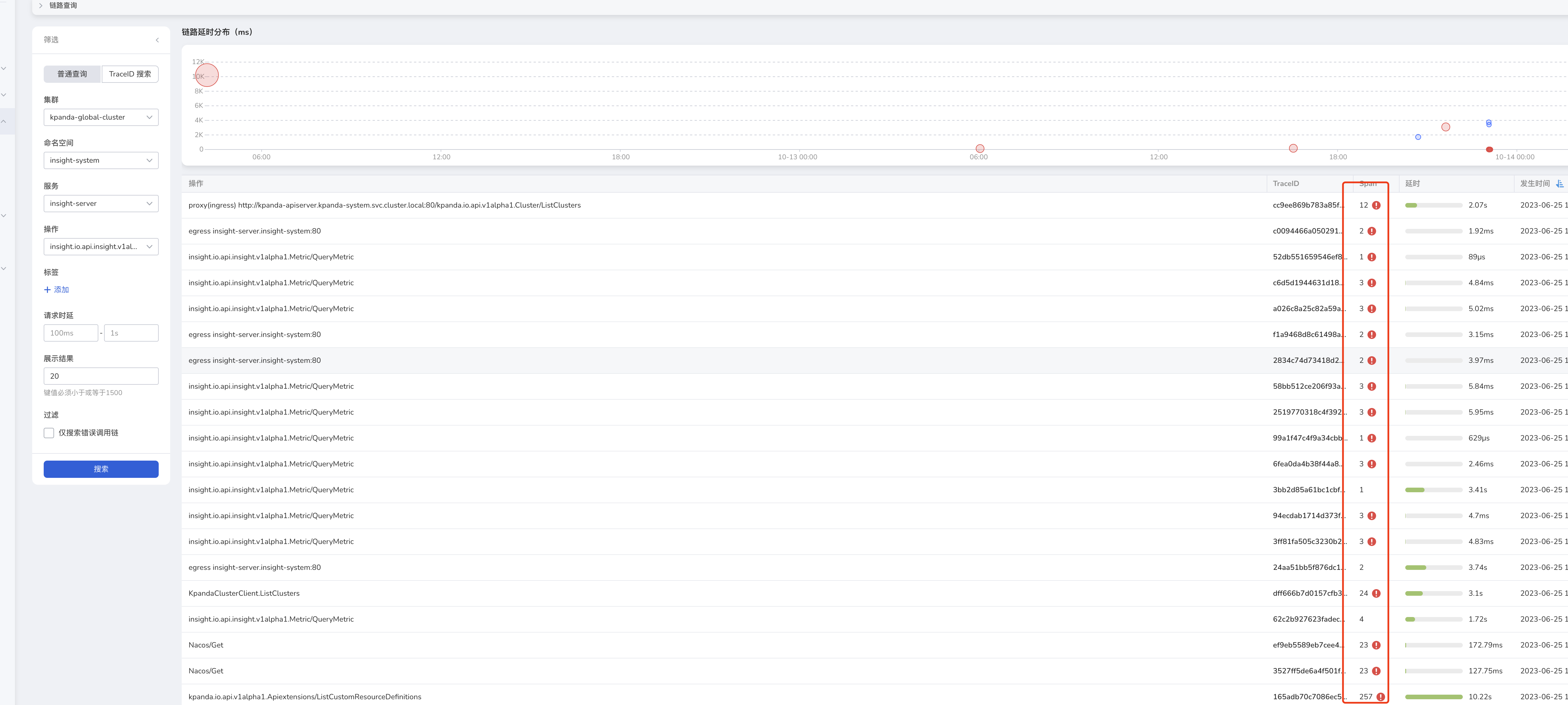
When it becomes necessary to analyze inbound and outbound traffic separately, you can use the filter in the upper right corner to refine the data. After applying the filter, you can observe that the service has multiple operations corresponding to a non-zero error rate. To investigate further, you can inspect the traces generated by these operations during a specific time period by clicking on "View Traces":
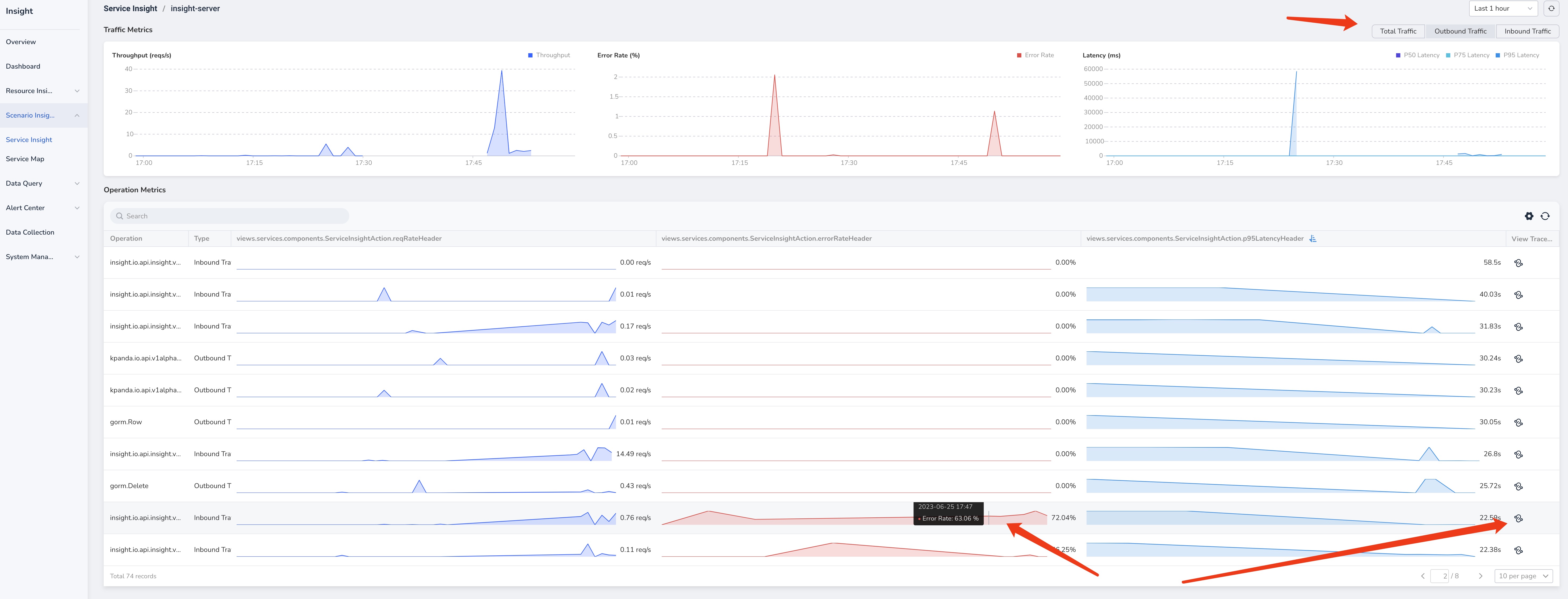
Trace Details - Identifying and Eliminating Root Causes of Errors
In the trace list, you can easily identify traces marked as error (circled in red in the figure above) and examine their details by clicking on the corresponding trace. The following figure illustrates the trace details:
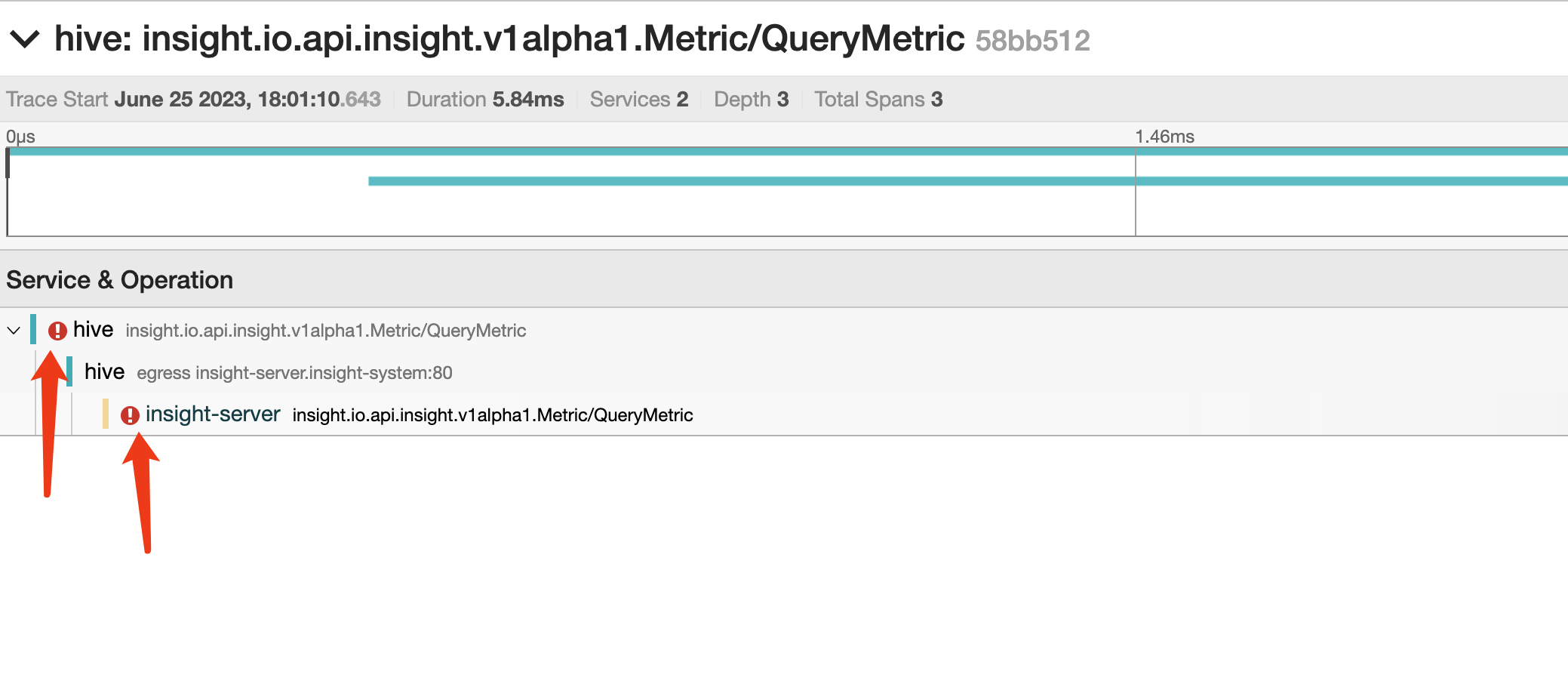
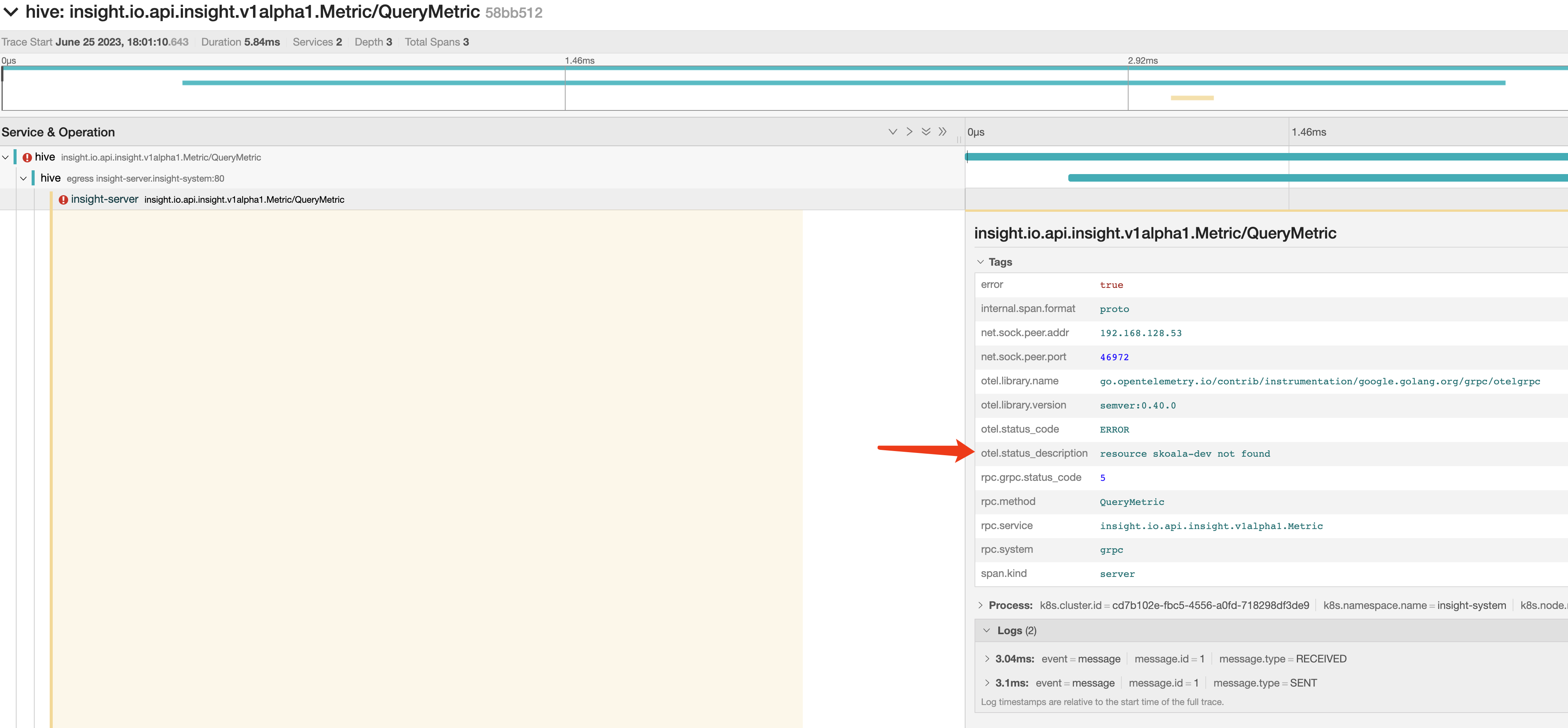
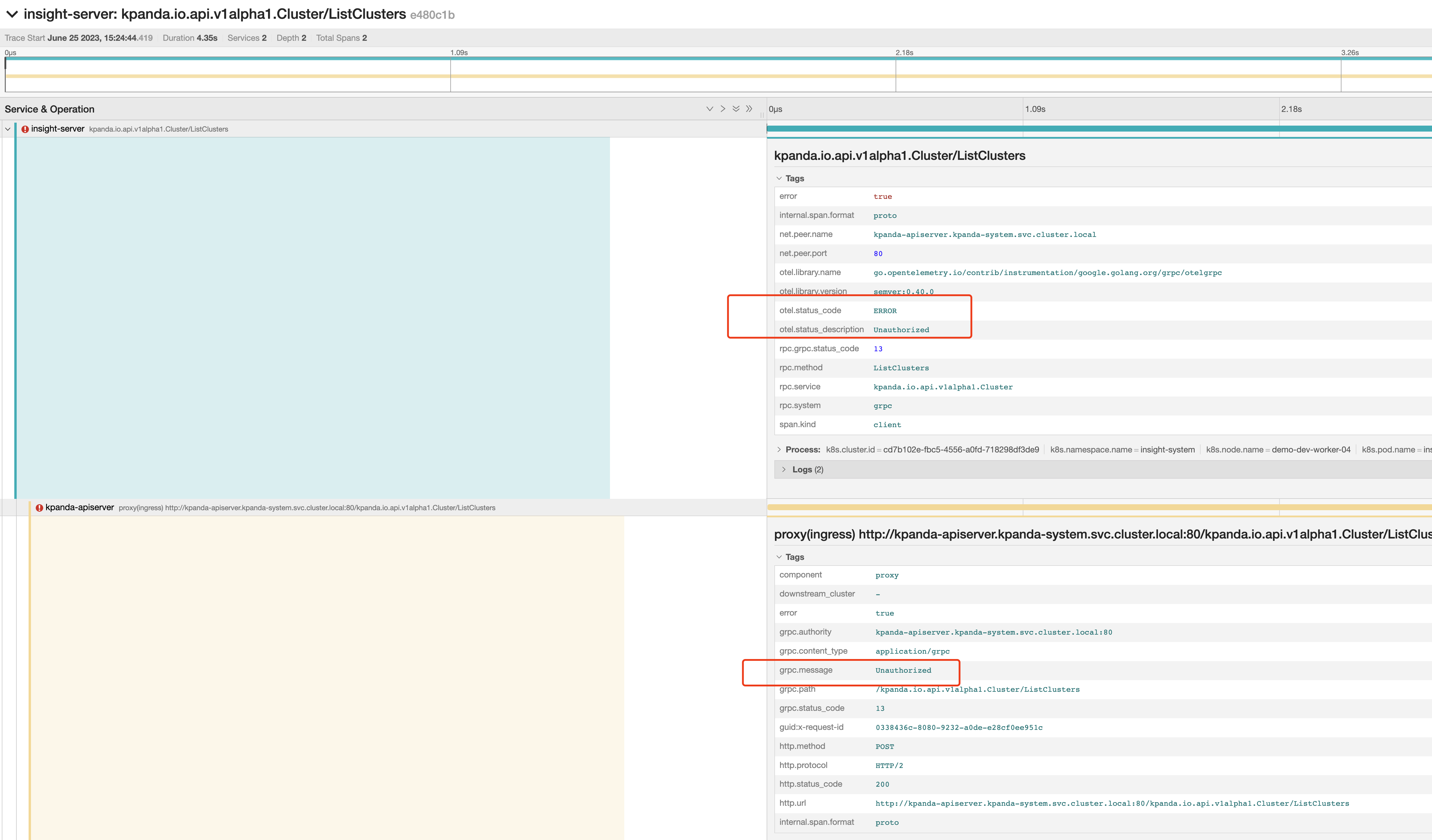
Within the trace diagram, you can quickly locate the last piece of data in an error state. Expanding the associated logs section reveals the cause of the request error:
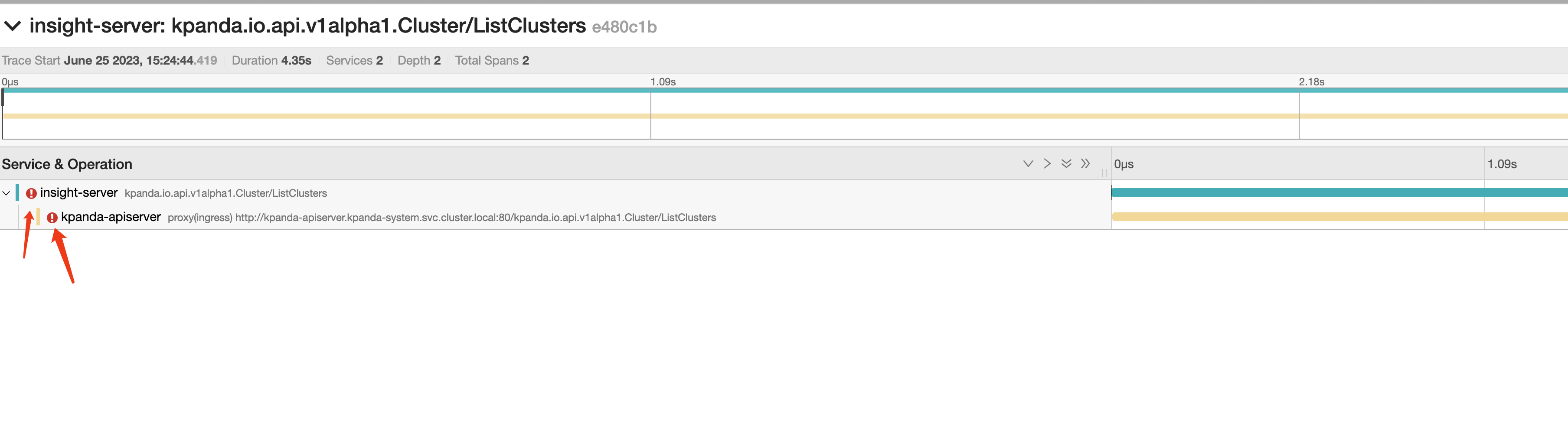
Following the above analysis method, you can also identify traces related to other operation errors:
Let's Get Started with Your Analysis!
What to do when ElasticSearch data is full?
When ElasticSearch memory is full, you can choose to either scale up or delete data to resolve the issue:
You can run the following command to check the resource usage of ES nodes.
kubectl get pod -n mcamel-system | grep common-es-cluster-masters-es | awk '{print $1}' | xargs -I {} kubectl exec {} -n mcamel-system -c elasticsearch -- df -h | grep /usr/share/elasticsearch/data
Scale Up
If the host still has available resources, scaling up is a common solution, which involves increasing the PVC capacity.
-
First, run the following command to get the PVC configuration of the
es-data-0node. Use the actual environment's PVC as a reference. -
Then modify the following
storagefield (the storage class SC you are using should be scalable):- Adjust this value as needed.
Delete Data
When ElasticSearch memory is full, you can also delete index data to free up resources.
You can follow the steps below to access the Kibana page and manually delete data.
-
First, ensure that the Kibana Pod exists and is running normally:
-
If it does not exist, manually set the replica to 1 and wait for the service to run normally. If it exists, skip this step.
-
Modify the Kibana Service to be exposed as a NodePort for access:
kubectl patch svc -n mcamel-system mcamel-common-es-cluster-masters-kb-http -p '{"spec":{"type":"NodePort"}}' # After modification, check the NodePort. For example, if the port is 30128, the access URL will be https://{NodeIP in the cluster}:30128 [root@insight-master1 ~]# kubectl get svc -n mcamel-system | grep mcamel-common-es-cluster-masters-kb-http mcamel-common-es-cluster-masters-kb-http NodePort 10.233.51.174 <none> 5601:30128/TCP 108m -
Retrieve the ElasticSearch Secret to log in to Kibana (username is
elastic): -
Go to Kibana -> Stack Management -> Index Management and enable the Include hidden indices option to see all indexes. Based on the index sequence numbers, keep the indexes with larger numbers and delete the ones with smaller numbers.
How to configure container log blacklist
Note: Currently only blacklists at the Deployment, Statefulset, Daemonset, and Pod levels are supported; Namespace level is not supported.
The specific configuration method is as follows:
- For any Pod whose container logs do not need to be collected, add
insight.opentelemetry.io/log-ignore: "true"to the Pod's annotation to specify the container logs that do not need to be collected.
⚠️ Note: Starting from Insight Agent v0.37.0, the
insight.opentelemetry.io/log-ignore: "true"annotation will be deprecated; please usefluentbit.io/exclude: "true"instead.
For example:
```yaml
apiVersion: apps/v1
kind: Deployment
metadata:
  name: log-generator
spec:
  selector:
    matchLabels:
      app.kubernetes.io/name: log-generator
  replicas: 1
  template:
    metadata:
      labels:
        app.kubernetes.io/name: log-generator
      annotations:
        #insight.opentelemetry.io/log-ignore: "true" # 👈 Deprecated starting from Insight Agent v0.37.0
        fluentbit.io/exclude: "true"
    spec:
      containers:
        - name: nginx
          image: banzaicloud/log-generator:0.3.2
```
- Restart the Pod. After the Pod returns to a running state, Fluent Bit will no longer collect the logs from the containers in this Pod.
Microservices Engine
For more questions, refer to Microservices Engine.
x-kubernets-validations error issue with skoala-init
When upgrading skoala-init from v0.11.0 to v0.12.0, an error occurred that prevented the upgrade:
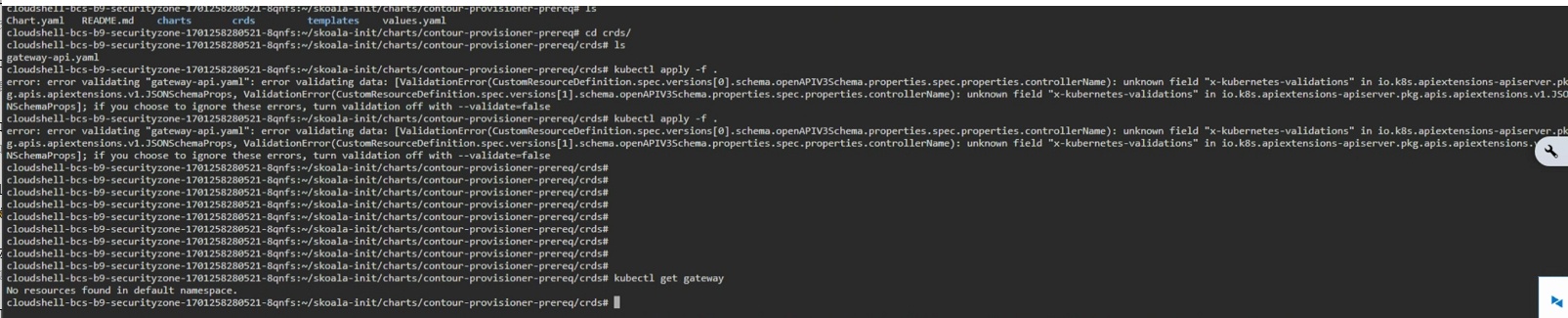
Troubleshooting Process
-
Q: Is the operation procedure correct?
A: Apply the CRD(s) first, then perform the helm upgrade. The operation procedure is correct, ruling out operation issues.
-
Q: Is the version tested and passed by QA, and was the upgrade function tested successfully during internal testing?
A: Confirm that it is correct.
-
Q: Confirm that the version being used matches the version of the Kubernetes cluster used for testing?
A: v1.21 (version being used), v1.26 (version used for testing).
-
Q: Based on the error screenshot and the above information, it is initially inferred that the customer's Kubernetes cluster version does not match the corresponding CRD. Additionally, skoala-init provides initial conditional configurations for all microservices, which includes multiple CRDs. According to the skoala-init v0.12.0 ChangeLog, the Gateway-API CRD has been upgraded. Therefore, the inference is:
A: The issue is caused by the upgrade of the Gateway-API.
Reference Documents
-
Rollout, Upgrade and Rollback Planning
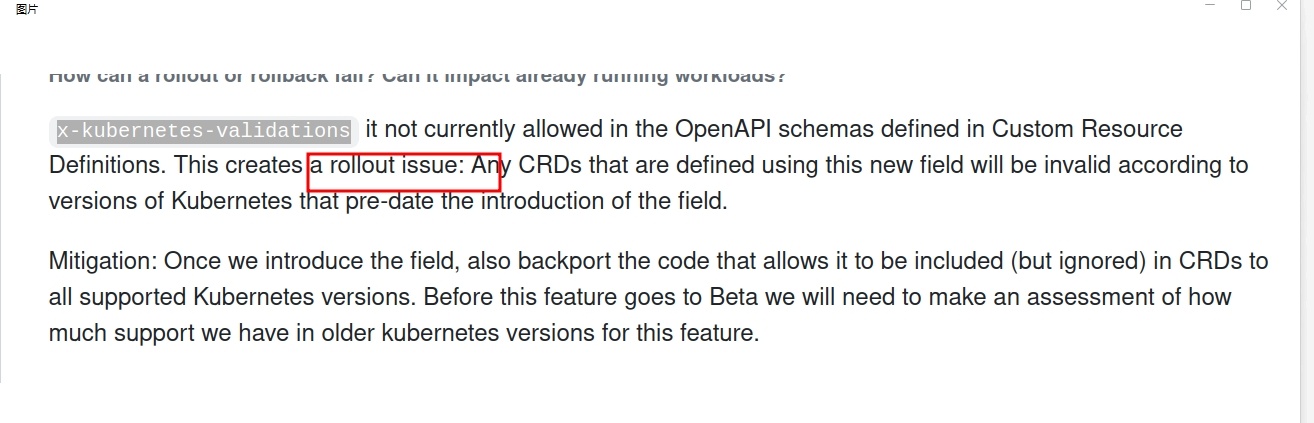
-
KEP-2876: Use Common Expression Language (CEL) for CRD Validation
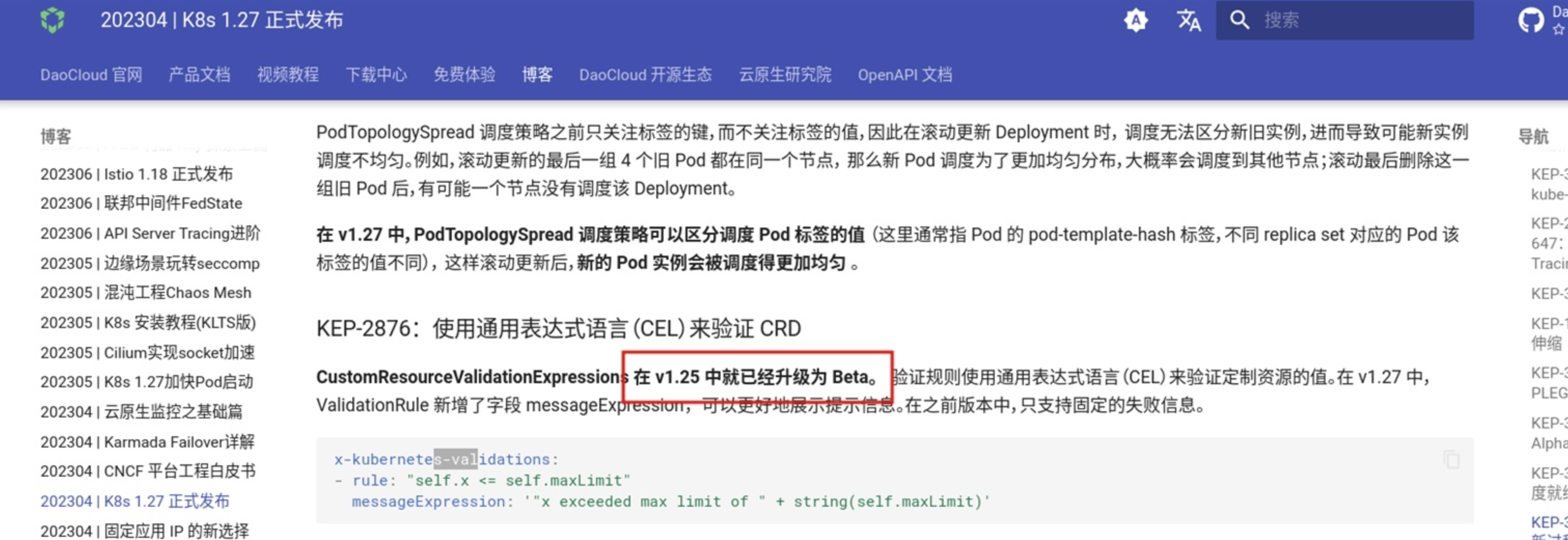
-
CRD validation error for x-kubernetes-preserve-unknown-fields: true #88252
Solution
Choose the appropriate solution based on the actual situation.
- Solution 1: Upgrade the Kubernetes cluster version being used to at least v1.25.
-
Solution 2: Follow the instructions in CRD validation error for x-kubernetes-preserve-unknown-fields: true #88252 and add:
Nacos version downgrade issue
If you are using a version later than Nacos 2.1.x and want to downgrade to a version earlier than 2.1.x, and you are using an external database, you can refer to the following steps to downgrade the version:
-
Find the Nacos CR resource that needs to be downgraded.
-
Modify the
imagefield and replace it with the version to be downgraded to. -
Modify the database.
-
Restart the StatefulSet of this Nacos.
Service Mesh
For more questions, refer to FAQs.
Cannot find the associated cluster when creating a mesh
Cause Analysis
The main reason is that the MeshCluster status of the cluster to which it belongs is not "CLUSTER_RUNNING". You can log in to the global cluster to view the status of the MeshCluster CRD of the cluster to which it belongs.
There are several situations that can cause this problem:
Case 1
If the mesh has not been created with the cluster before, the meshcluster CRD of the cluster cannot be found by executing the above command. Probably because of gsc-controller syncing cluster exception from container management (kpanda).
Case 2
To remove the cluster from the created mesh, run the above command. The state of the meshcluster found for this cluster may be in one of the following states:
- MANAGED_RECONCILING
- MANAGED_SUCCEED
- MANAGED_EVICTING
- MANAGED_FAILED
The reason may be that resources are being cleaned up or there is a meshconfig that is not cleaned up.
Solution
-
For case 1, you only need to restart the gsc-controller of the global cluster.
-
For case 2, the environment may not be cleaned up. Please ensure that the control plane components of the cluster to which it belongs (control plane cluster) are cleaned up, otherwise it will affect the next mesh creation.
-
Delete the meshconfig that has not been cleaned up and caused abnormal installation status
-
Restart gsc-controller to resync the cluster
-
Mesh creation is stuck in "Creating" and ultimately fails
Problem Description
The mcpc-ckube-remote pod is always ContainerCreating . The mcpc-remote-kube-api-server configmap waited for a long time without being created.
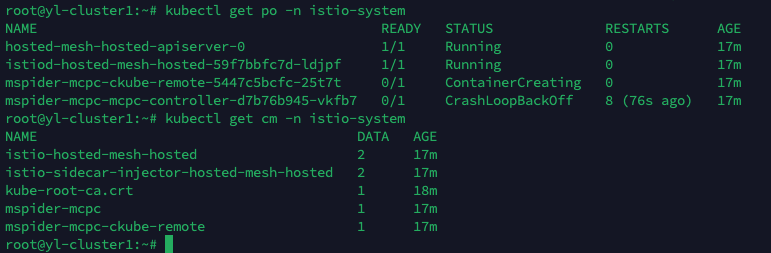
logs
-
View Pod logs
Events: Type Reason Age From Message ---- ------- ---- ---- ------- Normal Scheduled 18m default-scheduler Successfully assigned istio-system/mspider-mcpc-ckube-remote-5447c5bcfc-25t7t to yl-cluster1 Warning FailedMount 6m59s kubelet Unable to attach or mount volumes: unmounted volumes=[remote-kube-api-server], unattached volumes=[remote-kube-api-server kube-api-access-ljncs ckube-config]: timed out waiting for the condition Warning FailedMount 2m23s (x5 over 16m) kubelet Unable to attach or mount volumes: unmounted volumes=[remote-kube-api-server], unattached volumes=[ckube-config remote-kube-api-server kube-api-access-ljncs ]: timed out waiting for the condition Warning FailedMount 105s (x16 over 18m) kubelet MountVolume.SetUp failed for volume "remote-kube-api-server" : configmap "mspider-mcpc-remote-kube-api-server" not found Warning FailedMount 5s (x2 over 13m) kubelet Unable to attach or mount volumes: unmounted volumes=[remote-kube-api-server], unattached volumes=[kube-api-access-ljncs ckube-config remote-kube-api-server ]: timed out waiting for the condition -
Check the gsc controller log
Click to view detailed log
none time="2022-12-27T08:08:10Z" level=error msg="unable to get livez for cluster hosted-mesh-hosted: client rate limiter Wait returned an error: context deadline exceeded - error from a previous attempt: read tcp 192.188.110.245:51674->10.105.106.29:6443: read: connection reset by peer" func="mesh-cluster.(*Reconciler).checkAPIServerHealthy.func1()" file="mesh-cluster.go:191" time="2022-12-27T08:08:10Z" level=error msg="cluster hosted-mesh-hosted reconcile api-server-healthy error: client rate limiter Wait returned an error: context deadline exceeded - error from a previous attempt : read tcp 192.188.110.245:51674->10.105.106.29:6443: read: connection reset by peer" func="mesh-cluster.(*Reconciler).Reconcile()" file="mesh-cluster.go:1212" time="2022-12-27T08:08:13Z" level=error msg="unable to get livez for cluster hosted-mesh-hosted: client rate limiter Wait returned an error: context deadline exceeded - error from a previous attempt: read tcp 192.188.110.245:35842->10.105.106.29:6443: read: connection reset by peer" func="mesh-cluster.(*Reconciler).checkAPIServerHealthy.func1()" file="mesh-cluster.go:191" time="2022-12-27T08:08:13Z" level=error msg="cluster hosted-mesh-hosted reconcile api-server-healthy error: client rate limiter Wait returned an error: context deadline exceeded - error from a previous attempt : read tcp 192.188.110.245:35842->10.105.106.29:6443: read: connection reset by peer" func="mesh-cluster.(*Reconciler).Reconcile()" file="mesh-cluster.go:1212" time="2022-12-27T08:08:16Z" level=error msg="unable to get livez for cluster hosted-mesh-hosted: client rate limiter Wait returned an error: context deadline exceeded - error from a previous attempt: read tcp 192.188.110.245:35874->10.105.106.29:6443: read: connection reset by peer" func="mesh-cluster.(*Reconciler).checkAPIServerHealthy.func1()" file="mesh-cluster.go:191" time="2022-12-27T08:08:16Z" level=error msg="cluster hosted-mesh-hosted reconcile api-server-healthy error: client rate limiter Wait returned an error: context deadline exceeded - error from a previous attempt : read tcp 192.188.110.245:35874->10.105.106.29:6443: read: connection reset by peer" func="mesh-cluster.(*Reconciler).Reconcile()" file="mesh-cluster.go:1212" time="2022-12-27T08:08:19Z" level=error msg="unable to get livez for cluster hosted-mesh-hosted: client rate limiter Wait returned an error: context deadline exceeded - error from a previous attempt: read tcp 192.188.110.245:35902->10.105.106.29:6443: read: connection reset by peer" func="mesh-cluster.(*Reconciler).checkAPIServerHealthy.func1()" file="mesh-cluster.go:191" time="2022-12-27T08:08:19Z" level=error msg="cluster hosted-mesh-hosted reconcile api-server-healthy error: client rate limiter Wait returned an error: context deadline exceeded - error from a previous attempt : read tcp 192.188.110.245:35902->10.105.106.29:6443: read: connection reset by peer" func="mesh-cluster.(*Reconciler).Reconcile()" file="mesh-cluster.go:1212" time="2022-12-27T08:08:22Z" level=error msg="unable to get livez for cluster hosted-mesh-hosted: client rate limiter Wait returned an error: context deadline exceeded - error from a previous attempt: read tcp 192.188.110.245:35940->10.105.106.29:6443: read: connection reset by peer" func="mesh-cluster.(*Reconciler).checkAPIServerHealthy.func1()" file="mesh-cluster.go:191" time="2022-12-27T08:08:22Z" level=error msg="cluster hosted-mesh-hosted reconcile api-server-healthy error: client rate limiter Wait returned an error: context deadline exceeded - error from a previous attempt: read tcp 192.188.110.245:35940->10.105.106.29:6443: read: connection reset by peer" func="mesh-cluster.(*Reconciler).Reconcile()" file="mesh-cluster.go:1212" time="2022-12-27T08:08:23Z" level=error msg="cluster cluster1-141 reconcile component-status error: deployment: istio-system/mspider-mcpc-mcpc-controller, error: {type: Available, reason: Deployment does not have minimum availability.;type: Progressing, reason: ReplicaSet \"mspider-mcpc-mcpc-controller-d7b76b945\" has timed out progressing.};deployment: istio-system/mspider-mcpc-ckube-remote, error: {type: Available, reason: Deployment does not have minimum availability.;type: Progressing, reason: ReplicaSet \"mspider-mcpc-ckube-remote-5447c5bcfc\" has timed out progressing.}" func="mesh-cluster.(*Reconciler).Reconcile()" file="mesh-cluster.go:1212" time="2022-12-27T08:08:23Z" level=info msg="get mesh hosted-mesh's address: 0.0.0.0:30527" func="hosted-apiserver-proxy.(*proxyServer).GetMeshPort()" file="proxy.go:87" time="2022-12-27T08:08:23Z" level=error msg="cluster cluster1-141 reconcile component-status error: deployment: istio-system/mspider-mcpc-mcpc-controller, error: {type: Available, reason: Deployment does not have minimum availability.;type: Progressing, reason: ReplicaSet \"mspider-mcpc-mcpc-controller-d7b76b945\" has timed out progressing.};deployment: istio-system/mspider-mcpc-ckube-remote, error: {type: Available, reason: Deployment does not have minimum availability.;type: Progressing, reason: ReplicaSet \"mspider-mcpc-ckube-remote-5447c5bcfc\" has timed out progressing.}" func="mesh-cluster.(*Reconciler).Reconcile()" file="mesh-cluster.go:1212" time="2022-12-27T08:08:25Z" level=error msg="unable to get livez for cluster hosted-mesh-hosted: client rate limiter Wait returned an error: context deadline exceeded - error from a previous attempt: read tcp 192.188.110.245:52050->10.105.106.29:6443: read: connection reset by peer" func="mesh-cluster.(*Reconciler).checkAPIServerHealthy.func1()" file="mesh-cluster.go:191" time="2022-12-27T08:08:25Z" level=error msg="cluster hosted-mesh-hosted reconcile api-server-healthy error: client rate limiter Wait returned an error: context deadline exceeded - error from a previous attempt: read tcp 192.188.110.245:52050->10.105.106.29:6443: read: connection reset by peer" func="mesh-cluster.(*Reconciler).Reconcile()" file="mesh-cluster.go:1212" 1.672128505418613e+09 ERROR Reconciler error {"controller": "meshcluster", "controllerGroup": "discovery.mspider.io", "controllerKind": "MeshCluster", "MeshCluster": {"name":"hosted-mesh-hosted","namespace":"mspider-system"}, "namespace": "mspider-system", "name": "hosted-mesh-hosted", "reconcileID": "e3583462-c271-4e58-ae00-18ba923362b8", "error": "Operation cannot be fulfilled on meshclusters.discovery.mspider.io \"hosted-mesh-hosted\": the object has been modified; please apply your changes to the latest version and try again"} sigs.k8s.io/controller-runtime/pkg/internal/controller.(*Controller).reconcileHandler /go/pkg/mod/sigs.k8s.io/controller-runtime@v0.13.0/pkg/internal/controller/controller.go:326 sigs.k8s.io/controller-runtime/pkg/internal/controller.(*Controller).processNextWorkItem /go/pkg/mod/sigs.k8s.io/controller-runtime@v0.13.0/pkg/internal/controller/controller.go:273 sigs.k8s.io/controller-runtime/pkg/internal/controller.(*Controller).Start.func2.2 /go/pkg/mod/sigs.k8s.io/controller-runtime@v0.13.0/pkg/internal/controller/controller.go:234 time="2022-12-27T08:08:25Z" level=error msg="update cluster status error: Operation cannot be fulfilled on meshclusters.discovery.mspider.io \"hosted-mesh-hosted\": the object has been modified; please apply your changes to the latest version and try again" func="mesh-cluster.(*Reconciler).Reconcile()" file="mesh-cluster.go:1241" time="2022-12-27T08:08:28Z" level=error msg="unable to get livez for cluster hosted-mesh-hosted: client rate limiter Wait returned an error: context deadline exceeded - error from a previous attempt: EOF" func="mesh-cluster.(*Reconciler).checkAPIServerHealthy.func1()" file="mesh-cluster.go:191" time="2022-12-27T08:08:28Z" level=error msg="cluster hosted-mesh-hosted reconcile api-server-healthy error: client rate limiter Wait returned an error: context deadline exceeded - error from a previous attempt: EOF" func="mesh-cluster.(*Reconciler).Reconcile()" file="mesh-cluster.go:1212" time="2022-12-27T08:08:31Z" level=error msg="unable to get livez for cluster hosted-mesh-hosted: client rate limiter Wait returned an error: context deadline exceeded - error from a previous attempt: read tcp 192.188.110.245:52104->10.105.106.29:6443: read: connection reset by peer" func="mesh-cluster.(*Reconciler).checkAPIServerHealthy.func1()" file="mesh-cluster.go:191" time="2022-12-27T08:08:31Z" level=error msg="cluster hosted-mesh-hosted reconcile api-server-healthy error: client rate limiter Wait returned an error: context deadline exceeded - error from a previous attempt: read tcp 192.188.110.245:52104->10.105.106.29:6443: read: connection reset by peer" func="mesh-cluster.(*Reconciler).Reconcile()" file="mesh-cluster.go:1212" 1.6721285114885132e+09 ERROR Reconciler error {"controller": "meshcluster", "controllerGroup": "discovery.mspider.io", "controllerKind": "MeshCluster", "MeshCluster": {"name":"hosted-mesh-hosted","namespace":"mspider-system"}, "namespace": "mspider-system", "name": "hosted-mesh-hosted", "reconcileID": "b3abe28d-8ec4-4a69-8ecb-1e69e2f8c12d", "error": "Operation cannot be fulfilled on meshclusters.discovery.mspider.io \"hosted-mesh-hosted\": the object has been modified; please apply your changes to the latest version and try again"} sigs.k8s.io/controller-runtime/pkg/internal/controller.(*Controller).reconcileHandler /go/pkg/mod/sigs.k8s.io/controller-runtime@v0.13.0/pkg/internal/controller/controller.go:326 sigs.k8s.io/controller-runtime/pkg/internal/controller.(*Controller).processNextWorkItem /go/pkg/mod/sigs.k8s.io/controller-runtime@v0.13.0/pkg/internal/controller/controller.go:273 sigs.k8s.io/controller-runtime/pkg/internal/controller.(*Controller).Start.func2.2 time="2022-12-27T08:08:31Z" level=error msg="update cluster status error: Operation cannot be fulfilled on meshclusters.discovery.mspider.io \"hosted-mesh-hosted\": the object has been modified; please apply your changes to the latest version and try again" func="mesh-cluster.(*Reconciler).Reconcile()" file="mesh-cluster.go:1241" /go/pkg/mod/sigs.k8s.io/controller-runtime@v0.13.0/pkg/internal/controller/controller.go:234 time="2022-12-27T08:08:34Z" level=error msg="unable to get livez for cluster hosted-mesh-hosted: client rate limiter Wait returned an error: context deadline exceeded - error from a previous attempt: read tcp 192.188.110.245:49646->10.105.106.29:6443: read: connection reset by peer" func="mesh-cluster.(*Reconciler).checkAPIServerHealthy.func1()" file="mesh-cluster.go:191" time="2022-12-27T08:08:34Z" level=error msg="cluster hosted-mesh-hosted reconcile api-server-healthy error: client rate limiter Wait returned an error: context deadline exceeded - error from a previous attempt: read tcp 192.188.110.245:49646->10.105.106.29:6443: read: connection reset by peer" func="mesh-cluster.(*Reconciler).Reconcile()" file="mesh-cluster.go:1212" time="2022-12-27T08:08:37Z" level=error msg="unable to get livez for cluster hosted-mesh-hosted: client rate limiter Wait returned an error: context deadline exceeded - error from a previous attempt: read tcp 192.188.110.245:49656->10.105.106.29:6443: read: connection reset by peer" func="mesh-cluster.(*Reconciler).checkAPIServerHealthy.func1()" file="mesh-cluster.go:191" time="2022-12-27T08:08:37Z" level=error msg="cluster hosted-mesh-hosted reconcile api-server-healthy error: client rate limiter Wait returned an error: context deadline exceeded - error from a previous attempt: read tcp 192.188.110.245:49656->10.105.106.29:6443: read: connection reset by peer" func="mesh-cluster.(*Reconciler).Reconcile()" file="mesh-cluster.go:1212" time="2022-12-27T08:08:37Z" level=error msg="update cluster status error: Operation cannot be fulfilled on meshclusters.discovery.mspider.io \"hosted-mesh-hosted\": the object has been modified; please apply your changes to the latest version and try again" func="mesh-cluster.(*Reconciler).Reconcile()" file="mesh-cluster.go:1241" 1.6721285175748258e+09 ERROR Reconciler error {"controller": "meshcluster", "controllerGroup": "discovery.mspider.io", "controllerKind": "MeshCluster", "MeshCluster": {"name":"hosted-mesh-hosted","namespace":"mspider-system"}, "namespace": "mspider-system", "name": "hosted-mesh-hosted", "reconcileID": "4cc3c5be-dbe1-4bdc-a606-70ff2b7bc3f2", "error": "Operation cannot be fulfilled on meshclusters.discovery.mspider.io \"hosted-mesh-hosted\": the object has been modified; please apply your changes to the latest version and try again"} sigs.k8s.io/controller-runtime/pkg/internal/controller.(*Controller).reconcileHandler /go/pkg/mod/sigs.k8s.io/controller-runtime@v0.13.0/pkg/internal/controller/controller.go:326 sigs.k8s.io/controller-runtime/pkg/internal/controller.(*Controller).processNextWorkItem /go/pkg/mod/sigs.k8s.io/controller-runtime@v0.13.0/pkg/internal/controller/controller.go:273sigs.k8s.io/controller-runtime/pkg/internal/controller.(*Controller).Start.func2.2 /go/pkg/mod/sigs.k8s.io/controller-runtime@v0.13.0/pkg/internal/controller/controller.go:234 time="2022-12-27T08:08:39Z" level=error msg="mesh hosted-mesh reconcile remote-config error: create mesh hosted-mesh hosted ns error: an error on the server (\"unknown\") has prevented the request from succeeding (post namespaces)" func="global-mesh.(*Reconciler).Reconcile()" file="global-mesh.go:1198" time="2022-12-27T08:08:40Z" level=error msg="unable to get livez for cluster hosted-mesh-hosted: client rate limiter Wait returned an error: context deadline exceeded - error from a previous attempt: read tcp 192.188.110.245:49676->10.105.106.29:6443: read: connection reset by peer" func="mesh-cluster.(*Reconciler).checkAPIServerHealthy.func1()" file="mesh-cluster.go:191" time="2022-12-27T08:08:40Z" level=error msg="cluster hosted-mesh-hosted reconcile api-server-healthy error: client rate limiter Wait returned an error: context deadline exceeded - error from a previous attempt: read tcp 192.188.110.245:49676->10.105.106.29:6443: read: connection reset by peer" func="mesh-cluster.(*Reconciler).Reconcile()" file="mesh-cluster.go:1212" time="2022-12-27T08:08:40Z" level=error msg="update cluster status error: Operation cannot be fulfilled on meshclusters.discovery.mspider.io \"hosted-mesh-hosted\": the object has been modified; please apply your changes to the latest version and try again" func="mesh-cluster.(*Reconciler).Reconcile()" file="mesh-cluster.go:1241" 1.6721285206091342e+09 ERROR Reconciler error {"controller": "meshcluster", "controllerGroup": "discovery.mspider.io", "controllerKind": "MeshCluster", "MeshCluster": {"name":"hosted-mesh-hosted","namespace":"mspider-system"}, "namespace": "mspider-system", "name": "hosted-mesh-hosted", "reconcileID": "31adec56-ca5b-4636-a74e-3ce4ae8b07af", "error": "Operation cannot be fulfilled on meshclusters.discovery.mspider.io \"hosted-mesh-hosted\": the object has been modified; please apply your changes to the latest version and try again"} sigs.k8s.io/controller-runtime/pkg/internal/controller.(*Controller).reconcileHandler /go/pkg/mod/sigs.k8s.io/controller-runtime@v0.13.0/pkg/internal/controller/controller.go:326 sigs.k8s.io/controller-runtime/pkg/internal/controller.(*Controller).processNextWorkItem /go/pkg/mod/sigs.k8s.io/controller-runtime@v0.13.0/pkg/internal/controller/controller.go:273 sigs.k8s.io/controller-runtime/pkg/internal/controller.(*Controller).Start.func2.2 /go/pkg/mod/sigs.k8s.io/controller-runtime@v0.13.0/pkg/internal/controller/controller.go:234 time="2022-12-27T08:08:43Z" level=error msg="unable to get livez for cluster hosted-mesh-hosted: client rate limiter Wait returned an error: context deadline exceeded - error from a previous attempt: read tcp 192.188.110.245:47316->10.105.106.29:6443: read: connection reset by peer" func="mesh-cluster.(*Reconciler).checkAPIServerHealthy.func1()" file="mesh-cluster.go:191" time="2022-12-27T08:08:43Z" level=error msg="cluster hosted-mesh-hosted reconcile api-server-healthy error: client rate limiter Wait returned an error: context deadline exceeded - error from a previous attempt: read tcp 192.188.110.245:47316->10.105.106.29:6443: read: connection reset by peer" func="mesh-cluster.(*Reconciler).Reconcile()" file="mesh-cluster.go:1212" time="2022-12-27T08:08:43Z" level=error msg="update cluster status error: Operation cannot be fulfilled on meshclusters.discovery.mspider.io \"hosted-mesh-hosted\": the object has been modified; please apply your changes to the latest version and try again" func="mesh-cluster.(*Reconciler).Reconcile()" file="mesh-cluster.go:1241" 1.6721285236628819e+09 ERROR Reconciler error {"controller": "meshcluster", "controllerGroup": "discovery.mspider.io", "controllerKind": "MeshCluster", "MeshCluster": {"name":"hosted-mesh-hosted","namespace":"mspider-system"}, "namespace": "mspider-system", "name": "hosted-mesh-hosted", "reconcileID": "908883a2-78a3-48f0-8a91-4f963903ae19", "error": "Operation cannot be fulfilled on meshclusters.discovery.mspider.io \"hosted-mesh-hosted\": the object has been modified; please apply your changes to the latest version and try again"} sigs.k8s.io/controller-runtime/pkg/internal/controller.(*Controller).reconcileHandler /go/pkg/mod/sigs.k8s.io/controller-runtime@v0.13.0/pkg/internal/controller/controller.go:326 sigs.k8s.io/controller-runtime/pkg/internal/controller.(*Controller).processNextWorkItem /go/pkg/mod/sigs.k8s.io/controller-runtime@v0.13.0/pkg/internal/controller/controller.go:273 sigs.k8s.io/controller-runtime/pkg/internal/controller.(*Controller).Start.func2.2 /go/pkg/mod/sigs.k8s.io/controller-runtime@v0.13.0/pkg/internal/controller/controller.go:234
Cause Analysis
-
Case 1: The hosted mesh fails to create a highly available ETCD because the control plane cluster has not deployed StorageClass in advance.
xxxxx-etcd-0 is always pending, etcd pvc cannot be bound to sc causing pvc pending, In turn, the etcd pod cannot be bound to pvc. You can try the following steps to solve the problem:
- Deploy hwameistor or localPath
- Delete the pending pvc under the istio-system namespace
- Restart the xxx-etcd-0 pod and wait
Note
the After deploying with hwameistor, there must be an empty disk on each node. You need to create LDC, then check LSN LocalStorage_PoolHDD.
-
Case 2: Hosted mesh istiod-xxxx-hosted-xxxx component is abnormal
-
Case 3: The mspider-mcpc-ckube-remote-xxxx component is abnormal, and the describe error is reported as follows:
Normal Scheduled 18m default-scheduler Successfully assigned istio-system/mspider-mcpc-ckube-remote-5447c5bcfc-25t7t to yl-cluster20 Warning FailedMount 6m59s kubelet Unable to attach or mount volumes: unmounted volumes=[remote-kube-api-server], unattached volumes=[remote-kube-api-server kube-api-access-ljncs ckube-config]: timed out waiting for the condition Warning FailedMount 2m23s (x5 over 16m) kubelet Unable to attach or mount volumes: unmounted volumes=[remote-kube-api-server], unattached volumes=[ckube-config remote-kube-api-server kube-api-access-ljncs ]: timed out waiting for the condition Warning FailedMount 105s (x16 over 18m) kubelet MountVolume.SetUp failed for volume "remote-kube-api-server" : configmap "mspider-mcpc-remote-kube-api-server" not found Warning FailedMount 5s (x2 over 13m) kubelet Unable to attach or mount volumes: unmounted volumes=[remote-kube-api-server], unattached volumes=[kube-api-access-ljncs ckube-config remote-kube-api-server ]: timed out waiting for the condition -
Case 4: inotify watcher limit problems, remote-ckube component log
Solution
-
Case 1: The control plane cluster deploys sc in advance.
-
Case 2: The abnormality of this component may cause the network failure due to the fact that metalLB is not deployed in the control plane cluster. istiod-xxxx-hosed-lb failed to allocate endpoint. metalLB can be deployed for this cluster in the addon.
-
Case 3: In the environment where the original hosted mesh is removed and the hosted mesh is created again, it is easy to cause the control plane to be not delivered in time. The mspider-mcpc-remote-kube-api-server ConfigMap was not created in time. You can restart the global cluster gsc controller:
-
Case 4: Modify fs.inotify.max_user_instances = 65535
Created mesh is abnormal but cannot be deleted
Cause Analysis
The mesh is in a failed state and the mesh instance cannot be clicked. Because the cluster is managed, a mesh gateway instance is created, or sidecar injection is enabled in the mesh, the detection always fails when the mesh is removed, so it cannot be deleted normally.
Solution
It is recommended to troubleshoot the cause of the failure of the specific mesh and solve it. If you want to delete it forcefully, please do the following:
-
Disable sidecar injection for managed clusters
-
Disable namespace sidecar automatic injection.
In Container Management , select the cluster -> Namespace -> Modify the label —> remove the istio-injection: enabled label, and restart all Pods under the namespace.
-
Disable workload sidecar injection:
In Container Management , select the cluster -> Workload —> Stateless Load —> Labels and Annotations —> remove sidecar.istio.io/inject: true label.
-
-
Delete the created mesh gateway instance.
-
Remove the cluster.
In Container Management , select the global cluster, and search globalmeshes.discovery.mspider.io for custom resources. Select the mesh to remove the cluster under the mspider-system namespace, and edit the YAML:
-
Return to the service mesh and delete the mesh instance.
Managed mesh management cluster failed
Question
-
istio-ingressgateway does not work properly when hosted mesh is connected to new cluster.
??? note "Click to see the full error log"
```none [root@dce88 metallb]# kubectl describe pod istio-ingressgateway-b8b597c59-7gnwr -n istio-system Name: istio-ingressgateway-b8b597c59-7gnwr Namespace: istio-system Priority: 0 Node: dce88/10.6.113.100 Start Time: Fri, 24 Feb 2023 10:51:22 +0800 Labels: app=istio-ingressgateway chart=gateways heritage=Tiller install.operator.istio.io/owning-resource=unknown istio=ingressgateway istio.io/rev=default operator.istio.io/component=IngressGateways pod-template-hash=b8b597c59 release=istio service.istio.io/canonical-name=istio-ingressgateway service.istio.io/canonical-revision=latest sidecar.istio.io/inject=false Annotations: prometheus.io/path: /stats/prometheus prometheus.io/port: 15020 prometheus.io/scrape: true sidecar.istio.io/inject: false Status: Running IP: 10.244.0.17 IPs: IP: 10.244.0.17 Controlled By: ReplicaSet/istio-ingressgateway-b8b597c59 Containers: istio-proxy: Container ID: docker://40ef710d84433b108b58e8d286b46d6fde3f5ac2f6b7e80765d61aafb2d269da Image: 10.16.10.120/release.daocloud.io/mspider/proxyv2:1.16.1-mspider Image ID: docker-pullable://10.16.10.120/release.daocloud.io/mspider/proxyv2@sha256:4ac80ff62af5ebe7ebb5cb75d1b1f6791b55b56e1b45a0547197b26d9674fd22 Ports: 15021/TCP, 8080/TCP, 8443/TCP, 15090/TCP Host Ports: 0/TCP, 0/TCP, 0/TCP, 0/TCP Args: proxy router --domain $(POD_NAMESPACE).svc.cluster.local --proxyLogLevel=warning --proxyComponentLogLevel=misc:error --log_output_level=default:info State: Running Started: Fri, 24 Feb 2023 10:51:25 +0800 Ready: False Restart Count: 0 Limits: cpu: 2 memory: 1Gi Requests: cpu: 100m memory: 128Mi Readiness: http-get http://:15021/healthz/ready delay=1s timeout=1s period=2s #success=1 #failure=30 Environment: JWT_POLICY: third-party-jwt PILOT_CERT_PROVIDER: istiod CA_ADDR: istiod.istio-system.svc:15012 NODE_NAME: (v1:spec.nodeName) POD_NAME: istio-ingressgateway-b8b597c59-7gnwr (v1:metadata.name) POD_NAMESPACE: istio-system (v1:metadata.namespace) INSTANCE_IP: (v1:status.podIP) HOST_IP: (v1:status.hostIP) SERVICE_ACCOUNT: (v1:spec.serviceAccountName) ISTIO_META_WORKLOAD_NAME: istio-ingressgateway ISTIO_META_OWNER: kubernetes://apis/apps/v1/namespaces/istio-system/deployments/istio-ingressgateway ISTIO_META_MESH_ID: fupan-mesh TRUST_DOMAIN: cluster.local ISTIO_META_UNPRIVILEGED_POD: true ISTIO_META_DNS_AUTO_ALLOCATE: true ISTIO_META_DNS_CAPTURE: true ISTIO_META_CLUSTER_ID: futest-2 Mounts: /etc/istio/config from config-volume (rw) /etc/istio/ingressgateway-ca-certs from ingressgateway-ca-certs (ro) /etc/istio/ingressgateway-certs from ingressgateway-certs (ro) /etc/istio/pod from podinfo (rw) /etc/istio/proxy from istio-envoy (rw) /var/lib/istio/data from istio-data (rw) /var/run/secrets/credential-uds from credential-socket (rw) /var/run/secrets/istio from istiod-ca-cert (rw) /var/run/secrets/kubernetes.io/serviceaccount from kube-api-access-hpgkx (ro) /var/run/secrets/tokens from istio-token (ro) /var/run/secrets/workload-spiffe-credentials from workload-certs (rw) /var/run/secrets/workload-spiffe-uds from workload-socket (rw) Conditions: Type Status Initialized True Ready False ContainersReady False PodScheduledTrue Volumes: workload-socket: Type: EmptyDir (a temporary directory that shares a pod's lifetime) Medium: SizeLimit: <unset> credential-socket: Type: EmptyDir (a temporary directory that shares a pod's lifetime) Medium: SizeLimit: <unset> workload-certs: Type: EmptyDir (a temporary directory that shares a pod's lifetime) Medium: SizeLimit: <unset> istiod-ca-cert: Type: ConfigMap (a volume populated by a ConfigMap) Name: istio-ca-root-cert Optional: false podinfo: Type: DownwardAPI (a volume populated by information about the pod) Items: metadata.labels -> labels metadata.annotations -> annotations istio-envoy: Type: EmptyDir (a temporary directory that shares a pod's lifetime) Medium: SizeLimit: <unset> istio-data: Type: EmptyDir (a temporary directory that shares a pod's lifetime) Medium: SizeLimit: <unset> istio-token: Type: Projected (a volume that contains injected data from multiple sources) TokenExpirationSeconds: 43200 config-volume: Type: ConfigMap (a volume populated by a ConfigMap) Name: istio Optional: true ingressgateway-certs: Type: Secret (a volume populated by a Secret) SecretName: istio-ingressgateway-certs Optional: true ingressgateway-ca-certs: Type: Secret (a volume populated by a Secret) SecretName: istio-ingressgateway-ca-certs Optional: true kube-api-access-hpgkx: Type: Projected (a volume that contains injected data from multiple sources) TokenExpirationSeconds: 3607 ConfigMapName: kube-root-ca.crt ConfigMapOptional: <nil> DownwardAPI: true QoS Class: Burstable Node-Selectors: <none> Tolerations: node.kubernetes.io/not-ready:NoExecute op=Exists for 300s node.kubernetes.io/unreachable:NoExecute op=Exists for 300s Events: Type Reason Age From Message ---- ------ ---- ---- ------- Normal Scheduled 63s default-scheduler Successfully assigned istio-system/istio-ingressgateway-b8b597c59-7gnwr to dce88 Normal Pulled 62s kubelet Container image "10.16.10.120/release.daocloud.io/mspider/proxyv2:1.16.1-mspider" already present on machine Normal Created 60s kubelet Created container istio-proxy Normal Started 60s kubelet Started container istio-proxy Warning Unhealthy 19s (x22 over 59s) kubelet Readiness probe failed: Get "http://10.244.0.17:15021/healthz/ready": dial tcp 10.244.0.17:15021: connect: connection refused ``` -
The istiod-remote ep ip assignment is wrong in the case where the control plane and data plane of the hosted mesh are deployed together.
When the managed cluster is connected to the hosted mesh as a workload cluster, the istiod-remote ep ip is allocated as metalLB IP, which should be PodIP (mspider-mcpc-ckube-remote-xxx)

Cause Analysis
-
Case 1: The managed cluster does not have metalLB installed, resulting in a cluster network failure, ingressgateway cannot normally allocate endpoints and CrashLoopBackoff
-
Case 2: The endpoint allocation of the istio-remote component is wrong, run kubectl get ep -n istio-system to view the details
Solution
- Case 1: addon deploys metalLB
-
Scenario 2: Check
- Control plane cluster istio-remote ep: istio-${meshID}-hosted ${podIP}:15012/15017
- Workload cluster istio-remote ep: istiod-hosted-mesh-hosted-lb ${loadBalancerIP}:15012/15017
Anomalies with istio-ingressgateway when managing mesh management cluster
Situation analysis
It is common to see istio-ingressgateway components become unhealthy when hosted meshs host workload clusters.
As shown below:

First check the istio-ingressgateway log error message:
2023-04-25T12:18:04.657568Z info JWT policy is third-party-jwt
2023-04-25T12:18:04.657573Z info using credential fetcher of JWT type in cluster.local trust domain
2023-04-25T12:18:06.658680Z info Workload SDS socket not found. Starting Istio SDS Server
2023-04-25T12:18:06.658716Z info CA Endpoint istiod.istio-system.svc:15012, provider Citadel
2023-04-25T12:18:06.658747Z info Using CA istiod.istio-system.svc:15012 cert with certs: var/run/secrets/istio/root-cert.pem
2023-04-25T12:18:06.667981Z info Opening status port 15020
2023-04-25T12:18:06.694111Z info ads All caches have been synced up in 2.053719558s, marking server ready
2023-04-25T12:18:06.694864Z info xdsproxy Initializing with upstream address "istiod-remote.istio-system.svc:15012" and cluster "yw55"
2023-04-25T12:18:06.696385Z info sds Starting SDS grpc server
2023-04-25T12:18:06.696568Z info starting Http service at 127.0.0.1:15004
2023-04-25T12:18:06.698950Z info Pilot SAN: [istiod-remote.istio-system.svc]
2023-04-25T12:18:06.705118Z info Starting proxy agent
2023-04-25T12:18:06.705177Z info starting
2023-04-25T12:18:06.705214Z info Envoy command: [-c etc/istio/proxy/envoy-rev.json --restart-epoch 0 --drain-time-s 45 --parent-shutdown-time- s 60 --local-address-ip-version v4 --file-flush-interval-msec 1000 --log-format %Y-%m-%dT%T.%fZ %l envoy %n %v -l warning --component-log-level misc:error]
2023-04-25T12:18:07.696708Z info cache generated new workload certificate latency=1.001557215s ttl=23h59m59.303308657s
2023-04-25T12:18:07.696756Z info cache Root cert has changed, start rotating root cert
2023-04-25T12:18:07.696785Z info ads XDS: Incremental Pushing:0 ConnectedEndpoints:0 Version:
2023-04-25T12:18:07.696896Z info cache returned workload trust anchor from cache ttl=23h59m59.303107754s
2023-04-25T12:19:07.664759Z warning envoy config StreamAggregatedResources gRPC config stream to xds-grpc closed since 40s ago: 14, connection error: desc = "transport: Error while dialing dial tcp 10.233.48.75 :15012: i/o timeout"
2023-04-25T12:19:29.530922Z warning envoy config StreamAggregatedResources gRPC config stream to xds-grpc closed since 62s ago: 14, connection error: desc = "transport: Error while dialing dial tcp 10.233.48.75 :15012: i/o timeout"
2023-04-25T12:19:51.228936Z warning envoy config StreamAggregatedResources gRPC config stream to xds-grpc closed since 84s ago: 14, connection error: desc = "transport: Error while dialing dial tcp 10.233.48.75 :15012: i/o timeout"
2023-04-25T12:20:11.732449Z warning envoy config StreamAggregatedResources gRPC config stream to xds-grpc closed since 104s ago: 14, connection error: desc = "transport: Error while dialing dial tcp 10.233.48.7 5:15012: i/o timeout"
2023-04-25T12:20:41.426914Z warning envoy config StreamAggregatedResources gRPC config stream to xds-grpc closed since 134s ago: 14, connection error: desc = "transport: Error while dialing dial tcp 10.233.48.7 5:15012: i/o timeout"
2023-04-25T12:21:15.199447Z warning envoy config StreamAggregatedResources gRPC config stream to xds-grpc closed since 168s ago: 14, connection error: desc = "transport: Error while dialing dial tcp 10.233.48.7 5:15012: i/o timeout"
The above error message shows that the connection to 10.233.48.75:15012 is istiod-remote ’s service ip:15012 timeout !!!.
At this point we look at the endpoint of istiod-remote under the istio-system namespace.
NAME ENDPOINTS AGE
istio-eastwestgateway 36s
istio-ingressgateway 10m
istiod 10.233.97.220:15012,10.233.97.220:15010,10.233.97.220:15017 + 1 more... 10m
istiod-remote 10.233.95.141:15012,10.233.95.141:15017 10m
It can be seen here that the endpoint address assigned by istio-remote is istiod-remote 10.233.95.141:15012,10.233.95.141:15017 . As shown below:

Note
When the workload cluster is connected to the hosted mesh, the endpoint address of istiod-remote should be allocated as loadBalancer IP of istiod-xxxx-hosted-lb service: 15012, But here it is assigned as the istiod-xxxx-hosted-xxxx Pod IP of the control plane cluster.
Solution
Update the control plane address in the mesh basic information configuration:
-
Log in to the control plane cluster and run the following command to obtain this address:
kubectl get svc -n istio-system istiod-ywistio-hosted-lb -o "jsonpath={.status.loadBalancer.ingress[0].ip}"
-
Click the menu on the right and select Edit Basic Information .
-
Fill in the control plane address.
-
Check the istio-ingressgateway of the workload cluster again, and find that it is normal now.

-
View istiod-remote endpoint information is also normal.

Mesh space cannot unbind properly
Problems
- Mesh type: Hosted mesh
- Istio version: 0.16.1-mspider
After renaming the workspace managed by Global Management, the mesh space cannot be unbound properly; Similarly, after unbinding the space in Global Management, the service mesh still shows binding and cannot be unbound. The space deleted by Global Management cannot be unbound in the mesh space.
Analysis
The service mesh has cached the workspace and needs to clean up dirty data from the cache.
Solution
-
If it is a hosted mesh, go to the $ClusterName where the corresponding mesh instance is deployed and find mesh-hosted-apiserver.
If it is a dedicated mesh, perform the operation directly in the proper cluster.
-
Use the following command to remove the annotations from the namespace:
Tracking issues to integrate DCE 4.0
This page lists some common issues encountered when joining DCE 4.0 with service mesh.
LimitRange Issue
Symptoms
-
When joining DCE 4.0, an error occurs:
-
Control plane cluster:
The following error is displayed:
Checking the logs of the control plane:
time="2022-10-19T06:35:49Z" level=error msg="Unable to get kube configs of multi clusters: Get \"http://mspider-mcpc-ckube-remote/api/v1/namespaces/istio-system/configmaps/mspider-mcpc-remote-kube-api-server?resourceVersion=dsm-cluster-dce4-mspider\": dial tcp: lookup mspider-mcpc-ckube-remote: i/o timeout" func="cmholder.NewConfigHolder()" file="holder.go:52" panic: unable to get kube configs of multi clusters: Get "http://mspider-mcpc-ckube-remote/api/v1/namespaces/istio-system/configmaps/mspider-mcpc-remote-kube-api-server?resourceVersion=dsm-cluster-dce4-mspider": dial tcp: lookup mspider-mcpc-ckube-remote: i/o timeout goroutine 1 [running]: main.main() /app/cmd/control-plane/mcpc/main.go:62 +0x694 -
rs: istio-operator-*** error:
Solution
Manually set the limit range in the istio-operator and istio-system namespaces to set the overallocation ratio to 0.
Run the following command to view the limit range in the istio-operator namespace:
Run the following command to view the limit range in the istio-system namespace:
istiod and ingressgateway are always in ContainerRunning state
Root cause analysis: DCE 4.0 uses Kubernetes version 1.18, which is relatively outdated for the new version of the service mesh.
Symptom 01: 'istio-managed-istio-hosted' fails to start, indicating that the Configmap of 'istio-token' does not exist.
To resolve this issue, manually for mesh instance of CR __ GlobalMesh __ add corresponding parameters: istio.custom_params.values.global.jwtPolicy .
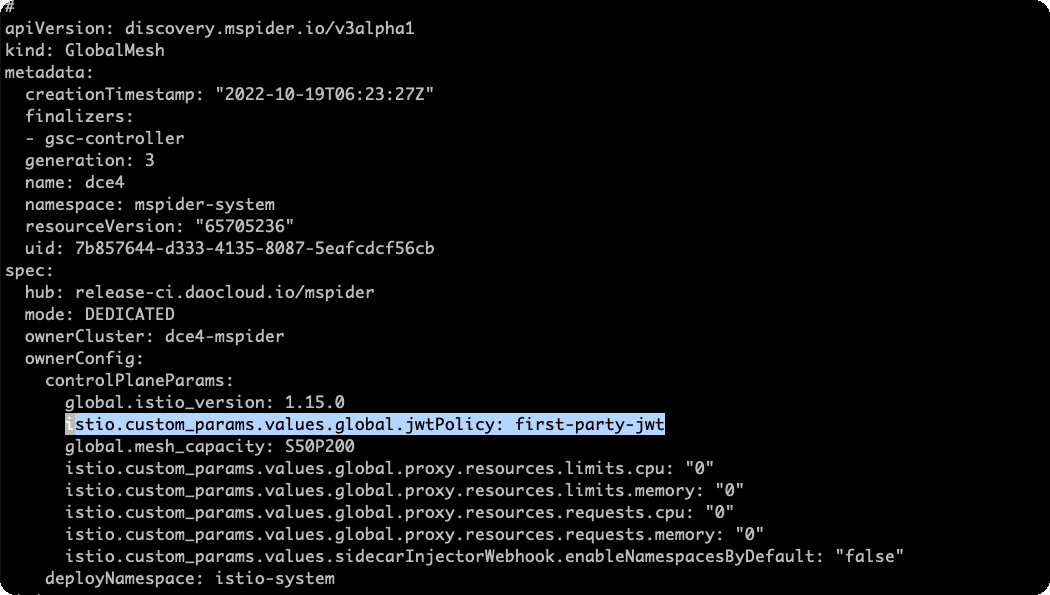
Tip
- Before integrating with the new version of the service mesh, deploy coreDNS in advance for DCE 4.0.
- The Global Mesh configuration is in Global Cluster, not in the access cluster.
Sidecar configuration conflicts with workload sidecar
Description
After modifying the Namespace Sidecar policy, the injection of sidecars into Pods does not take effect immediately upon injection.
Analysis
The Namespace configuration represents the default sidecar injection policy for sidecars within the current namespace. When a Pod is enabled, it automatically undergoes sidecar injection based on the policy defined in the current namespace. This injection occurs at the start of the Pod on the launching node. If the Namespace sidecar policy is modified while the Pod is running.
In Istio, the frist order to ensure the stability of the production environment, does not automatically restart the Pod. Therefore, the user needs to manually restart the Pod.
Solution
- To address this issue, it is necessary to manually restart the Pod. Please proceed with caution and plan accordingly based on the specific business requirements.
- Use the command kubectl rollout restart deployment
-n to restart the Pod.
Multi-cloud interconnect anomalies in managed mesh
This page explains issues related to cross-cluster interconnect in a service mesh and their solutions.
Cross-Cluster Service Experiences 10s Access Latency
In a hosted mesh with 2 clusters, both clusters have the same test service. When accessing the test service via the ingress gateway, there are occasional 10-second delays.
Cause Analysis
- The clusters are managed, services are discovered, but multi-cloud interconnect is not enabled, causing network issues. Requests fail and fallback to the local cluster's test service, leading to delays.
- Multi-cloud interconnect is enabled, clusters are in the same network group, but the network communication between pods in interconnected clusters is not established.
- East-West gateways are in an abnormal state.
- Some clusters are down. Multi-cloud interconnect solves the network connectivity between clusters but does not handle individual service anomalies. Hence, an outlier detection policy needs to be configured.
Solutions
- Enable multi-cloud interconnect.
- Create multiple network groups, place clusters in different groups, and restart all pods.
- Identify and fix the cause of the East-West gateway issues.
-
Enable outlier detection in the destination rule:
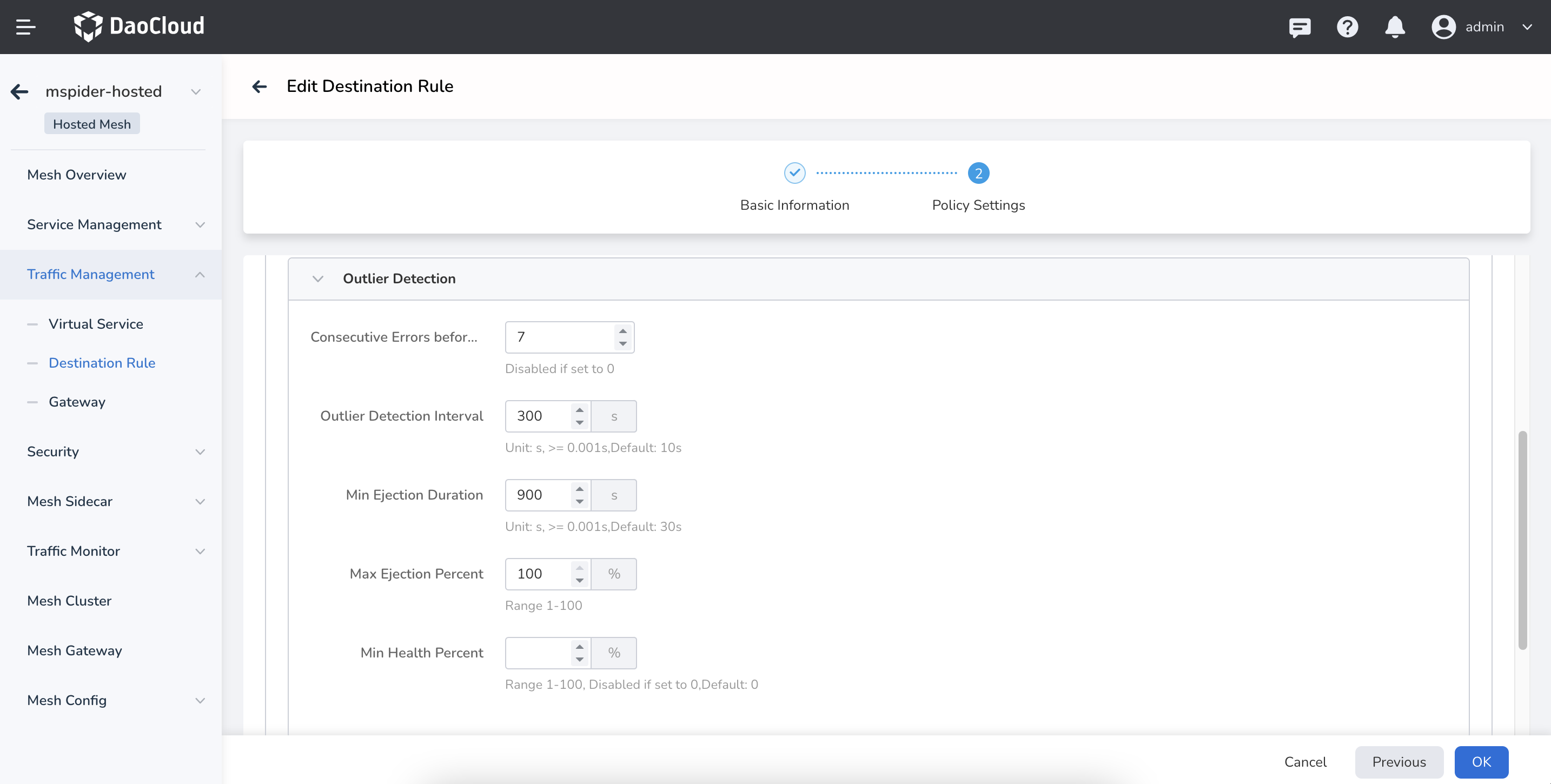
After successful configuration, instances from down clusters will be automatically removed, preventing delays.
Traffic in Mesh Only Hits Test Services in Some Clusters
In a hosted mesh with 2 clusters, multi-cloud interconnect is enabled and successfully configured. However, continuous access to the test service via the ingress gateway only hits test services in some clusters.
Cause Analysis
- Some test services are in an abnormal state. Check the service status.
- Some test services have not injected sidecars. Check the sidecar injection status.
- Some test service configurations are incorrect. Check service configurations such as svc ports and port names
- Multi-cloud interconnect was enabled after the test services were created.
Solutions
- Investigate and resolve the causes of service anomalies to restore normal service status.
- Inject sidecars into the services.
-
Ensure consistent svc configurations for all test services. Use the Service Management -> Service List diagnostic function to assist in observation:
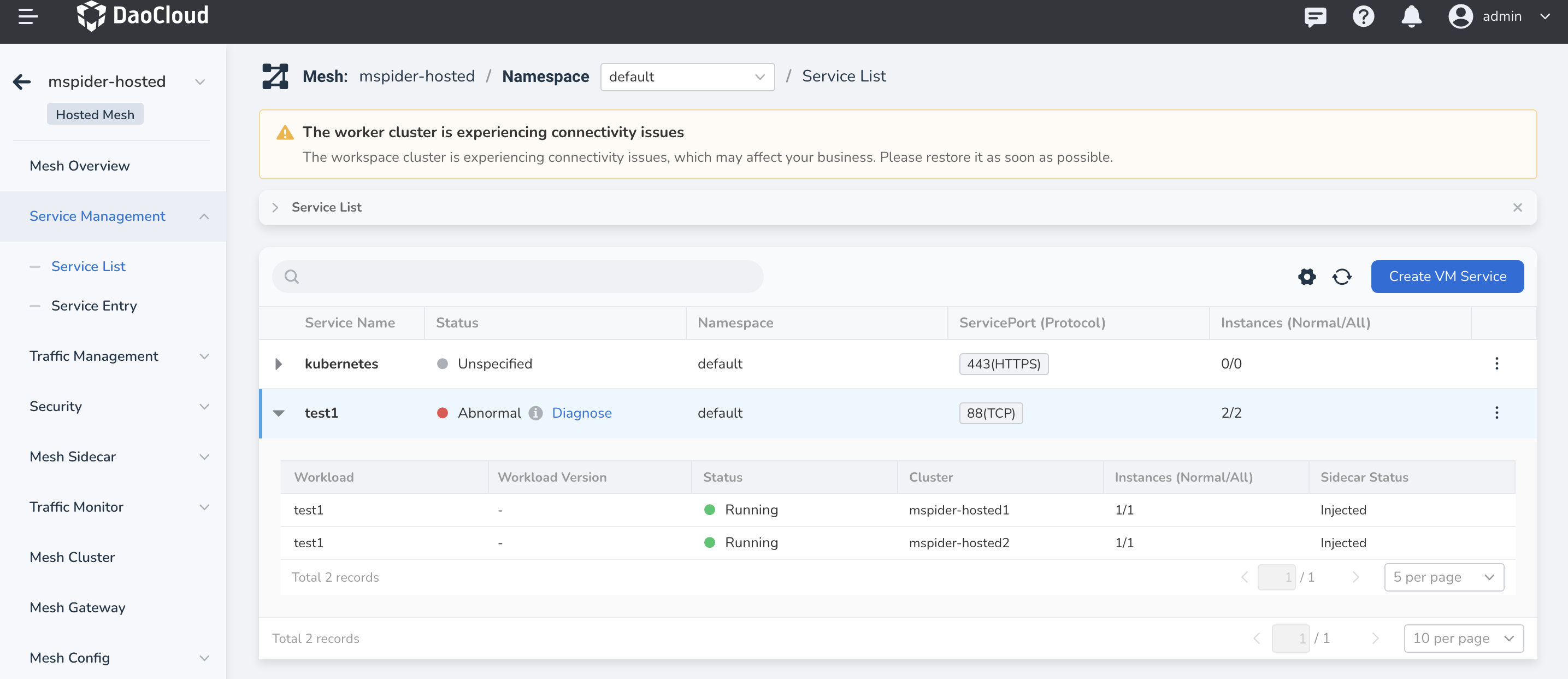
-
Restart all gateways, including self-built gateways and the North-South and East-West gateways in the data plane clusters:

By following these steps, you can troubleshoot and resolve issues related to cross-cluster interconnect in your service mesh.
Sidecar occupies a lot of memory
There are several situations that can cause this issue:
Case 1
The namespace isolation feature for sidecar discovery scope is not enabled. The sidecar caches information about all services in the mesh. When the mesh cluster is large and there are many service discovery rules, it can consume a significant amount of memory. It is recommended to enable this feature when creating the mesh or by selecting it in the Mesh Overview -> Edit Sidecar section. For cross-namespace access, configure individual namespaces in Sidecar Management -> Namespace.
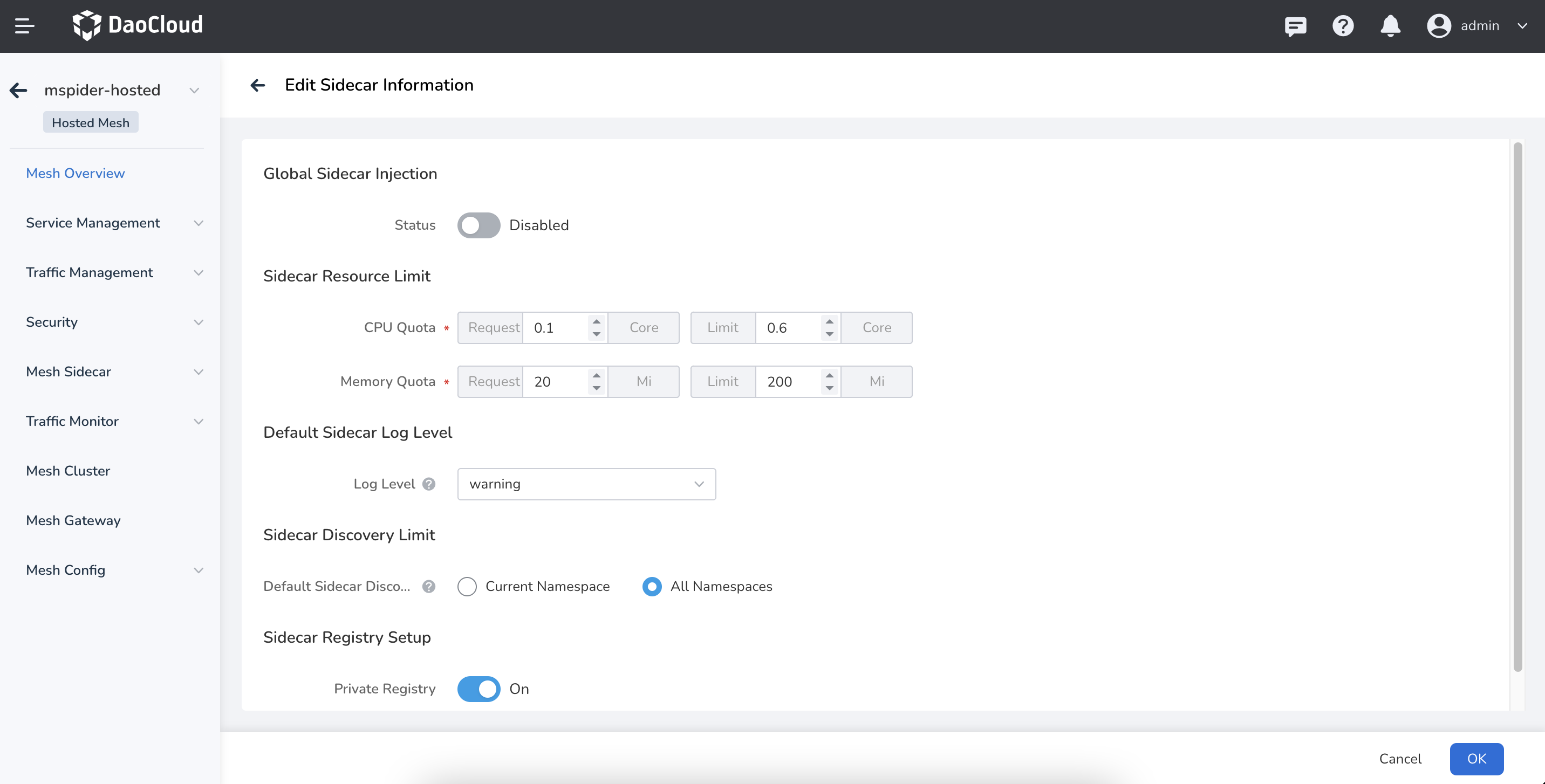
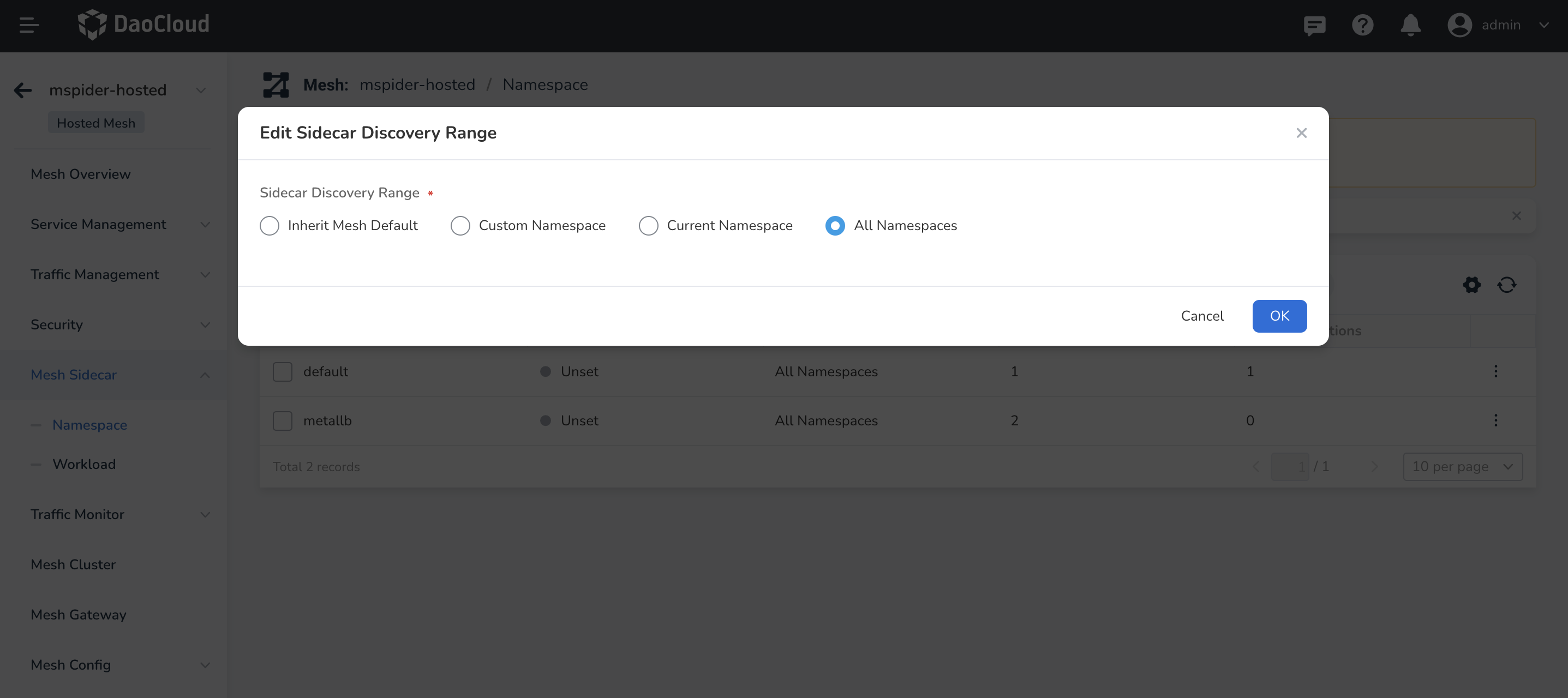
Case 2
A large volume of traffic passing through the sidecar, high request latency, and large response body text can all consume more memory. You can confirm this by checking the monitoring topology.
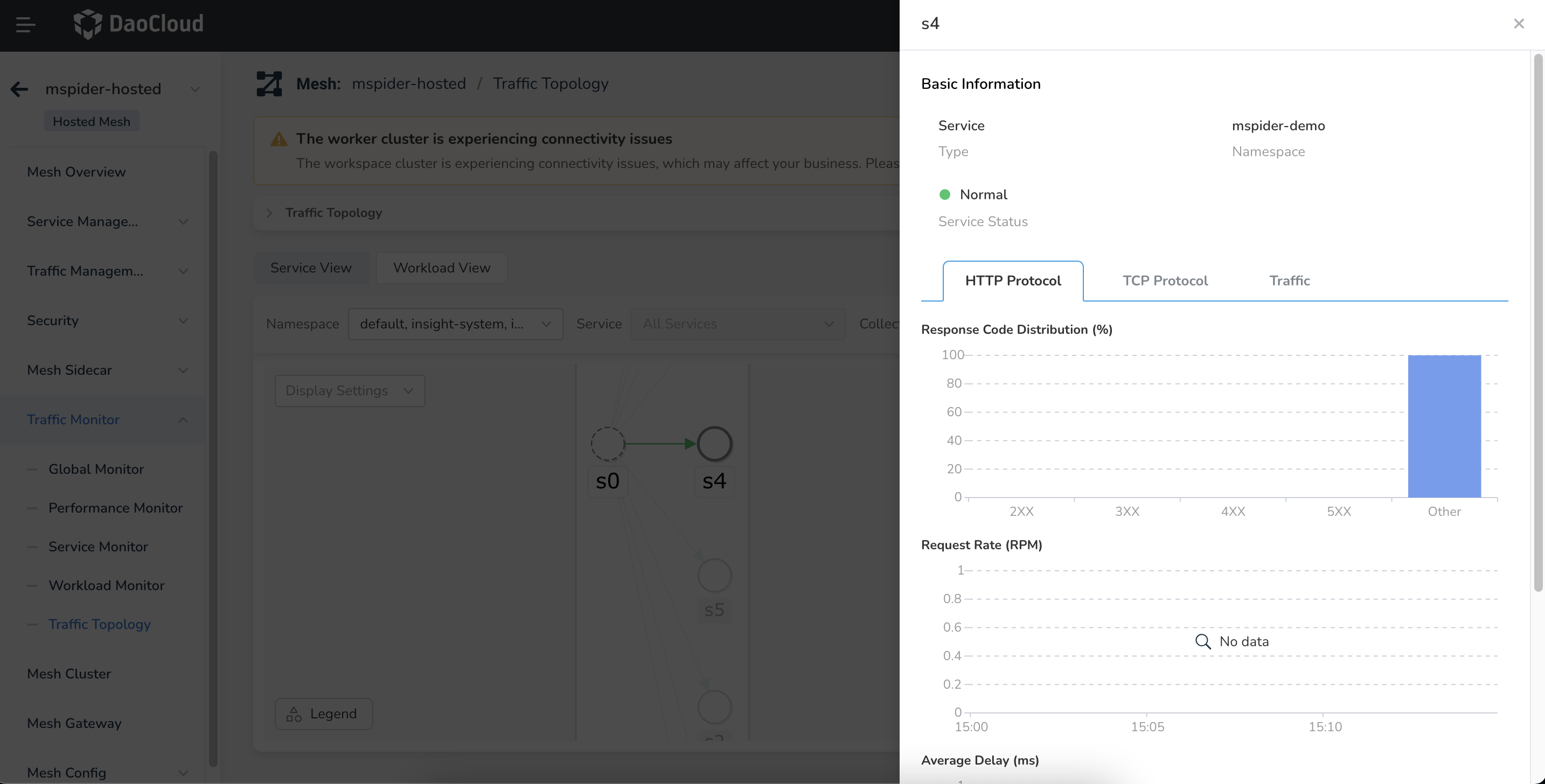
Case 3
Memory leak in the sidecar. Check using monitoring components, such as the Insight component. If the cluster traffic scale has not changed but the sidecar memory usage continues to rise, it could be a memory leak. Contact us to diagnose the issue.
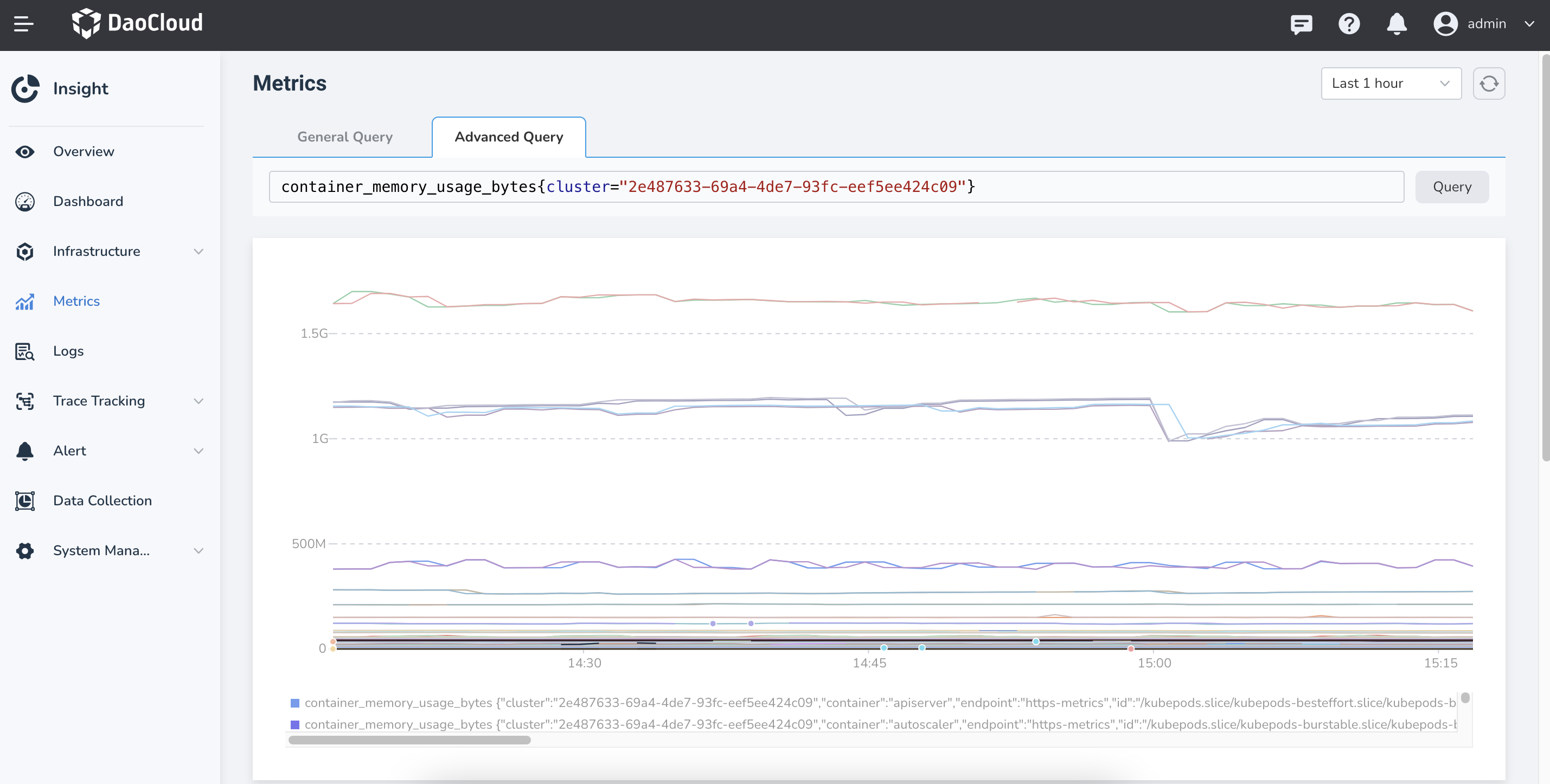
When creating a mesh, the cluster list contains unknown clusters
There are several potential reasons for this issue:
-
Reason: The unknown cluster was recently uninstalled, and the cluster synchronization task has not yet been triggered.
Analysis: The mesh instance of the unknown cluster may still be in the process of being uninstalled, waiting for the uninstallation to complete.
Solution: In this case, simply trigger the cluster synchronization automatically.
-
Reason: There are remnants from the cluster uninstallation.
Solution: Confirm that the unknown cluster no longer exists, and manually delete any remained cluster information. To do this, log into the global service cluster
kpanda-global-clusterand run the following commands: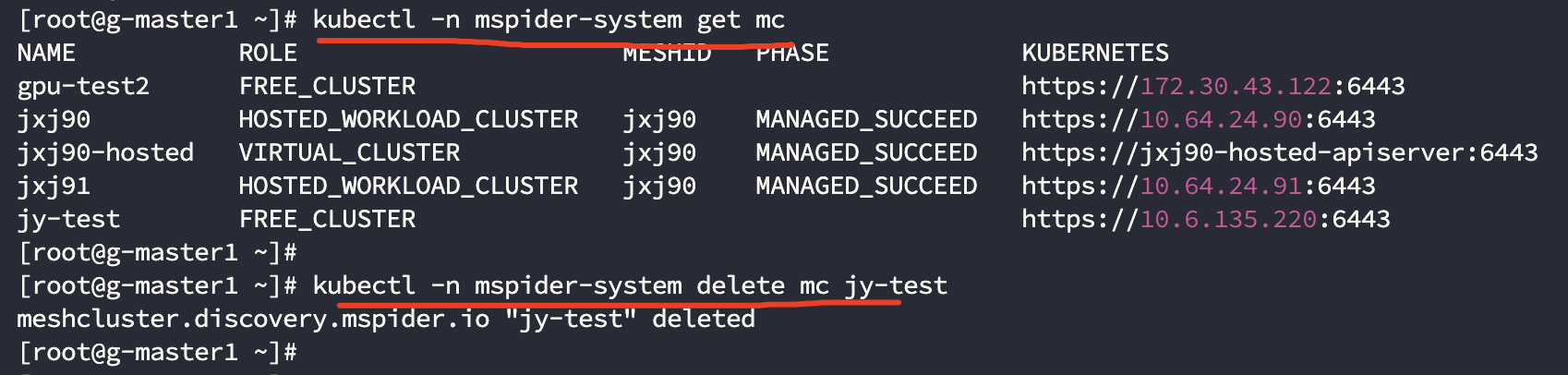
Managed mesh APIServer certificate expiration handling methods
Problem Description
For security reasons, the certificates for the hosted mesh are valid for only one year. We need to periodically regenerate these certificates to ensure that the cluster services operate normally.
If you notice an abnormal mesh status on the interface and see logs in the hosted-apiserver of the control plane cluster with messages similar to the following:
It indicates that the certificate has expired or is about to expire and needs to be replaced.
Impact Scope
Certificate expiration will not affect normal business operations but will impact policy issuance, application creation, or restart operations. Therefore, timely replacement is necessary.
Solution
For an already installed mesh, we need to manually handle the certificate update process.
First, replace all instances of MESH_ID in the following YAML with the mesh ID (the name on the interface, such as hosted-demo).
apiVersion: batch/v1
kind: Job
metadata:
  name: MESH_ID-hosted-apiserver-certs-renew
  namespace: istio-system
spec:
  parallelism: 1
  completions: 1
  template:
    spec:
      serviceAccountName: mspider-mcpc
      restartPolicy: Never
      volumes:
        - name: etcd-certs
          secret:
            secretName: MESH_ID-etcd-certs
        - name: kube-certs
          secret:
            secretName: MESH_ID-kube-certs
      containers:
        - name: init-certs
          image: release.daocloud.io/mspider/self-hosted-apiserver:0.0.13
          imagePullPolicy: IfNotPresent
          env:
            - name: MESH_ID
              value: MESH_ID
            - name: KUBE_CERT_SECRET
              value: MESH_ID-kube-certs
            - name: ETCD_CERT_SECRET
              value: MESH_ID-etcd-certs
            - name: KUBECONFIG_SECRET
              value: MESH_ID-apiserver-admin-kubeconfig
            - name: EXT_SANS
              value: MESH_ID-hosted-apiserver,MESH_ID-hosted-apiserver.istio-system,MESH_ID-hosted-apiserver.istio-system.svc,MESH_ID-hosted-apiserver.istio-system.svc.cluster.local
          command:
          - bash
          - -c
          volumeMounts:
            - name: etcd-certs
              mountPath: /etc/kubernetes/pki/etcd
            - name: kube-certs
              mountPath: /etc/kubernetes/pki
          args:
          - |-
            set -ex
            cd /etc/kubernetes/pki
            if [ ! -f ca.crt ]; then
              echo "ca.crt not found"
              exit 1
            fi
            d=$(mktemp -d)
            cp -Lrf /etc/kubernetes/pki/* ${d}
            cd ${d}
            # renew certs
            kubeadm  certs renew all --cert-dir ${d}
            files=$(for a in $(find . -maxdepth 1 -type f); do echo -n " --from-file $a "; done)
            cat > /tmp/secret-patch.json <<EOF
            {"data": $(kubectl create secret generic ${KUBE_CERT_SECRET} ${files} --dry-run -o jsonpath='{.data}')}
            EOF
            kubectl patch secrets ${KUBE_CERT_SECRET} --type merge --patch-file /tmp/secret-patch.json

            files=$(for a in $(find etcd -maxdepth 1 -type f); do echo -n " --from-file $a "; done)
            cat > /tmp/secret-patch.json <<EOF
            {"data": $(kubectl create secret generic ${ETCD_CERT_SECRET} ${files} --dry-run -o jsonpath='{.data}')}
            EOF
            kubectl patch secrets ${ETCD_CERT_SECRET} --type merge --patch-file /tmp/secret-patch.json

            kubeadm init phase kubeconfig admin --cert-dir ${d} --kubeconfig-dir ${d}
            cp admin.conf config
            sed -i 's#server: .*#server: https://MESH_ID-hosted-apiserver:6443#g' config
            cat > /tmp/secret-patch.json <<EOF
            {"data": $(kubectl create secret generic ${KUBECONFIG_SECRET} --from-file config --dry-run -o jsonpath='{.data}')}
            EOF
            kubectl patch secrets ${KUBECONFIG_SECRET} --type merge --patch-file /tmp/secret-patch.json
Next, in the control plane cluster of the hosted mesh (which can be viewed in the mesh list), create this Job and wait for it to execute successfully. After successful execution, you need to restart the istiod, hosted-apiserver, etcd, and ckube-remote components in the istio-system namespace.
Restarting these components will not affect normal business services.
Verification
- Check the mesh status on the interface.
- Ensure that deleting and creating mesh-related resources work properly.
Common 503 errors in service mesh
This page describes common 503 error scenarios in the service mesh and their solutions.
Occasional 503
Using Custom Metrics Where a Few 503 Errors Appear in Log Monitoring Whenever the Configuration Changes
Problem Cause
The logic of the custom metrics feature is to update the configuration of istio.stats by generating a corresponding EnvoyFilter. This configuration takes effect at the Envoy Listener level, that is, it takes effect through LDS synchronization. When Envoy applies a Listener-level configuration, it needs to disconnect existing connections. The corresponding in-flight requests return 503 because the connection is reset or closed.
Solution
When the upstream server actively closes the connection, the 503 you see is not sent by the upstream server, but is a response returned locally by the client sidecar because the upstream connection was actively disconnected.
The default retry configuration of Istio does not include "the upstream server actively closes the connection". Among the retry conditions of EnvoyProxy, reset matches the trigger condition for this case. Therefore, you need to configure a retry policy for the route of the corresponding service. The retry policy configured under the VirtualService includes the trigger condition reset.
The configuration example is as follows. This configuration only takes effect for the Ratings service.
apiVersion: networking.istio.io/v1beta1
kind: VirtualService
metadata:
  name: ratings-route
spec:
  hosts:
    - ratings.prod.svc.cluster.local
  http:
    - route:
        - destination:
            host: ratings.prod.svc.cluster.local
            subset: v1
      retries:
        attempts: 2
        retryOn: connect-failure,refused-stream,unavailable,cancelled,retriable-status-codes,reset,503
Related FAQs
Why does the default retry mechanism of Istio not take effect?
The conditions under which the default retry of Istio occurs are as follows. By default, it retries 2 times. This scenario is not among the retry conditions, so it does not take effect.
"retry_policy":
  {
    "retry_on": "connect-failure,refused-stream,unavailable,cancelled,retriable-status-codes",
    "num_retries": 2,
    "retry_host_predicate":
      [{ "name": "envoy.retry_host_predicates.previous_hosts" }],
    "host_selection_retry_max_attempts": "5",
    "retriable_status_codes": [503],
  }
- connect-failure: The connection failed.
- refused-stream: The HTTP2 stream returns the
REFUSED_STREAMerror code. - unavailable: The gRPC request returns the
unavailableerror code. - cancelled: The gRPC request returns the
cancellederror code. - retriable-status-codes: The
status_codereturned by the request matches the error code defined in theretriable_status_codesconfiguration.
For the complete retry conditions of the latest version of EnvoyProxy, see the following documents.
- Existing retry condition configuration for HTTP (including HTTP2 and HTTP3): Router
- Retry condition configuration specific to gRPC: x-envoy-retry-grpc-on
Occasional 503 Without Regularity and Without Configuration Changes During the Process
503 appears occasionally, but it appears continuously when the traffic is intensive. It usually appears on the Inbound side of the sidecar.
Problem Cause
The idle connection keep-alive time of Envoy does not match that of the application. The default Envoy idle connection time is 1 hour.
-
The Envoy idle connection time is too long while that of the application is relatively short:
The application has ended the idle connection, but Envoy thinks it has not ended. If there is a new connection at this time, a 503UC will be reported.
-
The Envoy idle connection time is too short while that of the application is relatively long:
This case will not cause a 503. Envoy thinks the previous connection has been closed, so it directly creates a new connection.
Solution
Solution 1: Configure idleTimeout in the DestinationRule
The cause of this problem is that idleTimeout does not match, so configuring idleTimeout in the DestinationRule is a relatively fundamental solution.
If idleTimeout is configured, it takes effect on both the Outbound and Inbound sides, that is, the Sidecar on both the Outbound and Inbound sides will have the idleTimeout configuration. If the client has no Sidecar, idleTimeout will also take effect and can effectively reduce 503s.
Configuration suggestion: This configuration is related to the business. If it is too short, the number of connections will be too high. It is recommended that you configure it slightly shorter than the real idleTimeout of the business application.
Solution 2: Configure retries in the VirtualService
Retries will re-establish the connection and can solve this problem. For details, see the solution in Scenario 1.
Important
This operation is a non-idempotent request, and retries carry great risks. Please proceed with caution.
Related to Sidecar Lifecycle
Problem Cause
It is caused by the lifecycle of the sidecar and the business container, and often occurs when a Pod is restarted.
Solution
For details, see Sidecar Lifecycle.
Guaranteed 503
Application Listens on localhost
Problem Cause
When an application in the cluster listens on the localhost network address, since localhost is a local address, other Pods in the cluster cannot access it normally.
Solution
You can solve this problem by exposing the application service externally. For details, see How to Make an Application Listening on localhost in a Cluster Accessible by Other Pods.
Health Check Always Fails with a 503 Error After Enabling the Sidecar
Problem Cause
After mTLS is enabled in the service mesh, the health check request sent by kubelet to the Pod is intercepted by the sidecar, and kubelet does not have the corresponding TLS certificate, which causes the health check to fail.
Solution
You can solve this problem by configuring the port so that the health check traffic bypasses the sidecar proxy.
How to allow applications listening on localhost in the cluster to be accessed by other Pods
This page describes how to configure sidecar resources so that an application listening on localhost can be accessed by other Pods in the cluster through a Service.
Symptom
When an application deployed in the cluster listens on localhost, even if the service port of the application is exposed through a Service, the service cannot be accessed by other Pods in the cluster.
Examples of applications listening on localhost in different languages are as follows:
- Golang: net.Listen("tcp", "localhost:8080")
- Node.js: http.createServer().listen(8080, "localhost")
- Python: socket.socket().bind(("localhost", 8083))
Problem Cause
When an application in the cluster listens on the localhost network address, since localhost is a local address, it is normal that other Pods in the cluster cannot access it.
Solution
You can choose any of the following ways to expose the application service.
-
Method 1: Change the network address the application listens on
If you want the service provided by the application to be exposed externally, it is recommended to modify the application code and change the network address the application listens on from localhost to 0.0.0.0.
-
Method 2: Use the service mesh to expose a service listening on localhost
If you do not want to modify the application code and need to expose the application listening on localhost to other Pods in the cluster, you can configure it when creating the sidecar.
Replace the following fields according to your actual situation.
Field Description {namespace}Replace it with the namespace where the application is deployed. {container_port}Replace it with the container port on which the application listens on localhost. {port}Replace it with the Service port of the application. {key} : {value}Replace it with the label of the selected application Pod.
Middleware
For more questions, refer to Middleware.
MySQL Troubleshooting
MySQL health check
If you encounter an issue that is not covered in the "Troubleshooting" section, you can quickly jump to the bottom of the page and submit your problem.
To perform a regular health check on MySQL, you can use a single command to quickly view the overall status of the MySQL instance:
The output is similar to:
mcamel-common-mysql-cluster-auto-2023-03-28t00-00-00-backujgg9m 0/1 Completed 0 27h
mcamel-common-mysql-cluster-auto-2023-03-29t00-00-00-backusgf59 0/1 Completed 0 3h43m
mcamel-common-mysql-cluster-mysql-0 4/4 Running 6 (11h ago) 25h yes master
mcamel-common-mysql-cluster-mysql-1 4/4 Running 690 (11h ago) 4d20h yes replica
mcamel-mysql-apiserver-9797c7f76-bvf5n 2/2 Running 0 22h
mcamel-mysql-ui-7ffd9dd8db-d5jfm 2/2 Running 0 25m
mysql-operator-0 2/2 Running 109 (47m ago) 2d21h
As shown above, if the status of the active and standby nodes ( master replica ) is yes , it means that MySQL is in a normal state.
MySQL Pod issues
You can use the following command to quickly check the health status of all MySQL instances in the current cluster:
The output will be similar to:
NAMESPACE       NAME                          READY   REPLICAS   AGE
ghippo-system   test                          True    1          3d
mcamel-system   mcamel-common-mysql-cluster   False   2          62d
For different replica states, refer to the troubleshooting solutions below.
Pod running = 0/4, with state Init:Error
When encountering this issue, start by checking the logs of the master node (sidecar) for more information.
kubectl get pod -n mcamel-system -Lhealthy,role | grep cluster-mysql | grep master | awk '{print $1}' | xargs -I {} kubectl logs -f {} -n mcamel-system -c sidecar
Example Output
2023-02-09T05:38:56.208445-00:00 0 [Note] [MY-011825] [Xtrabackup] perl binary not found. Skipping the version check
2023-02-09T05:38:56.208521-00:00 0 [Note] [MY-011825] [Xtrabackup] Connecting to MySQL server host: 127.0.0.1, user: sys_replication, password: set, port: not set, socket: not set
2023-02-09T05:38:56.212595-00:00 0 [Note] [MY-011825] [Xtrabackup] Using server version 8.0.29
2023-02-09T05:38:56.217325-00:00 0 [Note] [MY-011825] [Xtrabackup] Executing LOCK INSTANCE FOR BACKUP ...
2023-02-09T05:38:56.219880-00:00 0 [ERROR] [MY-011825] [Xtrabackup] Found tables with row versions due to INSTANT ADD/DROP columns
2023-02-09T05:38:56.219931-00:00 0 [ERROR] [MY-011825] [Xtrabackup] This feature is not stable and will cause backup corruption.
2023-02-09T05:38:56.219940-00:00 0 [ERROR] [MY-011825] [Xtrabackup] Please check https://docs.percona.com/percona-xtrabackup/8.0/em/instant.html for more details.
2023-02-09T05:38:56.219945-00:00 0 [ERROR] [MY-011825] [Xtrabackup] Tables found:
2023-02-09T05:38:56.219951-00:00 0 [ERROR] [MY-011825] [Xtrabackup] keycloak/USER_SESSION
2023-02-09T05:38:56.219956-00:00 0 [ERROR] [MY-011825] [Xtrabackup] keycloak/AUTHENTICATION_EXECUTION
2023-02-09T05:38:56.219960-00:00 0 [ERROR] [MY-011825] [Xtrabackup] keycloak/AUTHENTICATION_FLOW
2023-02-09T05:38:56.219968-00:00 0 [ERROR] [MY-011825] [Xtrabackup] keycloak/AUTHENTICATOR_CONFIG
2023-02-09T05:38:56.219984-00:00 0 [ERROR] [MY-011825] [Xtrabackup] keycloak/CLIENT_SESSION
2023-02-09T05:38:56.219991-00:00 0 [ERROR] [MY-011825] [Xtrabackup] keycloak/IDENTITY_PROVIDER
2023-02-09T05:38:56.219998-00:00 0 [ERROR] [MY-011825] [Xtrabackup] keycloak/PROTOCOL_MAPPER
2023-02-09T05:38:56.220005-00:00 0 [ERROR] [MY-011825] [Xtrabackup] keycloak/RESOURCE_SERVER_SCOPE
2023-02-09T05:38:56.220012-00:00 0 [ERROR] [MY-011825] [Xtrabackup] keycloak/REQUIRED_ACTION_PROVIDER
2023-02-09T05:38:56.220018-00:00 0 [ERROR] [MY-011825] [Xtrabackup] keycloak/COMPONENT
2023-02-09T05:38:56.220027-00:00 0 [ERROR] [MY-011825] [Xtrabackup] keycloak/RESOURCE_SERVER
2023-02-09T05:38:56.220036-00:00 0 [ERROR] [MY-011825] [Xtrabackup] keycloak/CREDENTIAL
2023-02-09T05:38:56.220043-00:00 0 [ERROR] [MY-011825] [Xtrabackup] keycloak/FED_USER_CREDENTIAL
2023-02-09T05:38:56.220049-00:00 0 [ERROR] [MY-011825] [Xtrabackup] keycloak/MIGRATION_MODEL
2023-02-09T05:38:56.220054-00:00 0 [ERROR] [MY-011825] [Xtrabackup] keycloak/REALM
2023-02-09T05:38:56.220062-00:00 0 [ERROR] [MY-011825] [Xtrabackup] keycloak/CLIENT
2023-02-09T05:38:56.220069-00:00 0 [ERROR] [MY-011825] [Xtrabackup] keycloak/REALM_ATTRIBUTE
2023-02-09T05:38:56.220075-00:00 0 [ERROR] [MY-011825] [Xtrabackup] keycloak/OFFLINE_USER_SESSION
2023-02-09T05:38:56.220084-00:00 0 [ERROR] [MY-011825] [Xtrabackup] Please run OPTIMIZE TABLE or ALTER TABLE ALGORITHM=COPY on all listed tables to fix this issue.
E0209 05:38:56.223635       1 deleg.go:144] sidecar "msg"="failed waiting for xtrabackup to finish" "error"="exit status 1"
Log in to the master node of MySQL and execute an ALTER table command:
[root@master-01 ~]$ kubectl get pod -n mcamel-system -Lhealthy,role | grep cluster-mysql | grep master
mcamel-common-mysql-cluster-mysql-0

**Get the password**
[root@master-01 ~]$ kubectl get secret -n mcamel-system mcamel-common-mysql-cluster-secret -o=jsonpath='{.data.ROOT_PASSWORD}' | base64 -d

[root@master-01 ~]$ kubectl exec -it mcamel-common-mysql-cluster-mysql-0 -n mcamel-system -c mysql -- /bin/bash

**Note: Modifying table structure requires root privileges for login**
~bash:mysql -uroot -p
SQL statements
use keycloak;
ALTER TABLE USER_SESSION ALGORITHM=COPY;
ALTER TABLE AUTHENTICATION_EXECUTION ALGORITHM=COPY;
ALTER TABLE AUTHENTICATION_FLOW ALGORITHM=COPY;
ALTER TABLE AUTHENTICATOR_CONFIG ALGORITHM=COPY;
ALTER TABLE CLIENT_SESSION ALGORITHM=COPY;
ALTER TABLE IDENTITY_PROVIDER ALGORITHM=COPY;
ALTER TABLE PROTOCOL_MAPPER ALGORITHM=COPY;
ALTER TABLE RESOURCE_SERVER_SCOPE ALGORITHM=COPY;
ALTER TABLE REQUIRED_ACTION_PROVIDER ALGORITHM=COPY;
ALTER TABLE COMPONENT ALGORITHM=COPY;
ALTER TABLE RESOURCE_SERVER ALGORITHM=COPY;
ALTER TABLE CREDENTIAL ALGORITHM=COPY;
ALTER TABLE FED_USER_CREDENTIAL ALGORITHM=COPY;
ALTER TABLE MIGRATION_MODEL ALGORITHM=COPY;
ALTER TABLE REALM ALGORITHM=COPY;
ALTER TABLE CLIENT ALGORITHM=COPY;
ALTER TABLE REALM_ATTRIBUTE ALGORITHM=COPY;
ALTER TABLE OFFLINE_USER_SESSION ALGORITHM=COPY
Pod running = 2/4
This type of issue is likely caused by the disk usage of the MySQL instances reaching 100%. You can run the following command on the master node to check the disk usage:
kubectl get pod -n mcamel-system | grep cluster-mysql | awk '{print $1}' | xargs -I {} kubectl exec {} -n mcamel-system -c sidecar -- df -h | grep /var/lib/mysql
The output will be similar to:
If you find that a PVC (PersistentVolumeClaim) is full, you need to resize the PVC.
kubectl edit pvc data-mcamel-common-mysql-cluster-mysql-0 -n mcamel-system # Modify the requested size
Pod running = ¾

When using kubectl describe on the Pod highlighted in the image above, you may encounter an error message: Warning Unhealthy 4m50s (x7194 over 3h58m) kubelet Readiness probe failed: .
In this case, manual intervention is required due to a current bug in the open-source mysql-operator version. You have two options to fix it:
- Restart the mysql-operator , or
- Manually update the configuration status of sys_operator .
MySQL Operator issues
Unspecified storageClass
When the storageClass is not specified, it causes the mysql-operator to be unable to retrieve the Persistent Volume Claim (PVC), resulting in a pending state.
If you are using Helm to deploy, you can make the following configuration:
-
Disable PVC provisioning:
-
Specify the storageClass to retrieve the PVC:
If you are using a different tool, you can modify the corresponding field in the value.yaml file to achieve the same effect as deploying with Helm.
MySQL master-slave relationship issues
The master-slave relationship in MySQL can be complex when it comes to troubleshooting, as different symptoms may require different solutions.
-
Run the following command to confirm the MySQL status:
The output will be similar to:
-
Pay attention to the databases with a Ready field value of False (here, the judgement of True is that the delay is less than 30 seconds), and check the logs of the MySQL slave:
When the instance status is False , there may be several types of failures. You can troubleshoot and fix them based on the information in the database logs.
Instance Status is False but No Error Messages in Logs
If there are no ERROR messages in the logs of the slave, it means that the False status is due to a large delay in master-slave synchronization. You can further investigate the slave by performing the following steps:
-
Find the Pod of the slave node:
kubectl get pod -n mcamel-system -Lhealthy,role | grep cluster-mysql | grep replica | awk '{print $1}'The output will be similar to:
-
Set the binlog parameter:
-
Enter the MySQL container:
-
Run the following command inside the MySQL container to check the slave status.
The Seconds_Behind_Master field indicates the delay between the master and slave. If the value is between 0 and 30, it can be considered as no delay, indicating that the master and slave are in sync.
SQL statements
mysql> show slave status\G; *************************** 1. row *************************** Slave_IO_State: Waiting for source to send event Master_Host: mcamel-common-mysql-cluster-mysql-0.mysql.mcamel-system Master_User: sys_replication Master_Port: 3306 Connect_Retry: 1 Master_Log_File: mysql-bin.000304 Read_Master_Log_Pos: 83592007 Relay_Log_File: mcamel-common-mysql-cluster-mysql-1-relay-bin.000002 Relay_Log_Pos: 83564355 Relay_Master_Log_File: mysql-bin.000304 Slave_IO_Running: Yes Slave_SQL_Running: Yes Replicate_Do_DB: Replicate_Ignore_DB: Replicate_Do_Table: Replicate_Ignore_Table: Replicate_Wild_Do_Table: Replicate_Wild_Ignore_Table: Last_Errno: 0 Last_Error: Skip_Counter: 0 Exec_Master_Log_Pos: 83564299 Relay_Log_Space: 83592303 Until_Condition: None Until_Log_File: Until_Log_Pos: 0 Master_SSL_Allowed: No Master_SSL_CA_File: Master_SSL_CA_Path: Master_SSL_Cert: Master_SSL_Cipher: Master_SSL_Key: Seconds_Behind_Master: 0 Master_SSL_Verify_Server_Cert: No Last_IO_Errno: 0 Last_IO_Error: Last_SQL_Errno: 0 Last_SQL_Error: Replicate_Ignore_Server_Ids: Master_Server_Id: 100 Master_UUID: e17dae09-8da0-11ed-9104-c2f9484728fd Master_Info_File: mysql.slave_master_info SQL_Delay: 0 SQL_Remaining_Delay: NULL Slave_SQL_Running_State: Replica has read all relay log; waiting for more updates Master_Retry_Count: 86400 Master_Bind: Last_IO_Error_Timestamp: Last_SQL_Error_Timestamp: Master_SSL_Crl: Master_SSL_Crlpath: Retrieved_Gtid_Set: e17dae09-8da0-11ed-9104-c2f9484728fd:21614244-21621569 Executed_Gtid_Set: 4bc2107c-819a-11ed-bf23-22be07e4eaff:1-342297, 7cc717ea-7c1b-11ed-b59d-c2ba3f807d12:1-619197, a5ab763a-7c1b-11ed-b5ca-522707642ace:1-178069, a6045297-8743-11ed-8712-8e52c3ace534:1-4073131, a95cf9df-84d7-11ed-8362-5e8a1c335253:1-493942, b5175b1b-a2ac-11ed-b0c6-d6fbe05d7579:1-3754703, c4dc2b14-9ed9-11ed-ac61-36da81109699:1-945884, e17dae09-8da0-11ed-9104-c2f9484728fd:1-21621569 Auto_Position: 1 Replicate_Rewrite_DB: Channel_Name: Master_TLS_Version: Master_public_key_path: Get_master_public_key: 0 Network_Namespace: 1 row in set, 1 warning (0.00 sec) -
After the master-slave synchronization, if Seconds_Behind_Master is less than 30s, set sync_binlog=1 :
-
If the issue persists, you can check the host load or IO of the slave node by running the following command:
In normal circumstances, the load averages should not exceed 10 for a prolonged period. If it exceeds 30 or above, consider adjusting the Pod and disk allocation for that node.
Replication Error in Slave Logs
If there are replication errors in the logs of the slave Pod, it may be caused by various reasons. The following sections will provide different scenarios along with their corresponding diagnosis and repair methods.
Purged Binlog Error
In case you encounter the keyword purged binlog in the logs, it typically indicates the need to rebuild the slave.
Erros
[root@demo-alpha-master-01 /]$ kubectl get pod -n mcamel-system -Lhealthy,role | grep cluster-mysql | grep replica | awk '{print $1}' | xargs -I {} kubectl logs {} -n mcamel-system -c mysql | grep ERROR
2023-02-08T18:43:21.991730Z 116 [ERROR] [MY-010557] [Repl] Error reading packet from server for channel '': Cannot replicate because the master purged required binary logs. Replicate the missing transactions from elsewhere, or provision a new slave from backup. Consider increasing the master's binary log expiration period. The GTID sets and the missing purged transactions are too long to print in this message. For more information, please see the master's error log or the manual for GTID_SUBTRACT (server_errno=1236)
2023-02-08T18:43:21.991777Z 116 [ERROR] [MY-013114] [Repl] Slave I/O for channel '': Got fatal error 1236 from master when reading data from binary log: 'Cannot replicate because the master purged required binary logs. Replicate the missing transactions from elsewhere, or provision a new slave from backup. Consider increasing the master's binary log expiration period. The GTID sets and the missing purged transactions are too long to print in this message. For more information, please see the master's error log or the manual for GTID_SUBTRACT', Error_code: MY-013114
The steps to perform the rebuild operation are as follows:
-
Find the Pod of the slave node:
-
Find the PVC (PersistentVolumeClaim) of the slave node:
-
Delete the PVC of the slave node:
-
Delete the Pod of the slave:
Primary Key Conflict Error
Errors
[root@demo-alpha-master-01 /]$ kubectl get pod -n mcamel-system -Lhealthy,role | grep cluster-mysql | grep replica | awk '{print $1}' | xargs -I {} kubectl logs {} -n mcamel-system -c mysql | grep ERROR
2023-02-08T18:43:21.991730Z 116 [ERROR] [MY-010557] [Repl] Could notexecute Write_rows event on table dr_brower_db.dr_user_info; Duplicate entry '24' for key 'PRIMARY', Error_code:1062; handler error HA_ERR_FOUND_DUPP_KEY; the event's master logmysql-bin.000010, end_log_pos 5295916
If you see the following error in the error log: Duplicate entry '24' for key 'PRIMARY', Error_code:1062; handler error HA_ERR_FOUND_DUPP_KEY; , it indicates a primary key conflict or an error where the primary key does not exist. In such cases, you can recover using an idempotent mode or skip the error by inserting an empty transaction:
Method 1: Idempotent Recovery
-
Find the Pod of the slave node:
-
Set MySQL to idempotent mode:
Method 2: Insert Empty Transaction to Skip Error
mysql> stop slave;
mysql> SET @@SESSION.GTID_NEXT= 'xxxxx:105220'; /* Specific value mentioned in the logs */
mysql> BEGIN;
mysql> COMMIT;
mysql> SET SESSION GTID_NEXT = AUTOMATIC;
mysql> START SLAVE;
After completing the above steps, observe the progress of the slave rebuild:
**Enter the MySQL container**
[root@master-01 ~]$ kubectl exec -it mcamel-common-mysql-cluster-mysql-1 -n mcamel-system -c mysql -- mysql --defaults-file=/etc/mysql/client.conf
Run the following command to check the slave's replication delay status in the field Seconds_Behind_Master . If the value is between 0 and 30, it indicates that there is no significant delay, and the master and slave databases are essentially synchronized.
After confirming the master-slave synchronization (when Seconds_Behind_Master is less than 30s), run the following command to set MySQL strict mode:
[root@master-01 ~]$ kubectl exec mcamel-common-mysql-cluster-mysql-1 -n mcamel-system -c mysql -- mysql --defaults-file=/etc/mysql/client.conf -NB -e 'stop slave;set global slave_exec_mode="STRICT";set global sync_binlog=10086;start slave;
Replication Error in Master-Slave Setup
When the slave database encounters an error message similar to [Note] Slave: MTS group recovery relay log info based on Worker-Id 0, group_r , you can perform the following steps:
-
Find the Pod of the slave node:
-
Set the slave to skip this particular log and continue replication:
Tip
- This situation can be handled using an idempotent mode.
- In such replication errors, redoing the setup on the slave database is also a viable option.
Both Primary and Replica Pods are Labeled as replica
-
By executing the following command, you will discover that both MySQL Pods are labeled as replica role. You need to correct one of them to master .
-
Go to MySQL to check:
-
To check the status information of the slave , look for the results where the query output is empty. These correspond to the original master . In the example below, mysql-0 corresponds to the relevant content:
??? note "Status examples“
```sql -- mysql-0 mysql> show slave status\G; empty set, 1 warning (0.00 sec) -- mysql-1 mysql> show slave status\G; *************************** 1. row *************************** Slave_IO_State: Waiting for source to send event Master_Host: mcamel-common-mysql-cluster-mysql-0.mysql.mcamel-system Master_User: sys_replication Master_Port: 3306 Connect_Retry: 1 Master_Log_File: mysql-bin.000004 Read_Master_Log_Pos: 38164242 Relay_Log_File: mcamel-common-mysql-cluster-mysql-1-relay-bin.000002 Relay_Log_Pos: 38164418 Relay_Master_Log_File: mysql-bin.000004 Slave_IO_Running: Yes Slave_SQL_Running: Yes Replicate_Do_DB: Replicate_Ignore_DB: Replicate_Do_Table: Replicate_Ignore_Table: Replicate_Wild_Do_Table: Replicate_Wild_Ignore_Table: Last_Errno: 0 Last_Error: Skip_Counter: 0 Exec_Master_Log_Pos: 38164242 Relay_Log_Space: 38164658 Until_Condition: None Until_Log_File: Until_Log_Pos: 0 Master_SSL_Allowed: No Master_SSL_CA_File: Master_SSL_CA_Path: Master_SSL_Cert: Master_SSL_Cipher: Master_SSL_Key: Seconds_Behind_Master: 0 Master_SSL_Verify_Server_Cert: No Last_IO_Errno: 0 Last_IO_Error: Last_SQL_Errno: 0 Last_SQL_Error: Replicate_Ignore_Server_Ids: Master_Server_Id: 100 Master_UUID: c16da70b-ad12-11ed-8084-0a580a810256 Master_Info_File: mysql.slave_master_info SQL_Delay: 0 SQL_Remaining_Delay: NULL Slave_SQL_Running_State: Replica has read all relay log; waiting for more updates Master_Retry_Count: 86400 Master_Bind: Last_IO_Error_Timestamp: Last_SQL_Error_Timestamp: Master_SSL_Crl: Master_SSL_Crlpath: Retrieved_Gtid_Set: c16da70b-ad12-11ed-8084-0a580a810256:537-59096 Executed_Gtid_Set: c16da70b-ad12-11ed-8084-0a580a810256:1-59096 Auto_Position: 1 Replicate_Rewrite_DB: Channel_Name: Master_TLS_Version: Master_public_key_path: Get_master_public_key: 0 Network_Namespace: 1 row in set, 1 warning (0.01 sec) ``` -
Perform a reset operation on the MySQL shell of the master:
-
Manually edit the Pod of the master: change its label from role replica to master and set healthy no to yes .
-
Run the following command on the MySQL shell of the slave:
-
If the master and slave are not establishing a connection, run the following command on the MySQL shell of the slave:
-- Note to replace {master-host-pod-index}
mysql > change master to master_host='mcamel-common-mysql-cluster-mysql-{master-host-pod-index}.mysql.mcamel-system',master_port=3306,master_user='root',master_password='{password}',master_auto_position=1,MASTER_HEARTBEAT_PERIOD=2,MASTER_CONNECT_RETRY=1, MASTER_RETRY_COUNT=86400;
Inconsistent Primary and Standby Data
When there is inconsistency in data between the primary and standby instances, you can run the following commands to achieve primary-standby consistency synchronization:
pt-table-sync --execute --charset=utf8 --ignore-databases=mysql,sys,percona --databases=amamba,audit,ghippo,insight,ipavo,keycloak,kpanda,skoala dsn=u=root,p=xxx,h=mcamel-common-kpanda-mysql-cluster-mysql-0.mysql.mcamel-system,P=3306 dsn=u=root,p=xxx,h=mcamel-common-kpanda-mysql-cluster-mysql.mysql.mcamel-system,P=3306  --print

pt-table-sync --execute --charset=utf8 --ignore-databases=mysql,sys,percona --databases=kpanda dsn=u=root,p=xxx,h=mcamel-common-kpanda-mysql-cluster-mysql-0.mysql.mcamel-system,P=3306 dsn=u=root,p=xxx,h=mcamel-common-kpanda-mysql-cluster-mysql-1.mysql.mcamel-system,P=3306  --print
To address this issue and achieve data supplementation, you can use pt-table-sync . The following example demonstrates how to supplement data from mysql-0 to mysql-1 .
This scenario is often applicable during master-slave switching, where the new slave has extra executed GTIDs that need to be synchronized before redoing the process.
Data supplementation ensures that data is not lost. However, there are potential risks involved. If the new master has deleted data, it will be re-supplemented. Additionally, if the new master has existing data, it will be replaced with older data.
MySQL MGR parameter configuration issues
When configuring MySQL Group Replication (MGR), the loose_ prefix is required for some parameters to ensure flexibility and backward compatibility. Some parameters in MySQL may be experimental or used only in certain scenarios. In these cases, the loose_ prefix ensures that these parameters can be ignored.
Examples
The following is an example of configuring MySQL Group Replication with the loose_ prefix:
[mysqld]
**Enable Group Replication**
loose_group_replication_start_on_boot=off
loose_group_replication_bootstrap_group=off
loose_group_replication_group_name="aaaaaaaa-bbbb-cccc-dddd-eeeeeeeeeeee"
loose_group_replication_local_address="192.168.0.1:33061"
loose_group_replication_group_seeds="192.168.0.1:33061,192.168.0.2:33061,192.168.0.3:33061"
loose_group_replication_single_primary_mode=on
loose_group_replication_enforce_update_everywhere_checks=off

**Group Replication SSL settings (optional)**
loose_group_replication_ssl_mode=REQUIRED
loose_group_replication_ssl_ca=ca.pem
loose_group_replication_ssl_cert=server-cert.pem
loose_group_replication_ssl_key=server-key.pem

**Other necessary settings**
binlog_checksum=NONE
binlog_format=ROW
log_slave_updates=ON
gtid_mode=ON
enforce_gtid_consistency=ON
master_info_repository=TABLE
relay_log_info_repository=TABLE
transaction_write_set_extraction=XXHASH64
Info
Using the loose_ prefix is a safe practice when configuring MGR parameters, especially when running in different versions or plugin states. It ensures compatibility and flexibility of configuration files and avoids unwanted startup errors.
MySQL MGR troubleshooting manual
Common Commands
Retrieve Root Password
To find the secret resource ending with "-mgr-secret" in the namespace of the MySQL MGR cluster, here is an example to retrieve the secret for the "kpanda-mgr" cluster:
kubectl get secrets/kpanda-mgr-mgr-secret -n mcamel-system --template={{.data.rootPassword}} | base64 -d
The command will output the root password, for example:
Check Cluster Status
You can check the cluster status using the MySQL command line:
Replace Password with the actual root password retrieved in the previous step.
sh-4.4$ mysqlsh -uroot -pPassword  -- cluster status
{
    "clusterName": "kpanda_mgr",
    "defaultReplicaSet": {
        "name": "default",
        "primary": "kpanda-mgr-2.kpanda-mgr-instances.mcamel-system.svc.cluster.local:3306",
        "ssl": "REQUIRED",
        "status": "OK",
        "statusText": "Cluster is ONLINE and can tolerate up to ONE failure.",
        "topology": {
            "kpanda-mgr-0.kpanda-mgr-instances.mcamel-system.svc.cluster.local:3306": {
                "address": "kpanda-mgr-0.kpanda-mgr-instances.mcamel-system.svc.cluster.local:3306",
                "memberRole": "SECONDARY",
                "mode": "R/O",
                "readReplicas": {},
                "replicationLag": "applier_queue_applied",
                "role": "HA",
                "status": "ONLINE",
                "version": "8.0.31"
            },
            "kpanda-mgr-1.kpanda-mgr-instances.mcamel-system.svc.cluster.local:3306": {
                "address": "kpanda-mgr-1.kpanda-mgr-instances.mcamel-system.svc.cluster.local:3306",
                "memberRole": "SECONDARY",
                "mode": "R/O",
                "readReplicas": {},
                "replicationLag": "applier_queue_applied",
                "role": "HA",
                "status": "ONLINE",
                "version": "8.0.31"
            },
            "kpanda-mgr-2.kpanda-mgr-instances.mcamel-system.svc.cluster.local:3306": {
                "address": "kpanda-mgr-2.kpanda-mgr-instances.mcamel-system.svc.cluster.local:3306",
                "memberRole": "PRIMARY",
                "mode": "R/W",
                "readReplicas": {},
                "replicationLag": "applier_queue_applied",
                "role": "HA",
                "status": "ONLINE",
                "version": "8.0.31"
            }
        },
        "topologyMode": "Single-Primary"
    },
    "groupInformationSourceMember": "kpanda-mgr-2.kpanda-mgr-instances.mcamel-system.svc.cluster.local:3306"
}
Note
Under normal circumstances in the cluster:
- The status of all nodes should be ONLINE.
- One node should have the memberRole of PRIMARY, while the other nodes should have the memberRole of SECONDARY.
To check using an SQL statement: SELECT * FROM performance_schema.replication_group_members\G
mysql> SELECT * FROM performance_schema.replication_group_members\G
*************************** 1. row ***************************
              CHANNEL_NAME: group_replication_applier
                 MEMBER_ID: 6f464f4e-ba96-11ee-a028-a225dc125542
               MEMBER_HOST: kpanda-mgr-2.kpanda-mgr-instances.mcamel-system.svc.cluster.local
               MEMBER_PORT: 3306
              MEMBER_STATE: ONLINE
               MEMBER_ROLE: PRIMARY
            MEMBER_VERSION: 8.0.31
MEMBER_COMMUNICATION_STACK: MySQL
*************************** 2. row ***************************
              CHANNEL_NAME: group_replication_applier
                 MEMBER_ID: b3a53102-bfec-11ee-a821-0a8fb9f7d1ce
               MEMBER_HOST: kpanda-mgr-0.kpanda-mgr-instances.mcamel-system.svc.cluster.local
               MEMBER_PORT: 3306
              MEMBER_STATE: ONLINE
               MEMBER_ROLE: SECONDARY
            MEMBER_VERSION: 8.0.31
MEMBER_COMMUNICATION_STACK: MySQL
*************************** 3. row ***************************
              CHANNEL_NAME: group_replication_applier
                 MEMBER_ID: bdddd16f-bfec-11ee-a7a4-324c8edaca40
               MEMBER_HOST: kpanda-mgr-1.kpanda-mgr-instances.mcamel-system.svc.cluster.local
               MEMBER_PORT: 3306
              MEMBER_STATE: ONLINE
               MEMBER_ROLE: SECONDARY
            MEMBER_VERSION: 8.0.31
MEMBER_COMMUNICATION_STACK: MySQL
3 rows in set (0.00 sec)
View Member Status
View member status: SELECT * FROM performance_schema.replication_group_member_stats\G
mysql> SELECT * FROM performance_schema.replication_group_member_stats\G
*************************** 1. row ***************************
                              CHANNEL_NAME: group_replication_applier
                                   VIEW_ID: 17066729271025607:9
                                 MEMBER_ID: 6f464f4e-ba96-11ee-a028-a225dc125542
               COUNT_TRANSACTIONS_IN_QUEUE: 0
                COUNT_TRANSACTIONS_CHECKED: 4748638
                  COUNT_CONFLICTS_DETECTED: 0
        COUNT_TRANSACTIONS_ROWS_VALIDATING: 1109
        TRANSACTIONS_COMMITTED_ALL_MEMBERS: 6f464f4e-ba96-11ee-a028-a225dc125542:1-10,
95201c7d-ba96-11ee-a018-bed74fb0bf8d:1-8,
b438e224-ba96-11ee-bc57-bed74fb0bf8d:1-12516339,
b439a7d3-ba96-11ee-bc57-bed74fb0bf8d:1-18
            LAST_CONFLICT_FREE_TRANSACTION: b438e224-ba96-11ee-bc57-bed74fb0bf8d:12519298
COUNT_TRANSACTIONS_REMOTE_IN_APPLIER_QUEUE: 0
         COUNT_TRANSACTIONS_REMOTE_APPLIED: 6
         COUNT_TRANSACTIONS_LOCAL_PROPOSED: 4748638
         COUNT_TRANSACTIONS_LOCAL_ROLLBACK: 0
*************************** 2. row ***************************
                              CHANNEL_NAME: group_replication_applier
                                   VIEW_ID: 17066729271025607:9
                                 MEMBER_ID: b3a53102-bfec-11ee-a821-0a8fb9f7d1ce
               COUNT_TRANSACTIONS_IN_QUEUE: 0
                COUNT_TRANSACTIONS_CHECKED: 4514132
                  COUNT_CONFLICTS_DETECTED: 0
        COUNT_TRANSACTIONS_ROWS_VALIDATING: 1110
        TRANSACTIONS_COMMITTED_ALL_MEMBERS: 6f464f4e-ba96-11ee-a028-a225dc125542:1-10,
95201c7d-ba96-11ee-a018-bed74fb0bf8d:1-8,
b438e224-ba96-11ee-bc57-bed74fb0bf8d:1-12519027,
b439a7d3-ba96-11ee-bc57-bed74fb0bf8d:1-18
            LAST_CONFLICT_FREE_TRANSACTION: b438e224-ba96-11ee-bc57-bed74fb0bf8d:12520590
COUNT_TRANSACTIONS_REMOTE_IN_APPLIER_QUEUE: 0
         COUNT_TRANSACTIONS_REMOTE_APPLIED: 4514129
         COUNT_TRANSACTIONS_LOCAL_PROPOSED: 0
         COUNT_TRANSACTIONS_LOCAL_ROLLBACK: 0
*************************** 3. row ***************************
                              CHANNEL_NAME: group_replication_applier
                                   VIEW_ID: 17066729271025607:9
                                 MEMBER_ID: bdddd16f-bfec-11ee-a7a4-324c8edaca40
               COUNT_TRANSACTIONS_IN_QUEUE: 0
                COUNT_TRANSACTIONS_CHECKED: 4658713
                  COUNT_CONFLICTS_DETECTED: 0
        COUNT_TRANSACTIONS_ROWS_VALIDATING: 1093
        TRANSACTIONS_COMMITTED_ALL_MEMBERS: 6f464f4e-ba96-11ee-a028-a225dc125542:1-10,
95201c7d-ba96-11ee-a018-bed74fb0bf8d:1-8,
b438e224-ba96-11ee-bc57-bed74fb0bf8d:1-12519027,
b439a7d3-ba96-11ee-bc57-bed74fb0bf8d:1-18
            LAST_CONFLICT_FREE_TRANSACTION: b438e224-ba96-11ee-bc57-bed74fb0bf8d:12520335
COUNT_TRANSACTIONS_REMOTE_IN_APPLIER_QUEUE: 0
         COUNT_TRANSACTIONS_REMOTE_APPLIED: 4658715
         COUNT_TRANSACTIONS_LOCAL_PROPOSED: 0
         COUNT_TRANSACTIONS_LOCAL_ROLLBACK: 0
3 rows in set (0.00 sec)
Assign Member Role
-
Assign a node as PRIMARY.
-
mysqlshsyntax
Common Failure Scenarios
A SECONDARY node is not in ONLINE status
{
    "clusterName": "mgr0117",
    "defaultReplicaSet": {
        "name": "default",
        "primary": "mgr0117-2.mgr0117-instances.m0103.svc.cluster.local:3306",
        "ssl": "REQUIRED",
        "status": "OK_NO_TOLERANCE_PARTIAL",
        "statusText": "Cluster is NOT tolerant to any failures. 1 member is not active.",
        "topology": {
            "mgr0117-0.mgr0117-instances.m0103.svc.cluster.local:3306": {
                "address": "mgr0117-0.mgr0117-instances.m0103.svc.cluster.local:3306",
                "instanceErrors": [
                    "NOTE: group_replication is stopped."
                ],
                "memberRole": "SECONDARY",
                "memberState": "OFFLINE",
                "mode": "R/O",
                "readReplicas": {},
                "role": "HA",
                "status": "(MISSING)",
                "version": "8.0.31"
            },
            "mgr0117-1.mgr0117-instances.m0103.svc.cluster.local:3306": {
                "address": "mgr0117-1.mgr0117-instances.m0103.svc.cluster.local:3306",
                "memberRole": "SECONDARY",
                "mode": "R/O",
                "readReplicas": {},
                "replicationLag": "applier_queue_applied",
                "role": "HA",
                "status": "ONLINE",
                "version": "8.0.31"
            },
            "mgr0117-2.mgr0117-instances.m0103.svc.cluster.local:3306": {
                "address": "mgr0117-2.mgr0117-instances.m0103.svc.cluster.local:3306",
                "memberRole": "PRIMARY",
                "mode": "R/W",
                "readReplicas": {},
                "replicationLag": "applier_queue_applied",
                "role": "HA",
                "status": "ONLINE",
                "version": "8.0.31"
            }
        },
        "topologyMode": "Single-Primary"
    },
    "groupInformationSourceMember": "mgr0117-2.mgr0117-instances.m0103.svc.cluster.local:3306"
}
Here, we see the proper address field is mgr0117-0.mgr0117-instances.m0103.svc.cluster.local:3306. Enter the mgr0117-0 pod and execute:
If the data volume is large, this node will remain in the RECOVERING state for a relatively long time.
No PRIMARY Node
All Nodes Show OFFLINE
mysql> SELECT * FROM performance_schema.replication_group_members;
+---------------------------+-----------+-------------+-------------+--------------+-------------+----------------+----------------------------+
| CHANNEL_NAME              | MEMBER_ID | MEMBER_HOST | MEMBER_PORT | MEMBER_STATE | MEMBER_ROLE | MEMBER_VERSION | MEMBER_COMMUNICATION_STACK |
+---------------------------+-----------+-------------+-------------+--------------+-------------+----------------+----------------------------+
| group_replication_applier |           |             |        NULL | OFFLINE      |             |                |                            |
+---------------------------+-----------+-------------+-------------+--------------+-------------+----------------+----------------------------+
1 row in set (0.00 sec)
At this point, you can attempt to restart the cluster from the MySQL shell:
If the issue persists, log in to the previous PRIMARY node using the command line and start the group replication on that node:
set global group_replication_bootstrap_group=on;
start group_replication;
set global group_replication_bootstrap_group=off;
Warning
For the other nodes, run the above commands sequentially.
Handle Network Fluctuations in MySQL Master-Slave Mode
The high availability guarantee in MySQL master-slave mode is independent of the cluster, which can lead to misjudgments. For example, consider the following cluster:
Suppose the master's network experiences a brief disconnection (lasting longer than the failover tolerance time set by orch). Orch will perform a failover, promoting one of the slaves to master. However, if the master's network recovers shortly after the switch, this failover operation would be redundant.
To handle such scenarios, we can disable orch's automatic switch capability for the MySQL cluster.
Note
This is applicable in situations where the network status of the cluster is uncontrollable. The principle is to ignore the master when orch detects that the master's network is unreachable.
Steps
-
For the
common-mysqldatabase, use Helm to update the operator: -
Retrieve the values set during the previous installation and upgrade the mysql-operator:
helm upgrade \ --install mysql-operator \ --create-namespace \ -n mcamel-system \ --cleanup-on-fail mcamel-release/mysql-operator \ --version 0.14.0-rc2 \ -f values.yaml --set "orchestrator.config.RecoveryIgnoreHostnameFilters[0]=^mcamel-common" # (1)!- This is a regular expression that will match with the MySQL pod names.
Note
Ensure that the operator restarts after execution is complete. Ensure that the mysql-operator-orc configmap includes the content set by --set after execution is complete.
Verification Procedure
-
Create a 3-node master-slave cluster (with
-0as the master), ensuring the name matches the regular expression set above: -
Disconnect the master's network:
-
Observe that no master switch occurs:
-
Observe that the cluster has returned to normal, with
-0still as the master:
Note
Additionally, verify that for clusters whose names do not match the regular expression set above, the same steps result in a normal switch.
Error Encountered when Creating Database with CR
The database is running normally, but an error occurs when creating a database using CR. This issue can be caused by the presence of special characters in the mysql root password.

-
Retrieve and view the original password:
-
If the password contains special characters such as - , attempting to enter the original password in MySQL Shell will result in the following error:
-
To resolve this issue, you are offered two methods to clean up and rebuild:
-
Method 1: Clear the data directory and delete the Pod. Wait for the sidecar to be running, then delete the data directory again and repete deleting the Pod:
-
Method 2: Delete the PVC first, then delete the Pod to restore functionality:
-
Note
Using the above methods to clean and rebuild will result in the database being reset and data loss.
The Following MySQL Message in the DCE Platform
When the following message appears during operations in the management platform, it indicates that the master-replica relationship of the MySQL nodes has changed. However, other modules of the platform have not timely updated the connection objects, resulting in a write operation being executed on a read-only replica node.
Solution: Go to the Container Management platform and restart all related replica nodes.
Error Code 1045 in the Operator or Related MySQL Resources
Cause: Poor Disk Performance Interrupts MySQL Initialization
When this error occurs, log in to MySQL and execute:
If you can log in directly, it is most likely that MySQL initialization was interrupted due to poor disk performance.
Temporary Solution
- Scale the mysql-operator StatefulSet down to 0.
- Delete the probe of the MySQL container in the corresponding MySQL StatefulSet.
- Delete the PVC of MySQL.
- Delete the Pod of MySQL and wait for MySQL to reinitialize.
- (After MySQL starts successfully) Log in to MySQL with
mysql -urootand check whether you can log in. If you cannot log in, it means MySQL was initialized successfully. - Scale the mysql-operator StatefulSet back up to its original value.
Elasticsearch Troubleshooting
Elasticsearch PVC disk capacity full
Storage depends on hwameistor
Error message
{"type": "server", "timestamp": "2022-12-18T10:47:08,573Z", "level": "ERROR", "component": "o.e.m.f.FsHealthService", "cluster.name": " mcamel-common-es-cluster-masters", "node.name": "mcamel-common-es-cluster-masters-es-masters-0", "message": "health check of [/usr/share/elasticsearch /data/nodes/0] failed", "cluster.uuid": "afIglgTVTXmYO2qPFNvsuA", "node.id": "nZRiBCUZQymQVV1son34pA" ,
"stacktrace": ["java.io.IOException: No space left on device",
"at sun.nio.ch.FileDispatcherImpl.write0(Native Method) ~[?:?]",
"at sun.nio.ch.FileDispatcherImpl.write(FileDispatcherImpl.java:62) ~[?:?]",
"at sun.nio.ch.IOUtil.writeFromNativeBuffer(IOUtil.java:132) ~[?:?]",
"at sun.nio.ch.IOUtil.write(IOUtil.java:97) ~[?:?]",
"at sun.nio.ch.IOUtil.write(IOUtil.java:67) ~[?:?]",
"at sun.nio.ch.FileChannelImpl.write(FileChannelImpl.java:285) ~[?:?]",
"at java.nio.channels.Channels.writeFullyImpl(Channels.java:74) ~[?:?]",
"at java.nio.channels.Channels.writeFully(Channels.java:96) ~[?:?]",
"at java.nio.channels.Channels$1.write(Channels.java:171) ~[?:?]",
"at java.io.OutputStream.write(OutputStream.java:127) ~[?:?]",
"at org.elasticsearch.monitor.fs.FsHealthService$FsHealthMonitor.monitorFSHealth(FsHealthService.java:170) [elasticsearch-7.16.3.jar:7.16.3]",
"at org.elasticsearch.monitor.fs.FsHealthService$FsHealthMonitor.run(FsHealthService.java:144) [elasticsearch-7.16.3.jar:7.16.3]",
"at org.elasticsearch.threadpool.Scheduler$ReschedulingRunnable.doRun(Scheduler.java:214) [elasticsearch-7.16.3.jar:7.16.3]",
"at org.elasticsearch.common.util.concurrent.ThreadContext$ContextPreservingAbstractRunnable.doRun(ThreadContext.java:777) [elasticsearch-7.16.3.jar:7.16.3]",
"at org.elasticsearch.common.util.concurrent.AbstractRunnable.run(AbstractRunnable.java:26) [elasticsearch-7.16.3.jar:7.16.3]",
"at java.util.concurrent.ThreadPoolExecutor.runWorker(ThreadPoolExecutor.java:1136) [?:?]",
"at java.util.concurrent.ThreadPoolExecutor$Worker.run(ThreadPoolExecutor.java:635) [?:?]",
"at java.lang.Thread.run(Thread.java:833) [?:?]"] }
Solution
-
Expansion of PVC (modified from 1Gi to 10Gi)
-
PVC expansion log
View elasticsearch-data-mcamel-common-es-cluster-masters-es-masters-0 expansion log information.
```none Name: elasticsearch-data-mcamel-common-es-cluster-masters-es-masters-0 Namespace: mcamel-system StorageClass: hwameistor-storage-lvm-hdd Status: Bound Volume: pvc-42309e19-b74f-45b4-9284-9c68b7dd93b3 Labels: common.k8s.elastic.co/type=elasticsearch elasticsearch.k8s.elastic.co/cluster-name=mcamel-common-es-cluster-masters elasticsearch.k8s.elastic.co/statefulset-name=mcamel-common-es-cluster-masters-es-masters Annotations: pv.kubernetes.io/bind-completed: yes pv.kubernetes.io/bound-by-controller: yes volume.beta.kubernetes.io/storage-provisioner:lvm.hwameistor.io volume.kubernetes.io/selected-node: xulongju-worker03 Finalizers: [kubernetes.io/pvc-protection] Capacity: 10Gi Access Modes: RWO VolumeMode: Filesystem Used By: mcamel-common-es-cluster-masters-es-masters-0 Events: Type Reason Age From Messagekubectl describe pvc elasticsearch-data-mcamel-common-es-cluster-masters-es-masters-0 -n mcamel-system
Normal WaitForPodScheduled 51m (x18 over 55m) persistent volume-controller waiting for pod mcamel-common-es-cluster-masters-es-masters-0 to be scheduled Normal WaitForFirstConsumer 50m (x7 over 56m) persistent volume-controller waiting for first consumer to be created before binding Normal External Provisioning 50m persistent volume-controller waiting for a volume to be created, either by external provisioner "lvm.hwameistor.io" or manually created by system administrator Normal Provisioning 50mlvm.hwameistor.io_hwameistor-local-storage-csi-controller-68c9df8db8-kzdgn_680380b5-fc4d-4b82-ba80-5681e99a8711 External provisioner is provisioning volume for claim "mcamel-system/elasticsearch-data-mcamel-common-es-cluster-masters-es-masters-0" Normal ProvisioningSucceeded 50m lvm.hwameistor.io_hwameistor-local-storage-csi-controller-68c9df8db8-kzdgn_680380b5-fc4d-4b82-ba80-5681e99a8711 Successfully provisioned volume pvc-42309e19-b74f-45b4-9284-9c68b7dd93b3 Warning ExternalExpanding 3m39s volume_expand Ignoring the PVC: didn't find a plugin capable of expanding the volume; waiting for an external controller to process this PVC. Warning VolumeResizeFailed 3m39s external-resizer lvm.hwameistor.io resize volume "pvc-42309e19-b74f-45b4-9284-9c68b7dd93b3" by resizer "lvm.hwameistor.io" failed: rpc error: code = Unknown desc = volume expansion not completed yet Warning VolumeResizeFailed 3m39s external-resizer lvm.hwameistor.io resize volume "pvc-42309e19-b74f-45b4-9284-9c68b7dd93b3" by resizer "lvm.hwameistor.io" failed: rpc error: code = Unknown desc = volume expansion in progress Normal Resizing 3m38s (x3 over 3m39s) external-resizer lvm.hwameistor.io External resizer is resizing volume pvc-42309e19-b74f-45b4-9284-9c68b7dd93b3 Normal FileSystemResizeRequired 3m38s external-resizer lvm.hwameistor.io Require file system resize of volume on node Normal FileSystemResizeSuccessful 2m42s kubelet
```
Elasticsearch business index alias is occupied
Phenomenon: index alias is occupied
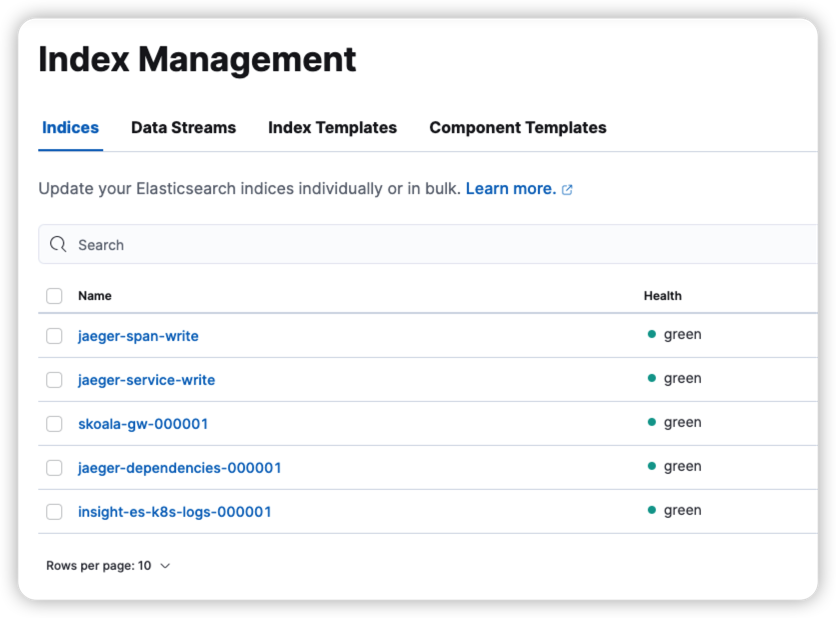
*-write in this figure is an alias, such as jaeger-span-write , which needs to be processed
View the alias rollover_alias corresponding value used in the business index template
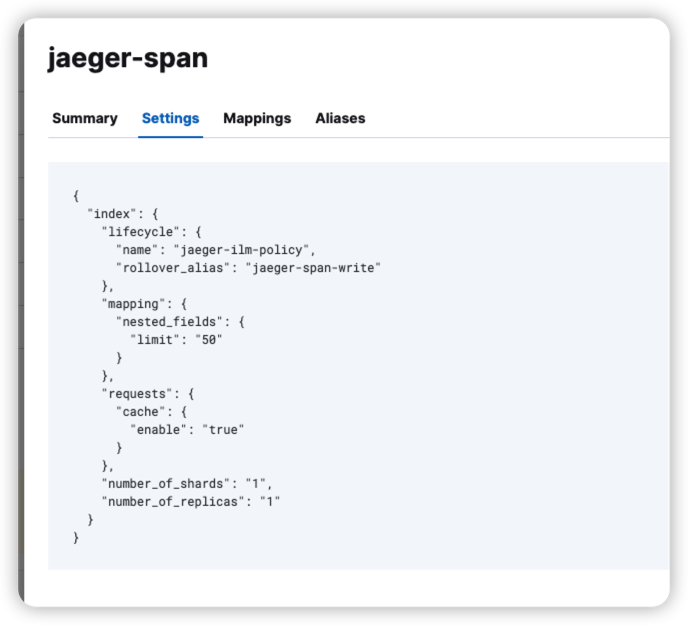
Temporary processing method: enter the es pod container and run the following script:
-
Modify the corresponding value of TEMPLATE_NAME
-
Modify the corresponding value of INDEX_ALIAS
-
You need to enter the elasticsearch pod to run the script
-
Modify the password value of the elastic user inside (ES_PASSWORD=xxxx)
#!/bin/bash
**Add a template/policy/index**
TEMPLATE_NAME=insight-es-k8s-logs
INDEX_ALIAS="${TEMPLATE_NAME}-alias"
ES_PASSWORD="DaoCloud"
ES_URL=https://localhost:9200
while [[ "$(curl -s -o /dev/null -w '%{http_code}\n' -u elastic:${ES_PASSWORD} $ES_URL -k)" != "200" ]]; do sleep 1 ; done
curl -XDELETE -u elastic:${ES_PASSWORD} -k "$ES_URL/${INDEX_ALIAS}"
curl -XPUT -u elastic:${ES_PASSWORD} -k "$ES_URL/${TEMPLATE_NAME}-000001" -H 'Content-Type: application/json' -d'{"aliases": {'\""${ INDEX_ALIAS}"\"':{"is_write_index": true }}}'
Note: This script has a certain chance of failure, depending on the data writing speed, as a temporary solution.
In the real situation, it is necessary to stop the writing of the data source, and then run the above method.
Error setting GoMAXPROCS for operator
error message
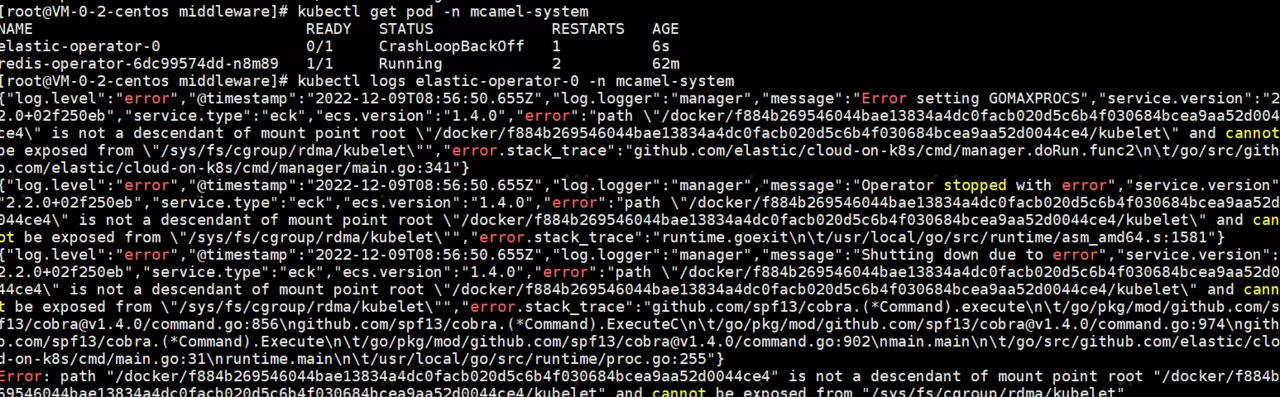
Environmental information:
Solution
Upgrade your version:
Error terminating due to java.lang.OutOfMemoryError: Java heap space
The complete error message is as follows:
{"type": "server", "timestamp": "2023-01-04T14:44:05,920Z", "level": "WARN", "component": "o.e.d.PeerFinder", "cluster.name": "gsc-cluster-1-master-es", "node.name": "gsc-cluster-1-master-es-es-data-0", "message": "address [127.0.0.1:9305], node [null], requesting [false] connection failed: [][127.0.0.1:9305] connect_exception: Connection refused: /127.0.0.1:9305: Connection refused", "cluster.uuid": "JOa0U_Q6T7WT60SPYiR1Ig", "node.id": "_zlorWVeRbyrUMYf9wJgfQ"  }
{"type": "server", "timestamp": "2023-01-04T14:44:06,379Z", "level": "WARN", "component": "o.e.m.j.JvmGcMonitorService", "cluster.name": "gsc-cluster-1-master-es", "node.name": "gsc-cluster-1-master-es-es-data-0", "message": "[gc][15375] overhead, spent [1.3s] collecting in the last [1.3s]", "cluster.uuid": "JOa0U_Q6T7WT60SPYiR1Ig", "node.id": "_zlorWVeRbyrUMYf9wJgfQ"  }
{"timestamp": "2023-01-04T14:44:06+00:00", "message": "readiness probe failed", "curl_rc": "28"}
java.lang.OutOfMemoryError: Java heap space
Dumping heap to data/java_pid7.hprof ...
{"timestamp": "2023-01-04T14:44:11+00:00", "message": "readiness probe failed", "curl_rc": "28"}
{"timestamp": "2023-01-04T14:44:14+00:00", "message": "readiness probe failed", "curl_rc": "28"}
{"timestamp": "2023-01-04T14:44:17+00:00", "message": "readiness probe failed", "curl_rc": "28"}
{"timestamp": "2023-01-04T14:44:21+00:00", "message": "readiness probe failed", "curl_rc": "28"}
{"timestamp": "2023-01-04T14:44:26+00:00", "message": "readiness probe failed", "curl_rc": "28"}
{"timestamp": "2023-01-04T14:44:31+00:00", "message": "readiness probe failed", "curl_rc": "28"}
Heap dump file created [737115702 bytes in 25.240 secs]
Terminating due to java.lang.OutOfMemoryError: Java heap space
Solution
If conditions permit, resource and capacity planning can be carried out.
Error during Elasticsearch installation in OCP environment: Operation not permitted
error message

Solution
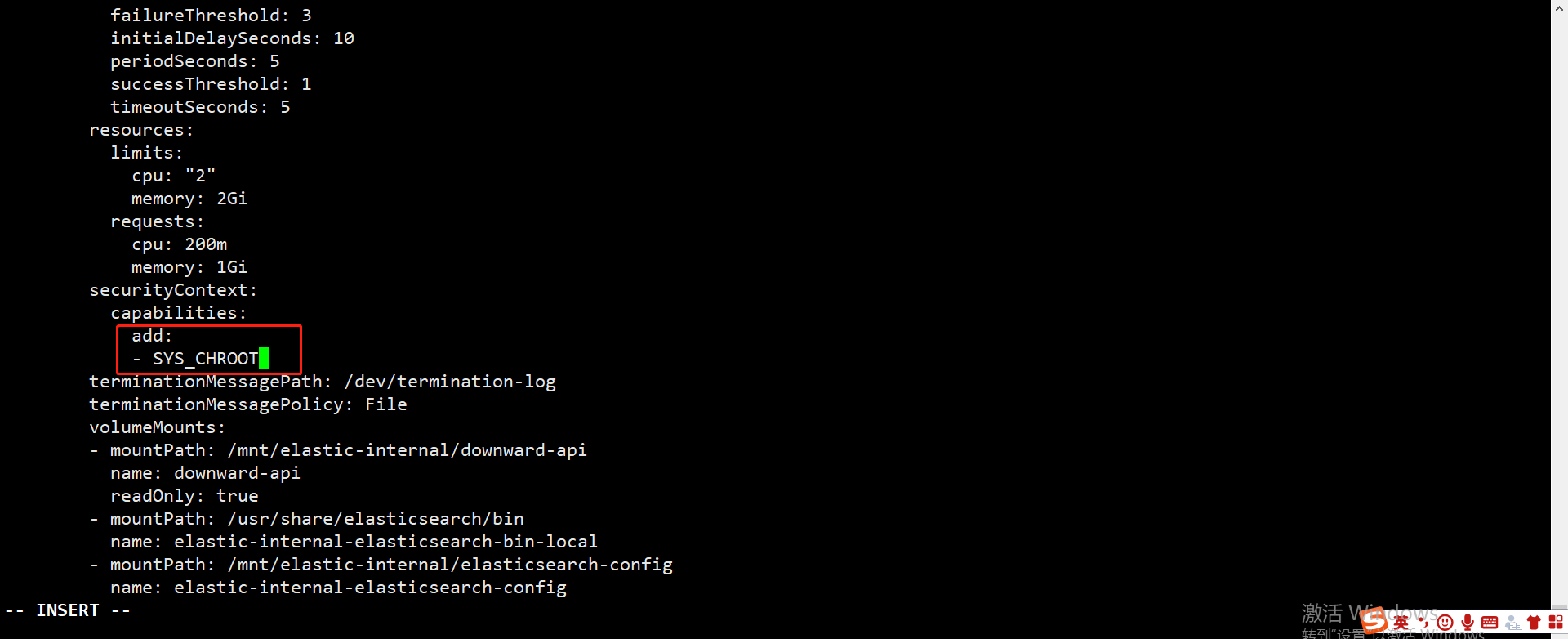
One node has abnormal disk read throughput and high CPU workload
Exceptions
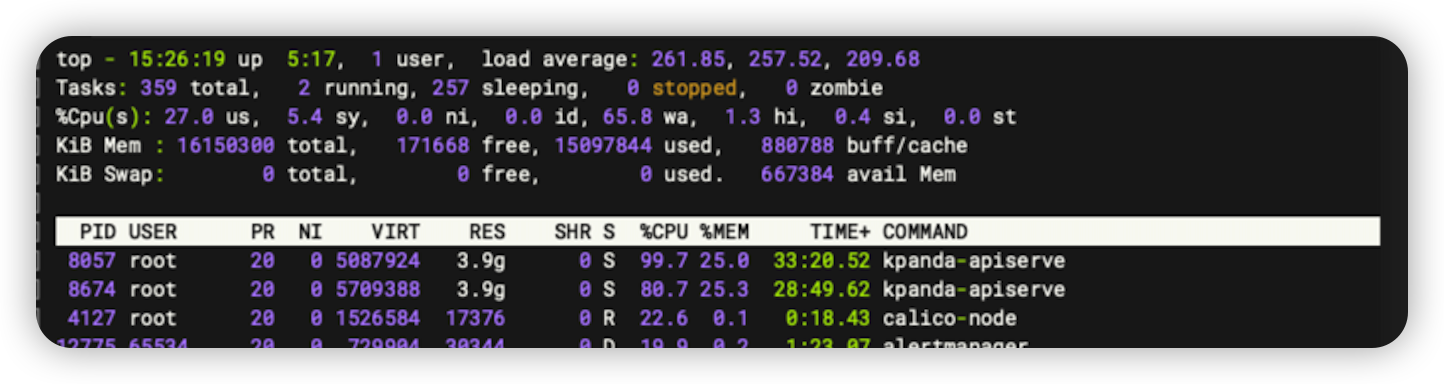
Solution
If es is on this node, the ES process can be killed and restored.
Error status:429 when writing data to Elasticsearch
The complete error message is as follows:
[2023/03/23 09:47:16] [error] [output:es:es.kube.kubeevent.syslog] error: Output
{"took":0,"errors":true,"items":[{"create":{"_index":"insight-es-k8s-logs-000067","_type":"_doc","_id ":"MhomDIcBLVS7yRloG6PF","status":429,"error":{"type":"es_rejected_execution_exception","reason":"rejected execution of org.elasticsearch.action.support.replication.TransportWriteAction$1/WrappedActionListener{org. elasticsearch.action.support.replication.ReplicationOperation$$Lambda$7002/0x0000000801b2b3d0@16e9faf7}{org.elasticsearch.action.support.replication.ReplicationOperation$$Lambda$7003/0x0000000801b2b5f8@46 bcb787} on EsThreadPoolExecutor[name = mcamel-common-es- cluster-masters-es-data-0/write, queue capacity = 10000, org.elasticsearch.common.util.concurrent.EsThreadPoolExecutor@499b0f50[Running, pool size = 2, active threads = 2, queued tasks = 10000, completed tasks = 11472149]]"}}},{"create":{"_index":"insight-es-k8s-logs-000067","_type":"_doc","_id":"MxomDIcBLVS7yRloG6PF","status" :429,"error":{"type":"es_rejected_execution_exception","reason":"rejected execution of org.elasticsearch.action.support.replication.TransportWriteAction$1/WrappedActionListener{org.elasticsearch.action.support.replication.ReplicationOperation $$Lambda$7002/0x0000000801b2b3d0@16e9faf7}{org.elasticsearch.action.support.replication.ReplicationOperation$$Lambda$7003/0x0000000801b2b5f8@46bcb787} on EsThreadPoolExecutor[name = mcamel -common-es-cluster-masters-es-data-0 /write, queue capacity = 10000, org.elasticsearch.common.util.concurrent.EsThreadPoolExecutor@499b0f50[Running, pool size = 2, active threads = 2, queued tasks = 10000, completed tasks = 11472149]]"}} }, {"create":{"_index":"insight-es-k8s-logs-000067","_type":"_doc","_id":"NBomDIcBLVS7yRloG6PF","status":429,"error":{" type":"es_rejected_execution_exception","reason":"rejected execution of org.elasticsearch.action.support.replication.TransportWriteAction$1/WrappedActionListener{org.elasticsearch.action.support.replication.ReplicationOperation$$Lambda$7002/0x000000 0801b2b3d0@16e9faf7} {org.elasticsearch.action.support.replication.ReplicationOperation$$Lambda$7003/0x0000000801b2b5f8@46bcb787} on EsThreadPoolExecutor[name = mcamel-common-es-cluster-masters-es-data-0/write, queue capacity = 10000 , org .elasticsearch.common.util.concurrent.EsThreadPoolExecutor@499b0f50[Running, pool size = 2, active threads = 2, queued tasks = 10000, completed tasks = 11472149]]"}}}]}
Solution
-
Method 1: The reason for the 429 error is that the writing concurrency of Elasticsearch is too large, and Elasticsearch is too late to deal with it. You can properly reduce the writing concurrency and control the amount of writing.
-
Method 2: If resources permit, the queue size can be appropriately increased
Method 1 and method 2 can be used together.
AI Lab
For more questions, refer to Troubleshooting.
Cluster not found in AI Lab dropdown list
Symptom
In the AI Lab Developer and Operator UI, the desired cluster cannot be found in the drop-down list while you search for a cluster.
Analysis
If the desired cluster is missing from the cluster drop-down list in AI Lab, it could be due to the following reasons:
- The
baize-agentis not installed or failed to install, causing AI Lab to be unable to retrieve cluster information. - The cluster name was not configured when installing
baize-agent, causing AI Lab to be unable to retrieve cluster information. - Observable components within the worker cluster are abnormal, leading to the inability to collect metrics information from the cluster.
Solution
baize-agent not installed or failed to install
AI Lab requires some basic components to be installed in each worker cluster. If the baize-agent is not installed in the worker cluster, you can choose to install it via UI, which might lead to some unexpected errors.
Therefore, to ensure a good user experience, the selectable cluster range only includes clusters where the baize-agent has been successfully installed.
If the issue is due to the baize-agent not being installed or installation failure, use the following steps:
Container Management -> Clusters -> Helm Apps -> Helm Charts , find baize-agent and install it.
Note
Quickly jump to this address: https://<dce_host>/kpanda/clusters/<cluster_name>/helm/charts/addon/baize-agent. Note to replace <dce_host> with the actual console address, and <cluster_name> with the actual cluster name.
Cluster name not configured in the process of installing baize-agent
When installing baize-agent, ensure to configure the cluster name. This name will be used for Insight metrics collection and is empty by default, requiring manual configuration .
Insight components in the worker cluster are abnormal
If the Insight components in the cluster are abnormal, it might cause AI Lab to be unable to retrieve cluster information. Check if the platform's Insight services are running and configured correctly.
- Check if the insight-server component is running properly in the Global Service Cluster.
- Check if the insight-agent component is running properly in the worker cluster.
AI Lab Notebook not controlled by queue quotas
In the AI Lab module, when users create a Notebook, they find that even if the selected queue lacks resources, the Notebook can still be created successfully.
Issue 01: Unsupported Kubernetes Version
-
Analysis:
The queue management capability in AI Lab is provided by Kueue, and the Notebook service is provided through JupyterHub. JupyterHub has high requirements for the Kubernetes version. For versions below v1.27, even if queue quotas are set, and users select the quota when creating a Notebook, the Notebook will not actually be restricted by the queue quota.
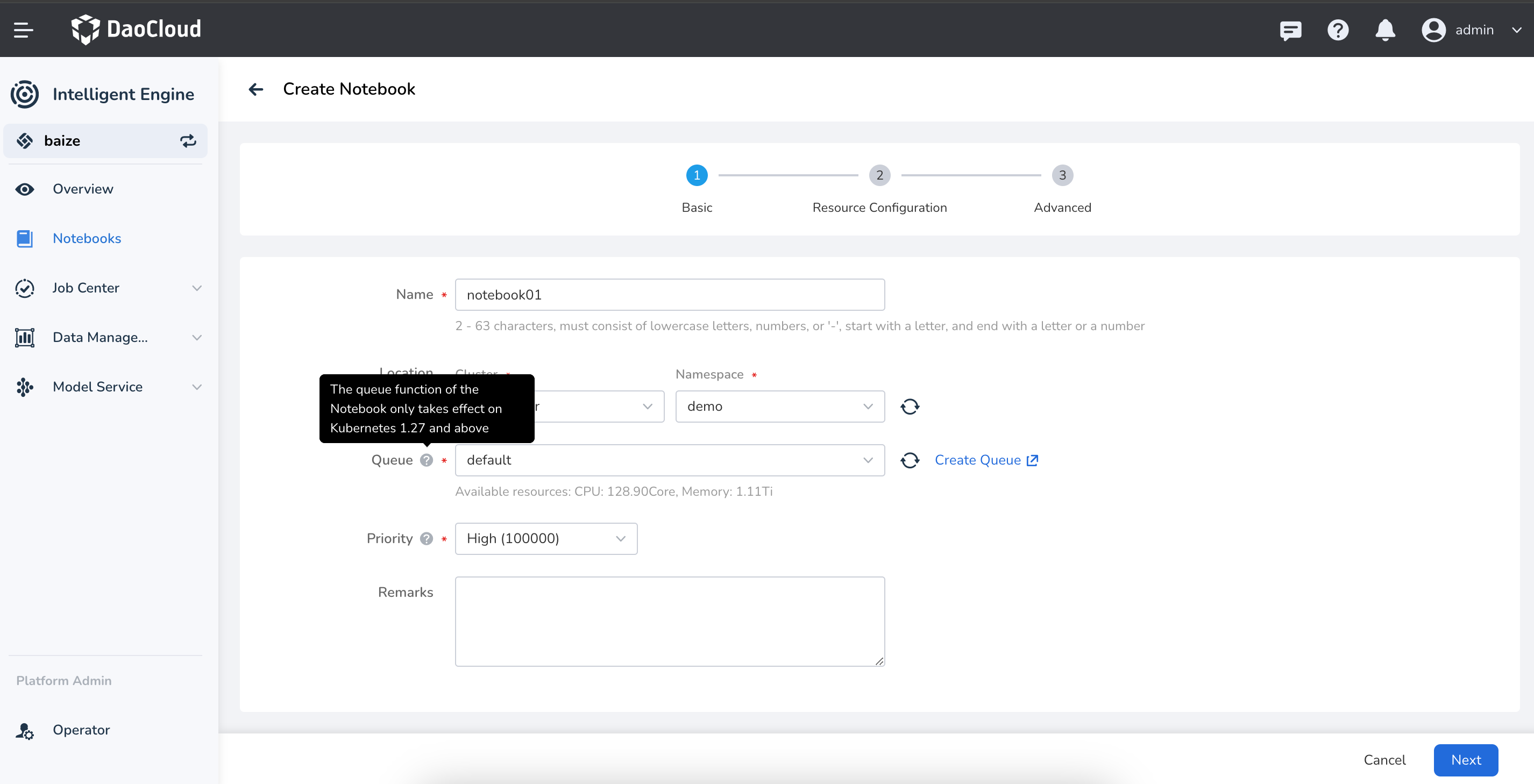
-
Solution: Plan in advance. It is recommended to use Kubernetes version
v1.27or above in the production environment. -
Reference: Jupyter Notebook Documentation
Issue 02: Configuration Not Enabled
-
Analysis:
When the Kubernetes cluster version is greater than v1.27, the Notebook still cannot be restricted by the queue quota.
This is because Kueue needs to have support for
enablePlainPodenabled to take effect for the Notebook service.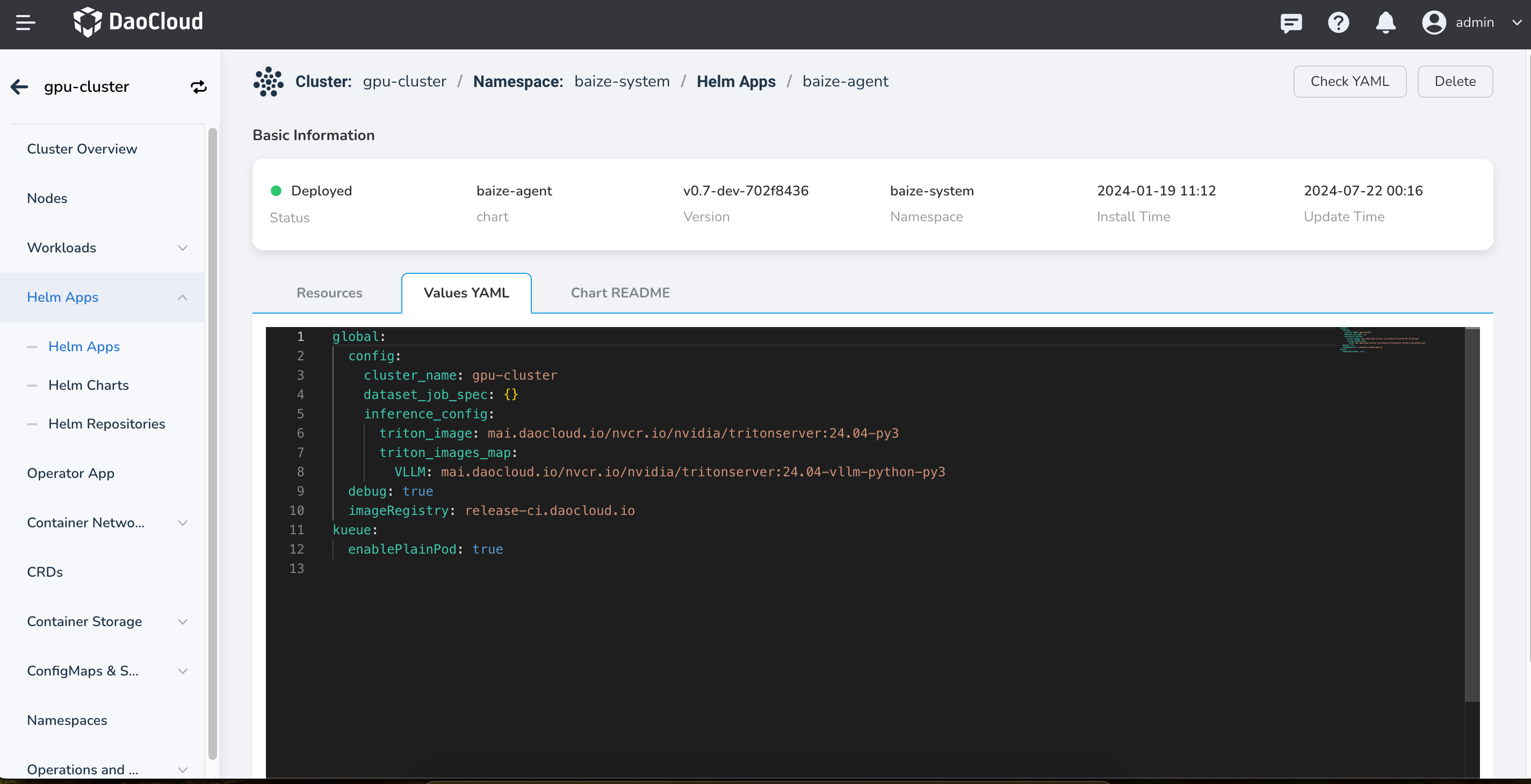
-
Solution: When deploying
baize-agentin the worker cluster, enable Kueue support forenablePlainPod. -
Reference: Run Plain Pods as a Kueue-Managed Job
AI Lab queue initialization failed
Issue Description
When creating a Notebook, training task, or inference service, if the queue is being used for the first time in that namespace, there will be a prompt to initialize the queue with one click. However, the initialization fails.
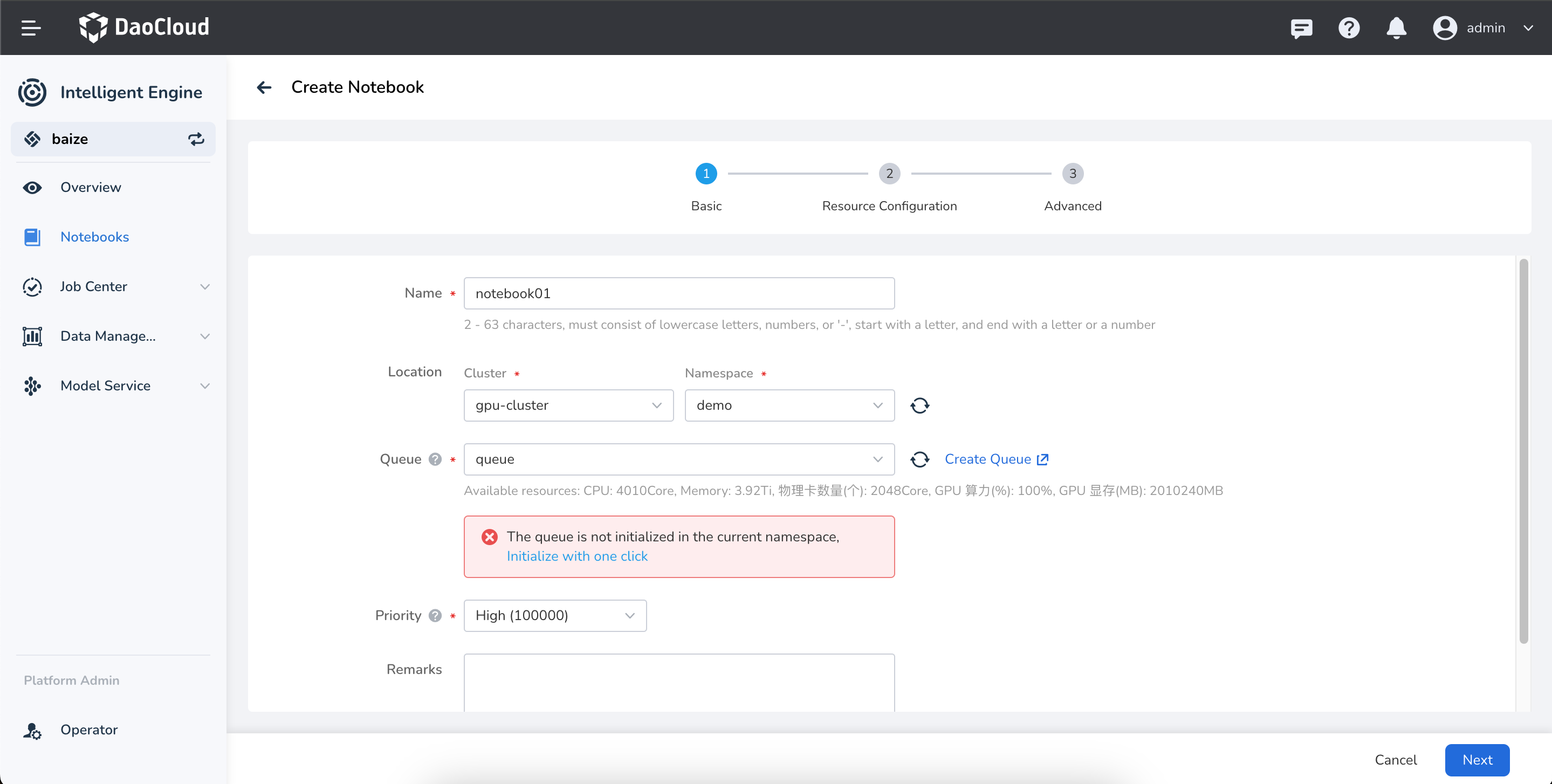
Issue Analysis
In the AI Lab environment, the queue management capability is provided by Kueue. Kueue provides two types of queue management resources:
- ClusterQueue: A cluster-level queue mainly used to manage resource quotas within the queue, including CPU, memory, and GPU.
- LocalQueue: A namespace-level queue that needs to point to a ClusterQueue for resource allocation within the queue.
In the AI Lab environment, if a service is created and the specified namespace does not have a LocalQueue, there will be a prompt to initialize the queue.
In rare cases, the LocalQueue initialization might fail due to special reasons.
Solution
Check if Kueue is running normally. If the kueue-controller-manager is not running, you can check it with the following command:
If the kueue-controller-manager is not running properly, fix Kueue first.
References
Global Management
For more questions, refer to Global Management FAQs.
Why can't istio-ingressgateway start after restarting the cluster (virtual machine)?
The error message is as shown in the following image:

Possible cause: The jwtsUri address of the RequestAuthentication CR cannot be accessed, causing istiod to be unable to push the configuration to istio-ingressgateway (This bug can be avoided in Istio 1.15: https://github.com/istio/istio/pull/39341/).
Solution:
-
Back up the RequestAuthentication ghippo CR.
-
Delete the RequestAuthentication ghippo CR.
-
Restart Istio.
-
Reapply the RequestAuthentication ghippo CR.
Note
Before applying the RequestAuthentication ghippo CR, make sure that ghippo-apiserver and ghippo-keycloak are started correctly.
Login infinite loop, error 401 or 403
This issue occurs when the MySQL database connected to ghippo-keycloak encounters a failure, causing the OIDC Public keys to be reset.
For Global Management version 0.11.1 and above, you can follow these steps to restore normal operation by updating the Global Management configuration file using helm .
**Update helm repository**
helm repo update ghippo

**Backup ghippo parameters**
helm get values ghippo -n ghippo-system -o yaml > ghippo-values-bak.yaml

**Get the current deployed ghippo version**
version=$(helm get notes ghippo -n ghippo-system | grep "Chart Version" | awk -F ': ' '{ print $2 }')

**Perform the update operation to make the configuration file take effect**
helm upgrade ghippo ghippo/ghippo \
-n ghippo-system \
-f ./ghippo-values-bak.yaml \
--version ${version}
Keycloak cannot start
Common Issues
Symptoms
MySQL is ready with no errors. After installing the global management, Keycloak fails to start (more than 10 times).

Checklist
- If the database is MySQL, check if the Keycloak database encoding is UTF8.
- Check the network connection from Keycloak to the database, ensure the database resources are sufficient, including but not limited to resource limits, storage space, and physical machine resources.
Troubleshooting Steps
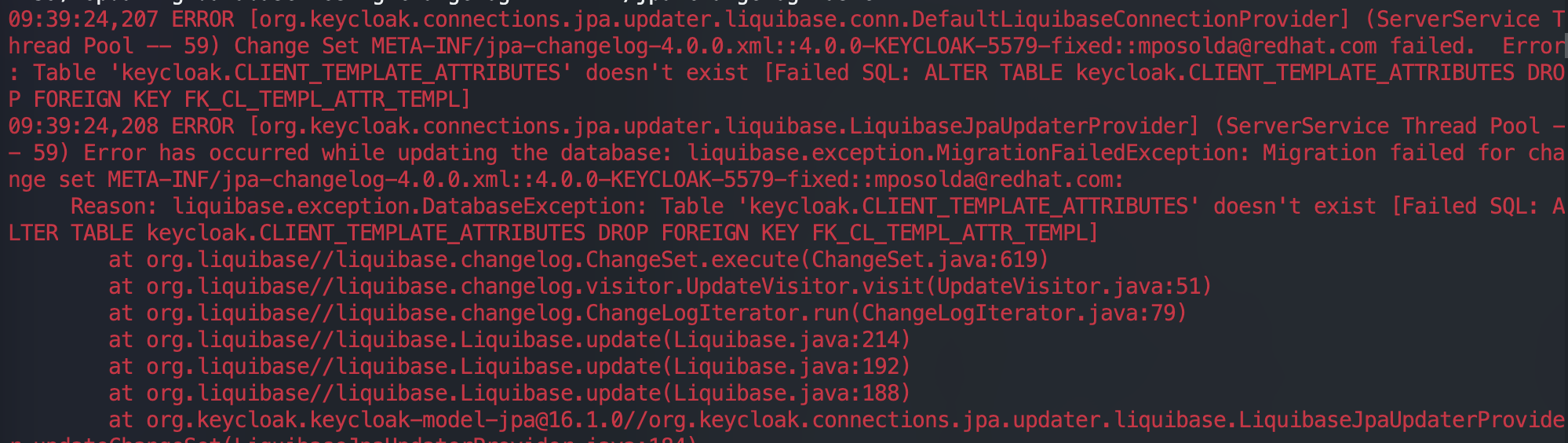
- Check if MySQL resource usage has reached the limit
- Check if the number of tables in the MySQL database keycloak is 95. (The number of tables may vary across different versions of Keycloak, so you can compare it with the number of tables in the Keycloak database of the same version in development or testing environments). If the number is fewer, it indicates that there may be an issue with the database table initialization (The command to check the number of tables is: show tables;).
- Delete and recreate the Keycloak database with the command CREATE DATABASE IF NOT EXISTS keycloak CHARACTER SET utf8
- Restart the Keycloak Pod to resolve the issue
CPU does not support ×86-64-v2
Symptoms
Keycloak cannot start normally, the Keycloak pod is in the CrashLoopBackOff state, and the Keycloak log shows:
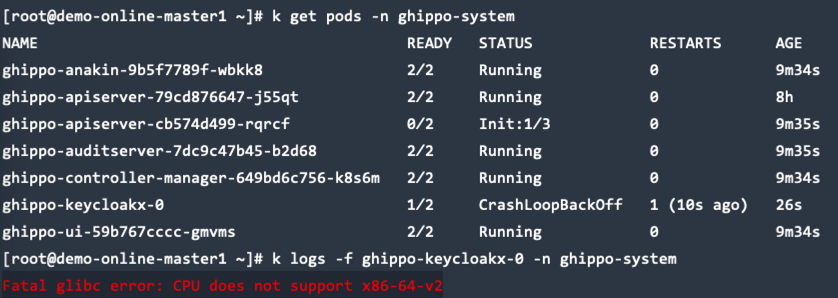
Checklist
Run the following script to check the supported CPU types:
cat <<"EOF" > detect-cpu.sh
#!/bin/sh -eu

flags=$(cat /proc/cpuinfo | grep flags | head -n 1 | cut -d: -f2)

supports_v2='awk "/cx16/&&/lahf/&&/popcnt/&&/sse4_1/&&/sse4_2/&&/ssse3/ {found=1} END {exit !found}"'
supports_v3='awk "/avx/&&/avx2/&&/bmi1/&&/bmi2/&&/f16c/&&/fma/&&/abm/&&/movbe/&&/xsave/ {found=1} END {exit !found}"'
supports_v4='awk "/avx512f/&&/avx512bw/&&/avx512cd/&&/avx512dq/&&/avx512vl/ {found=1} END {exit !found}"'

echo "$flags" | eval $supports_v2 || exit 2 && echo "CPU supports x86-64-v2"
echo "$flags" | eval $supports_v3 || exit 3 && echo "CPU supports x86-64-v3"
echo "$flags" | eval $supports_v4 || exit 4 && echo "CPU supports x86-64-v4"
EOF

chmod +x detect-cpu.sh
sh detect-cpu.sh
Execute the command below to check the current CPU features. If the output contains sse4_2, it indicates that your processor supports SSE 4.2.
Solution You need to upgrade your virtual machine or physical machine CPU to support x86-64-v2 and above, ensuring that the x86 CPU instruction set supports SSE4.2. For details on how to upgrade, you should consult your virtual machine platform provider or your physical machine provider.
For more information, see: https://github.com/keycloak/keycloak/issues/17290
Upgrade fails when upgrading global management alone
CRD Not Updated Error
If the upgrade fails and includes the following message, you can refer to the Offline Upgrade section to complete the installation of CRDs by following the steps for updating the ghippo crd.
Database Migration Error
Symptoms
Pod fails to start, and the following log message appears:
Causes
This error usually occurs due to issues such as abnormal environment conditions, inconsistent database state, or SQL syntax errors. The real database error message is only output the first time the Pod reports the failure; subsequent restarts will show the generic “dirty database” error.
Solution
-
Log in to MySQL and select the database corresponding to the failed service (possible databases include
auditandghippo). -
Update the
dirtyfield in theschema_migrationstable: -
Restart the failed service.
-
If the SQL migration still fails after the restart, it may be due to an actual issue in the SQL statements. In this case, report a bug and contact the development team for resolution.
Permission Issues
For more questions, refer to Permissions of All Modules.
Container management permission description
The container management module uses the following roles:
- Admin / Kpanda Owner
- Cluster Admin
- NS Admin
- NS Editor
- NS Viewer
Note
- For more information about permissions, please refer to the Container Management Permission System Description.
- For creating, managing, and deleting roles, please refer to Role and Permission Management.
- The permissions of Cluster Admin , NS Admin , NS Editor , NS Viewer only take effect within the current cluster or namespace.
The permissions granted to each role are as follows:
| Primary Function | Secondary Function | Permission | Cluster Admin | Ns Admin | Ns Editor | NS Viewer |
|---|---|---|---|---|---|---|
| Cluster | Cluster List | View Cluster List | ✔ | ✔ | ✔ | ✔ |
| Access Cluster | ✘ | ✘ | ✘ | ✘ | ||
| Create Cluster | ✘ | ✘ | ✘ | ✘ | ||
| Cluster Operations | Enter Console | ✔ | ✔ (only in the list) | ✔ | ✘ | |
| View Monitoring | ✔ | ✘ | ✘ | ✘ | ||
| Edit Basic Configuration | ✔ | ✘ | ✘ | ✘ | ||
| Download kubeconfig | ✔ | ✔ (with ns permission) | ✔ (with ns permission) | ✔ (with ns permission) | ||
| Disconnect Cluster | ✘ | ✘ | ✘ | ✘ | ||
| View Logs | ✔ | ✘ | ✘ | ✘ | ||
| Retry | ✘ | ✘ | ✘ | ✘ | ||
| Uninstall Cluster | ✘ | ✘ | ✘ | ✘ | ||
| Cluster Overview | View Cluster Overview | ✔ | ✘ | ✘ | ✘ | |
| Node Management | Access Node | ✘ | ✘ | ✘ | ✘ | |
| View Node List | ✔ | ✘ | ✘ | ✘ | ||
| View Node Details | ✔ | ✘ | ✘ | ✘ | ||
| View YAML | ✔ | ✘ | ✘ | ✘ | ||
| Pause Scheduling | ✔ | ✘ | ✘ | ✘ | ||
| Modify Labels | ✔ | ✘ | ✘ | ✘ | ||
| Modify Annotations | ✔ | ✘ | ✘ | ✘ | ||
| Modify Taints | ✔ | ✘ | ✘ | ✘ | ||
| Remove Node | ✘ | ✘ | ✘ | ✘ | ||
| Deployment | View List | ✔ | ✔ | ✔ | ✔ | |
| View/Manage Details | ✔ | ✔ | ✔ | ✔ (view only) | ||
| Create by YAML | ✔ | ✔ | ✔ | ✘ | ||
| Create by image | ✔ | ✔ | ✔ | ✘ | ||
| Select an instance in ws bound to ns | Select image | ✔ | ✔ | ✔ | ✘ | |
| View IP Pool | ✔ | ✔ | ✔ | ✘ | ||
| Edit Network Interface | ✔ | ✔ | ✔ | ✘ | ||
| Enter Console | ✔ | ✔ | ✔ | ✘ | ||
| View Monitoring | ✔ | ✔ | ✔ | ✔ | ||
| View Logs | ✔ | ✔ | ✔ | ✔ | ||
| Load Balancer Scaling | ✔ | ✔ | ✔ | ✘ | ||
| Edit YAML | ✔ | ✔ | ✔ | ✘ | ||
| Update | ✔ | ✔ | ✔ | ✘ | ||
| Status - Pause Upgrade | ✔ | ✔ | ✔ | ✘ | ||
| Status - Stop | ✔ | ✔ | ✔ | ✘ | ||
| Status - Restart | ✔ | ✔ | ✔ | ✘ | ||
| Delete | ✔ | ✔ | ✔ | ✘ | ||
| StatefulSet | View List | ✔ | ✔ | ✔ | ✔ | |
| View/Manage Details | ✔ | ✔ | ✔ | ✔ (view only) | ||
| Create by YAML | ✔ | ✔ | ✔ | ✘ | ||
| Create by image | ✔ | ✔ | ✔ | ✘ | ||
| Select an instance in ws bound to ns | Select image | ✔ | ✔ | ✔ | ✘ | |
| Enter Console | ✔ | ✔ | ✔ | ✘ | ||
| View Monitoring | ✔ | ✔ | ✔ | ✔ | ||
| View Logs | ✔ | ✔ | ✔ | ✔ | ||
| Load Balancer Scaling | ✔ | ✔ | ✔ | ✘ | ||
| Edit YAML | ✔ | ✔ | ✔ | ✘ | ||
| Update | ✔ | ✔ | ✔ | ✘ | ||
| Status - Stop | ✔ | ✔ | ✔ | ✘ | ||
| Status - Restart | ✓ | ✓ | ✓ | ✗ | ||
| Delete | ✓ | ✓ | ✓ | ✗ | ||
| DaemonSet | View list | ✓ | ✓ | ✓ | ✓ | |
| View/Manage details | ✓ | ✓ | ✓ | ✓ (Only view) | ||
| Create by YAML | ✓ | ✓ | ✓ | ✗ | ||
| Create by image | ✓ | ✓ | ✓ | ✗ | ||
| Select an instance in ws bound to ns | Select image | ✓ | ✓ | ✓ | ✗ | |
| Go to console | ✓ | ✓ | ✓ | ✗ | ||
| Check monitor | ✓ | ✓ | ✓ | ✓ | ||
| View logs | ✓ | ✓ | ✓ | ✓ | ||
| Edit YAML | ✓ | ✓ | ✓ | ✗ | ||
| Update | ✓ | ✓ | ✓ | ✗ | ||
| Status - restart | ✓ | ✓ | ✓ | ✗ | ||
| Delete | ✓ | ✓ | ✓ | ✗ | ||
| Job | View list | ✓ | ✓ | ✓ | ✓ | |
| View/Manage details | ✓ | ✓ | ✓ | ✓ (Only view) | ||
| Create by YAML | ✓ | ✓ | ✓ | ✗ | ||
| Create by image | ✓ | ✓ | ✓ | ✗ | ||
| Instance list | ✓ | ✓ | ✓ | ✓ | ||
| Select an instance in ws bound to ns | Select image | ✓ | ✓ | ✓ | ✗ | |
| Go to console | ✓ | ✓ | ✓ | ✗ | ||
| View logs | ✓ | ✓ | ✓ | ✓ | ||
| View YAML | ✓ | ✓ | ✓ | ✓ | ||
| Restart | ✓ | ✓ | ✓ | ✗ | ||
| View event | ✓ | ✓ | ✓ | ✓ | ||
| Delete | ✓ | ✓ | ✓ | ✗ | ||
| CronJob | View list | ✓ | ✓ | ✓ | ✓ | |
| View/Manage details | ✓ | ✓ | ✓ | ✓ (Only view) | ||
| Create by YAML | ✓ | ✓ | ✓ | ✗ | ||
| Create by image | ✓ | ✓ | ✓ | ✗ | ||
| Select an instance in ws bound to ns | Select image | ✓ | ✓ | ✓ | ✗ | |
| Edit YAML | ✓ | ✓ | ✓ | ✗ | ||
| Stop | ✓ | ✓ | ✓ | ✗ | ||
| View jobs | ✓ | ✓ | ✓ | ✓ | ||
| View event | ✓ | ✓ | ✓ | ✓ | ||
| Delete | ✓ | ✓ | ✓ | ✗ | ||
| Pod | View list | ✓ | ✓ | ✓ | ✓ | |
| View/Manage details | ✓ | ✓ | ✓ | ✓ (Only view) | ||
| Go to console | ✓ | ✓ | ✓ | ✗ | ||
| Check monitor | ✓ | ✓ | ✓ | ✓ | ||
| View logs | ✓ | ✓ | ✓ | ✓ | ||
| View YAML | ✓ | ✓ | ✓ | ✓ | ||
| Upload file | ✓ | ✓ | ✓ | ✗ | ||
| Download file | ✓ | ✓ | ✓ | ✗ | ||
| View containers | ✓ | ✓ | ✓ | ✓ | ||
| View event | ✓ | ✓ | ✓ | ✓ | ||
| Delete | ✓ | ✓ | ✓ | ✗ | ||
| ReplicaSet | View list | ✓ | ✓ | ✓ | ✓ | |
| View/Manage details | ✓ | ✓ | ✓ | ✓ (Only view) | ||
| Go to console | ✓ | ✓ | ✓ | ✗ | ||
| Check monitor | ✓ | ✓ | ✓ | ✓ | ||
| View logs | ✓ | ✓ | ✓ | ✓ | ||
| View YAML | ✓ | ✓ | ✓ | ✓ | ||
| Delete | ✓ | ✓ | ✓ | ✗ | ||
| Helm app | View list | ✓ | ✓ | ✓ | ✓ | |
| View/Manage details | ✓ | ✓ | ✓ | ✓ (Only view) | ||
| Update | ✓ | ✓ | ✓ | ✗ | ||
| View YAML | ✓ | ✓ | ✓ | ✓ | ||
| Delete | ✓ | ✓ | ✓ | ✗ | ||
| Helm chart | View list | ✓ | ✓ | ✓ | ✓ | |
| View details | ✓ | ✓ | ✓ | ✓ | ||
| Install chart | ✓ | ✓ (Fine for ns level) | ✗ | ✗ | ||
| Download chart | ✓ | ✓ | ✓ (Consistent with viewing interface) | ✓ | ||
| Helm repo | View list | ✓ | ✓ | ✓ | ✓ | |
| Create repo | ✓ | ✗ | ✗ | ✗ | ||
| Update repo | ✓ | ✗ | ✗ | ✗ | ||
| Clone repo | ✓ | ✗ | ✗ | ✗ | ||
| Refresh repo | ✓ | ✗ | ✗ | ✗ | ||
| Modify label | ✓ | ✗ | ✗ | ✗ | ||
| Modify annotation | ✓ | ✗ | ✗ | ✗ | ||
| Delete | ✓ | ✗ | ✗ | ✗ | ||
| Service | View list | ✓ | ✓ | ✓ | ✓ | |
| View/Manage details | ✓ | ✓ | ✓ | ✓ (Only view) | ||
| Create by YAML | ✓ | ✓ | ✓ | ✗ | ||
| Create | ✓ | ✓ | ✓ | ✗ | ||
| Update | ✓ | ✓ | ✓ | ✗ | ||
| View event | ✓ | ✓ | ✓ | ✓ | ||
| Edit YAML | ✓ | ✓ | ✓ | ✗ | ||
| Delete | ✓ | ✓ | ✓ | ✗ | ||
| Ingress | View list | ✓ | ✓ | ✓ | ✓ | |
| View/Manage details | ✓ | ✓ | ✓ | ✓ (Only view) | ||
| Create by YAML | ✓ | ✓ | ✓ | ✗ | ||
| Create | ✓ | ✓ | ✓ | ✗ | ||
| Update | ✓ | ✓ | ✓ | ✗ | ||
| View event | ✓ | ✓ | ✓ | ✓ | ||
| Edit YAML | ✓ | ✓ | ✓ | ✗ | ||
| Delete | ✓ | ✓ | ✓ | ✗ | ||
| Network policy | View list | ✓ | ✓ | ✓ | ✓ | |
| View/Manage details | ✓ | ✓ | ✓ | ✗ | ||
| Create by YAML | ✓ | ✓ | ✓ | ✗ | ||
| Create | ✓ | ✓ | ✓ | ✗ | ||
| Delete | ✓ | ✓ | ✓ | ✗ | ||
| Network config | Config | ✓ | ✓ | ✓ | ✗ | |
| CRD | View list | ✓ | ✗ | ✗ | ✗ | |
| View/Manage details | ✓ | ✗ | ✗ | ✗ | ||
| Create by YAML | ✓ | ✗ | ✗ | ✗ | ||
| Edit YAML | ✓ | ✗ | ✗ | ✗ | ||
| Delete | ✓ | ✗ | ✗ | ✗ | ||
| PVC | View list | ✓ | ✓ | ✓ | ✓ | |
| View/Manage details | ✓ | ✓ | ✓ | ✓ (Only view) | ||
| Create | ✓ | ✓ | ✓ | ✗ | ||
| Select sc | ✓ | ✓ | ✓ | ✗ | ||
| Create by YAML | ✓ | ✓ | ✓ | ✗ | ||
| Edit YAML | ✓ | ✓ | ✓ | ✗ | ||
| Clone | ✓ | ✓ | ✓ | ✗ | ||
| Delete | ✓ | ✓ | ✓ | ✗ | ||
| PV | View list | ✓ | ✗ | ✗ | ✗ | |
| View/Manage details | ✓ | ✗ | ✗ | ✗ | ||
| Create by YAML | ✓ | ✗ | ✗ | ✗ | ||
| Create | ✓ | ✗ | ✗ | ✗ | ||
| Edit YAML | ✓ | ✗ | ✗ | ✗ | ||
| Update | ✓ | ✗ | ✗ | ✗ | ||
| Clone | ✓ | ✗ | ✗ | ✗ | ||
| Modify label | ✓ | ✗ | ✗ | ✗ | ||
| Modify annotation | ✓ | ✗ | ✗ | ✗ | ||
| Delete | ✓ | ✗ | ✗ | ✗ | ||
| SC | View list | ✓ | ✗ | ✗ | ✗ | |
| Create by YAML | ✓ | ✗ | ✗ | ✗ | ||
| Create | ✓ | ✗ | ✗ | ✗ | ||
| View YAML | ✓ | ✗ | ✗ | ✗ | ||
| Update | ✓ | ✗ | ✗ | ✗ | ||
| Authorize NS | ✓ | ✗ | ✗ | ✗ | ||
| Deauthorize | ✓ | ✗ | ✗ | ✗ | ||
| Delete | ✓ | ✗ | ✗ | ✗ | ||
| ConfigMap | View list | ✓ | ✓ | ✓ | ✓ | |
| View/Manage details | ✓ | ✓ | ✓ | ✓ (Only view) | ||
| Create by YAML | ✓ | ✓ | ✓ | ✗ | ||
| Create | ✓ | ✓ | ✓ | ✗ | ||
| Edit YAML | ✓ | ✓ | ✓ | ✗ | ||
| Update | ✓ | ✓ | ✓ | ✗ | ||
| Export ConfigMap | ✓ | ✓ | ✓ | ✗ | ||
| Delete | ✓ | ✓ | ✓ | ✗ | ||
| Secret | View list | ✓ | ✓ | ✓ | ✗ | |
| View/Manage details | ✓ | ✓ | ✓ | ✗ | ||
| Create by YAML | ✓ | ✓ | ✓ | ✗ | ||
| Create | ✓ | ✓ | ✓ | ✗ | ||
| Edit YAML | ✓ | ✓ | ✓ | ✗ | ||
| Update | ✓ | ✓ | ✓ | ✗ | ||
| Export secret | ✓ | ✓ | ✓ | ✗ | ||
| Delete | ✓ | ✓ | ✓ | ✗ | ||
| Namespace | View list | ✓ | ✓ | ✓ | ✓ | |
| View/Manage details | ✓ | ✓ | ✓ | ✓ (Only view) | ||
| Create by YAML | ✓ | ✗ | ✗ | ✗ | ||
| Create | ✓ | ✗ | ✗ | ✗ | ||
| View YAML | ✓ | ✓ | ✓ | ✗ | ||
| Modify label | ✓ | ✓ | ✗ | ✗ | ||
| Unbind WS | ✗ | ✗ | ✗ | ✗ | ||
| Bind WS | ✗ | ✗ | ✗ | ✗ | ||
| Quotas | ✓ | ✗ | ✗ | ✗ | ||
| Delete | ✓ | ✗ | ✗ | ✗ | ||
| Cluster operation | View list | ✓ | ✗ | ✗ | ✗ | |
| View YAML | ✓ | ✗ | ✗ | ✗ | ||
| View logs | ✓ | ✗ | ✗ | ✗ | ||
| Delete | ✓ | ✗ | ✗ | ✗ | ||
| Helm operation | Set preserved entries | ✓ | ✗ | ✗ | ✗ | |
| View YAML | ✓ | ✓ | ✗ | ✗ | ||
| View logs | ✓ | ✓ | ✗ | ✗ | ||
| Delete | ✓ | ✓ | ✗ | ✗ | ||
| Cluster upgrade | View details | ✓ | ✗ | ✗ | ✗ | |
| Upgrade | ✗ | ✗ | ✗ | ✗ | ||
| Cluster settings | Addon config | ✓ | ✗ | ✗ | ✗ | |
| Advanced config | ✓ | ✗ | ✗ | ✗ | ||
| Namespace | View list | ✓ | ✓ | ✓ | ✓ | |
| Create | ✓ | ✗ | ✗ | ✗ | ||
| View/Manage details | ✓ | ✓ | ✓ | ✓ | ||
| View YAML | ✓ | ✓ | ✓ | ✗ | ||
| Modify label | ✓ | ✓ | ✗ | ✗ | ||
| Bind WS | ✓ | ✗ | ✗ | ✗ | ||
| Quotas | ✓ | ✗ | ✗ | ✗ | ||
| Delete | ✓ | ✗ | ✗ | ✗ | ||
| Workload | Deployment | View list | ✓ | ✓ | ✓ | ✓ |
| View/Manage details | ✓ | ✓ | ✓ | ✓ (Only view) | ||
| Go to console | ✓ | ✓ | ✓ | ✗ | ||
| Check monitor | ✓ | ✓ | ✓ | ✓ | ||
| View logs | ✓ | ✓ | ✓ | ✓ | ||
| Workload scaling | ✓ | ✓ | ✓ | ✗ | ||
| Edit YAML | ✓ | ✓ | ✓ | ✗ | ||
| Update | ✓ | ✓ | ✓ | ✗ | ||
| Status - Pause Upgrade | ✓ | ✓ | ✓ | ✗ | ||
| Status - Stop | ✓ | ✓ | ✓ | ✗ | ||
| Status - restart | ✓ | ✓ | ✓ | ✗ | ||
| Revert | ✓ | ✓ | ✓ | ✗ | ||
| Modify label and annotation | ✓ | ✓ | ✓ | ✗ | ||
| Delete | ✓ | ✓ | ✓ | ✗ | ||
| StatefulSet | View list | ✓ | ✓ | ✓ | ✓ | |
| View/Manage details | ✓ | ✓ | ✓ | ✓ (Only view) | ||
| Go to console | ✓ | ✓ | ✓ | ✗ | ||
| Check monitor | ✓ | ✓ | ✓ | ✓ | ||
| View logs | ✓ | ✓ | ✓ | ✓ | ||
| Workload scaling | ✓ | ✓ | ✓ | ✗ | ||
| Edit YAML | ✓ | ✓ | ✓ | ✗ | ||
| Update | ✓ | ✓ | ✓ | ✗ | ||
| Status - Stop | ✓ | ✓ | ✓ | ✗ | ||
| Status - restart | ✓ | ✓ | ✓ | ✗ | ||
| Delete | ✓ | ✓ | ✓ | ✗ | ||
| DaemonSet | View list | ✓ | ✓ | ✓ | ✓ | |
| View/Manage details | ✓ | ✓ | ✓ | ✓ (Only view) | ||
| Go to console | ✓ | ✓ | ✓ | ✗ | ||
| Check monitor | ✓ | ✓ | ✓ | ✓ | ||
| View logs | ✓ | ✓ | ✓ | ✓ | ||
| Edit YAML | ✓ | ✓ | ✓ | ✗ | ||
| Update | ✓ | ✓ | ✓ | ✗ | ||
| Status - restart | ✓ | ✓ | ✓ | ✗ | ||
| Delete | ✓ | ✓ | ✓ | ✗ | ||
| Job | View list | ✓ | ✓ | ✓ | ✓ | |
| View/Manage details | ✓ | ✓ | ✓ | ✓ (Only view) | ||
| Go to console | ✓ | ✓ | ✓ | ✗ | ||
| View logs | ✓ | ✓ | ✓ | ✓ | ||
| View YAML | ✓ | ✓ | ✓ | ✗ | ||
| Restart | ✓ | ✓ | ✓ | ✗ | ||
| View event | ✓ | ✓ | ✓ | ✓ | ||
| Delete | ✓ | ✓ | ✓ | ✗ | ||
| CronJob | View list | ✓ | ✓ | ✓ | ✓ | |
| View/Manage details | ✓ | ✓ | ✓ | ✓ (Only view) | ||
| View event | ✓ | ✓ | ✓ | ✓ | ||
| Delete | ✓ | ✓ | ✓ | ✗ | ||
| Pod | View list | ✓ | ✓ | ✓ | ✓ | |
| View/Manage details | ✓ | ✓ | ✓ | ✓ (Only view) | ||
| Go to console | ✓ | ✓ | ✓ | ✗ | ||
| Check monitor | ✓ | ✓ | ✓ | ✓ | ||
| View logs | ✓ | ✓ | ✓ | ✓ | ||
| View YAML | ✓ | ✓ | ✓ | ✓ | ||
| Upload file | ✓ | ✓ | ✓ | ✗ | ||
| Download file | ✓ | ✓ | ✓ | ✗ | ||
| View containers | ✓ | ✓ | ✓ | ✓ | ||
| View event | ✓ | ✓ | ✓ | ✓ | ||
| Delete | ✓ | ✓ | ✓ | ✗ | ||
| Backup and Restore | App backup | View list | ✓ | ✗ | ✗ | ✗ |
| View/Manage details | ✓ | ✗ | ✗ | ✗ | ||
| Create backup schedule | ✓ | ✗ | ✗ | ✗ | ||
| View YAML | ✓ | ✗ | ✗ | ✗ | ||
| Update Schedule | ✓ | ✗ | ✗ | ✗ | ||
| Pause | ✓ | ✗ | ✗ | ✗ | ||
| Run now | ✓ | ✗ | ✗ | ✗ | ||
| Delete | ✓ | ✗ | ✗ | ✗ | ||
| Resume backup | View list | ✓ | ✗ | ✗ | ✗ | |
| View/Manage details | ✓ | ✗ | ✗ | ✗ | ||
| Resume backup | ✓ | ✗ | ✗ | ✗ | ||
| Delete | ✓ | ✗ | ✗ | ✗ | ||
| Backup point | View list | ✓ | ✗ | ✗ | ✗ | |
| Delete | ✓ | ✗ | ✗ | ✗ | ||
| Object storage | View list | ✓ | ✗ | ✗ | ✗ | |
| etcd backup | View backup policies | ✓ | ✗ | ✗ | ✗ | |
| Create backup policies | ✓ | ✗ | ✗ | ✗ | ||
| View logs | ✓ | ✗ | ✗ | ✗ | ||
| View YAML | ✓ | ✗ | ✗ | ✗ | ||
| Update backup policy | ✓ | ✗ | ✗ | ✗ | ||
| Stop/Start | ✓ | ✗ | ✗ | ✗ | ||
| Run now | ✓ | ✗ | ✗ | ✗ | ||
| View/Manage details | ✓ | ✗ | ✗ | ✗ | ||
| Delete backup records | ✓ | ✗ | ✗ | ✗ | ||
| View backup points | ✓ | ✗ | ✗ | ✗ | ||
| Cluster inspection | Cluster inspection | View list | ✓ | ✗ | ✗ | ✗ |
| View/Manage details | ✓ | ✗ | ✗ | ✗ | ||
| Cluster inspection | ✓ | ✗ | ✗ | ✗ | ||
| Settings | ✓ | ✗ | ✗ | ✗ | ||
| Permissions | Permissions | View list | ✓ | ✗ | ✗ | ✗ |
| Grant to cluster admin | ✓ | ✗ | ✗ | ✗ | ||
| Delete | ✓ | ✗ | ✗ | ✗ | ||
| NS permissions | View list | ✓ | ✓ | ✗ | ✗ | |
| Grant to ns admin | ✓ | ✓ | ✗ | ✗ | ||
| Grant to ns editor | ✓ | ✓ | ✗ | ✗ | ||
| Grant to ns viewer | ✓ | ✓ | ✗ | ✗ | ||
| Edit permissions | ✓ | ✓ | ✗ | ✗ | ||
| Delete | ✓ | ✓ | ✗ | ✗ | ||
| Security | Compliance scanning | View scanning report | ✓ | ✗ | ✗ | ✗ |
| View scanning report details | ✓ | ✗ | ✗ | ✗ | ||
| Download scanning report | ✓ | ✗ | ✗ | ✗ | ||
| Delete scanning report | ✓ | ✗ | ✗ | ✗ | ||
| View scanning policies | ✓ | ✗ | ✗ | ✗ | ||
| Create scanning policy | ✓ | ✗ | ✗ | ✗ | ||
| Delete scanning policy | ✓ | ✗ | ✗ | ✗ | ||
| View scanning config list | ✓ | ✗ | ✗ | ✗ | ||
| View scanning config details | ✓ | ✗ | ✗ | ✗ | ||
| Delete scanning config | ✓ | ✗ | ✗ | ✗ | ||
| Scan permission | View scanning reports | ✓ | ✗ | ✗ | ✗ | |
| View scanning report details | ✓ | ✗ | ✗ | ✗ | ||
| Delete scanning report | ✓ | ✗ | ✗ | ✗ | ||
| View scanning policies | ✓ | ✗ | ✗ | ✗ | ||
| Create scanning policy | ✓ | ✗ | ✗ | ✗ | ||
| Delete scanning policy | ✓ | ✗ | ✗ | ✗ | ||
| Scan vulnerability | View scanning reports | ✓ | ✗ | ✗ | ✗ | |
| View scanning report detail | ✓ | ✗ | ✗ | ✗ | ||
| Delete scanning report | ✓ | ✗ | ✗ | ✗ | ||
| View scanning policies | ✓ | ✗ | ✗ | ✗ | ||
| Create scanning policy | ✓ | ✗ | ✗ | ✗ | ||
| Delete scanning policy | ✓ | ✗ | ✗ | ✗ |
Microservices engine permission description
Microservice engine includes two parts: microservice management center and microservice gateway. The microservice engine supports three user roles:
- Workspace Admin
- Workspace Editor
- Workspace Viewer
Each role has different permissions, which are described below.
Microservice Governance Permissions
| Menu Objects | Actions | Workspace Admin | Workspace Editor | Workspace Viewer |
|---|---|---|---|---|
| Hosted Registry List | View List | ✓ | ✓ | ✓ |
| Hosted Registry | View Basic Information | ✓ | ✓ | ✓ |
| Create | ✓ | ✓ | ✗ | |
| restart | ✓ | ✓ | ✗ | |
| edit | ✓ | ✓ | ✗ | |
| delete | ✓ | ✗ | ✗ | |
| On/Off | ✓ | ✓ | ✗ | |
| Microservice Namespace | View | ✓ | ✓ | ✓ |
| Create | ✓ | ✓ | ✗ | |
| edit | ✓ | ✓ | ✗ | |
| delete | ✓ | ✓ | ✗ | |
| Microservice List | View | ✓ | ✓ | ✓ |
| filter namespace | ✓ | ✓ | ✓ | |
| Create | ✓ | ✓ | ✗ | |
| Governance | ✓ | ✓ | ✗ | |
| delete | ✓ | ✓ | ✗ | |
| Service Governance Rules-Sentinel | View | ✓ | ✓ | ✓ |
| Create | ✓ | ✓ | ✗ | |
| edit | ✓ | ✓ | ✗ | |
| delete | ✓ | ✓ | ✗ | |
| Service Governance Rules-Mesh | Governance | ✓ | ✓ | ✗ |
| Instance List | View | ✓ | ✓ | ✓ |
| On/Off | ✓ | ✓ | ✗ | |
| edit | ✓ | ✓ | ✗ | |
| Service Governance Policy-Sentinel | View | ✓ | ✓ | ✓ |
| Create | ✓ | ✓ | ✗ | |
| edit | ✓ | ✓ | ✗ | |
| delete | ✓ | ✓ | ✗ | |
| Service Governance Policy-Mesh | View | ✓ | ✓ | ✓ |
| Create | ✓ | ✓ | ✗ | |
| Create with YAML | ✓ | ✓ | ✗ | |
| edit | ✓ | ✓ | ✗ | |
| YAML Editing | ✓ | ✓ | ✗ | |
| delete | ✓ | ✓ | ✗ | |
| Microservice Configuration List | View | ✓ | ✓ | ✓ |
| filter namespace | ✓ | ✓ | ✓ | |
| Batch delete | ✓ | ✓ | ✗ | |
| Export/Import | ✓ | ✓ | ✗ | |
| Create | ✓ | ✓ | ✗ | |
| Clone | ✓ | ✓ | ✗ | |
| edit | ✓ | ✓ | ✗ | |
| History query | ✓ | ✓ | ✓ | |
| rollback | ✓ | ✓ | ✗ | |
| listen query | ✓ | ✓ | ✓ | |
| Business Monitor | View | ✓ | ✓ | ✓ |
| Resource Monitor | View | ✓ | ✓ | ✓ |
| Request Log | View | ✓ | ✓ | ✓ |
| Instance Log | View | ✓ | ✓ | ✓ |
| Plugin Center | View | ✓ | ✓ | ✓ |
| Open | ✓ | ✓ | ✗ | |
| Close | ✓ | ✓ | ✗ | |
| edit | ✓ | ✓ | ✗ | |
| View Details | ✓ | ✓ | ✓ | |
| access registry list | view | ✓ | ✓ | ✓ |
| Access | ✓ | ✓ | ✗ | |
| edit | ✓ | ✓ | ✗ | |
| Remove | ✓ | ✗ | ✗ | |
| Microservices | View List | ✓ | ✓ | ✓ |
| View Details | ✓ | ✓ | ✓ | |
| Governance | ✓ | ✓ | ✗ | |
| Service Governance Policy-Mesh | View | ✓ | ✓ | ✓ |
| Create | ✓ | ✓ | ✗ | |
| Create with YAML | ✓ | ✓ | ✗ | |
| edit | ✓ | ✓ | ✗ | |
| YAML Editing | ✓ | ✓ | ✗ | |
| delete | ✓ | ✓ | ✗ |
Microservice Gateway Permissions
| Objects | Actions | Workspace Admin | Workspace Editor | Workspace Viewer |
|---|---|---|---|---|
| Gateway List | View | ✓ | ✓ | ✓ |
| Gateway instance | View | ✓ | ✓ | ✓ |
| Create | ✓ | ✓ | ✗ | |
| edit | ✓ | ✓ | ✗ | |
| delete | ✓ | ✗ | ✗ | |
| Diagnostic Mode | View | ✓ | ✓ | ✓ |
| debug | ✓ | ✓ | ✗ | |
| Service List | View | ✓ | ✓ | ✓ |
| Add | ✓ | ✓ | ✗ | |
| edit | ✓ | ✓ | ✗ | |
| delete | ✓ | ✓ | ✗ | |
| Service Details | View | ✓ | ✓ | ✓ |
| Service Source Management | View | ✓ | ✓ | ✓ |
| Add | ✓ | ✓ | ✗ | |
| edit | ✓ | ✓ | ✗ | |
| delete | ✓ | ✓ | ✗ | |
| API List | View | ✓ | ✓ | ✓ |
| Create | ✓ | ✓ | ✗ | |
| edit | ✓ | ✓ | ✗ | |
| delete | ✓ | ✓ | ✗ | |
| Request Log | View | ✓ | ✓ | ✓ |
| Instance Log | View | ✓ | ✓ | ✓ |
| Plugin Center | View | ✓ | ✓ | ✓ |
| enable | ✓ | ✓ | ✗ | |
| disabled | ✓ | ✓ | ✗ | |
| Plugin Configuration | View | ✓ | ✓ | ✓ |
| enable | ✓ | ✓ | ✗ | |
| Domain List | View | ✓ | ✓ | ✓ |
| Add | ✓ | ✓ | ✗ | |
| edit | ✓ | ✓ | ✗ | |
| delete | ✓ | ✓ | ✓ | |
| Monitor Alert | View | ✓ | ✓ | ✓ |
Note
For a complete introduction to role and access management, please refer to Role and Access Management.
Application workbench permission description
Workbench supports three user roles:
- Workspace Admin
- Workspace Editor
- Workspace Viewer
Each role has different permissions, which are described below.
| Menu Objects | Actions | Workspace Admin | Workspace Editor | Workspace Viewer |
|---|---|---|---|---|
| Apps | View App List | ✓ | ✓ | ✓ |
| View details (jump to container management) | ✓ | ✓ | ✓ | |
| View application logs (jump to observables) | ✓ | ✓ | ✓ | |
| View application monitoring (jump to observables) | ✓ | ✓ | ✓ | |
| View RabbitMQ Details - Basic Information | ✓ | ✓ | ✓ | |
| View service mesh (jump to service mesh) | ✓ | ✓ | ✓ | |
| View microservice engine (jump to microservice engine) | ✓ | ✓ | ✓ | |
| Create App | ✓ | ✓ | ✗ | |
| Edit YAML | ✓ | ✓ | ✗ | |
| Update replica count | ✓ | ✓ | ✗ | |
| Update container image | ✓ | ✓ | ✗ | |
| Edit Pipeline | ✓ | ✓ | ✗ | |
| App Grouping | ✓ | ✓ | ✗ | |
| delete | ✓ | ✓ | ✗ | |
| Namespace | View | ✓ | ✓ | ✓ |
| Create | ✓ | ✗ | ✗ | |
| Edit Tab | ✓ | ✗ | ✗ | |
| Edit Resource Quota | ✓ | ✗ | ✗ | |
| delete | ✓ | ✗ | ✗ | |
| Pipeline | View Pipeline | ✓ | ✓ | ✓ |
| View running records | ✓ | ✓ | ✓ | |
| Create | ✓ | ✓ | ✗ | |
| run | ✓ | ✓ | ✗ | |
| delete | ✓ | ✓ | ✗ | |
| Copy | ✓ | ✓ | ✗ | |
| edit | ✓ | ✓ | ✗ | |
| cancel run | ✓ | ✓ | ✗ | |
| Credentials | View | ✓ | ✓ | ✓ |
| Create | ✓ | ✓ | ✗ | |
| edit | ✓ | ✓ | ✗ | |
| delete | ✓ | ✓ | ✗ | |
| Continuous Deployment | View | ✓ | ✓ | ✓ |
| Create | ✓ | ✓ | ✗ | |
| sync | ✓ | ✓ | ✗ | |
| edit | ✓ | ✓ | ✗ | |
| delete | ✓ | ✓ | ✓ | |
| Code repository | View | ✓ | ✓ | ✗ |
| import | ✓ | ✓ | ✗ | |
| delete | ✓ | ✓ | ✗ | |
| Grayscale release | View | ✓ | ✓ | ✓ |
| Create | ✓ | ✓ | ✗ | |
| Post | ✓ | ✓ | ✗ | |
| Continue posting | ✓ | ✓ | ✗ | |
| End of publication | ✓ | ✓ | ✗ | |
| Update | ✓ | ✓ | ✗ | |
| rollback | ✓ | ✓ | ✗ | |
| delete | ✓ | ✓ | ✗ |
Note
For a complete introduction to role and access management, please refer to Role and Access Management.
Service mesh permission description
Service Mesh supports several user roles:
- Admin
- Workspace Admin
- Workspace Editor
- Workspace Viewer
Info
Starting from installer v0.6.0, the global management module supports custom roles configuration for Service Mesh, meaning that in addition to using default system roles, custom roles can be defined and granted different permissions within Service Mesh.
The specific permissions for each role are shown in the following table.
| Menu Object | Action | Admin | Workspace Admin | Workspace Editor | Workspace Viewer |
|---|---|---|---|---|---|
| Service Mesh List | Create Mesh | ✓ | ✗ | ✗ | ✗ |
| Edit Mesh | ✓ | ✓ | ✗ | ✗ | |
| Delete Mesh | ✓ | ✗ | ✗ | ✗ | |
| View Mesh | ✓ | ✓ | ✓ | ✓ | |
| Mesh Overview | View | ✓ | ✓ | ✓ | ✓ |
| Service List | View | ✓ | ✓ | ✓ | ✓ |
| Create VM | ✓ | ✓ | ✓ | ✗ | |
| Delete VM | ✓ | ✓ | ✓ | ✗ | |
| Service Entry | Create | ✓ | ✓ | ✓ | ✗ |
| Edit | ✓ | ✓ | ✓ | ✗ | |
| Delete | ✓ | ✓ | ✓ | ✗ | |
| View | ✓ | ✓ | ✓ | ✓ | |
| Virtual Service | Create | ✓ | ✓ | ✓ | ✗ |
| Edit | ✓ | ✓ | ✓ | ✗ | |
| Delete | ✓ | ✓ | ✓ | ✗ | |
| View | ✓ | ✓ | ✓ | ✓ | |
| Destination Rule | Create | ✓ | ✓ | ✓ | ✗ |
| Edit | ✓ | ✓ | ✓ | ✗ | |
| Delete | ✓ | ✓ | ✓ | ✗ | |
| View | ✓ | ✓ | ✓ | ✓ | |
| Gateway Rule | Create | ✓ | ✓ | ✓ | ✗ |
| Edit | ✓ | ✓ | ✓ | ✗ | |
| Delete | ✓ | ✓ | ✓ | ✗ | |
| View | ✓ | ✓ | ✓ | ✓ | |
| Peer Authentication | Create | ✓ | ✓ | ✓ | ✗ |
| Edit | ✓ | ✓ | ✓ | ✗ | |
| Delete | ✓ | ✓ | ✓ | ✗ | |
| View | ✓ | ✓ | ✓ | ✓ | |
| Request Authentication | Create | ✓ | ✓ | ✓ | ✗ |
| Edit | ✓ | ✓ | ✓ | ✗ | |
| Delete | ✓ | ✓ | ✓ | ✗ | |
| View | ✓ | ✓ | ✓ | ✓ | |
| Authorization Policy | Create | ✓ | ✓ | ✓ | ✗ |
| Edit | ✓ | ✓ | ✓ | ✗ | |
| Delete | ✓ | ✓ | ✓ | ✗ | |
| View | ✓ | ✓ | ✓ | ✓ | |
| Namespace Sidecar Management | Enable Injection | ✓ | ✓ | ✓ | ✗ |
| Disable Injection | ✓ | ✓ | ✓ | ✗ | |
| View | ✓ | ✓ | ✓ | ✓ | |
| Sidecar Service Discovery Scope | ✓ | ✓ | ✓ | ✗ | |
| Workload Sidecar Management | Enable Injection | ✓ | ✓ | ✓ | ✗ |
| Disable Injection | ✓ | ✓ | ✓ | ✗ | |
| Configure Sidecar Resources | ✓ | ✓ | ✓ | ✗ | |
| View | ✓ | ✓ | ✓ | ✓ | |
| Global Sidecar Injection | Enable Injection | ✓ | ✓ | ✗ | ✗ |
| Disable Injection | ✓ | ✓ | ✗ | ✗ | |
| Configure Sidecar Resources | ✓ | ✓ | ✗ | ✗ | |
| View | ✓ | ✓ | ✓ | ✓ | |
| Cluster Management (for Hosted Mesh only) | Join Cluster | ✓ | ✓ | ✗ | ✗ |
| Leave Cluster | ✓ | ✓ | ✗ | ✗ | |
| View | ✓ | ✓ | ✓ | ✓ | |
| Mesh Gateway Management | Create | ✓ | ✓ | ✗ | ✗ |
| Edit | ✓ | ✓ | ✓ | ✗ | |
| Delete | ✓ | ✓ | ✗ | ✗ | |
| View | ✓ | ✓ | ✓ | ✓ | |
| Istio Resource Management | Create | ✓ | ✓ | ✗ | ✗ |
| Edit | ✓ | ✓ | ✓ | ✗ | |
| Delete | ✓ | ✓ | ✗ | ✗ | |
| View | ✓ | ✓ | ✓ | ✓ | |
| TLS Certificate Management | Create | ✓ | ✓ | ✓ | ✗ |
| Edit | ✓ | ✓ | ✓ | ✗ | |
| Delete | ✓ | ✓ | ✓ | ✗ | |
| View | ✓ | ✓ | ✓ | ✓ | |
| Multicloud Network Interconnection | Enable | ✓ | ✓ | ✗ | ✗ |
| View | ✓ | ✓ | ✗ | ✗ | |
| Edit | ✓ | ✓ | ✗ | ✗ | |
| Delete | ✓ | ✓ | ✗ | ✗ | |
| Disable | ✓ | ✓ | ✗ | ✗ | |
| System Upgrade | Istio Upgrade | ✓ | ✓ | ✗ | ✗ |
| Sidecar Upgrade | ✓ | ✓ | ✗ | ✗ | |
| View | ✓ | ✓ | ✓ | ✓ | |
| Workspace Management | Bind | ✓ | ✗ | ✗ | ✗ |
| Unbind | ✓ | ✗ | ✗ | ✗ | |
| View | ✓ | ✗ | ✗ | ✗ |
Middleware permission description
Middleware includes selected middleware: MySQL, Redis, MongoDB, PostgreSQL, Elasticsearch, Kafka, RabbitMQ, RocketMQ, MinIO. Middleware supports three user roles:
- Workspace Admin
- Workspace Editor
- Workspace Viewer
Each role has different permissions, which are described below.
Middleware Permissions
| Middleware Modules | Menu Objects | Actions | Workspace Admin | Workspace Editor | Workspace Viewer |
|---|---|---|---|---|---|
| MySQL | MySQL Instance List | View List | ✓ | ✓ | ✓ |
| instance name search | ✓ | ✓ | ✓ | ||
| Create instance | ✓ | ✓ | ✗ | ||
| Update Instance Configuration | ✓ | ✓ | ✗ | ||
| delete instance | ✓ | ✗ | ✗ | ||
| MySQL Instance Details | Instance Overview | ✓ | ✓ | ✓ | |
| Instance Monitoring | ✓ | ✓ | ✓ | ||
| View Instance Configuration Parameters | ✓ | ✓ | ✓ | ||
| Modify instance configuration parameters | ✓ | ✓ | ✗ | ||
| View Instance Access Password | ✓ | ✓ | ✗ | ||
| View instance backup list | ✓ | ✓ | ✓ | ||
| instance creation backup | ✓ | ✓ | ✗ | ||
| Instance modification automatic backup task | ✓ | ✓ | ✗ | ||
| Create new instance with backup | ✓ | ✓ | ✗ | ||
| Backup configuration management | Backup configuration list | ✓ | ✗ | ✗ | |
| Create Backup Configuration | ✓ | ✗ | ✗ | ||
| Modify backup configuration | ✓ | ✗ | ✗ | ||
| delete backup configuration | ✓ | ✗ | ✗ | ||
| RabbitMQ | RabbitMQ Instance List | View List | ✓ | ✓ | ✓ |
| instance name search | ✓ | ✓ | ✓ | ||
| Create instance | ✓ | ✓ | ✗ | ||
| Update Instance Configuration | ✓ | ✓ | ✗ | ||
| delete instance | ✓ | ✗ | ✗ | ||
| RabbitMQ Instance Details | Instance Overview | ✓ | ✓ | ✓ | |
| Instance Monitoring | ✓ | ✓ | ✓ | ||
| View Instance Configuration Parameters | ✓ | ✓ | ✓ | ||
| Modify instance configuration parameters | ✓ | ✓ | ✗ | ||
| View Instance Access Password | ✓ | ✓ | ✗ | ||
| Elasticsearch | Elasticsearch Instance List | View List | ✓ | ✓ | ✓ |
| instance name search | ✓ | ✓ | ✓ | ||
| Create instance | ✓ | ✓ | ✗ | ||
| Update Instance Configuration | ✓ | ✓ | ✗ | ||
| delete instance | ✓ | ✗ | ✗ | ||
| Elasticsearch Instance Details | Instance Overview | ✓ | ✓ | ✓ | |
| Instance Monitoring | ✓ | ✓ | ✓ | ||
| View Instance Configuration Parameters | ✓ | ✓ | ✓ | ||
| Modify instance configuration parameters | ✓ | ✓ | ✗ | ||
| View Instance Access Password | ✓ | ✓ | ✗ | ||
| Redis | Redis Instance List | View List | ✓ | ✓ | ✓ |
| instance name search | ✓ | ✓ | ✓ | ||
| Create instance | ✓ | ✓ | ✗ | ||
| Update Instance Configuration | ✓ | ✓ | ✗ | ||
| delete instance | ✓ | ✗ | ✗ | ||
| Redis Instance Details | Instance Overview | ✓ | ✓ | ✓ | |
| Instance Monitoring | ✓ | ✓ | ✓ | ||
| View Instance Configuration Parameters | ✓ | ✓ | ✓ | ||
| Modify instance configuration parameters | ✓ | ✓ | ✗ | ||
| View Instance Access Password | ✓ | ✓ | ✗ | ||
| Kafka | Kafka instance list | View list | ✓ | ✓ | ✓ |
| instance name search | ✓ | ✓ | ✓ | ||
| Create instance | ✓ | ✓ | ✗ | ||
| Update Instance Configuration | ✓ | ✓ | ✗ | ||
| delete instance | ✓ | ✗ | ✗ | ||
| Kafka Instance Details | Instance Overview | ✓ | ✓ | ✓ | |
| Instance Monitoring | ✓ | ✓ | ✓ | ||
| View Instance Configuration Parameters | ✓ | ✓ | ✓ | ||
| Modify instance configuration parameters | ✓ | ✓ | ✗ | ||
| View Instance Access Password | ✓ | ✓ | ✗ | ||
| MinIO | MinIO Instance List | View List | ✓ | ✓ | ✓ |
| instance name search | ✓ | ✓ | ✓ | ||
| Create instance | ✓ | ✓ | ✗ | ||
| Update Instance Configuration | ✓ | ✓ | ✗ | ||
| delete instance | ✓ | ✗ | ✗ | ||
| MinIO Instance Details | Instance Overview | ✓ | ✓ | ✓ | |
| Instance Monitoring | ✓ | ✓ | ✓ | ||
| View Instance Configuration Parameters | ✓ | ✓ | ✓ | ||
| Modify instance configuration parameters | ✓ | ✓ | ✗ | ||
| View Instance Access Password | ✓ | ✓ | ✗ |
AI Lab permission description
AI Lab supports four user roles:
- Admin / Baize Owner: Has full permissions (create, read, update, delete) for all features in the
DeveloperandOperator. - Workspace Admin: Has full permissions (create, read, update, delete) for all features in the authorized workspace's
Developer. - Workspace Editor: Has update and read permissions for all features in the authorized workspace's
Developer. - Workspace Viewer: Has read permissions for all features in the authorized workspace's
Developer.
Each role has different permissions, as detailed below.
| Menu Object | Operation | Admin / Baize Owner | Workspace Admin | Workspace Editor | Workspace Viewer |
|---|---|---|---|---|---|
| Developer | |||||
| Overview | View Overview | ✓ | ✓ | ✓ | ✓ |
| Notebooks | View Notebooks | ✓ | ✓ | ✓ | ✓ |
| View Notebooks Details | ✓ | ✓ | ✓ | ✗ | |
| Create Notebooks | ✓ | ✓ | ✗ | ✗ | |
| Update Notebooks | ✓ | ✓ | ✓ | ✗ | |
| Clone Notebooks | ✓ | ✓ | ✗ | ✗ | |
| Stop Notebooks | ✓ | ✓ | ✓ | ✗ | |
| Start Notebooks | ✓ | ✓ | ✓ | ✗ | |
| Delete Notebooks | ✓ | ✓ | ✗ | ✗ | |
| Jobs | View Jobs | ✓ | ✓ | ✓ | ✓ |
| View Job Details | ✓ | ✓ | ✓ | ✓ | |
| Create Job | ✓ | ✓ | ✗ | ✗ | |
| Clone Job | ✓ | ✓ | ✗ | ✗ | |
| View Job Load Details | ✓ | ✓ | ✓ | ✗ | |
| Delete Job | ✓ | ✓ | ✗ | ✗ | |
| Job Analysis | View Job Analysis | ✓ | ✓ | ✓ | ✓ |
| View Job Analysis Details | ✓ | ✓ | ✓ | ✓ | |
| Delete Job Analysis | ✓ | ✓ | ✗ | ✗ | |
| Datasets | View Datasets | ✓ | ✓ | ✓ | ✗ |
| Create Dataset | ✓ | ✓ | ✗ | ✗ | |
| Resync Dataset | ✓ | ✓ | ✓ | ✗ | |
| Update Credentials | ✓ | ✓ | ✓ | ✗ | |
| Delete Dataset | ✓ | ✓ | ✗ | ✗ | |
| Runtime Env | View Runtime Env | ✓ | ✓ | ✓ | ✓ |
| Create Runtime Env | ✓ | ✓ | ✗ | ✗ | |
| Update Runtime Env | ✓ | ✓ | ✓ | ✗ | |
| Delete Runtime Env | ✓ | ✓ | ✗ | ✗ | |
| Inference Services | View Inference Services | ✓ | ✓ | ✓ | ✓ |
| View Inference Services Details | ✓ | ✓ | ✓ | ✓ | |
| Create Inference Service | ✓ | ✓ | ✗ | ✗ | |
| Update Inference Service | ✓ | ✓ | ✓ | ✗ | |
| Stop Inference Service | ✓ | ✓ | ✓ | ✗ | |
| Start Inference Service | ✓ | ✓ | ✓ | ✗ | |
| Delete Inference Service | ✓ | ✓ | ✗ | ✗ | |
| Operator | |||||
| Overview | View Overview | ✓ | ✗ | ✗ | ✗ |
| GPU Management | View GPU Management | ✓ | ✗ | ✗ | ✗ |
| Queue Management | View Queue Management | ✓ | ✗ | ✗ | ✗ |
| View Queue Details | ✓ | ✗ | ✗ | ✗ | |
| Create Queue | ✓ | ✗ | ✗ | ✗ | |
| Update Queue | ✓ | ✗ | ✗ | ✗ | |
| Delete Queue | ✓ | ✗ | ✗ | ✗ |