Model Services
Model Services are the core use case of Turbo Inference: they combine model weights, an inference engine, and GPU resources, and deploy them in a Kubernetes cluster as an online inference service that exposes APIs. This document introduces the basic concepts and deployment value of model services, and provides overall guidance on deployment paths.
What is a Model Service
A model service is an inference service deployed in a specified cluster and namespace: organized by model, created from deployment templates or a custom values.yaml, and exposing model access capabilities externally. A model service consists of one or more service roles that work together to complete the full workflow from receiving requests to returning inference results:
- Inference role: loads model weights and performs inference computation such as prefill and decode. It is the primary consumer of GPU resources.
- Routing role: such as
llm-d-routerandfrontend, provides a unified request entry point, distributes requests, connects inference stages, and returns results.
During deployment, the platform mounts model weights from a PVC to inference instances and runs the selected inference engine (such as vLLM) to build the service. Once the service is ready, call the inference API through the model access name entered during deployment, for integration with model serving entry points such as Knoway and Hydra, or business applications such as agents and RAG.
On the Model Services list page, each service is displayed as a card with key information such as alias, cluster and namespace, inference mode, resource running status, and GPU count and model:
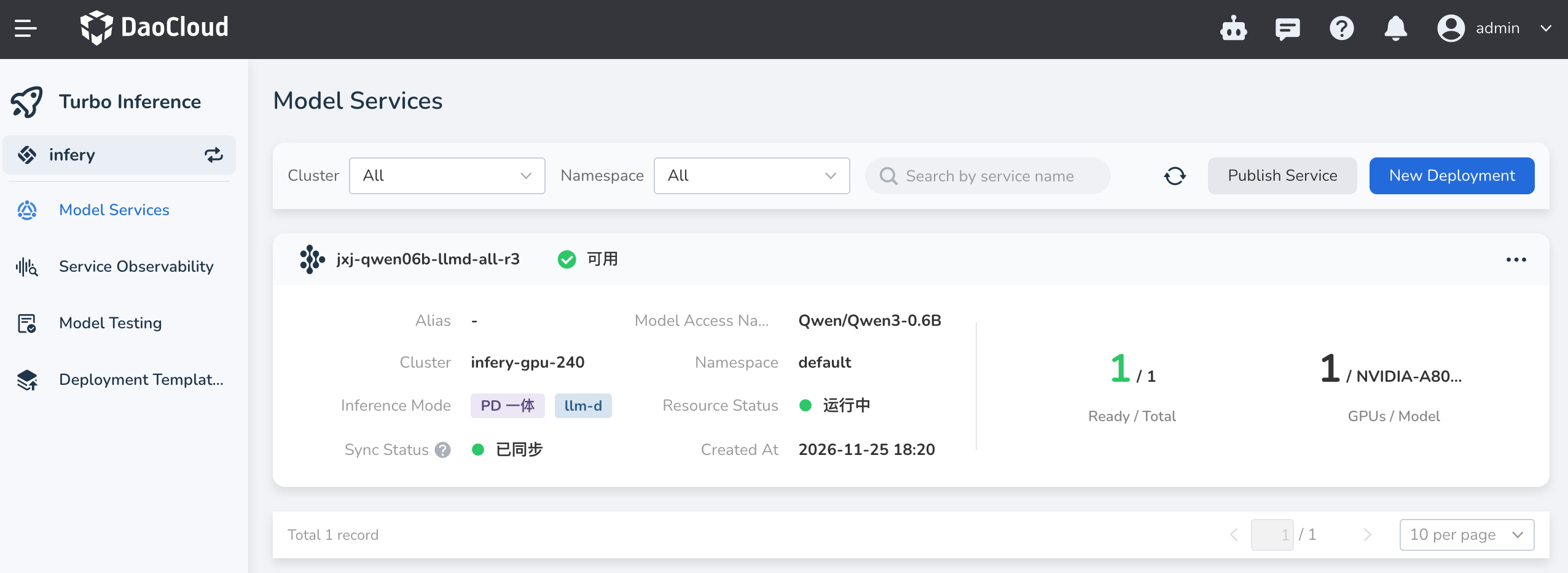
The platform currently supports two high-performance orchestration frameworks and their inference modes, which can be selected by scenario during deployment:
| Orchestration Framework | Inference Mode | Applicable Scenario |
|---|---|---|
| llm-d or Dynamo | PD Aggregated | Prefill and decode are handled by the same instance. The architecture is simple and suitable for small- and medium-scale deployments. |
| llm-d or Dynamo | PD Disaggregated | Prefill and decode are split into separate roles that scale independently, suitable for long-context and high-concurrency scenarios. |
Why Deploy a Model Service
Holding model weights alone does not provide inference capabilities externally; the weights must be turned into an online service:
| Reason | Description |
|---|---|
| Weights require an inference engine to run | Model weights are static files. Only when loaded by an inference engine with GPU computing resources can they respond to inference requests. |
| Production scenarios demand high performance and stability | Barely started inference processes struggle with high-concurrency and long-context workloads. The platform optimizes throughput and latency through PD disaggregation, KV Cache offload, multi-node multi-GPU deployment, and other architectural optimizations, and continuously ensures service quality through service observability. |
| Operational complexity should be abstracted by the platform | Multi-role orchestration, GPU scheduling, RDMA networking, and parallelism strategies (TP/DP/PP/EP) have a high barrier in native Kubernetes. The platform productizes these configurations through templates and forms, reducing deployment and maintenance costs. |
| Business applications need a standardized access method | Once ready, a model service can be uniformly accessed and managed, avoiding resource waste and inconsistent practices caused by business teams building their own inference environments. |
Deployment Path
Deploying a model service usually involves the following steps:
- Complete deployment preparation: confirm permissions, cluster components, GPU resources, and inference images, and store model weights in a PVC.
-
Choose a deployment method: navigate to Turbo Inference > Model Services in the left navigation bar, click New Deployment, then choose by scenario:
- Optimized Template: pre-configured templates for specific combinations of model, GPU, and inference engine. Templates marked Production Ready have been validated in real environments and are suitable for quick deployment.
- Generic Template: configure resources and inference parameters yourself based on the actual model, hardware, and inference engine, suitable for scenarios without a fully matching template.
- Custom Deployment: deploy with a
values.yamlthat matches the platform Helm Chart, suitable for automated operations scenarios.
-
Verify the service: return to the Model Services list, confirm the service status is Available and the resource running status is Running; click the service card to view details, check each role in Topology & Config, view resource readiness on the Resources page, and use Service Observability to view healthy instances and instance trends.
Both templates use the same resource configuration and inference parameter conventions; an optimized template is essentially a generic template with these parameters pre-filled. When no template fully matches, copy the parameters of a similar template into the generic template, adjust them, and deploy.