Installation FAQs
This page summarizes common installation issues and troubleshooting solutions, making it easier for users to quickly resolve issues encountered during installation and operation.
UI Issues
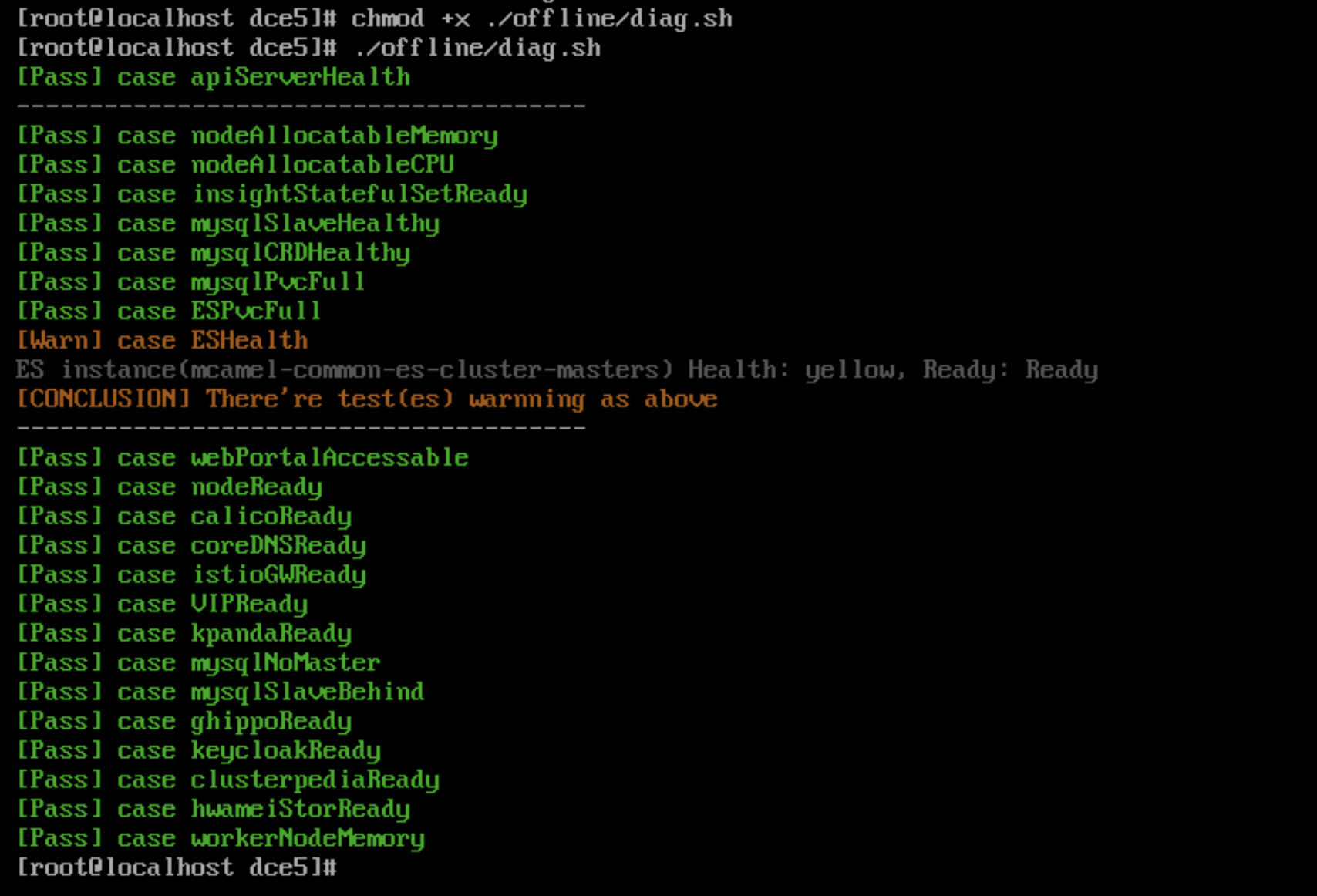
Troubleshoot UI issues with diag.sh
Since installer v0.12.0, the diag.sh script has been added to help users quickly troubleshoot the UI issues.
Run the command:
Example of execution results:
VIP access issues when using Metallb preventing the login page from opening
- Check if the VIP address is in the same subnet as the host. In Metallb L2 mode, it is necessary to ensure they are in the same subnet.
- If a network card was added to the control node in a Global cluster causing access issues, L2Advertisement needs to be configured manually.
Refer to the Metallb documentation on this issue.
Bootstrap Node Issues
After shutting down and restarting the bootstrap node, the kind cluster cannot restart properly
After shutting down and restarting the bootstrap node, the kind cluster cannot start properly due to the lack of auto-start configuration during deployment on the openEuler 22.03 LTS SP2 operating system.
You need to run the following command to start it:
Note
If this scenario occurs in other environments, you can also run this command to restart.
Missing ip6tables when deploying Ubuntu 20.04 as a bootstrap node
Deploying Ubuntu 20.04 as a bootstrap node may cause errors during the deployment process due to the absence of ip6tables.
Refer to the Podman known issues.
Temporary solution: Manually install iptables, refer to Install and Use iptables on Ubuntu 22.04.
After disabling IPv6 during installation, Podman on the bootstrap node cannot create containers
The error message is as follows:
Solution: Re-enable IPv6 or update the bootstrap node base to Docker.
Refer to the related Podman issue: podman 4.0 hangs indefinitely if ipv6 is disabled on system
After restarting the kind container on the bootstrap node, the kubelet service cannot start
After the kind container restarts, the kubelet service cannot start and reports the following error:
Solutions:
-
Solution 1: Restart and run the command
podman restart [kind] --time 120. Do not interrupt this task with Ctrl+C during execution. -
Solution 2: Run
podman execto enter the kind container and run the following command:
How to uninstall data from the bootstrap node
After deploying the commercial version, if you want to uninstall, in addition to the cluster nodes themselves, you also need to reset the bootstrap node. The reset steps are as follows:
You need to use the sudo rm -rf command to delete these three directories:
- /tmp
- /var/lib/dce5/
- /home/kind/etcd
Certificate Issues
The kubeconfig of the Global cluster needs to be updated on the bootstrap's replica
Prior to v0.20.0, the kubeconfig of the Global cluster stored on the bootstrap node does not automatically update. v0.20.0 supports automatic updates, run once a month.
In previous versions, you need to update the dce5-installer to v0.20.0 and then run:
Updating the certificates and kubeconfig of the kind cluster on the bootstrap node itself
Prior to v0.20.0, the kubeconfig of the kind cluster stored on the bootstrap node does not automatically update. v0.20.0 supports automatic updates, run once a month.
In previous versions, you need to update the dce5-installer to v0.20.0 and then run:
After installing Contour, the default certificate validity period is only one year and will not auto-renew, leading to continuous restarts of the Contour-Envoy component
For versions prior to v0.21.0, there was support for enabling the installation of the Contour component. Subsequent versions will no longer support this. Customers who have installed Contour in previous versions need to execute the helm upgrade command to update the certificate validity period:
Operating System Related Issues
Error during installation on CentOS 7.6
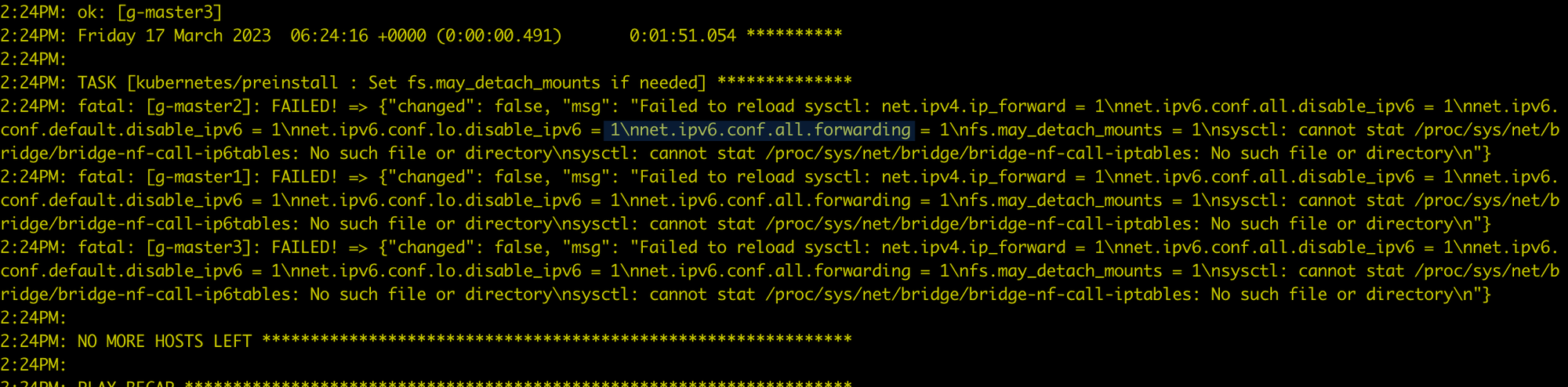
Executing modprobe br_netfilter on each node where the global service cluster is installed will resolve the issue by loading br_netfilter.
CentOS Environment Preparation Issues
An error occurs when running yum install docker:
Failed to set locale, defaulting to C.UTF-8
CentOS Linux 8 - AppStream                                                                    93  B/s |  38  B     00:00
Error: Failed to download metadata for repo 'appstream': Cannot prepare internal mirrorlist: No URLs in mirrorlist
You can try the following methods to resolve it:
-
Install
glibc-langpack-en -
If the issue persists, try:
osRepos External Mode externalRepoURLs Check Failure
The clusterConfig.yaml is as follows:
  osRepos:
    type: external
    externalRepoType: rocky
    externalRepoURLs:
      - http://10.5.14.100:8081/rocky/\$releasever/os/\$basearch
      - http://10.5.14.100:8081/rocky-iso/\$releasever/os/\$basearch/AppStream
      - http://10.5.14.100:8081/rocky-iso/\$releasever/os/\$basearch/BaseOS
Error message:
[root@localhost dce5]# ./dist/dce5-installer cluster-create -c ./sample/clusterConfig.yaml -m ./sample/manifest.yaml --max-tasks 2
[Error]:[Error] invalid ClusterConfig: maybe the binaries.externalRepoURLs http://10.5.14.100:8081/rocky/$releasever/os/$basearch cannot be connected, return code: 404
The configuration is actually correct, and externalRepoURLs can be accessed normally. However, during validation, the variables are not properly parsed, resulting in a 404 error.
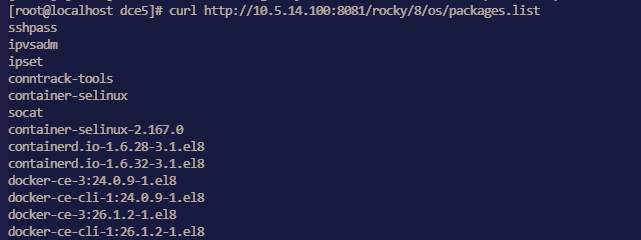
Impact: Clusters using osRepos in external mode cannot be created successfully.
Workaround: Retry using a new binary file.
Manifest setting for enabling MySQL MGR mode not effective
Issue:
Since dce5-installer v0.30, enabling MySQL MGR through the Manifest has no effect.
Other parameters such as pvcSize are also ineffective, and only the enable parameter works.
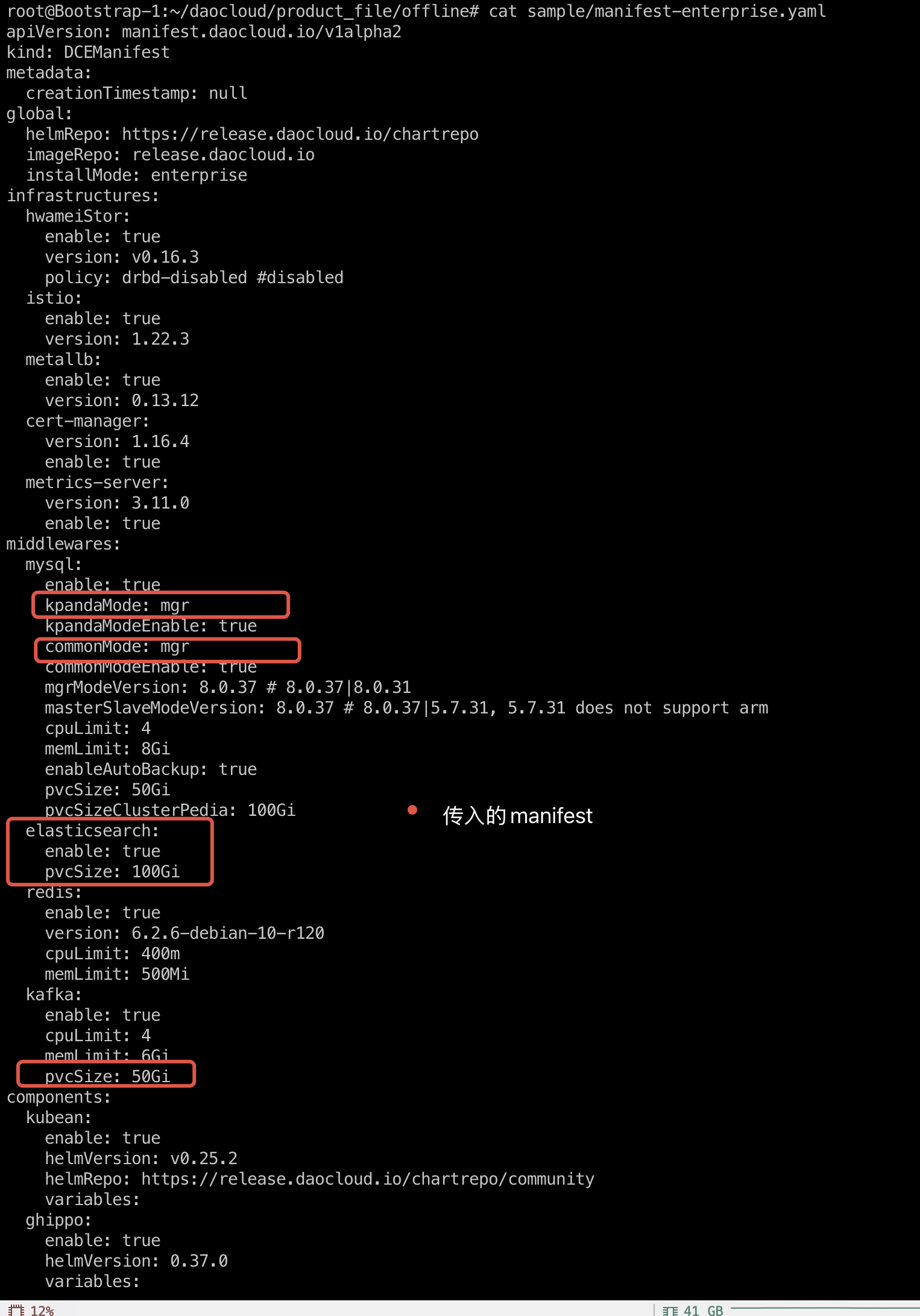
Solution:
-
Run the installer command with the
--dry-runparameter to output the execution script toinstaller.sh: -
At the beginning of the
installer.shscript file, add the following line: -
Add the
-sparameter and re-runinstaller.sh:
Installation fails because the MySQL Common instance in MGR mode cannot be initialized
During installation, the MySQL initialization phase of the mcamel-common instance fails. It was observed that the mysqlrouter user is missing from MySQL, which keeps the replica count of the router Deployment at 0, and the whole installation process cannot continue.
The mcamel-common instance failed to recreate the mysqlrouter user
→ router deployment replica = 0
→ installation hangs/fails
- Affected module: The MySQL initialization process of the installer
- Scope of impact: All
commonMySQL instances that use MGR mode - Affected versions: v0.27.0, v0.28.0, v0.29.0, etc.
-
Summary of symptoms:
- The router cannot connect to the MGR cluster
- The
mysqlrouteruser is missing - The router deployment cannot start (replica = 0)
Root Cause Analysis
After an abnormal operation (such as a power outage restart or PVC cleanup), the operations personnel manually restored the MGR cluster, but the Operator did not detect the change in the cluster state, so the corresponding reconciliation logic was not triggered.
Because the PVC was cleared, the original mysqlrouter user information was lost in the MySQL database, so the router could not authenticate and connect to the cluster, and the installation kept crashing.
Data Verification
Query the user table through MySQL and you will find that the mysqlrouter user cannot be found:
mysql> select user,host from mysql.user;
+---------------------------+-----------+
| user                      | host      |
+---------------------------+-----------+
| kpanda                    | %         |
| mysql_innodb_cluster_1000 | %         |
| mysql_innodb_cluster_1001 | %         |
| mysql_innodb_cluster_1002 | %         |
| mysqladmin                | %         |
| root                      | %         |
| localroot                 | localhost |
| mysql.infoschema          | localhost |
| mysql.session             | localhost |
| mysql.sys                 | localhost |
| mysqlhealthchecker        | localhost |
| mysqlmetrics              | localhost |
+---------------------------+-----------+
12 rows in set (0.00 sec)
Solution
-
Obtain the Secret of
mysqlrouterGet the username and password of the Router from the Kubernetes cluster:
Example output:
apiVersion: v1
data:
  routerPassword: aVVOZHEtWm9tb0gtamJYTGstS3E9VEotNnlqc1M=
  routerUsername: bXlzcWxyb3V0ZXI=
kind: Secret
metadata:
  name: mcamel-common-kpanda-mgr-router
  namespace: mcamel-system
Decode to get the username and password:
-
Manually create the
mysqlrouteruser in the MGR clusterLog in to the MGR cluster that has been restored to normal, and call the
setupRouterAccount()function to recreate themysqlrouteruser:MySQL localhost:33060+ ssl JS > cluster.setupRouterAccount('mysqlrouter', {password: "iUNdq-ZomoH-jbXLk-Kq=TJ-6yjsS"})Output:
Verify that the
mysqlrouteruser was created successfully:MySQL localhost:33060+ ssl SQL > select user,host from mysql.user; +---------------------------+-----------+ | user | host | +---------------------------+-----------+ | kpanda | % | | mysql_innodb_cluster_1000 | % | | mysql_innodb_cluster_1001 | % | | mysql_innodb_cluster_1002 | % | | mysqladmin | % | | mysqlrouter | % | | root | % | | localroot | localhost | | mysql.infoschema | localhost | | mysql.session | localhost | | mysql.sys | localhost | | mysqlhealthchecker | localhost | | mysqlmetrics | localhost | +---------------------------+-----------+ 13 rows in set (0.00 sec) -
Restart the
routerdeployment:kubectl scale deploy mcamel-common-kpanda-mgr-router --replicas=0 -n mcamel-system kubectl scale deploy mcamel-common-kpanda-mgr-router --replicas=2 -n mcamel-systemVerify the recovery:
kubectl get deploy | grep router

mcamel-common-kpanda-mgr-router             2/2     2            2           2d2h
mcamel-common-mgr-cluster-router            2/2     2            2           2d2h
At this point, the
routerruns properly and the installation process returns to normal.
DCE Community Package Issues
Redis hanging during DCE reinstallation of the kind cluster
Issue: The Redis Pod has been stuck at 0/4 running for a long time, indicating: primary ClusterIP can not unset
-
Delete rfs-mcamel-common-redis in the
mcamel-systemnamespace -
Then re-run the installation command.
fluent-bit installation failure
Error message:
Check the Pod logs for the following key information:
[warn] [net] getaddrinfo(host='mcamel-common-es-cluster-masters-es-http.mcamel-system.svc.cluster.local',errt11):Could not contact DNS servers
The above issue is a bug in fluent-bit. You can refer to an issue in aws/aws-for-fluent-bit: Seeing Timeout while contacting DNS servers with latest v2.19.1