Scenarios and Advantages
Scenarios
Multicloud Deployment and Cross-Cloud Disaster Recovery for Applications
Multicloud Combined Deployment
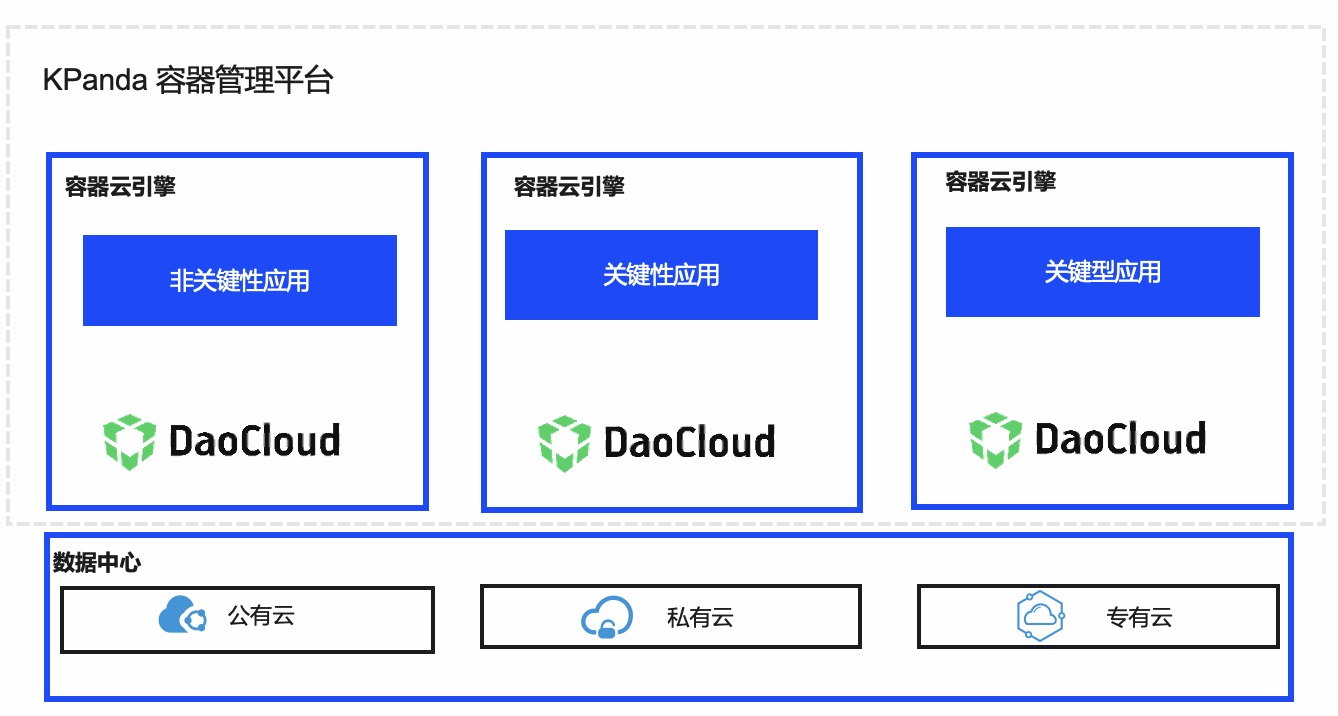
Combine cloud platforms with different cost-effectiveness according to different application scenarios to build a multicloud combination and reduce overall costs. For users in industries with high security requirements such as finance, based on the security and sensitivity requirements of business data, deploy some business applications in a private cloud environment while deploying non-sensitive applications in cloud clusters, and manage them in a unified manner.
Cross-Cloud Disaster Recovery and Backup
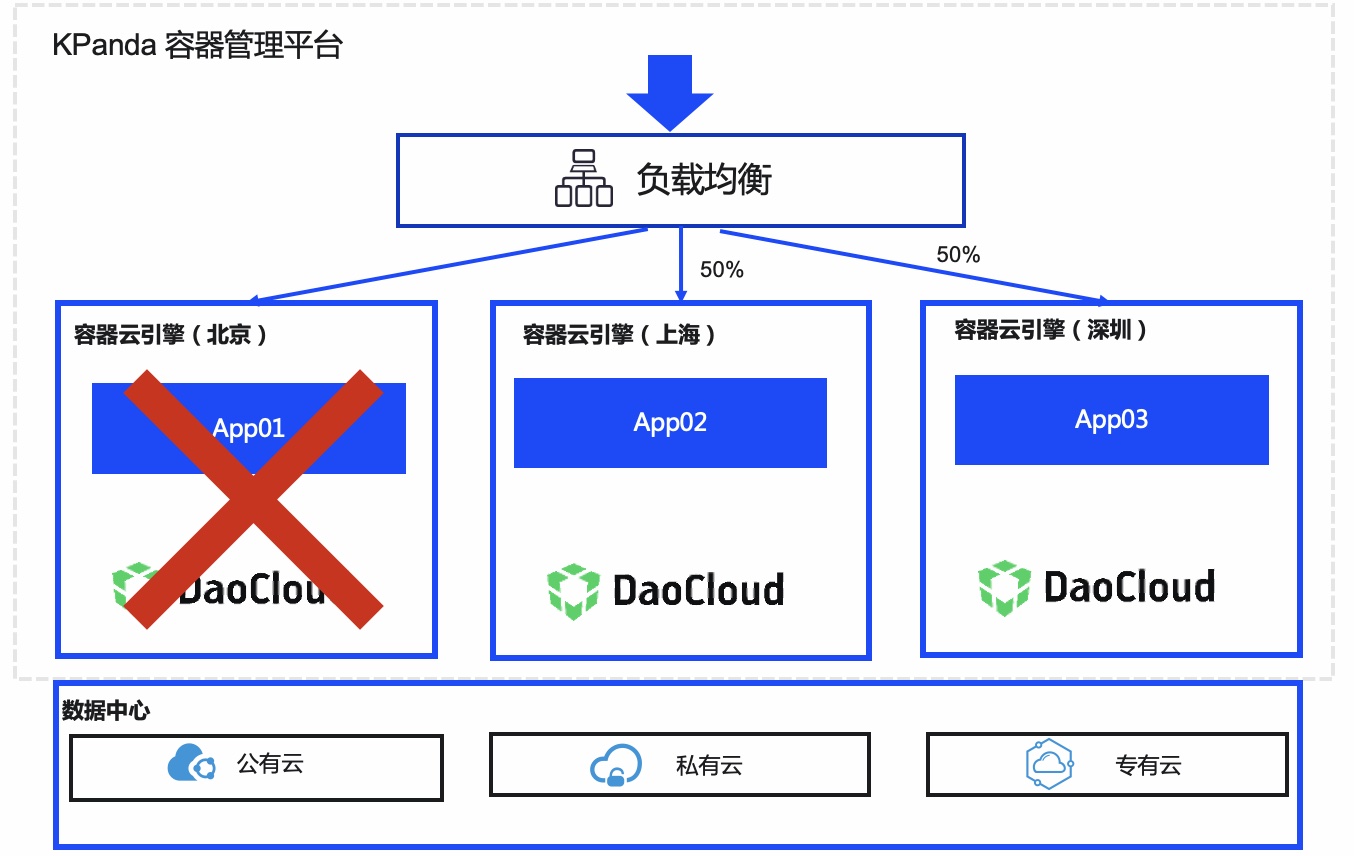
To ensure high business availability, deploy the business on multiple cloud container platforms in different regions at the same time, helping applications achieve multi-region traffic distribution and enabling cross-cloud applications to be managed on the same platform, thereby reducing O&M costs. In addition, when a cloud container platform fails, the unified traffic distribution mechanism automatically switches business traffic to other cloud container platforms.
Unified Management Across Cloud Clusters
Unified Onboarding of Cross-Cloud Clusters
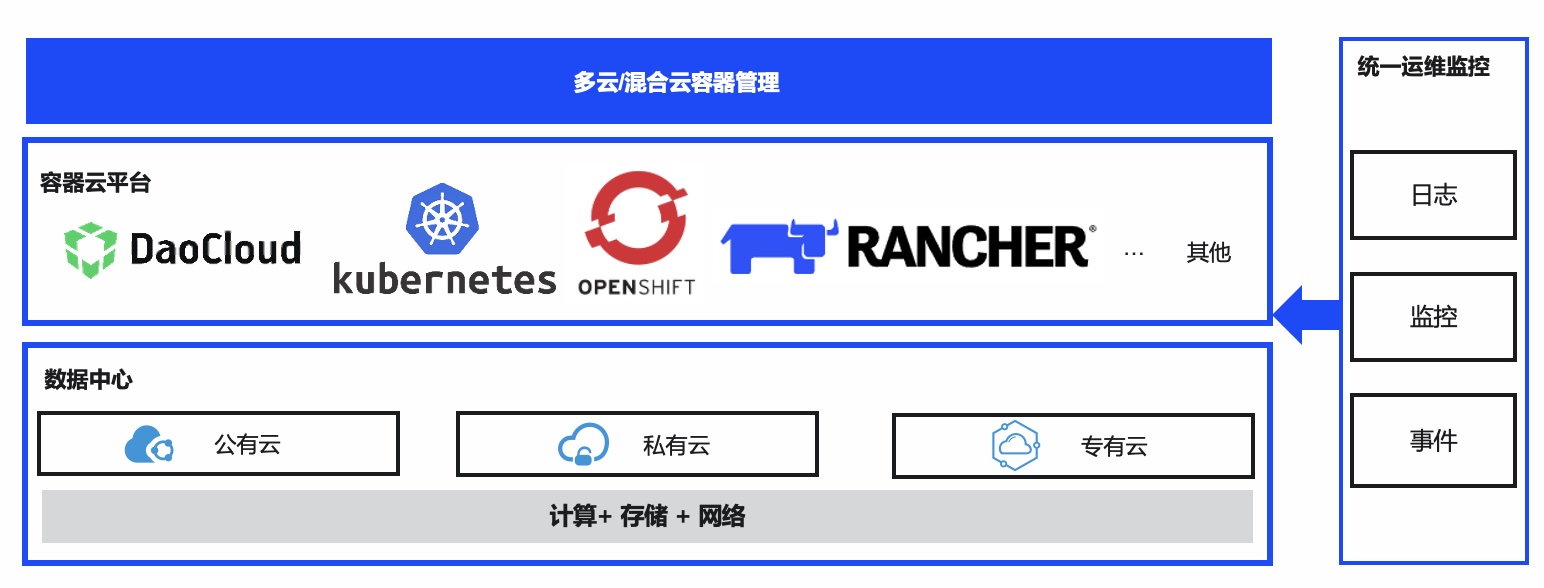
Regardless of whether the underlying infrastructure environment is different (public cloud, private cloud, and hybrid cloud) or the Kubernetes platform is built by different container cloud vendors, the container management module can manage them in a unified manner.
This reduces the additional management costs caused by different infrastructures and different cloud providers, unifies the management process, and lowers costs.
Unified O&M Across Cloud Clusters
Different cloud container providers offer different cloud platform monitoring based on different Kubernetes distributions, which makes unified platform monitoring and O&M difficult and makes it impossible to conveniently understand the overall operating status or keep track of the fault handling process and results. Based on the container management module, integrated monitoring services can be implemented through unified cluster onboarding, enabling multi-dimensional, cross-cloud unified monitoring and O&M.
Elastic Scaling to Handle Traffic Peaks
Elastic Scaling of Clusters
To help enterprise customers handle traffic peaks, when the resources of the Kubernetes container platform where business applications are deployed have reached the threshold, the underlying IaaS elastic scaling capability needs to be combined to automatically scale cluster nodes elastically, thereby handling business peaks with extremely large traffic and scaling in during business off-peak periods to save costs.
Elastic Scaling of Applications
When e-commerce customers encounter promotions such as Double 11 or flash sales, business traffic rises rapidly, so application computing resources need to be scaled out in time and automatically adjusted according to the scaling policies set by users. The number of business Pods increases as business traffic rises and decreases as business traffic falls.
Advantages
The container management module has the following benefits:
Unified Cluster Management
- Supports unified onboarding of different clusters, and supports including any Kubernetes cluster within a specific version range in the scope of container management, achieving unified management of on-cloud, off-cloud, multicloud, and hybrid cloud container platforms and avoiding vendor lock-in.
- Enables one-click smooth upgrade of Kubernetes clusters through the web interface.
- Provides unified web interface capabilities for cluster creation, cluster node scaling, and other management tasks.
- Supports unified onboarding of very large-scale clusters.
Production-Ready Applications
- One-stop application distribution: applications can be distributed through images, YAML, and Helm, with unified management across clouds and clusters.
- High availability for applications: supports distributed deployment of applications and automatic traffic failover in the event of a single point of failure.
- Rich monitoring metrics provide all-round application monitoring and give early warnings of application traffic peaks and application failures.
Unified Policy Distribution
- Supports formulating network policies, quota policies, resource limit policies, disaster recovery policies, security policies, and other policies at the granularity of namespaces or clusters, and supports policy distribution at the granularity of clusters/namespaces.
Secure and Reliable
- Self-built clusters are deployed in high availability mode by default, ensuring high availability of your business. When a node fails or a natural disaster occurs, applications can continue to run, ensuring high availability of the production environment and uninterrupted business application systems.
- Cross-region application high availability: supports deploying different container clusters across regions, and can deploy business on multiple cloud container clusters in different regions at the same time, helping applications achieve multi-region traffic distribution. When a cloud container cluster fails, the machine room goes down, or a natural disaster occurs, the unified traffic distribution mechanism automatically switches business traffic to other cloud container platforms, ensuring high availability of applications.
- A comprehensive user permission system that integrates the Kubernetes RBAC permission system, supporting setting different granularity of permissions for different users.
Heterogeneous Compatibility
- Provides highly automated and elastic heterogeneous multicloud support capabilities, adapting to the x86 and domestic innovation cloud architecture.
- Supports unified deployment of mixed x86 and ARM architecture clusters, unified management, and support for application running, ensuring network connectivity between applications.
Open and Compatible
- Based on native Kubernetes and Docker technologies, and fully compatible with the Kubernetes API and kubectl commands.
- Provides a rich plugin system to expand the capabilities of cloud container clusters, such as the network plugins Multus, Cillum, Contour, and other components.
Basic Concepts
The basic concepts related to container management are as follows.
| Concept | Description |
|---|---|
| Cluster | A cluster refers to the combination of cloud resources required for container operation, associated with several cloud server nodes. You can create several clusters or integrate several standard Kubernetes clusters. |
| Node | Each node corresponds to a virtual machine/physical server, and all container applications run on the nodes of the cluster. Node types are divided into controller nodes and worker nodes. |
| Pod | A Pod is the smallest and basic unit for deploying an application or service in Kubernetes. It can encapsulate one or more application containers, storage resources, and an independent network IP. |
| Container | A container is an instance deployed through a container image, decoupling the application from the underlying host facilities to facilitate deployment in different cloud or OS environments. |
| Workload | An application running on Kubernetes, including stateless services, stateful services, daemon services, jobs, and CronJobs. |
| Application template | Unified resource management and scheduling of standard templates. Supports managing and deploying community standard application templates and custom business application templates. |
| Image | A container image is a standard format template packaged for a container application and used to create containers. It contains files such as programs, libraries, resources, and configurations. |
| Namespace | An abstract consolidation of a group of resources and objects. Data in different namespaces is isolated from each other. |
| Service | An abstract method of exposing an application running on a group of Pods as a network service. Supports types such as ClusterIP, NodePort, and LoadBalancer. |
| L7 Load Balancing (Ingress) | A collection of routing rules for requests entering the cluster. Supports functions such as URLs, load balancing, and SSL termination. |
| NetworkPolicy | Provides policy-based network control to isolate applications and reduce the attack surface. |
| ConfigMap | Stores non-confidential configuration data in key-value pairs, which Pods can use as environment variables, command-line arguments, or configuration files. |
| Secret | Used to store configuration information for confidential data, such as passwords, tokens, and keys. |
| Label | A key/value pair attached to an object, used to identify the characteristics of the object. |
| LabelSelector | The core grouping mechanism of Kubernetes. Through Label Selector, a group of resource objects with common characteristics is identified. |
| Annotation | Associates arbitrary non-identifying metadata to Kubernetes resource objects, which can be retrieved through annotations. |
| PersistentVolume | Provides convenient persistent volumes. PVs provide network storage resources, and PVCs claim storage resources. |
| PersistentVolumeClaim | A claim request for a PV, similar to how a Pod consumes Node resources. |
| HPA | A feature in Kubernetes that implements horizontal autoscaling of Pods. |
| Affinity and Anti-Affinity | Constraint types are defined through affinity and anti-affinity to achieve nearby deployment and high reliability. |
| NodeAffinity | Restricts Pods from being scheduled to specific nodes. |
| NodeAntiAffinity | Restricts Pods from being scheduled to specific nodes. |
| PodAffinity | Specifies that workloads are deployed on the same node to reduce network consumption. |
| PodAntiAffinity | Specifies that workloads are deployed on different nodes to reduce the impact of downtime. |
| Resource Quota | A mechanism used to limit the amount of resources used by a user. |
| Limit Range | Adds resource limits to a namespace, including minimum, maximum, and default resources. |
| Environment Variable | A variable set in the container runtime environment, providing flexibility. |