Overview of NVIDIA Multi-Instance GPU (MIG)
MIG Scenarios
- Multi-Tenant Cloud Environments:
MIG allows cloud service providers to partition a physical GPU into multiple independent GPU instances, which can be allocated to different tenants. This enables resource isolation and independence, meeting the GPU computing needs of multiple tenants.
- Containerized Applications:
MIG enables finer-grained GPU resource management in containerized environments. By partitioning a physical GPU into multiple MIG instances, each container can be assigned with dedicated GPU compute resources, providing better performance isolation and resource utilization.
- Batch Processing Jobs:
For batch processing jobs requiring large-scale parallel computing, MIG provides higher computational performance and larger memory capacity. Each MIG instance can utilize a portion of the physical GPU's compute resources, accelerating the processing of large-scale computational tasks.
- AI/Machine Learning Training:
MIG offers increased compute power and memory capacity for training large-scale deep learning models. By partitioning the physical GPU into multiple MIG instances, each instance can independently carry out model training, improving training efficiency and throughput.
In general, NVIDIA MIG is suitable for scenarios that require finer-grained allocation and management of GPU resources. It enables resource isolation, improved performance utilization, and meets the GPU computing needs of multiple users or applications.
Overview of MIG
NVIDIA Multi-Instance GPU (MIG) is a new feature introduced by NVIDIA on H100, A100, and A30 series GPUs. Its purpose is to divide a physical GPU into multiple GPU instances to provide finer-grained resource sharing and isolation. MIG can split a GPU into up to seven GPU instances, allowing a single physical GPU card to provide separate GPU resources to multiple users, maximizing GPU utilization.
This feature enables multiple applications or users to share GPU resources simultaneously, improving the utilization of computational resources and increasing system scalability.
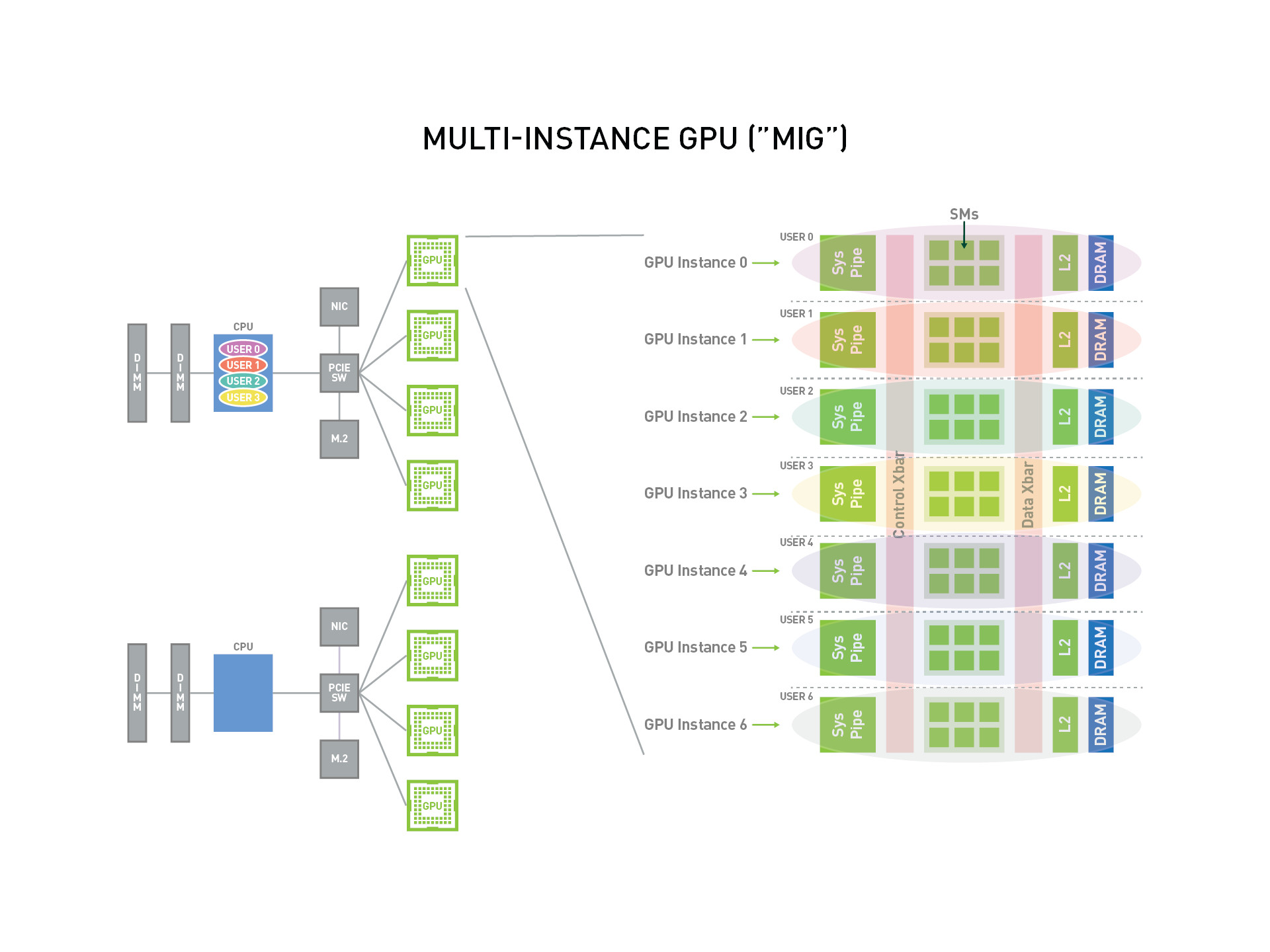
With MIG, each GPU instance's processor has an independent and isolated path throughout the entire memory system, including cross-switch ports on the chip, L2 cache groups, memory controllers, and DRAM address buses, all uniquely allocated to a single instance.
This ensures that the workload of individual users can run with predictable throughput and latency, along with identical L2 cache allocation and DRAM bandwidth. MIG can partition available GPU compute resources (such as streaming multiprocessors or SMs and GPU engines like copy engines or decoders) to provide defined quality of service (QoS) and fault isolation for different clients such as virtual machines, containers, or processes. MIG enables multiple GPU instances to run in parallel on a single physical GPU.
MIG allows multiple vGPUs (and virtual machines) to run in parallel on a single GPU instance while retaining the isolation guarantees provided by vGPU. For more details on using vGPU and MIG for GPU partitioning, refer to NVIDIA Multi-Instance GPU and NVIDIA Virtual Compute Server.
MIG Architecture
The following diagram provides an overview of MIG, illustrating how it virtualizes one physical GPU card into seven GPU instances that can be used by multiple users.
Important Concepts
- SM (Streaming Multiprocessor): The core computational unit of a GPU responsible for executing graphics rendering and general-purpose computing tasks. Each SM contains a group of CUDA cores, as well as shared memory, register files, and other resources, capable of executing multiple threads concurrently. Each MIG instance has a certain number of SMs and other related resources, along with the allocated memory slices.
- GPU Memory Slice : The smallest portion of GPU memory, including the corresponding memory controller and cache. A GPU memory slice is approximately one-eighth of the total GPU memory resources in terms of capacity and bandwidth.
- GPU SM Slice : The smallest computational unit of SMs on a GPU. When configuring in MIG mode, the GPU SM slice is approximately one-seventh of the total available SMs in the GPU.
- GPU Slice : The GPU slice represents the smallest portion of the GPU, consisting of a single GPU memory slice and a single GPU SM slice combined together.
- GPU Instance (GI): A GPU instance is the combination of a GPU slice and GPU engines (DMA, NVDEC, etc.). Anything within a GPU instance always shares all GPU memory slices and other GPU engines, but its SM slice can be further subdivided into Compute Instances (CIs). A GPU instance provides memory QoS. Each GPU slice contains dedicated GPU memory resources, limiting available capacity and bandwidth while providing memory QoS. Each GPU memory slice gets one-eighth of the total GPU memory resources, and each GPU SM slice gets one-seventh of the total SM count.
- Compute Instance (CI): The compute slice of a GPU instance can be further subdivided into multiple Compute Instances (CIs), where CIs share the engines and memory of the parent GI, but each CI has dedicated SM resources.
GPU Instance (GI)
This section describes how to create various partitions on a GPU. It uses A100-40GB as an example to demonstrate how to partition a single physical GPU card.
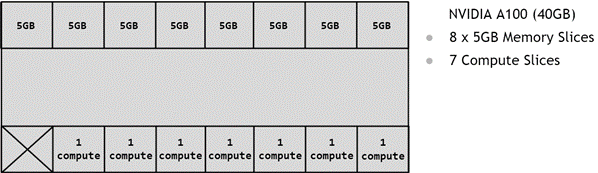
GPU partitioning is done using memory slices, so an A100-40GB GPU can be considered to have 8x5GB memory slices and 7 GPU SM slices, as shown in the figure below, which displays the memory slices available on the A100.
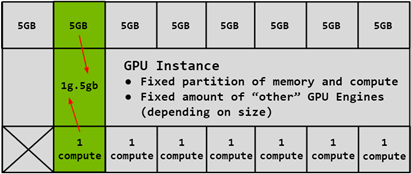
As described above, creating a GPU Instance (GI) requires combining a certain number of memory slices with a certain number of compute slices. In the figure below, one 5GB memory slice is combined with 1 compute slice to create the 1g.5gb GI profile:
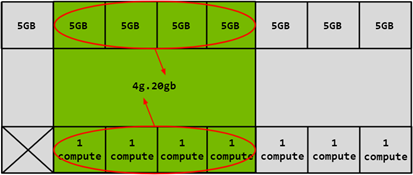
Likewise, 4x5GB memory slices can be combined with 4x1 compute slices to create the 4g.20gb GI profile:
Compute Instance (CI)
The compute slice of a GPU Instance (GI) can be further subdivided into multiple Compute Instances (CIs), where CIs share the engines and memory of the parent GI, but each CI has dedicated SM resources. Using the same 4g.20gb example above, you can create a CI to use only the first compute slice, with the 1c.4g.20gb compute profile, as shown in the blue part of the figure below:
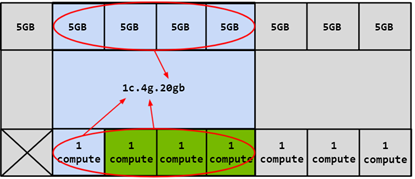
In this case, 4 different CIs can be created by selecting any of the compute slices. You can also combine two compute slices together to create the 2c.4g.20gb compute profile:
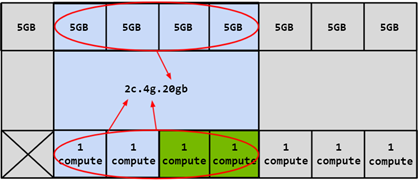
In addition, you can combine 3 compute slices to create a compute profile, or combine all 4 compute slices to create the 3c.4g.20gb and 4c.4g.20gb compute profiles. When all 4 compute slices are combined, the profile is simply referred to as 4g.20gb .
Download Center Learn about d.run Token Factory Learn about d.run AI OS