Operations Insight - User
After the models and agents are running, the top concern of operators is the business status of the platform. This tutorial uses the Cockpit to review end-to-end operations data such as compute capacity, token output, revenue, and cost.
Prerequisites
- You have completed Deploy a Model Service, Experience and Call Models, or Create an Agent, and the platform has produced real token consumption.
- Sign in to the console with a user who has the Cockpit permission.
Note
Cockpit (crane) is disabled by default after installation. Enable it in manifest-cloud.yaml and re-apply before the module appears.
View the Cockpit
-
Open Cockpit in the product navigation. The Business Overview Panel opens by default.
-
In the business overview, review core metrics such as revenue, cost, gross profit, capacity monetization, and customer spending structure, and keep track of compute capacity, token output, and production health.
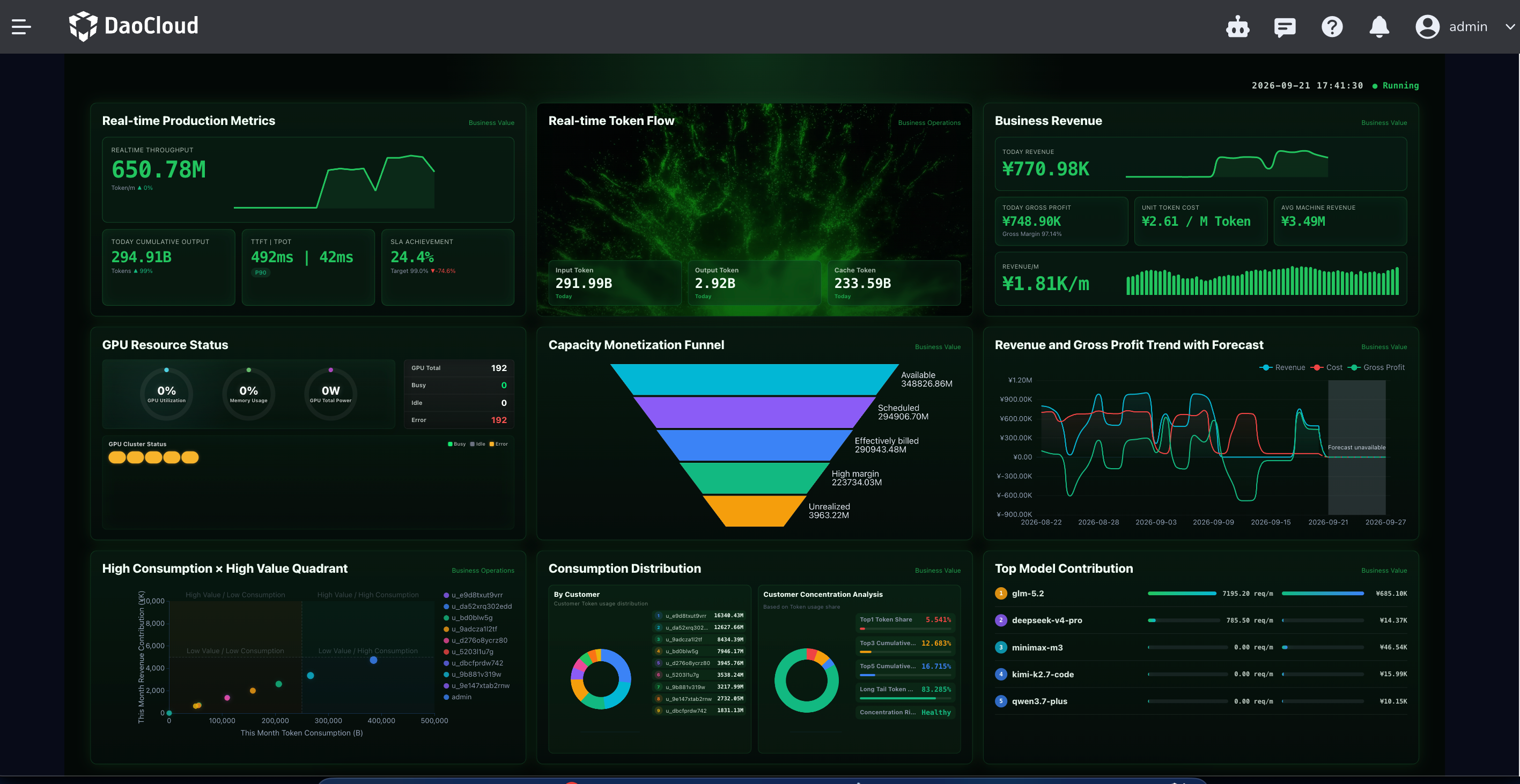
-
To review department quota consumption and organization usage distribution, switch to the enterprise mode view; to review business performance, switch to the operations mode view.
Verify
If the Cockpit shows token output and consumption data matching the actual invocations, the operations insight pipeline works end to end.
Next step
To confirm that metrics and log collection work properly, see Insight. For more operations metrics, see Cockpit.