Deployment Requirements
Before deploying DCE, software planning, hardware planning, and network planning must be completed in advance.
Operating System Requirements
| Architecture | OS | Tested OS / Kernel | Notes (Installation Guide) |
|---|---|---|---|
| AMD 64 | Red Hat 8.X | Red Hat 8.4 4.18.0-305.el8.x86_64 | Offline Install DCE Enterprise |
| Red Hat 7.X | Red Hat 7.9 3.10.0-1160.el7.x86 | Offline Install DCE Enterprise | |
| Red Hat 9.X | Red Hat 9.2 5.14.0-284.11.1.el9_2.x86_64 | Offline Install DCE Enterprise | |
| Ubuntu 22.04 | 5.15.0-78-generic | Offline Install DCE Enterprise | |
| Ubuntu 24.04 | / | Offline Install DCE Enterprise | |
| Rocky Linux 9.2 | 5.14.0-284.11.1.el9_2.x86_64 | Offline Install DCE Enterprise | |
| UnionTech UOS V20 (1020a) | 5.4.0-125-generic | Deploy DCE Enterprise on UOS V20 (1020a) | |
| openEuler 22.03 | 5.10.0-60.18.0.50.oe2203.x86_64 | Offline Install DCE Enterprise | |
| Oracle Linux R9/R8 U1 | 5.15.0-3.60.5.1.el9uek.x86_64 | Deploy DCE Enterprise on Oracle Linux R9 U1 | |
| TencentOS Server 3.1 | 5.4.119-19.0009.14 | Deploy DCE Enterprise on TencentOS Server 3.1 | |
| ARM 64 | Kylin OS V10 SP2 | 4.19.90-24.4.v2101.ky10.aarch64 | Offline Install DCE Enterprise |
| Kylin OS V10 SP3 | 4.19.90-89.11.v2401.ky10.aarch64 | Offline Install DCE Enterprise |
Note
- CentOS 7 will reach end of support on June 30, 2024. Enterprises should replace the operating system according to their own situation.
- The operating systems and kernels listed above are the versions used by testers.
- For operating systems not listed above, refer to Offline Deployment of DCE Enterprise on Other Linux Distributions.
Kernel Requirements
Some components or features have specific kernel version requirements. Before deployment, select the kernel version according to the following table:
| Component/Feature | Kernel Version |
|---|---|
| Container management GPU capability | ≥ 5.15 |
| Cilium | ≥ 5.12 |
| HwameiStor DRBD capability | DRBD-supported kernel versions |
| KubeVirt | > 4.11 |
| Merbridge | ≥ 5.7 |
⚠️ Kernel Notes
-
When the kernel version is lower than 5.9 and
kube-proxyusesipvsmode, accessing in-cluster services via Service may occasionally experience a 1-second delay or Service access failures after backend upgrades. For details, see Kubernetes community Issue #81775. The following workarounds are available:- Upgrade the kernel to 5.9 or later
- Switch the
kube-proxymode toiptables - Update kernel parameters:
net.ipv4.vs.conntrack=1+net.ipv4.vs.conn_reuse_mode=0+net.ipv4.vs.expire_nodest_conn=1
-
Automatic Ubuntu kernel updates may cause unexpected system reboots. If your software depends on a specific kernel version, automatic upgrades to a newer kernel may introduce compatibility issues.
Hardware Requirements
CPU, Memory, and Disk
| Type | Requirement |
|---|---|
| CPU | No overcommit |
| Memory | No overcommit |
| Disk | IOPS > 500, throughput > 200 MB/s |
CPU, Memory, and Disk Requirements in Beginner Mode
Refer to the Beginner Mode Description.
| Count | Server Role | Purpose | CPU | Memory | System Disk | Unpartitioned Disk |
|---|---|---|---|---|---|---|
| 1 | All-in-one | Image registry, chart museum, and the global cluster itself | 24 cores | 48 GB | 300 GB | 400 GB |
If disk partitioning is required, allocate disk resources according to the table below:
| Server Role | Disk Partition / Directory | Recommended Free Space | Notes |
|---|---|---|---|
| All-in-one | /var/lib | >50 GB | On master nodes, this path stores local images, etcd, monitoring, logs, etc., and requires reserved buffer space. Worker nodes use less space, but a unified standard is recommended. |
| All-in-one | / (root filesystem) | >70 GB | If /home and /var/lib are not separate partitions, their required space must be added to the root partition. |
| All-in-one | /home | >150 GB | / |
4-Node Mode CPU, Memory, and Disk Requirements
Refer to the 4-Node Mode Description.
| Count | Server Role | Purpose | CPU | Memory | System Disk | Unpartitioned Disk |
|---|---|---|---|---|---|---|
| 1 | Bootstrap node | 1. Run the installation program 2. Run the required image registry and chart museum | 2 cores | 4 GB | 200 GB | - |
| 3 | Control plane | 1. Run DCE components 2. Run Kubernetes system components | 16 cores | 32 GB | 100 GB | 200 GB |
If disk partitioning is required, allocate disk resources according to the table below:
| Server Role | Disk Partition / Directory | Recommended Free Space | Notes |
|---|---|---|---|
| Bootstrap node | /var/lib | >30 GB | Mainly used for bootstrap Podman container storage (/var/lib/containers) |
| Bootstrap node | / (root filesystem) | >150 GB | Stores offline installation resources (ISO, Addons, Binaries, Images, etc.) |
| Bootstrap node | /home | >50 GB | If /home and /var/lib are not separate partitions, their required space must be added to the root partition. |
| Bootstrap node (upgrade considered) | /var/lib | >30 GB | / |
| Bootstrap node (upgrade considered) | / (root filesystem) | >50 GB | / |
| Bootstrap node (upgrade considered) | /home | >300 GB | Space requirements double if old installation packages are retained for upgrades |
| Control plane | /var/lib | >50 GB | / |
| Control plane | / (root filesystem) | >50 GB | / |
7-Node Mode (Recommended for Production) CPU, Memory, and Disk Requirements
Refer to the 7-Node Mode Description.
| Count | Server Role | Purpose | CPU | Memory | System Disk | Unpartitioned Disk |
|---|---|---|---|---|---|---|
| 1 | Bootstrap node | 1. Run the installation program 2. Run the required image registry and chart museum | 4 cores | 8 GB | 300 GB | - |
| 3 | Master | 1. Run DCE components 2. Run Kubernetes system components | 16 cores | 16 GB | 100 GB | 200 GB |
| 3 | Worker | Run logging-related components separately | 16 cores | 32 GB | 100 GB | 200 GB |
If disk partitioning is required, allocate disk resources according to the table below:
| Server Role | Disk Partition / Directory | Recommended Free Space | Notes |
|---|---|---|---|
| Bootstrap node | /var/lib | >30 GB | Mainly used for bootstrap Podman container storage (/var/lib/containers) |
| Bootstrap node | / (root filesystem) | >150 GB | Stores offline installation resources (ISO, Addons, Binaries, Images, etc.) |
| Bootstrap node | /home | >50 GB | If /home and /var/lib are not separate partitions, their required space must be added to the root partition. |
| Bootstrap node (upgrade considered) | /var/lib | >30 GB | / |
| Bootstrap node (upgrade considered) | / (root filesystem) | >50 GB | / |
| Bootstrap node (upgrade considered) | /home | >300 GB | Space requirements double if old installation packages are retained for upgrades |
| Master | /var/lib | >50 GB | / |
| Master | / (root filesystem) | >50 GB | / |
| Worker | /var/lib | >30 GB | / |
| Worker | / (root filesystem) | >50 GB | / |
etcd Disk Recommendations
Since etcd writes data to disk and persists it on disk, its performance depends on disk performance. etcd is extremely sensitive to write latency, and latency issues may cause etcd to lose heartbeats.
Recommendations:
- Run etcd on machines backed by low-latency and high-throughput SSD or NVMe disks whenever possible.
- Use SSDs as the minimum choice; NVMe drives are preferred in production environments.
Network Requirements
Network Topology
Assuming VIP is used as the load balancing method for the global cluster:
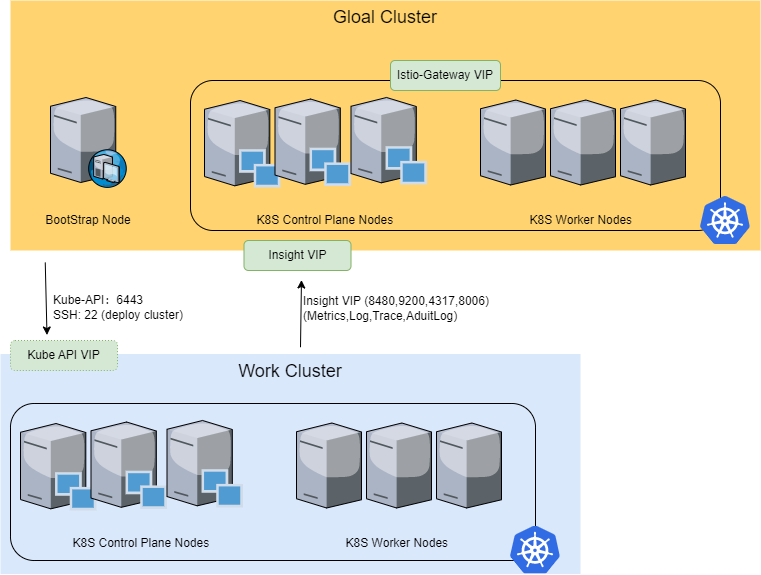
Network Requirements
| Resource | Requirement | Description |
|---|---|---|
istioGatewayVip | 1 | If the load balancing mode is MetalLB, a VIP must be specified to provide access to the DCE UI and OpenAPI. |
insightVip | 1 | If the load balancing mode is MetalLB, a VIP must be specified as the Insight data collection endpoint for the global cluster. Subcluster insight-agents report data to this VIP. |
| Network speed | 1000 Mb/s | At least 1 Gbps; 10 Gbps recommended |
| Protocol | - | IPv6 supported |
| Reserved IP ranges | Two ranges required | For Pods (default 10.233.64.0/18) and Services (default 10.233.0.0/18). If already in use, customize other ranges to avoid IP conflicts. |
| Routing | - | Servers must have a default route or a route pointing to 0.0.0.0. |
| NTP server addresses | 1–4 | Ensure accessible NTP server IP addresses are available in your data center. |
| DNS server addresses | 1–2 | If your applications require DNS services, prepare accessible DNS server IP addresses. |
Client Browser Requirements
- Firefox ≥ v49
- Chrome ≥ v54