Git Proxy Settings
Proxy is commonly known as ladder, scientific internet access, crossing the firewall, etc. This is the first step to use GitHub.
For GitHub, sometimes even with proxy enabled, git clone speed is still extremely slow, only a few KB per second, and often push timeout - this is unacceptable!
Win10
Show hidden files, modify the .gitconfig file in the user root directory on the system drive.
-
Find your HTTP proxy address and port number.
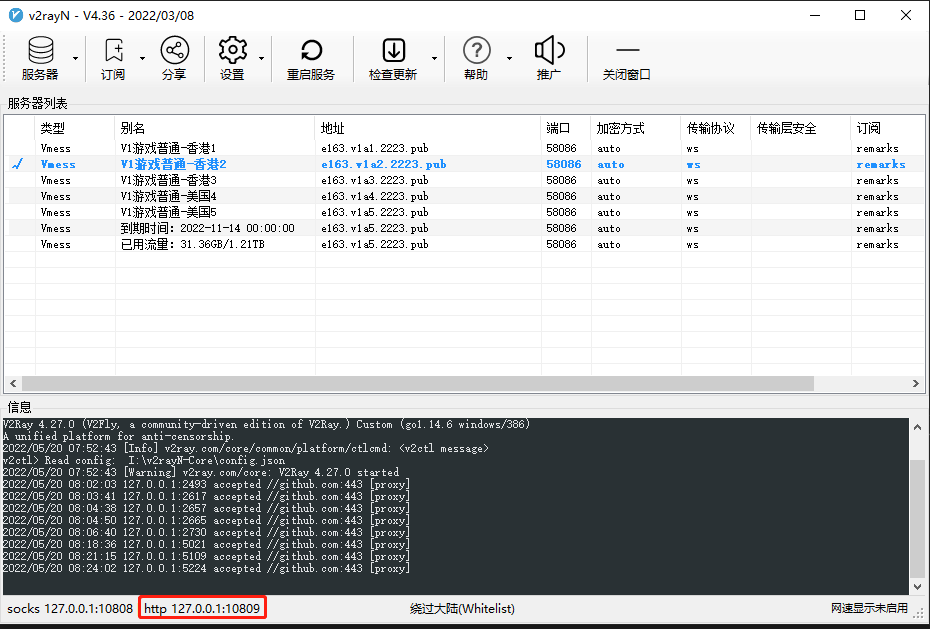
-
Find the .gitconfig file in the system drive user root directory, for example on my computer:
-
Edit the .gitconfig file, add these two lines at the bottom:
-
Save and exit, then run git clone command again. The speed improved by 100 times, haha! My .gitconfig example configuration is as follows: