Create a Ceph Object Storage (RGW) StorageClass
Prerequisites
Refer to Deploy Rook-ceph with the App Store to install rook-ceph and rook-ceph-cluster through the app store.
Steps
-
Click the name of the target cluster in the cluster list, and then click Container Storage -> StorageClass (SC) -> Create StorageClass (SC) in the left navigation bar.
-
Fill in the basic information. The parameters are described as follows:
- The StorageClass name, CSI driver, reclaim policy, and disk binding mode cannot be modified after creation.
- CSI storage driver: enter
rook-ceph.ceph.rook.io/bucket. - The custom parameters are defined as follows:
Parameter Value Description objectStoreName ceph-objectstore Specifies the name of the object store objectStoreNamespace rook-ceph Specifies the Kubernetes namespace where the object store instance resides region us-east-1 Usually used to specify the geographic region of the object store instance 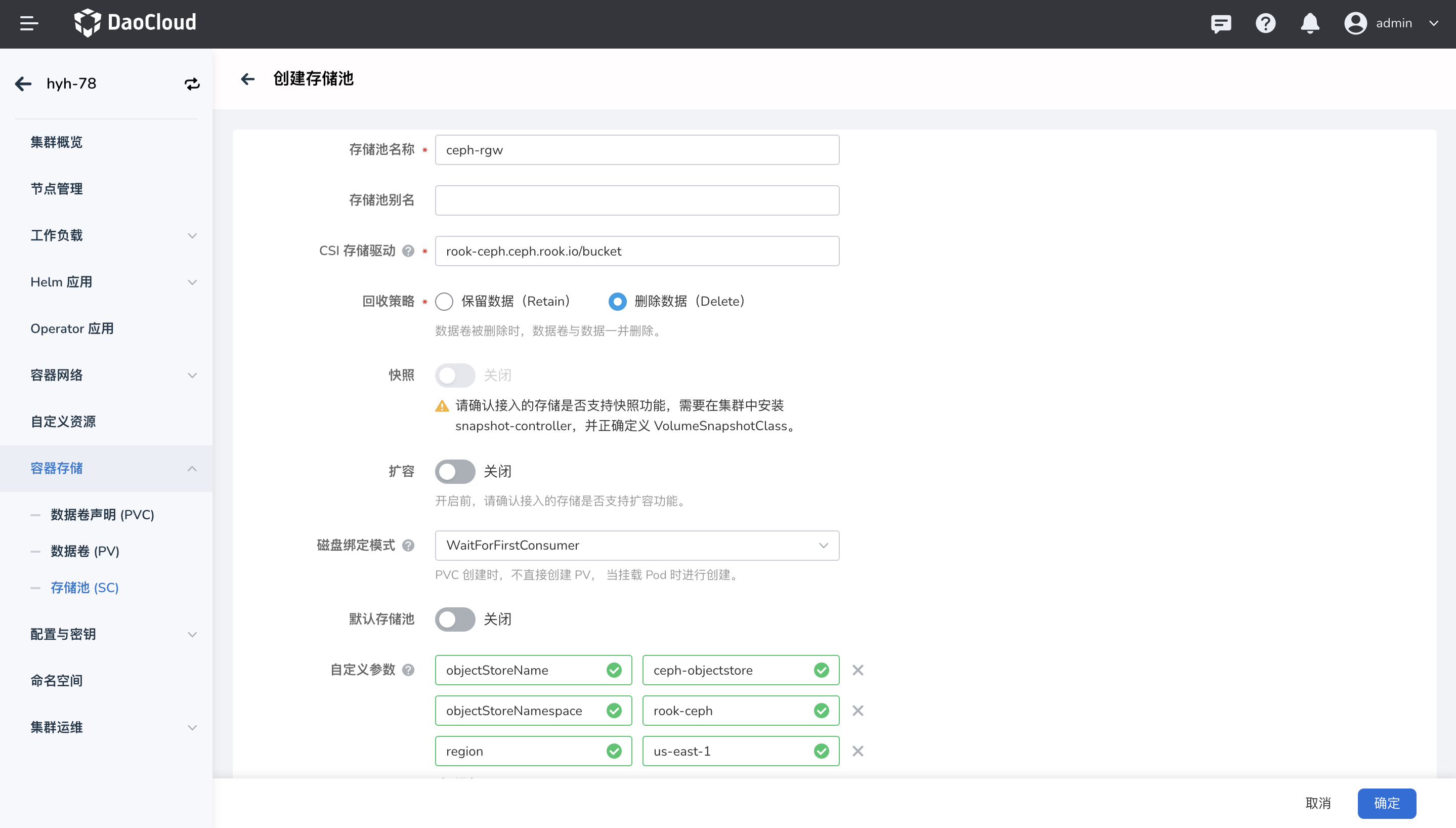
-
After filling in the information, click OK to create the StorageClass successfully.