What is Global Management
Global Management (Ghippo) is a comprehensive, user-centric service module that brings access control, workspaces and folders, audit logs, and platform settings together in one place. Flat management of users and groups combined with hierarchical tenant (workspace) collaboration enables platform-level access control and resource-based permission division. It also supports customizing the login page and top navigation bar, with security policies such as password rules and session timeout pre-configured, so administrators can complete basic platform settings and user management under one menu, ready to use out of the box.
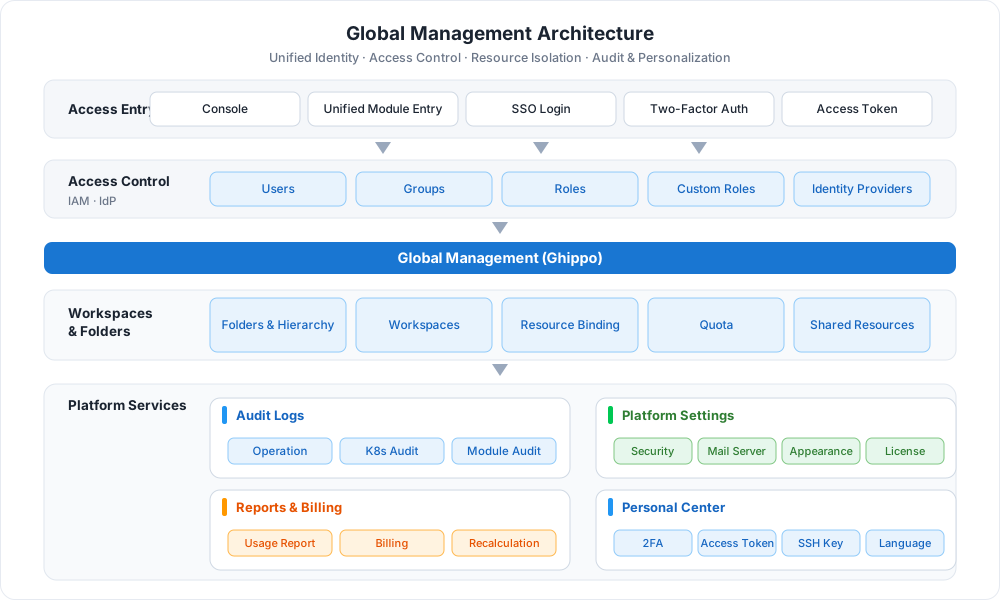
Core Capabilities
-
Access Control
Create and manage users, groups, and roles with flexible permissions. Supports identity providers such as OIDC, LDAP, and OAuth2.
-
Workspaces and Folders
Resource isolation units with hierarchical structure and access permission control. Organize folders by enterprise environment or department structure and control who can access which resources.
-
Audit Logs
Record resource operations across the platform and modules for security analysis, change tracking, and troubleshooting. Audit logs can be exported.
-
Platform Settings
Configure security policies, mail server, appearance customization, and genuine license to keep user information secure and the platform personalized.
-
Reports and Billing
Aggregate usage reports of clusters and modules, with billing management, report recalculation, and GPU usage statistics.
-
Personal Center
Manage personal account security settings such as two-factor authentication, access tokens, SSH keys, and language preference.
 Access Control
Procedure
Global Management is usually initialized in the following five steps for users, tenants, and basic platform policies:
flowchart LR
    A["① Log in to Platform<br/>Admin Privileges"] --> B["② Access Control<br/>Users · Groups · IdP"]
    B --> C["③ Workspaces and Folders<br/>Folders · Workspaces"]
    C --> D["④ Audit Logs<br/>View · Export"]
    D --> E["⑤ Platform Settings<br/>Security · Mail · Appearance"]

    click A href "../install/login/"
    click B href "../user-guide/access-control/user/"
    click C href "../user-guide/workspace/ws-folder/"
    click D href "../user-guide/audit/audit-log/"
click E href "../user-guide/platform-setting/security/"| Step | Description |
|---|---|
| ① Log in to the platform | Log in to the platform as the platform administrator (Admin) or a user with admin privileges |
| ② Access Control | Create users and authorize, create groups and authorize, and create an identity provider |
| ③ Workspaces and Folders | Create folders (enterprise hierarchy) and create workspaces (tenants) |
| ④ Audit Logs | View and export audit logs |
| ⑤ Platform Settings | Configure security policy, mail server, appearance, and genuine license |
Quick Start
More Resources
-
Feature List
View the complete feature list of Global Management covering access control, workspaces and folders, audit logs, and platform settings.
-
FAQs
Common issues and troubleshooting for installation, login, and usage of Global Management.
-
Best Practices
Practical recommendations for workspace planning, permission assignment, folder design, and OEM customization.
Start Free Trial Now Download Center Learn about d.run Token Factory Learn about d.run AI OS Read the Global Management User Guide (PDF)