Container Management
Container management is a containerization management module for cloud native applications built on Kubernetes. Based on a native multi-cluster architecture, it decouples the underlying infrastructure to achieve unified management across multiple clouds and clusters. This greatly simplifies the process of migrating enterprise applications to the cloud and reduces operational and manpower costs. With container management, you can easily create Kubernetes clusters and quickly build an enterprise-grade container cloud management platform.
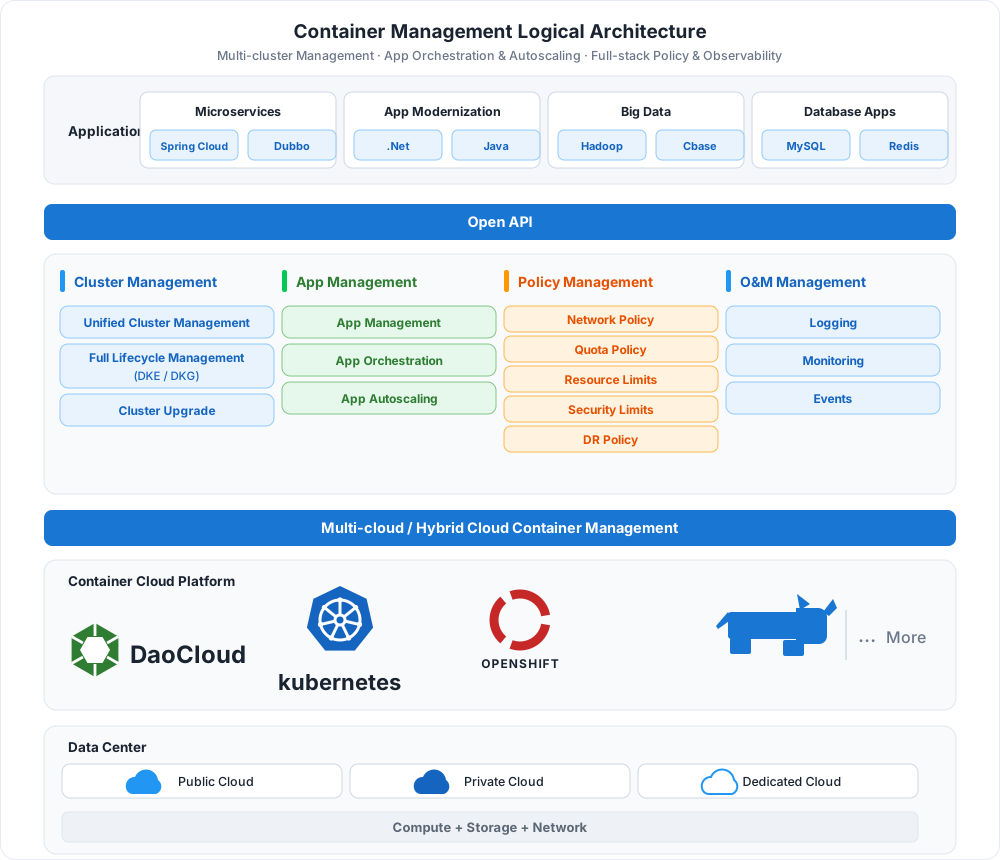
Key Capabilities
-
Cluster Management
Supports four cluster types — global service cluster, management cluster, worker cluster, and integrated cluster — covering creation, integration, upgrade, roles and status, and runtime selection.
-
Nodes & Namespaces
Node scheduling, labels and annotations, taint management, scale-out/in, and availability checks; namespace isolation, dedicated nodes, and Pod security policies.
-
Workloads & Autoscaling
Create Deployments, StatefulSets, DaemonSets, and Jobs/CronJobs, and scale workloads automatically with HPA and VPA policies.
-
Helm Apps
Hundreds of Helm charts for one-click deployment, with app and repository management to bring business applications online quickly.
-
Networking & Storage
Manage traffic and routing with Services, Ingresses, and NetworkPolicies; native CSI support for dynamic provisioning, volume snapshots, and cloning.
-
Security & Inspection
Compliance, permission, and vulnerability scans for nodes and clusters; cluster inspection checks the overall health status automatically or on demand.
 Create a cluster
Workflow
Using container management typically involves two stages: platform preparation and running applications. Administrators first create or integrate clusters and plan namespaces; business users then deploy workloads and expose services, with autoscaling and inspection keeping applications healthy over time.
flowchart LR
    A["① Create/integrate cluster<br/>Global · worker clusters"] --> B["② Create a namespace<br/>Isolation · dedicated nodes"]
    B --> C["③ Deploy workloads<br/>Deployment · Helm"]
    C --> D["④ Expose services & storage<br/>Service · Ingress · PVC"]
    D --> E["⑤ Autoscaling & inspection<br/>HPA · reports"]

    click A href "../user-guide/clusters/create-cluster/"
    click B href "../user-guide/namespaces/createns/"
    click C href "../user-guide/workloads/create-deployment/"
    click D href "../user-guide/network/create-services/"
click E href "../user-guide/scale/create-hpa/"| Step | Role | Description |
|---|---|---|
| ① Create/integrate a cluster | Platform Administrator | Create global service, management, and worker clusters, or integrate existing Kubernetes clusters |
| ② Create a namespace | Platform Administrator | Define resource isolation boundaries, with dedicated nodes and Pod security policies |
| ③ Deploy workloads | Business User | Deploy Deployments, StatefulSets, and more from images or Helm charts |
| ④ Expose services and mount storage | Business User | Create Services / Ingresses to expose applications, and mount persistent storage through PVCs |
| ⑤ Autoscaling & inspection | Platform Administrator | Configure HPA/VPA for load fluctuations, and run periodic inspections for cluster health |
Quick Start
More Resources
-
Features
A complete list of container management features across clusters, nodes, workloads, networking and storage, security, and inspection.
-
Scenarios
Best practices for multi-cluster management, application delivery, hybrid cloud, and more.
-
FAQ
Common questions and solutions about cluster creation, workload operation, and networking and storage.
Download Center Learn about d.run Token Factory Learn about d.run AI OS View User Manual (PDF)