Access Clusters
Clusters integrated or created using the DCE Container Management platform can be accessed not only through the UI interface but also in two other ways for access control:
- Access online via CloudShell
- Access via kubectl after downloading the cluster certificate
Note
When accessing the cluster, the user should have Cluster Admin permission or higher.
Access via CloudShell
-
Enter Clusters page, select the cluster you want to access via CloudShell, click the ... icon on the right, and then click Console from the dropdown list.

-
Run kubectl get node command in the Console to verify the connectivity between CloudShell and the cluster. If the console returns node information of the cluster, you can access and manage the cluster through CloudShell.
Note
To access an AWS cluster through CloudShell, you need to upgrade kpanda to v0.29.x or later and manually adjust the configuration of the kpanda-apiserver service. The detailed procedure is as follows:
-
Go to the Global Service Cluster . In the Workloads -> Deployments list, find the kpanda-apiserver service.

-
Enter the details page of the deployment, click ┇ in the upper right corner of the page, and click Update in the drop-down list.

-
In step 2 Container Settings of the wizard, find the parameter --feature-gates= under Lifecycle -> Startup Command and change it to --feature-gates=UseTokenInCloudShell=true .

-
After the modification, enter the details page of the kpanda-apiserver deployment, click ┇ in the upper right corner of the page, and click Restart in the drop-down list.

After completing the steps above, you can access AWS clusters through CloudShell.
Access via kubectl
If you want to access and manage remote clusters from a local node, make sure you have met these prerequisites:
- Your local node and the cloud cluster are in a connected network.
- The cluster certificate has been downloaded to the local node.
- The kubectl tool has been installed on the local node. For detailed installation guides, see Installing tools.
If everything is in place, follow these steps to access a cloud cluster from your local environment.
-
Enter Clusters page, find your target cluster, click ... on the right, and select Download kubeconfig in the drop-down list.

-
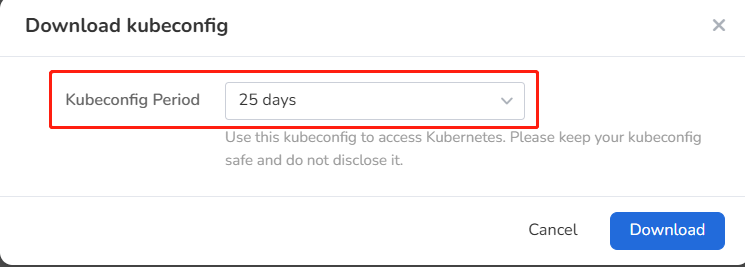
Set the Kubeconfig period and click Download .
-
Open the downloaded certificate and copy its content to the config file of the local node.
By default, the kubectl tool will look for a file named config in the $HOME/.kube directory on the local node. This file stores access credentials of clusters. Kubectl can access the cluster with that configuration file.
-
Run the following command on the local node to verify its connectivity with the cluster:
An expected output is as follows:
Now you can access and manage the cluster locally with kubectl.