What is Virtual Machine (Virtnest)?
Virtnest, built on KubeVirt, manages virtual machines as cloud native applications so that VMs and containers share the same Kubernetes scheduling, networking, storage and image system. You can create VMs quickly from an image, a template or YAML, log in over VNC / SSH, and handle day-to-day operations such as start/stop/restart, spec changes, snapshots and cloning, migration and monitoring on the same platform. Typical use cases include migrating traditional applications to the cloud, importing VMware VMs, development and test environments, and GPU workloads.
Note
The Virtual Machine, Virtnest , is a feature exclusive to the DCE Enterprise Package (Standard, Advanced, and Platinum editions).
Product Architecture
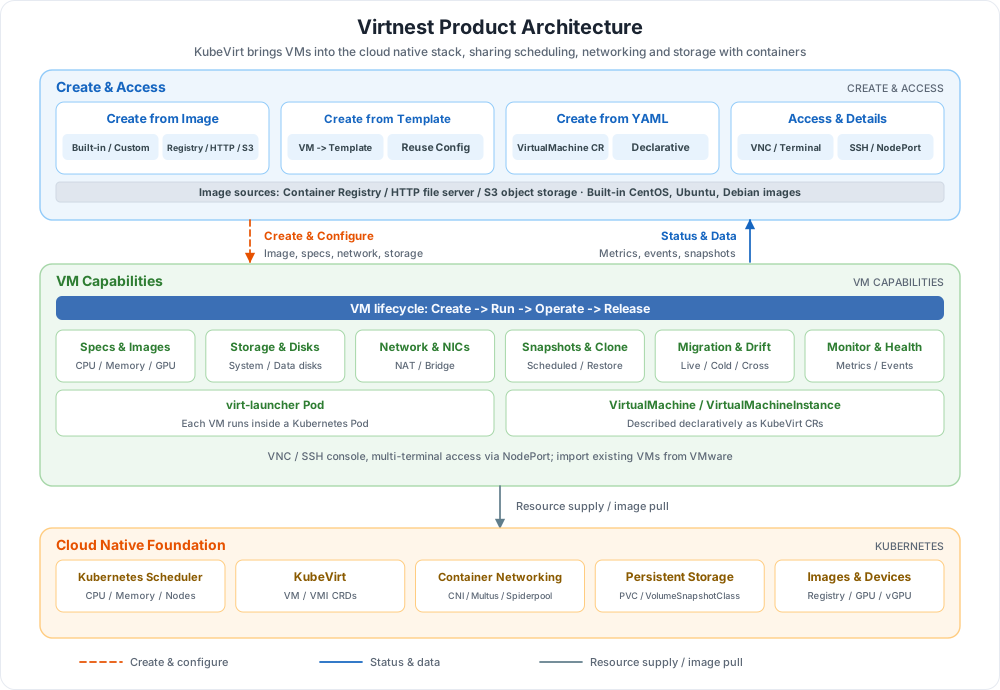
The architecture consists of three layers, from top to bottom: creation and access, VM capabilities, and the cloud native foundation:
| Layer | Component | Responsibility | In the diagram |
|---|---|---|---|
| Creation & Access | Image / Template / YAML creation | Three ways to create VMs; VNC, SSH and NodePort multi-terminal access, plus VM details | Blue area |
| Creation & Access | VM images | Container registries, HTTP file servers and S3 object storage; built-in CentOS, Ubuntu and Debian images | Blue bar |
| VM Capabilities | Lifecycle and operations | Start/stop/restart, spec changes, snapshots and scheduled snapshots, cloning, live / cold / cross-cluster migration, monitoring and health checks | Green area |
| VM Capabilities | Specs, networking and storage | CPU / memory hot-plug and Nvidia GPU / vGPU; Masquerade (NAT) and Bridge networking; system disks, data disks and PVCs | Green cards |
| Cloud Native Foundation | KubeVirt + Kubernetes | VMs described by VirtualMachine / VMI custom resources and hosted by virt-launcher Pods; reuses cluster scheduling, CNI, storage and image services | Orange area |
Key Capabilities
Virtnest provides complete capabilities for creating, running and operating virtual machines. Each VM runs its own guest OS and kernel inside a virt-launcher Pod, isolated by QEMU / KVM. On top of that, Virtnest reuses Kubernetes scheduling, networking and storage: container images serve as the basis for VM creation, and VMs are scheduled alongside container workloads by the same cluster, improving resource utilization; image-based distribution shortens VM startup time and supports fast, on-demand deployment and scaling; start/stop, configuration and monitoring use the same cluster management tools, simplifying day-to-day operations; applications and their configurations can be packaged into images for flexible release, and can directly reuse container networking, service discovery and load balancing to work seamlessly with existing containerized applications.
-
Cloud Native Virtual Machines
Manages VMs as cloud native applications with KubeVirt, sharing Kubernetes scheduling, service discovery and networking with containers, and reducing the cost of running virtualization and containerization side by side.
-
Three Ways to Create VMs
Create VMs from an image, a template or YAML. Images can come from a container registry, an HTTP file server or S3 object storage, and custom images are supported.
-
Images and Templates
Built-in CentOS, Ubuntu and Debian images, plus custom image builds; convert an existing VM into a template to reuse configurations in bulk.
-
Snapshots, Cloning and Migration
Snapshots and scheduled snapshots, VM cloning, live migration, cold migration, cross-cluster migration and automatic node drift.
-
Networking and Storage
Masquerade (NAT) and Bridge networking, multiple NICs and fixed IPs; PVC-based system disks, data disk attachment and expansion.
-
GPU and Observability
Nvidia GPU / vGPU passthrough, metrics, events, health checks and console access for full visibility into VM status.
 Virtual Machine Features
Learning Path
Complete the following steps in order to create and operate a virtual machine from scratch:
Download Center Learn about d.run Token Factory Learn about d.run AI OS View User Manual (PDF)